
AI Generated, didn't even look at the code, but does the job. I actually created this manually for waybar in the past... ain't doing that again ;)
Decent Workspaces
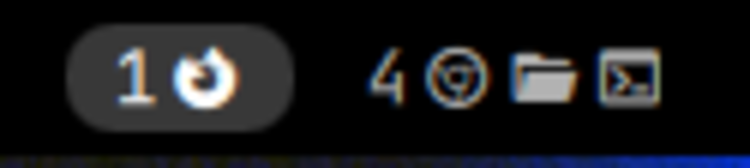
A bar widget for Omarchy Quattro that shows workspaces the way you actually use them:
- Only workspaces in use. Empty workspaces are hidden, except the one you are on, so the bar never goes blank underneath you.
- Only this monitor's workspaces. Each bar filters to its own monitor and highlights that monitor's active workspace, softer where keyboard focus isn't, so you can tell at a glance where you are.
- App icons beside the number. Every open window contributes a Nerd Font glyph.
- The scratchpad, when it holds something. Windows stashed with
SUPER + ALT + Sget their own pill instead of vanishing until you toggle the stash open.
Click a workspace to focus it.
Install
omarchy plugin add https://github.com/TheTrueFerret/omarchy-decent-workspaces.git --enable
omarchy bar put io.github.thetrueferret.decent-workspaces --section left --index 1
You probably want to drop the stock widget at the same time, since two workspace indicators side by side is rarely what you want:
omarchy plugin disable omarchy.workspaces
Settings
Set these on the widget's entry in ~/.config/omarchy/shell.json, or with
omarchy bar set io.github.thetrueferret.decent-workspaces <key> <value> --json:
| Key | Default | Meaning |
|---|---|---|
perMonitor |
true |
Show only workspaces belonging to this bar's monitor. Set false to show all of them on every bar. |
showEmpty |
false |
Keep every workspace number on the bar up to maxWorkspaceId, occupied or not. Set true for stock-like behaviour. |
showIcons |
true |
Draw an app icon per open window. |
maxIcons |
0 |
Cap icons per workspace, collapsing the rest to +N. 0 means no cap. |
maxWorkspaceId |
10 |
Highest workspace id to consider. |
localWorkspaceNumbers |
false |
Label each monitor's bank from 1 instead of using the global Hyprland id. |
workspacesPerMonitor |
10 |
Size of a bank when local numbering is on. |
showScratchpad |
true |
Show a pill for the scratchpad while it holds windows. |
scratchpadName |
special:scratchpad |
Which special workspace that pill tracks. |
scratchpadLabel |
S |
Text on the scratchpad pill. Set "" for icons only. |
omarchy bar set io.github.thetrueferret.decent-workspaces maxIcons 4 --json
omarchy bar set io.github.thetrueferret.decent-workspaces showEmpty true --json
Defaults match the behaviour above, so an existing install keeps working untouched — every addition is off until you turn it on.
Keeping every workspace on the bar
showEmpty: true pins all of 1..maxWorkspaceId so the pills never move under
the pointer. Hyprland only reports workspaces that exist, so the missing numbers
are synthesised, and with perMonitor: true each one lands on a bar by asking,
in order: where that workspace lives right now, what your Hyprland workspace
rules say, then the nearest live workspace below it — sequential banks (1-5 /
6-10) and interleaved ones (odds / evens) both work. Clicking an empty number
creates it, the same as a keybind would.
Local numbers per monitor
Hyprland workspace ids are global. If your setup pins fixed banks such as
1-10, 11-20 and 21-30, the widget can show every bank as 1-10:
omarchy bar set io.github.thetrueferret.decent-workspaces localWorkspaceNumbers true --json
omarchy bar set io.github.thetrueferret.decent-workspaces workspacesPerMonitor 10 --json
omarchy bar set io.github.thetrueferret.decent-workspaces maxWorkspaceId 20 --json
Labels only — pinning the banks stays your Hyprland config's job.
The scratchpad
SUPER + ALT + S stashes a window in special:scratchpad, SUPER + S brings it
back. The pill appears while the stash holds windows, shows an icon per stashed
window, lights up on the monitor currently displaying it, and toggles the stash
on click. It shows on every bar, because the scratchpad is one global stash
rather than something a monitor owns.
Adding an app icon
Icons live in IconRules.js as an ordered list of { pattern, icon }. The
pattern is a case-insensitive regex tested against the window title first and
the window class second, and the first match wins — so title-specific rules
have to sit above generic class rules, or an Amazon tab in Firefox would render
the Firefox icon.
To find the class of a window you want to add:
hyprctl clients -j | jq -r '.[] | "\(.class)\t\(.title)"'
Uninstall
omarchy plugin remove io.github.thetrueferret.decent-workspaces
Development
Editing a bar widget needs a shell restart — the "local plugin changed, reloading" hot reload does not rebuild bar surfaces:
omarchy plugin validate ~/.config/omarchy/plugins/io.github.thetrueferret.decent-workspaces
qmllint -I ~/.local/share/omarchy/shell Workspaces.qml
omarchy-restart-shell
qs log -i "$(qs list --all | awk '/^Instance/ {print substr($2, 1, length($2)-1); exit}')"
Credits
The icon map is adapted from the saif.workspaces plugin by Saif Omar (MIT).
showEmpty was fixed by @roddutra (#2), local
workspace numbering added by @jorgeccastro
(#3), and the scratchpad pill suggested by
@sirfrank0 (#4).
License
MIT