
AdGuard filtering
Ad and tracker filtering at a glance for AdGuard for Linux, on the Omarchy bar.
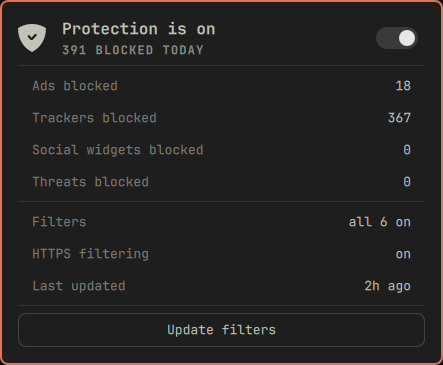
The shield sits in the bar and dims when filtering stops. Open it for today's numbers, and flip protection with the switch.
Features
- Today's blocks, broken down the way AdGuard breaks them down, one row per filter category you have lists in, so ads, trackers, social widgets and threats on a stock setup. Every blocked request names the filter that matched it, so the numbers are counted rather than estimated.
- Protection switch. Starts and stops the AdGuard proxy. Right click the bar mark to flip it without opening the panel.
- Filter and HTTPS filtering state, and how long ago the lists last changed.
- Update filters, which runs AdGuard's own update check and reports the outcome in the button itself.
- Automatic filter updates every six hours by default, driven by the lists' own timestamps rather than a stored clock, so restarting the shell neither loses the schedule nor forces a fresh download. A failed attempt waits thirty minutes before trying again. Set the interval to 0 to turn it off.
- Tailscale exit node warning. AdGuard's transparent proxy and a Tailscale exit node cannot both be on: the proxy opens its own outbound connection and the exit node's default route sends it back into the tunnel, so the machine loses internet. The panel says so when it sees both.
The panel is a display with one switch. Filter lists are managed with adguard-cli,
which is where that job belongs.
Requirements
-
adguard-clionPATH, activated and configured. The widget removes itself from the bar when AdGuard is not installed. -
proxy_modeset toauto, otherwise AdGuard filters nothing and the panel will honestly report a running proxy that is doing no work:adguard-cli config set proxy_mode auto -
tailscaleonPATHis optional. Without it the exit node warning never appears.
Install
AdGuard itself is manual setup: this plugin reads and drives adguard-cli but never
installs, activates or licenses it. Do that first, then add the widget.
omarchy plugin add https://github.com/thisisgm/omarchy-adguard.git --enable
omarchy bar put io.github.thisisgm.adguard
omarchy restart shell
Keyboard
| Key | Action |
|---|---|
j / k / arrows |
move between the switch and the button |
enter / space |
activate the row under the cursor |
t |
toggle protection |
u |
update filters |
r |
refresh |
esc |
close |
Left click opens the panel, right click toggles protection, middle click refreshes.
Settings
| Setting | Default | Range |
|---|---|---|
| Refresh interval (seconds) | 30 | 5 to 3600 |
| Auto-update filters every (hours) | 6 | 0 to 168, 0 disables |
IPC
| Command | Effect |
|---|---|
omarchy-shell adguard open |
open the panel |
omarchy-shell adguard close |
close the panel |
omarchy-shell adguard toggle |
open or close the panel |
omarchy-shell adguard refresh |
re-read the state now |
The IPC surface is read-only. Any process on the box can reach that socket, so starting
or stopping filtering and running the update check stay in the panel, where the click is
the confirmation. Script them against adguard-cli directly instead.
Managing filter lists
The panel reports the filter lists; it does not edit them. AdGuard's catalogue runs to about sixty lists, and adding or removing one is a considered change rather than a bar click:
adguard-cli filters list --all
adguard-cli filters add 18
adguard-cli filters remove 18
adguard-cli filters disable 4
While auto_enable_language_filters is on, AdGuard adds a language-specific list of its
own accord during an update, so a new row can appear in the totals. Turn it off with:
adguard-cli config set auto_enable_language_filters false
How it works
The panel is strictly a display. Everything that touches AdGuard lives in
bin/omarchy-adguard, which prints one JSON object and always exits 0, so the panel can
always render something:
bin/omarchy-adguard status
{"ok":true,"installed":true,"running":true,"httpsFiltering":true,"blockedToday":180, ...}
adguard-cli exits 0 even when it refuses a request, so the helper never reads an exit
code. Starting or stopping protection re-reads the state afterwards and reports what it
actually observed.
The helper never calls adguard-cli license, and no field it prints carries the licence
key.
Uninstall
omarchy plugin remove io.github.thisisgm.adguard
The plugin writes no state of its own, and AdGuard's own configuration is untouched.
Removing a plugin does not rewrite the bar layout, so the widget's entry stays in
~/.config/omarchy/shell.json until you take that line out by hand.
Support
If this saved you an afternoon, you can buy me a coffee.
Licence
MIT. See LICENSE.