
Slack availability for Omarchy
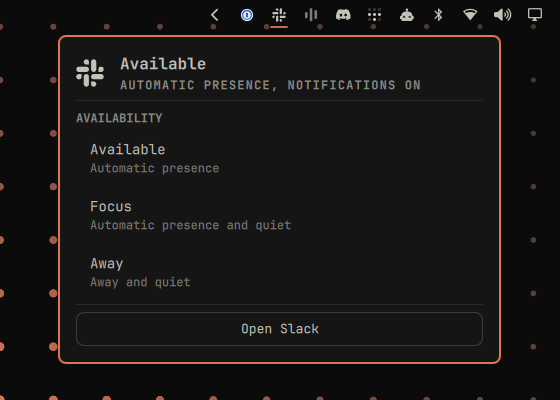
Available, Focus, and Away control for Slack, built into the Omarchy bar.


What it does
Pick an intent instead of managing Slack presence and notifications one control at a time:
| Mode | Presence | Notifications |
|---|---|---|
| Available | automatic | on |
| Focus | automatic | quiet until the chosen time |
| Away | manual away | quiet until the chosen time |
The panel header names the combined state it found, such as
Automatic presence, notifications on while you are Available. The bar mark
shows whether Slack is currently quiet, and a shell helper stays the only
component that talks to Slack. The design follows the first-party Omarchy
Agents, Tailscale, and Dropbox plugins.

Quick start
You need Omarchy Quattro, a running Secret Service, and permission to install a
Slack app in your workspace. curl, jq, GNU date, and secret-tool all
ship with Omarchy. The plugin installs no packages and needs no elevated
privileges.
-
Install the plugin:
omarchy plugin add https://github.com/thisisgm/omarchy-slack.git --enable -
Create your Slack app and store its user token, described in Slack app setup.
-
Confirm the connection:
~/.config/omarchy/plugins/io.github.thisisgm.slack/bin/omarchy-slack statusThe command always prints one complete JSON object. A working connection has
"ok": true.
Slack also registers a tray icon. To avoid two Slack marks, right-click the Omarchy tray, choose Manage, and hide Slack's tray item.
Slack app setup
Slack requires your own consent for a personal token, so this step is manual and
per user. Create an app at https://api.slack.com/apps from
docs/slack-app-manifest.yml, then install it to
your workspace. The manifest grants exactly four user scopes:
| Scope | Used for |
|---|---|
dnd:read |
reading manual and scheduled quiet |
dnd:write |
starting snoozes and ending current quiet sessions |
users:read |
reading your presence |
users:write |
changing your presence |
A bot token does not work. Existing tokens carrying older profile grants stay usable, but the plugin never calls a profile API.
Copy the User OAuth Token, which starts with xoxp-, and store it through
the Secret Service prompt:
secret-tool store --label='Slack user token' service omarchy-slack key user-token
The prompt keeps the value out of the command line and out of shell history.
Workspace policy may require an administrator to approve the app. Every user needs their own install and their own personal token.
Panel controls
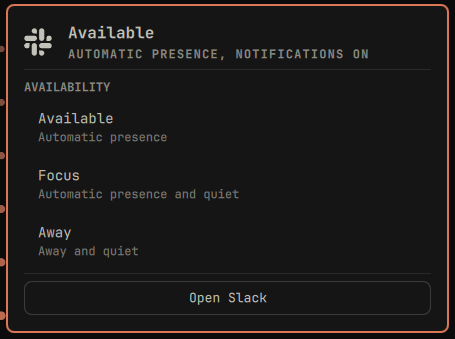
The main view shows the actual combined mode. Available applies immediately.
Focus and Away open a duration view with exactly 30m, 1h, 2h, and
Other. Other opens one custom-time field. Open Slack focuses the running
desktop client or launches it through Omarchy.
| Input | Action |
|---|---|
| left click | open the panel |
| middle click | refresh |
| right click | start Focus for 60 minutes, or set Available when Focus/Away is active |
j / k, arrows |
move |
| Enter / Space | activate |
v |
set Available |
f |
open Focus durations |
a |
open Away durations |
o |
open or focus Slack |
r |
refresh outside the custom field |
| Escape | custom to duration, duration to main, then close |
The custom field accepts GNU date -d expressions such as:
4:30pmin 90mtomorrow 9amMonday 8:30
After 350 ms without typing, the helper resolves the expression locally and shows the exact end time. Enter applies only a valid preview. Mode targets must be in the future and no more than 24 hours away.
Command-line automation
Run these from the plugin directory, or use the absolute installed path:
bin/omarchy-slack mode available
bin/omarchy-slack mode focus 60
bin/omarchy-slack mode focus until "4:30pm"
bin/omarchy-slack mode away 120
bin/omarchy-slack mode away until "Monday 8:30"
Existing low-level commands remain for scripts that already use them:
bin/omarchy-slack dnd <arguments>
bin/omarchy-slack presence <arguments>
bin/omarchy-slack resolve <when>
Shell IPC exposes the panel, refresh, Available, and the named 60-minute Focus accelerator:
omarchy-shell slack toggle
omarchy-shell slack refresh
omarchy-shell slack available
omarchy-shell slack focus
Settings
Setup > Plugins exposes one setting: refresh interval from 30 through 3600 seconds, default 120. Failed polls back off automatically and the first successful poll restores the configured interval.
Safety and limits
- Every mode validates its target, all four scopes, DND, and presence before the first write.
- Available ends any current manual snooze and the active scheduled quiet session. A recurring Slack schedule stays configured for its next window.
- A scheduled quiet window that covers the requested mode is reused. If it ends too early, the mode is rejected before any write and is never shortened.
- Available selects automatic presence. It does not force a green dot or defeat Slack's idle detection; Slack remains authoritative for automatic presence.
- Slack snoozes are limited to 24 hours.
- Slack has no server-side Away expiry. The plugin stores the deadline under
~/.local/state/omarchy/slack/and uses the transientomarchy-slack-away-return.timerto restore automatic presence. - The plugin records only its local mode and expiration in
~/.local/state/omarchy/slack/status-owner; that filename is local and has no connection to your Slack profile. - Custom profile status text, emoji, and expiration remain untouched, so workspace schedule automation keeps sole ownership of them.
- Slack has no transaction across DND and presence APIs. A partial action returns a refreshed true snapshot plus one error instead of attempting a destructive rollback.
- Slack replies are read with a 64 KiB ceiling, so an oversized body fails closed instead of being parsed.
Privacy
The app has no message, channel-history, file, reaction, or bot scopes, so it cannot read messages. It calls only the Slack Web API methods needed for DND and presence, and never reads or writes your profile status.
The OAuth token stays in the Secret Service and enters curl through standard input. It is never placed in process arguments, output, fixtures, or repository history. Local state stores only deadlines and the selected mode and expiration pair. There is no telemetry.
Troubleshooting
"ok": false with invalid_auth. The stored token is missing, revoked, or
belongs to a bot. Store the xoxp- user token again with the secret-tool
command above, then re-run bin/omarchy-slack status.
An error naming a missing scope. The installed app predates the four-scope
manifest. Reinstall the app from docs/slack-app-manifest.yml, then store the
new user token.
secret-tool prompts every time, or reports no collection. No Secret
Service is running or the login keyring is locked. Unlock the keyring, then
retry.
The bar mark is missing. The plugin hides itself when it has nothing to say.
Check omarchy plugin list, then omarchy restart shell.
A mode is refused before anything changes. A scheduled quiet window ends before your requested time, or the target is over 24 hours away. Pick a time inside those limits; the plugin never shortens a workspace schedule.
Away did not flip back. Inspect the transient timer with
systemctl --user list-timers omarchy-slack-away-return.timer. The deadline
itself lives in ~/.local/state/omarchy/slack/away-until.
Open Slack does nothing. The Slack desktop client is not installed. Install
it through omarchy install, or use Slack in the browser.
Remove completely
omarchy plugin remove io.github.thisisgm.slack
secret-tool clear service omarchy-slack key user-token
rm -rf ~/.local/state/omarchy/slack
systemctl --user stop omarchy-slack-away-return.timer 2>/dev/null
That removes the plugin, the token it created, its local state, and its timer, and leaves your own Slack settings alone. Delete the app at https://api.slack.com/apps to revoke its Slack-side token, then unhide Slack's tray item if you want it back.
Contributing
./tests/run.sh runs the Bash contract suite and the pure Model.js tests. Deno
is required only for the development tests, never at plugin runtime.
To run a local checkout on the box:
cp -r omarchy-slack ~/.config/omarchy/plugins/io.github.thisisgm.slack
omarchy-shell shell rescanPlugins
omarchy plugin enable io.github.thisisgm.slack
Trademark
Slack is a trademark of Slack Technologies, LLC. This project is not affiliated with, endorsed by, or sponsored by Slack. The monochrome mark only identifies the service controlled by the widget.
Support
If this saved you an afternoon, you can buy me a coffee.
License
MIT.