
Dependency Audit
A bar badge for the Omarchy shell that watches your
project directories for dependency security and staleness — outdated
packages and known CVEs — aggregated across every repo you work in, so you
don't have to remember to run npm audit / pnpm audit / yarn audit /
cargo audit / pip-audit / govulncheck / bundle-audit /
dotnet list package --vulnerable in each one yourself. Point it at a
directory and it finds your projects on its own (or list them by hand, or
both).
No dashboard, no daemon: a shield icon in the bar shows the total finding count, color-coded by worst severity, and only notifies when something new shows up — not on every routine scan. Clicking it opens a per-repo list, each row showing a severity-count summary (e.g. "2 critical 1 high") without opening it — click a repo to see its findings in a dedicated, filterable, paginated detail view: package name, current vs. fixed version, severity, the CVE number (or native advisory id when no CVE was assigned), and a click-to-copy fix command.
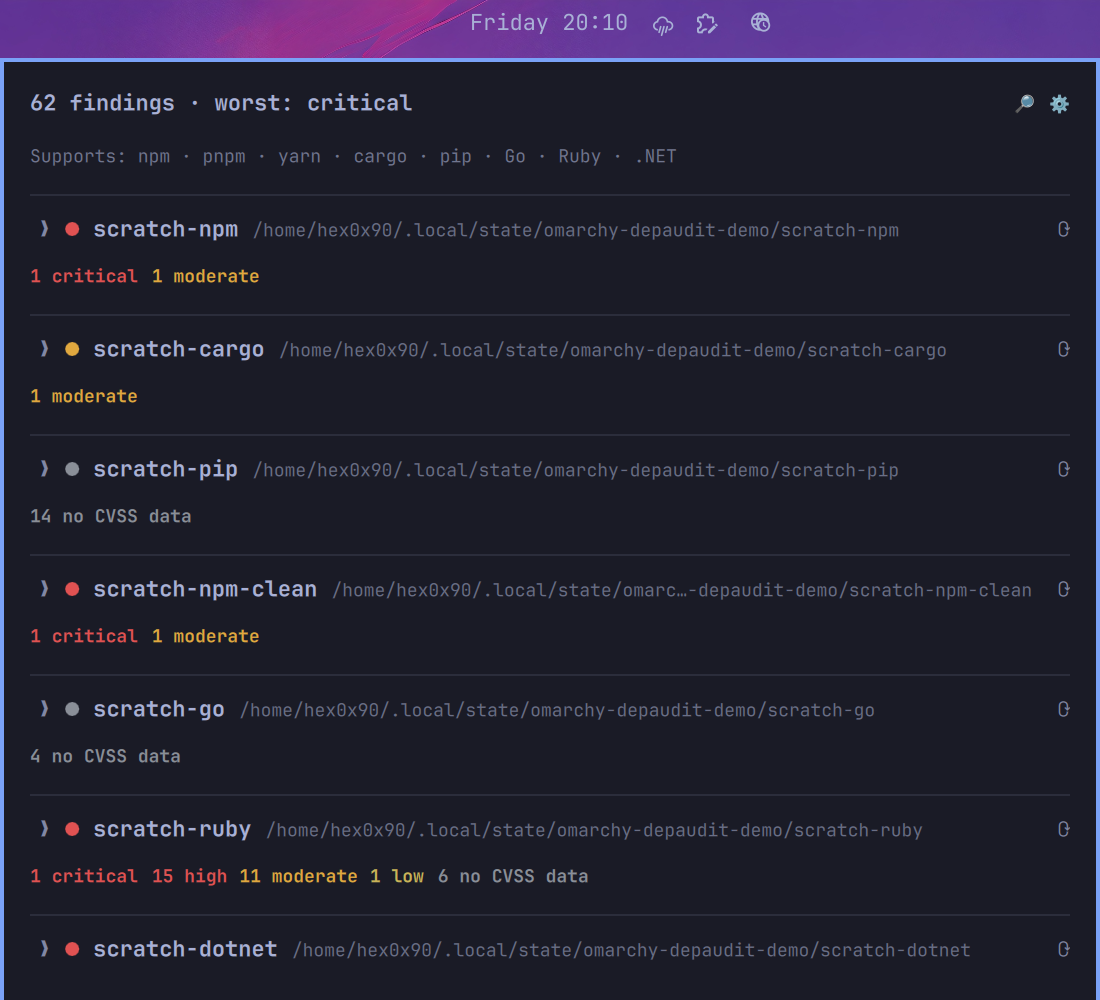
The screenshot above is a real capture against the plugin's own demo data
(the scratch-* labels are this repo's own throwaway test fixtures, one
intentionally-vulnerable project per supported ecosystem — not a hint
about anything). Each row is exactly what the list shows without opening
anything: severity dot, label, path, and a severity-count summary —
including "no CVSS data" for advisories (cargo's RustSec entries, mostly)
that never got a severity assigned at all, shown distinctly from a real
low/moderate/high/critical rating. Click any row to open its findings in
the dedicated detail view described below.
Install
omarchy plugin add https://github.com/thomasvez/omarchy-depaudit.git --enable
Usage
- Left click: open/close the per-repo breakdown (Escape also closes)
- Middle click, or
rwhile the panel is focused: re-run every project's audit now - Right click: send the current summary as a desktop notification — glanceable without opening the panel at all
- Click the ⚙ in the panel header: open the settings form — edit icon, refresh interval, discover roots, and projects without touching shell.json (✕ or Cancel discards changes, Save persists them)
- Click the 🔎 in the panel header (only shown when discoverRoots is
configured): scan for new projects only — re-runs discovery and audits
just what's newly found, without re-checking every already-known
project. Middle click /
rre-audits everything; this is for "did I just clone something new" without paying for a full rescan. - Click a repo's header in the panel: open its findings in a dedicated, wider detail view (the severity-count row next to the header in the list is always visible, so you can see whether a repo's a problem without opening it) — with severity filter chips and pagination (20 per page), so even a repo with thousands of findings stays responsive. ‹ Back or Escape returns to the list.
- Click the ⟳ — next to a repo's header in the list, or in the detail view's header once it's open: re-audit just that one project
- Click a finding's CVE/advisory id in the panel: open that advisory's page in the browser
- Click anywhere else on a finding: copy its fix command to the clipboard
A desktop notification also fires on its own — no click needed — whenever a scan turns up a finding that wasn't there last time, so you don't have to be watching the bar to notice something new.
Configure
Nothing runs until you configure at least one project, either by hand or by
pointing the widget at a directory to search. Easiest: click the ⚙ in
the panel — it edits the same settings described below without touching a
config file. Or add either (or both) to this widget's block in
~/.config/omarchy/shell.json directly (hot-reloads on save):
{
  "id": "io.github.thomasvez.depaudit",
  "refreshIntervalMinutes": 60,
  "discoverRoots": [
    "/home/you/Development"
  ],
  "projects": [
    { "label": "work-api", "path": "/home/you/work/api" }
  ]
}
discoverRoots— absolute directory paths to search (depth 3) for recognized manifests, so you don't have to list every project by hand. Dependency/build-output directories (node_modules,.git,target,vendor,.venv/venv,bin,obj,build) are pruned, so it won't waste time descending into an already-found project's own dependency tree. Re-run at the top of every refresh, so a project added later under a configured root shows up on its own. Must be absolute —~isn't expanded, same constraint asprojects[].pathbelow.projects— explicitly-listed repos, top to bottom in the panel. Wins over adiscoverRootsmatch on the same path (so you can override just one discovered project's label without listing everything by hand).path— absolute path to the project's root directory.label— display name in the panel; defaults topathif omitted.
refreshIntervalMinutes— how often every repo re-audits (anddiscoverRootsre-scans) in the background. Default60. Set0to disable the recurring timer and rely on middle-click / therkey instead — audits shell out to package registries, so there's a real cost to running them often.icon— bar glyph, default🛡.
Each repo's "last seen" baseline (for new-finding notifications) is stored
separately from this config, at ~/.local/state/omarchy-depaudit/state.json
— not something you're expected to hand-edit, but delete it if you ever
want a clean slate (next scan's findings treated as a fresh baseline
rather than compared against history).
Move it in the bar:
omarchy bar move io.github.thomasvez.depaudit --section right
How detection works
For each configured (or discovered) project, first checked: does the path exist at all? A typo'd or moved/deleted project shows "path does not exist" rather than being misreported as missing a manifest. Then, in order:
Cargo.tomlpresent →cargo audit --json(needscargo-auditinstalled:cargo install cargo-audit).package.jsonpresent → checks the lockfile to pick the right tool, since auditing with the wrong one can resolve a different dependency tree than what's actually installed:pnpm-lock.yaml→pnpm audit --json(needspnpm).yarn.lock→yarn audit --json(needsyarn).- neither →
npm audit --json(needsnpm).
requirements.txtpresent →pip-audit --format json -r requirements.txt, orpyproject.tomlpresent →pip-audit --format json .(needspip-audit:pip install pip-audit).go.modpresent →govulncheck -scan module -json(needsgovulncheck:go install golang.org/x/vuln/cmd/govulncheck@latest). Module-level scanning checks every declared dependency's version against the vuln DB regardless of whether your code actually calls into the vulnerable function — matching how npm/cargo/pip audit work, rather than govulncheck's default call-graph-reachability mode.Gemfile.lockpresent →bundle-audit check --format json(needsbundler-audit:gem install bundler-audit). Requires an already-resolved, committed lockfile — a bareGemfilewith no lock isn't enough, since bundle-audit only reads one, it doesn't generate one.*.csproj/*.sln/*.fsprojpresent →dotnet list package --vulnerable --include-transitive --format json(needs thedotnetSDK — this is a built-in subcommand, no separate tool to install).- None of the above → shown as "no recognized manifest" in the panel.
If the matching tool isn't on PATH, that repo shows "not found on PATH"
instead of a false "clean" result — a missing tool is never silently
treated as zero vulnerabilities.
No network calls happen outside what each audit tool itself makes (npm,
pnpm, yarn, pip-audit, govulncheck, and
dotnet list package --vulnerable query their registries/vuln DBs;
cargo audit and bundle-audit check a local advisory-DB clone each
downloads on first run). The plugin itself doesn't talk to any server —
discoverRoots search is a local find, nothing more.
Known limitations
- Severity on pip/go/.NET findings:
pip-auditandgovulncheckdon't include any severity data in their JSON output (unlike npm's critical/high/moderate/low). Their findings are shown asunknownseverity (amber) rather than a guessed rank.cargo-auditandbundle-auditfindings do get a real severity — RustSec advisories often carry a CVSS v3.x vector (scored into critical/high/moderate/low the same as npm's), and ruby-advisory-db carries a plain severity (criticality) directly; only advisories with neither (e.g. "unmaintained" notices) fall back tounknown.dotnet list package --vulnerabledoes report a real severity per finding, same scale, no extra scoring needed. - No fixed-version info from .NET: unlike every other tool here,
dotnet list package --vulnerable's JSON gives no CVE and no target version to upgrade to — just the current version and a GHSA URL. Its fix command re-adds the package without pinning a version (resolves to latest stable) rather than a specific one. - No CMake/C++ or other build-system support: npm, cargo, pip, Go, Ruby, and .NET are covered. There's no single standard audit tool for C/C++ dependencies the way the others have one.
Development
Model.js is plain, dependency-free JS — all the audit-script generation
and JSON parsing runs standalone in Node, no QML/Quickshell involved. The
QML files (BarWidget.qml, Panel.qml) are the only pieces that need a
real Omarchy shell to exercise.
npm test
Runs tests/model.test.js (Node's built-in node:test, no dependencies
to install) against the fixtures in tests/fixtures/ — real captured
output from each tool, not hand-written approximations. A GitHub Actions
workflow runs the same on every push/PR.
Remove
omarchy plugin remove io.github.thomasvez.depaudit