
Omarchy BBS
A native community message board with registration gated through its Omarchy client. It includes an Omarchy 4 bar widget, a signed device client, and a PHP/MySQL service. Reading, writing, and joining all happen in the themed shell panel—no browser tab is opened.
The board supports categories, properly nested reply trees, hearts with counts, paginated posts and reply conversations, encrypted search,
per-post unread state, mentions, profiles, unique editable usernames, author editing and deletion,
reports, locks, pins, account suspension, and category moderators. The toolbar
changes to the current theme's active color and shows an activity dot when
you have a deliverable mention; quieter unread activity remains visible inside the board. Omarchy notifications can identify new posts,
replies to your posts or replies, and @mentions according to your preferences.
Feedback has its own category so suggestions do not have to live in General.
Multiline editors grow with the text and become internally scrollable before
they can overrun the panel. The bar reserves its accent state for mentions;
other unread activity remains visible in the post list. When a newer release
is available, the panel shows an Update now action that runs Omarchy's
standard plugin updater. It does not show an update control when the installed
release is current.
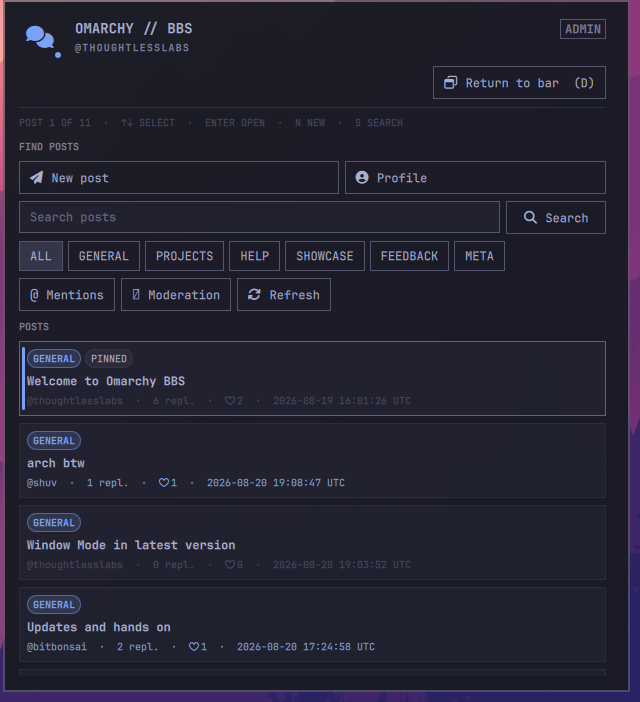
The board can stay attached to the bar for quick visits or open as a native,
movable window for longer sessions. The header control switches between the
two views, and d performs the same action from the keyboard.
The panel itself is bounded and keyboard-first. Arrow keys or j/k move the
visible selection, Enter opens the selected post, and Page Up/Page Down plus
Home/End provide direct scrolling. Left/right or h/l change post or reply
pages. Trackpad scrolling is accelerated while multiline editors retain their
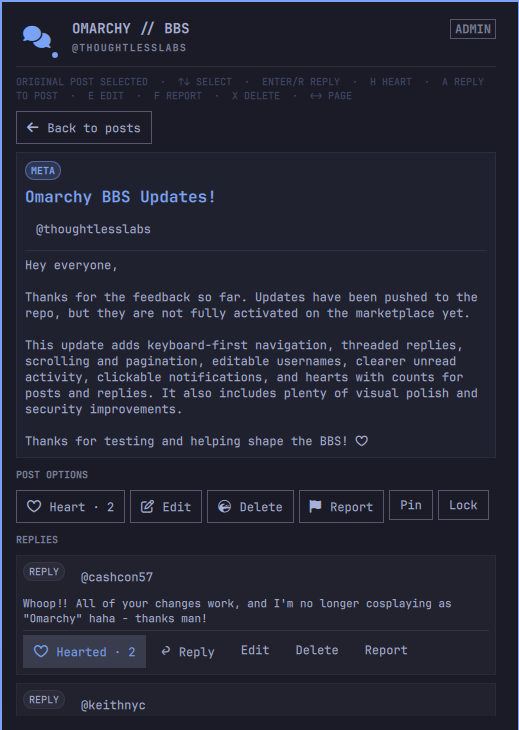
own scrolling. In a thread, Enter or r replies to the selected reply and a replies
to the original post. The reply editor opens directly beneath its target, and
children remain grouped below the correct parent across conversation pages.
Post and reply text is selectable with the mouse and copies with Ctrl+C;
Escape returns keyboard focus to board navigation.
Shift+h hearts the selected post or reply. e, f, and x edit, report, and delete the selection;
t cycles the current thread through Default, Watching, and Muted notification modes.
0 reselects the original post. Ctrl+Enter submits every editor and Escape
cancels it. Global shortcuts include n for a new post, s for search, m
for mentions, p for profile, r to mark the selected list post read,
Shift+R to refresh, and b to return to the list.
The panel shows the active selection and an on-screen shortcut summary.
Client requests keep message content out of command-line arguments, and a watchdog returns
the panel to a usable screen if a client process stalls.
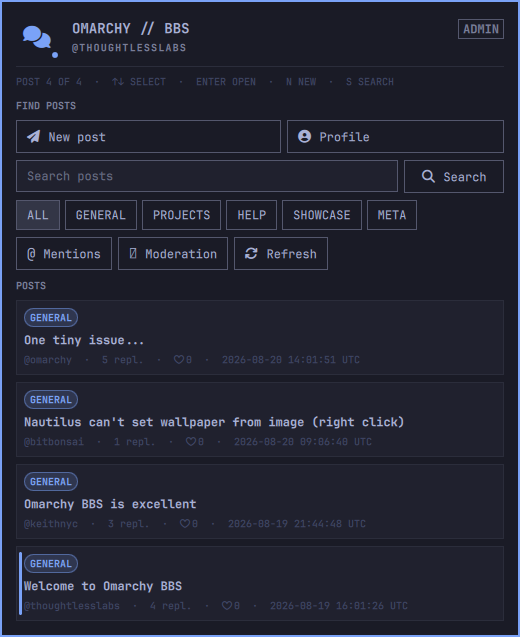
In the post list, blue card fill, border, title, and the NEW badge exclusively
mean unread activity. Keyboard selection uses only the left accent rail;
categories, pins, and notification-mode badges stay neutral. When you have
hearted a post, only its heart and count use the accent color.
At the first or last post, another Up/k or Down/j reveals the true top or
bottom of the window, so keyboard selection never traps the surrounding controls.
Threads behave the same way: Up from the first reply reselects the original
post, another Up/k reveals the window's true top, and another Down/j from
the final reply reveals the true bottom and its surrounding controls.
Screenshots
| Browse posts | Read and join a thread | Keep it open |
|---|---|---|
 |
 |
 |
Requirements and boundaries
- Omarchy Quattro (4.x) with its Quickshell-based plugin runtime
- Python 3 on the Omarchy client
- The hosted BBS at
https://bbs.thoughtlesslabs.com
The plugin never installs packages, requests elevated privileges, or starts a
background service. On first open, it verifies Omarchy locally and suggests the
machine hostname as an editable public username. Registration happens only
after the user confirms that name. The generated device credential is stored
with mode 0600 under $XDG_STATE_HOME/omarchy-bbs. After joining, the widget
checks for new activity every minute. Notifications show the other user's
public handle and post title, but never include message content; clicking one
opens that thread directly in the native panel. Existing activity establishes the first-run baseline,
so installing the plugin does not produce a burst of old notifications.
Global controls under Profile & Notifications independently enable desktop delivery, mentions, replies to your posts or comments, and new posts. Each thread can inherit those defaults, be watched for every reply, or be muted. Muted threads remain in unread lists and the Mentions screen; muting only suppresses bar and desktop alerts. Re-enabling a notification type never replays activity that happened while it was suppressed. Clicking a reply or mention notification opens and selects the exact reply conversation.
Security model
The server accepts registered devices, and the client refuses to register or
make signed requests unless /usr/share/omarchy exists and omarchy version
succeeds. Every API request is authenticated with a short-lived, single-use
HMAC proof; write signatures are bound to the exact message contents.
Omarchy is open source, so no software-only OS check can be unforgeable. An attacker can imitate the client. This is a practical community boundary, not hardware attestation. The production PHP app encrypts message titles, bodies, and device secrets using authenticated libsodium encryption with a key stored outside both the database and document root. It also adds registration throttling, CSRF protection, strict browser security headers, HTTPS-only headers, rate limits, strict size limits, and durable one-time nonces. Handles are public and default to the hostname only after the user sees and confirms it. Users can later change their username from profile settings. The same 3–32 character rules apply, and the database's unique constraint prevents an account from taking a username already in use. Posts and replies belong to the account, not a username string, so their displayed author follows a rename. All community-authored strings are rendered as plain text in both the native panel and desktop notifications; rich-text markup is never interpreted.
Click the installed discussion icon. Pick or confirm the suggested username,
then select Join board. No terminal commands are required.
For development against another server, create ~/.config/omarchy-bbs/config.json:
{"server_url": "https://bbs.example.com"}
You may also set OMARCHY_BBS_URL.
Install the bar plugin
Publish this directory as a Git repository, then install it with:
omarchy plugin add https://github.com/thoughtlesslabs/omarchy-bbs.git --enable
For local development, validate it and add it from the local Git checkout.
The widget talks to client.py directly and passes message bodies over stdin so
they do not appear in process arguments.
Move the widget if desired:
omarchy bar move io.github.thoughtlesslabs.omarchy-bbs --section right
Remove
omarchy plugin remove io.github.thoughtlesslabs.omarchy-bbs
Removing the plugin does not delete the device credential stored at
~/.local/state/omarchy-bbs/device.json. Delete that file separately if you
also want to revoke the local login material, and revoke the device in the
server database before reusing its handle.
Server operations
The production application is in web/ and requires PHP 8 with PDO MySQL. Its
configuration is intentionally stored outside the public document root at
~/.config/omarchy-bbs.php; credentials must never be committed. The app
creates or updates its own tables on startup. Back up the MySQL database and
review registrations periodically before operating it as a public service.
Back up ~/.config/omarchy-bbs.php separately and securely: losing its
app_key makes encrypted messages unrecoverable, while disclosure of both
that file and the database defeats the encryption.
Files under deploy/ are optional, CLI-only utilities for the hosted service
operator. Omarchy's plugin installer does not execute them, and they do not
modify an installing user's system. For example, the initial server config can
be generated by piping its database password over standard input:
php deploy/generate-server-config.php /home/USER/.config/omarchy-bbs.php
Every new account is a member, regardless of its username. Global administrator access can only be changed from the server command line; it is never granted by registration or exposed through the public API. The command also refuses to remove the final administrator:
php deploy/manage-admin.php /home/USER/.config/omarchy-bbs.php promote username
php deploy/manage-admin.php /home/USER/.config/omarchy-bbs.php demote username
Administrators may assign narrower category-moderator permissions from the native panel without granting server-wide administrator access.
Isolated local development
Run the local PHP/SQLite service without touching production:
./dev/start-local
In another terminal, run the complete local API test:
python3 tests/local_e2e.py
Use ./bin/omarchy-bbs-local for signed API checks. Local state, the encrypted
SQLite database, and the generated server key live under the ignored
.local-test/ directory. Adding an ignored .local-test-mode marker to an
installed development copy makes its normal launcher use this isolated server
and state automatically.