
Stopwatch
A project stopwatch for the Omarchy bar. Start, pause, and stop timing sessions from the status bar, give each one a project name, and keep the recent ones with the date and time they started.
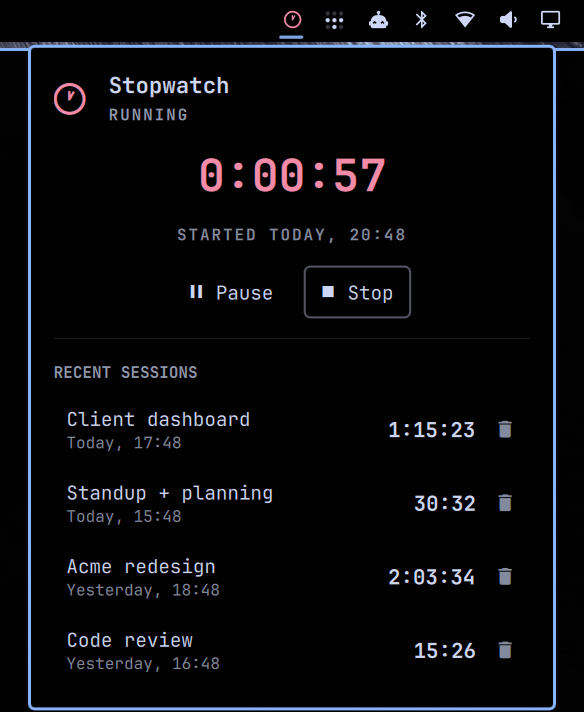
Features
- Bar icon that reports state at a glance — an outline stopwatch when idle, a filled one in the theme's accent color while running, and a dimmed accent when paused. Hover for the elapsed time.
- Start / pause / stop — pausing banks the time and resumes where it left off, so interruptions don't cost you a session. Stopping files it away.
- Named sessions — stopping opens a field to name the session. Rename or delete anything in the list afterwards by clicking it.
- Recent sessions — the last five (configurable) with duration and start time, kept across restarts.
- Survives restarts — a running or paused timer comes back intact after
omarchy restart shell, a logout, or a reboot. Elapsed time is derived from wall-clock timestamps, so it never drifts. - Follows your theme — every color is bound to the live Omarchy palette and
repaints on
omarchy theme setwithout a restart. - Multi-monitor aware — the bar runs one widget instance per screen; all of them share one stopwatch rather than counting separately.
Requirements
Omarchy with the Quickshell-based shell (omarchy-shell). No external
dependencies, no network access, no privileged operations.
Install
omarchy plugin add https://github.com/tlun0911/omarchy-stopwatch.git
omarchy plugin enable io.github.tlun0911.stopwatch
Plugins land disabled so you can read the code first. enable places the
widget in the bar's right section; move it with:
omarchy bar move io.github.tlun0911.stopwatch --section right --index 1
Usage
Bar icon
| Action | Result |
|---|---|
| Left click | Open the panel |
| Middle or right click | Start / pause / resume without opening the panel |
| Hover | Tooltip with the current state and elapsed time |
Panel
Start, then Pause or Stop. Stopping opens a Name this session field — type a project name and press Enter, or leave it blank. Closing the panel with a session still awaiting its name saves it rather than discarding it; the X button is the only way to throw a measured time away.
Click any row under Recent sessions to rename it, or the trash icon to delete it.
Keyboard
The panel is fully keyboard-driven when open:
| Key | Action |
|---|---|
↑ ↓ ← → or h j k l |
Move the cursor |
Space / Enter |
Activate the focused control |
s |
Start / pause / resume |
f |
Finish the session (stop and save) |
d |
Discard the running session |
x |
Delete the selected history row |
Esc |
Close the panel |
Optional keybindings
Add to ~/.config/hypr/bindings.lua:
o.bind("SUPER + SHIFT + T", "Stopwatch start/pause",
  "omarchy-shell -q io.github.tlun0911.stopwatch toggleTimer")
o.bind("SUPER + SHIFT + ALT + T", "Stopwatch panel",
  "omarchy-shell -q io.github.tlun0911.stopwatch toggle")
toggleTimer starts, pauses, or resumes — it never finalizes a session, so a
stray keypress can't file one away. Stopping from a keybind or the bar saves
the session unlabeled, since there is nowhere to type; rename it from the
history list.
Configuration
| Setting | Default | Description |
|---|---|---|
historyLimit |
5 |
Sessions kept in the list (1–20) |
showHundredths |
false |
Show hundredths in the panel readout |
omarchy bar set io.github.tlun0911.stopwatch historyLimit 10
omarchy bar set io.github.tlun0911.stopwatch showHundredths true
IPC
Every action is scriptable through the shell's IPC:
omarchy-shell io.github.tlun0911.stopwatch status       # "Running 0:12:34"
omarchy-shell io.github.tlun0911.stopwatch toggleTimer  # start / pause / resume
omarchy-shell io.github.tlun0911.stopwatch start
omarchy-shell io.github.tlun0911.stopwatch pause
omarchy-shell io.github.tlun0911.stopwatch stop         # save the session
omarchy-shell io.github.tlun0911.stopwatch discard      # drop it unsaved
omarchy-shell io.github.tlun0911.stopwatch toggle       # show/hide the panel
Files written
The plugin writes only these two files, both under your own state directory:
| Path | Contents |
|---|---|
~/.local/state/omarchy/stopwatch-history.json |
Recent sessions |
~/.local/state/omarchy/stopwatch-session.json |
The live timer, so it survives a restart |
It does not modify your Omarchy or Hyprland configuration. Adding the widget to
the bar and setting options go through omarchy plugin and omarchy bar,
which edit ~/.config/omarchy/shell.json on your behalf. Keybindings are
optional and added by you.
A note on long-running sessions
Elapsed time is wall-clock, which is what makes a session survive a reboot. The flip side: start a timer on Friday, leave it running, and on Monday it reads ~60 hours. Stop or discard a session when you finish for the day.
Removal
omarchy plugin disable io.github.tlun0911.stopwatch
omarchy plugin remove io.github.tlun0911.stopwatch
Remove the saved times too, if you want them gone, and delete any keybindings
you added to ~/.config/hypr/bindings.lua:
rm -f ~/.local/state/omarchy/stopwatch-history.json \
      ~/.local/state/omarchy/stopwatch-session.json
License
MIT © Tom Lunt