
Raindrop Bookmarks for Omarchy
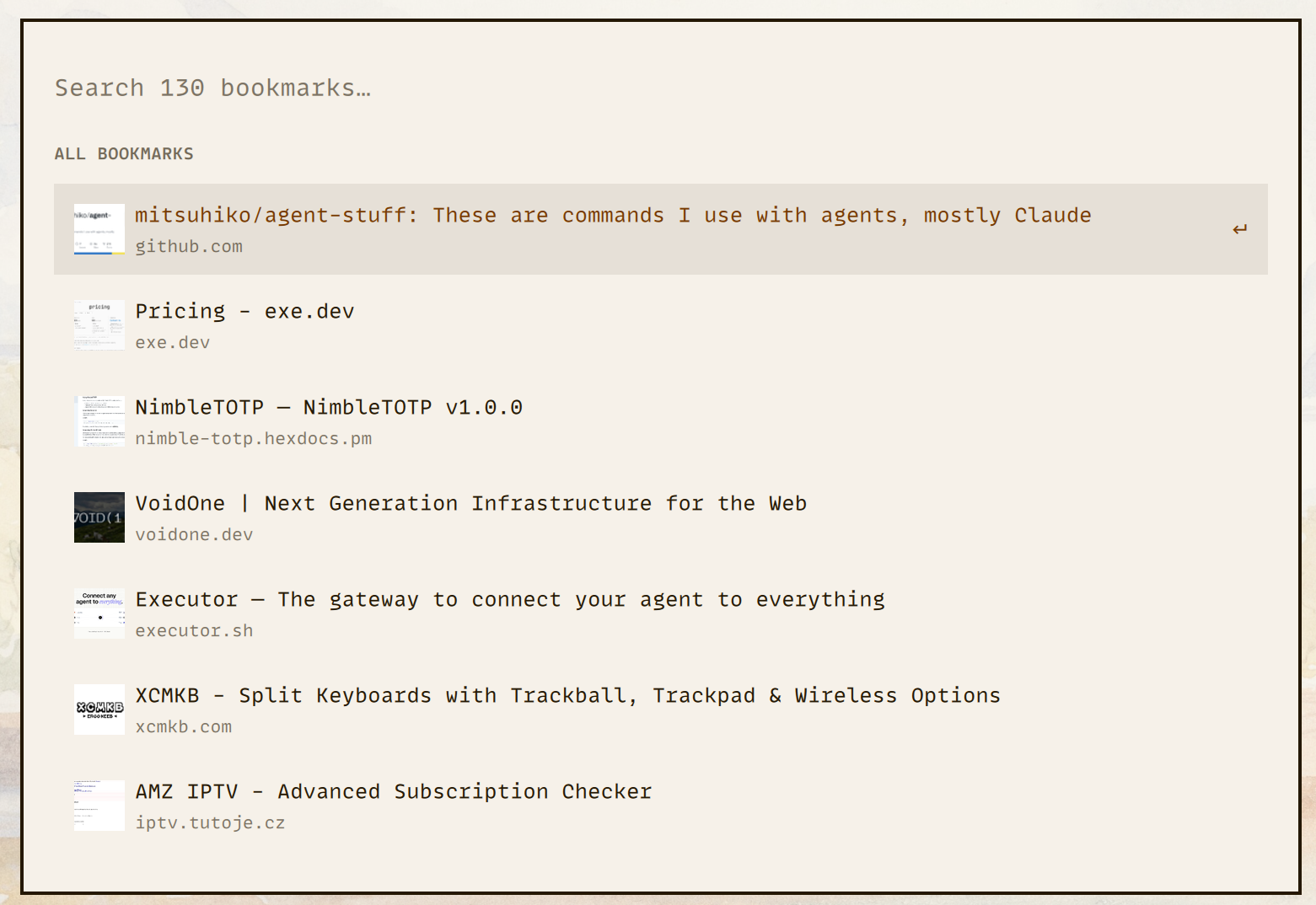
A keyboard-first Omarchy Quattro overlay for searching your Raindrop.io bookmarks. It keeps the last successful bookmark download for offline search, caches small cover thumbnails, and uses a letter tile when a bookmark has no usable cover.
Requirements
- Omarchy Quattro
curl,jq,file,python3,timeout, and ImageMagick'smagick
Install the required packages:
omarchy pkg add jq imagemagick python
Install
omarchy plugin add https://github.com/treramey/omarchy-raindrop-bookmarks.git --enable
Open the overlay and paste your Raindrop test token when prompted. The plugin
links to the Raindrop integrations menu, verifies the token, and stores it at
${XDG_CONFIG_HOME:-$HOME/.config}/raindrop/token with private permissions.
To open the overlay from a terminal:
omarchy-shell shell toggle io.github.treramey.raindrop-bookmarks '{}'
To store the token elsewhere, set RAINDROP_TOKEN_FILE before you start
Omarchy Shell.
Keyboard shortcut
To use Super + Shift + R, add this binding to
~/.config/hypr/bindings.lua:
hl.unbind("SUPER + SHIFT + R")
o.bind(
  "SUPER + SHIFT + R",
  "Raindrop bookmarks",
  "omarchy-shell shell toggle io.github.treramey.raindrop-bookmarks '{}'"
)
This replaces any existing Super + Shift + R binding. Change the key
combination if you already use it, then reload Hyprland:
hyprctl reload
Use
- Type to fuzzy-search titles, domains, tags, and URLs.
- Use
Up,Down,Page Up, andPage Downto move through results. - Press
Enterto open the selected bookmark. - Press
Escapeto clear the query, then press it again to close the overlay. - Click outside the card to close it.
- Use
Refreshto request a manual bookmark refresh. - Use
Reconnectwhen the saved token is no longer valid.
Data and security
Omarchy plugins run unsandboxed with your user permissions. This plugin:
- reads credentials only from the configured Raindrop token file;
- sends that token only to
https://api.raindrop.io; - stores the last complete bookmark response under
${XDG_DATA_HOME:-$HOME/.local/share}/omarchy-shell/raindrop-bookmarks; - binds saved bookmarks to a local SHA-256 fingerprint of the token without storing the token in the snapshot;
- downloads only HTTPS cover URLs on port 443 whose DNS answers are all public;
- pins each cover request to its validated address, disables redirects and proxies, and enforces strict connection, transfer-time, and 5 MiB limits;
- accepts only PNG, JPEG, GIF, and WebP covers and processes them under a restrictive ImageMagick resource and codec policy;
- stores generated thumbnails under
${XDG_CACHE_HOME:-$HOME/.cache}/omarchy-shell/raindrop-bookmarks/covers; and - opens selected links through
xdg-open.
The plugin never copies the token into its directory or exposes it in a process argument. During cover sync, it attempts to refresh thumbnails at least seven days old and deletes thumbnail files with a modification age greater than 30 days. These checks do not run on a timer. It refreshes bookmark data in the background when you open the overlay and the last successful sync is at least five minutes old. A failed refresh keeps the last successful snapshot.
To clear the saved bookmark snapshot and cover cache without removing your
token, run clear-bookmarks from the installed plugin directory:
Stop Omarchy Shell before clearing data. Closing the overlay does not stop background syncs. The command deletes files, but does not clear bookmarks from a running shell's memory or prevent an active sync from recreating the files. Start Omarchy Shell again when finished. Opening the plugin can download the bookmarks again while the token remains configured.
"${XDG_CONFIG_HOME:-$HOME/.config}/omarchy/plugins/io.github.treramey.raindrop-bookmarks/clear-bookmarks"
Remove
"${XDG_CONFIG_HOME:-$HOME/.config}/omarchy/plugins/io.github.treramey.raindrop-bookmarks/clear-bookmarks"
omarchy plugin remove io.github.treramey.raindrop-bookmarks
The clear command removes the saved snapshot and cover cache. The removal command leaves the configured token file in place because other Raindrop tools might use it. Remove that file yourself if you no longer need it.
Development
Test the onboarding flow from the current checkout. The script restores your installed plugin and token when you finish:
The script does not back up or restore bookmark snapshots or cover caches. Connecting during the test can replace those files with data for the test token.
scripts/test-onboarding.sh
Or run the checks directly:
omarchy plugin validate .
qmllint -I "$OMARCHY_PATH/shell" RaindropBookmarks.qml
for script in configure-token validate-token token-fingerprint load-bookmarks bookmark-sync clear-bookmarks cover-sync tests/*.sh; do
  bash -n "$script" || break
done
python3 -m py_compile validate-cover-url
tests/configure-token.sh
tests/validate-token.sh
tests/bookmark-sync.sh
tests/security.sh
Runtime changes require a Changesets entry (pnpm changeset). The release pull
request updates package.json and manifest.json. Use Conventional Commit
subjects.
Changesets tooling requires pnpm install. Its local node_modules tree
contains symlinks, which Omarchy's plugin validator intentionally rejects.
Remove it before validating the plugin folder:
rm -rf node_modules
omarchy plugin validate .
See the Omarchy marketplace guides for development and publishing.