
Omarchy OpenVPN Connect
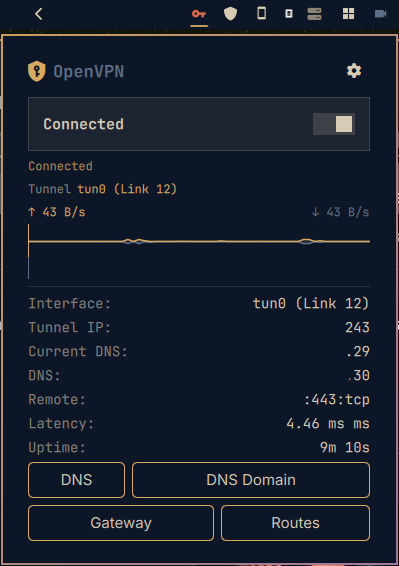
An Omarchy plugin to manage an OpenVPN connection from the
bar: import multiple .ovpn profiles, authenticate with username/password and a
TOTP (MFA) code via challenge/response, view a real-time traffic graph, and inspect
a network info panel (tunnel IP, interface, gateway, DNS, routes, search domains).
No sudo / NOPASSWD is required — the plugin drives NetworkManager (nmcli) using
the user's existing PolicyKit privileges. Credentials are passed through the
environment; only the username is persisted to disk, never the password.
Preview
Features
- Multiple profiles — import several
.ovpnfiles, selectable from the config panel. Import is idempotent by name: re-importing reuses the existing connection instead of creating duplicates. - User/pass + TOTP auth — the server's dynamic challenge (
CRV1) is handled by feeding the password and the raw OTP throughnmcli connection up --askon stdin (the colon-keyed challenge secret cannot be expressed via a passwd-file). The TOTP code is entered at connect time and is never stored. - OpenVPN Access Server compatible — works against OpenVPN Access Server (AS),
which uses the same
CRV1dynamic-challenge for username/password + TOTP; the password and OTP are fed throughnmcli connection up --askexactly as above. - Live traffic graph — up/down throughput (mirrored ↑/↓) across the panel width.
- Network info — status, tunnel IP, interface (e.g.
tun0), gateway, DNS, search domains, routes, latency, remote endpoint. - Split tunnel — keep personal traffic on the physical interface (the VPN does not become the default route) while professional routes still go through the tunnel.
- mssfix — optional
mssfix 1360for HTTPS/MTU issues.
Installation
omarchy plugin add https://github.com/tug-benson/omarchy-openvpn
Or symlink during development:
ln -s /path/to/omarchy-openvpn ~/.config/omarchy/plugins/openvpn
To remove:
omarchy plugin remove io.github.tug-benson.openvpn
Dependencies
sudo pacman -S networkmanager networkmanager-openvpn openvpn python3 polkit zenity
networkmanager/nmcli— manages the VPN connection (no root needed).networkmanager-openvpn— the NetworkManager OpenVPN plugin; required so thatnmcli connection import type openvpncan create the VPN connection. Without it the import fails (the UI will now report the error instead of failing silently).openvpn(>= 2.6) — the underlying client launched by NetworkManager.python3— generates the connection config and gathers traffic/network info.zenity— file picker for.ovpnimport.polkit— grants the user permission to modify NetworkManager connections.
Usage
- Click the VPN icon in the bar to open the panel.
- Click ⚙ to import a
.ovpn, enter credentials, and enable TOTP if the server asks. - Press Connect; enter the TOTP code when prompted, then connect.
- The traffic graph and network info appear once connected.
How it works
bin/omarchy-openvpn-importcopies a.ovpninto~/.config/openvpn/profilesand creates a NetworkManager connection (idempotent by name).bin/omarchy-openvpn-connectapplies the chosen port/protocol, mssfix and split-tunnel settings, then brings the connection up. For TOTP, the password and the raw OTP are piped tonmcli connection up --askon stdin.bin/omarchy-openvpn-disconnectbrings the connection down.bin/omarchy-openvpn-inforeads traffic counters and network details (ip,resolvectl,nmcli) for the active tunnel device and returns them as JSON.bin/omarchy-openvpn-statusreports the connection state.bin/omarchy-openvpn-configstores non-secret settings (selected profile, username, TOTP/mssfix/split flags); the password is never written to disk.
Layout
omarchy-openvpn/
├── manifest.json
├── BarWidget.qml        # bar icon + panel host
├── Panel.qml            # panel: title, Connect/Disconnect, graph, info, TOTP prompt
├── ConfigPanel.qml      # profile import, credentials, TOTP, split tunnel, mssfix
├── Service.qml          # shared state, polling, connect/disconnect
├── Sparkline.qml        # traffic graph (adapted from harshith.system-monitor, MIT)
└── bin/
    ├── omarchy-openvpn-status      # connection state (JSON)
    ├── omarchy-openvpn-info        # network info + traffic counters (JSON)
    ├── omarchy-openvpn-profiles    # list imported profiles
    ├── omarchy-openvpn-import      # copy a .ovpn into ~/.config/openvpn/profiles
    ├── omarchy-openvpn-remote      # extract the remote endpoint
    ├── omarchy-openvpn-static-challenge  # detect a forced static-challenge
    ├── omarchy-openvpn-config      # non-secret settings (profile, TOTP, etc.)
    ├── omarchy-openvpn-connect     # bring the connection up (handles TOTP)
    └── omarchy-openvpn-disconnect  # bring the connection down
License
MIT