
Synology Drive for Omarchy
A bar-widget + panel for the Omarchy Quattro shell that replaces the broken Qt-tray Synology Drive UI on Wayland.
The official
synology-driveAUR package bundles Qt5 without a Wayland platform plugin (qt.qpa.plugin: Could not find the Qt platform plugin "wayland"), so the tray icon and main window render incorrectly under Hyprland/Wayland. This plugin reads the local Synology Drive SQLite state directly and surfaces it natively in the Omarchy bar.
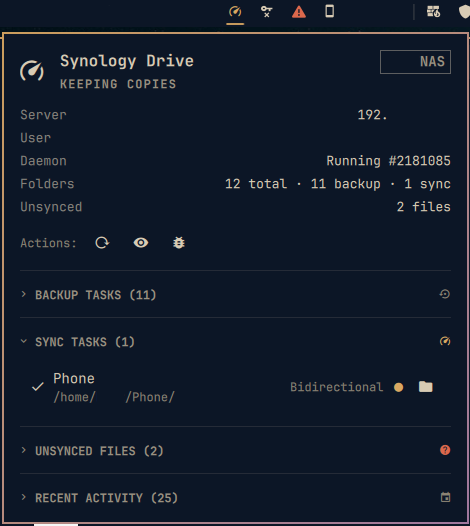
Features
- Bar icon — live state without the tray (Nerd Font glyphs in the bar; text shown here for readability):
- Up to date — green
- Syncing — accent, animated hero phrase
- Unsynced files — urgent
- Not linked / Daemon stopped — dim
- Hero — host (
YOUR_NASexample), user, and status phrase cycling while syncing - Stats — server, user, daemon PID, folder count, unsynced count
- Actions — Refresh (R), Open App (O), Logs (L), Restart/Stop via
synology-drivewrapper - Sync & Backup folders — session-aware (
session_tablefrom~/.SynologyDrive/data/db/sys.sqlite), separated into Backup Tasks (session_type=2, upload) and Sync Tasks (session_type=1, bidirectional), each with distinct header/icon and count, click toxdg-openthe local folder. Direction badge per row (Upload/Bidirectional). Headers are collapsible (click to collapse/expand) with a separator between the two kinds. - Unsynced files — from
file-status.sqlite(syncStatus != 0, e.g. locked~/.config/some-app/run/lockfile.txt) with reason, collapsible with separator and count. - Recent activity — from
history.sqliteordered byupdate_timewith relative times, collapsible with separator and count.
No network access, no daemon socket reverse-engineering for v1 — purely reads ~/ .SynologyDrive/data/db/*.sqlite via status.py every 30s (configurable).
Requirements
- Arch Linux +
synology-drivefrom AUR (yay -S synology-drive) — AUR - Source
.debishttps://global.synologydownload.com/download/Utility/SynologyDriveClient/4.2.0-20058/Ubuntu/Installer/synology-drive-client-20058.x86_64.deb - Omarchy Quattro (
omarchy-shellonquickshell) python3+sqlite3(standard library)
Optional but assumed installed by the AUR package: curl, glib2, libarchive, qt5-base, qt5-wayland, hicolor-icon-theme, nautilus (for folder open).
Install
omarchy plugin add https://github.com/tug-benson/synology-drive.git --enable --yes
# or manually:
mkdir -p ~/.config/omarchy/plugins
cp -r /path/to/synology-drive ~/.config/omarchy/plugins/io.github.tug-benson.synology-drive
omarchy-shell shell rescanPlugins
The widget lands in right by default. Move it:
omarchy bar move io.github.tug-benson.synology-drive --section right
Usage
- Left click — toggle panel
- Right click — refresh now
- Middle click — open Synology Drive app (
synology-drive startwithLD_LIBRARY_PATH=/opt/Synology/SynologyDrive/lib) - Panel keys —
j/knavigate,Enteropen folder/file,Rrefresh,Oopen app,Lopendaemon.log,Escclose,Tabswitch panels - IPC —
omarchy-shell shell summon io.github.tug-benson.synology-drive '{}'/hide/call … refresh
Sessions and recent files are clickable. Unsynced files open their path (or parent) via xdg-open. Logs open ~/.SynologyDrive/log/daemon.log in your default handler.
Configuration
~/.config/omarchy/shell.json entry:
{ "id": "io.github.tug-benson.synology-drive", "refreshIntervalSec": 30 }
| key | type | default | range | effect |
|---|---|---|---|---|
refreshIntervalSec |
integer | 30 | 5–3600 | status.py poll interval |
Lower values poll the SQLite DBs more often; the helper itself is cheap (< 20 ms, read-only mode=ro).
How it works
status.pyreads:~/.SynologyDrive/data/db/sys.sqlite→connection_table(server/linked) +session_table(sync folders)~/.SynologyDrive/data/db/file-status.sqlite→fstatinfoforunsyncedCount~/.SynologyDrive/data/db/history.sqlite→history_tablefor recent files~/.SynologyDrive/{daemon,ui}.pid+pgrep cloud-drive-daemonfor running state
Service.qmlrunspython3 status.py 25viaQuickshell.Io.Process, appliesModel.jsparsing, and re-polls viarefreshTimer.Panel.qml(entrybarWidgetinmanifest.json:11) renders both theBarIconButtonand thePanel/KeyboardPanel(same combined pattern asomarchy.dropboxand validated marketplace plugins likeharshith.system-monitor). The guide's canonical split isBarWidget.qml+Panel.qmlviaLoader— this plugin keeps a single file for minimal IPC surface; a split stays compatible and can be adopted whenqmllintships fullqs.Uitypes.
No daemon socket write in v1; pause/resume is not wired (Synology's daemon.sock/ui.sock protocol is Qt-proprietary). The plugin intentionally does not run sudo or install hooks.
Autostart & tray
Synology Drive's own autostart (checked in the Drive client settings) is sufficient — leave it enabled. The Drive daemon (cloud-drive-daemon) and the UI (cloud-drive-ui) will start at login. No separate systemd unit is needed.
The native Qt tray (qt.qpa.plugin: Could not find the Qt platform plugin "wayland") is broken under Hyprland/Wayland — this plugin replaces it. Hiding the tray icon is optional and left to your preference:
- The plugin does not hide or disable
omarchy.trayautomatically — you choose. - To keep the tray clean, move Synology's icon from
pinnedtohidden(one-time):
# via shell.json (recommended)
python3 -c "
import json, pathlib
p = pathlib.Path.home() / '.config/omarchy/shell.json'
j = json.loads(p.read_text())
for e in j['bar']['layout']['right']:
    if e.get('id')=='omarchy.tray':
        if 'cloud-drive-ui' in e.get('pinned',[]): e['pinned'].remove('cloud-drive-ui')
        if 'cloud-drive-ui' not in e.get('hidden',[]): e.setdefault('hidden',[]).append('cloud-drive-ui')
p.write_text(json.dumps(j, indent=4))
"
omarchy-shell shell reloadConfig
Or right-click the tray chevron → Manage → move cloud-drive-ui to Hidden.
- To keep the native icon alongside the widget, leave
pinnedunchanged — both can coexist. The widget never stops the daemon; it only reads its SQLite state.
Troubleshooting
status.pyfails / panel shows Checking… — confirm~/.SynologyDrive/data/db/sys.sqliteexists andpython3 status.pyprints JSON:python3 ~/.config/omarchy/plugins/io.github.tug-benson.synology-drive/status.py | jq .- Daemon stopped —
synology-drive start(wrapper setsLD_LIBRARY_PATH=/opt/Synology/SynologyDrive/lib) or re-enable autostart in Drive settings; check~/.SynologyDrive/log/daemon.log. - Unsynced locked files — e.g.
~/.config/some-app/run/lockfile.txtwithsyncStatus=2(locked/permission) is expected for files held open by another process. Exclude it via Drive's selective sync if noisy.
Remove
omarchy plugin remove io.github.tug-benson.synology-drive --yes
# or
rm -rf ~/.config/omarchy/plugins/io.github.tug-benson.synology-drive
omarchy-shell shell rescanPlugins
License
MIT — see LICENSE. Synology Drive itself is under Synology's license; this plugin only reads its local DBs.