
Omarchy Lunar Calendar Plugin
A feature-rich Lunar Calendar Plugin for Omarchy Quattro (the Quickshell desktop environment on Arch Linux / Omarchy).
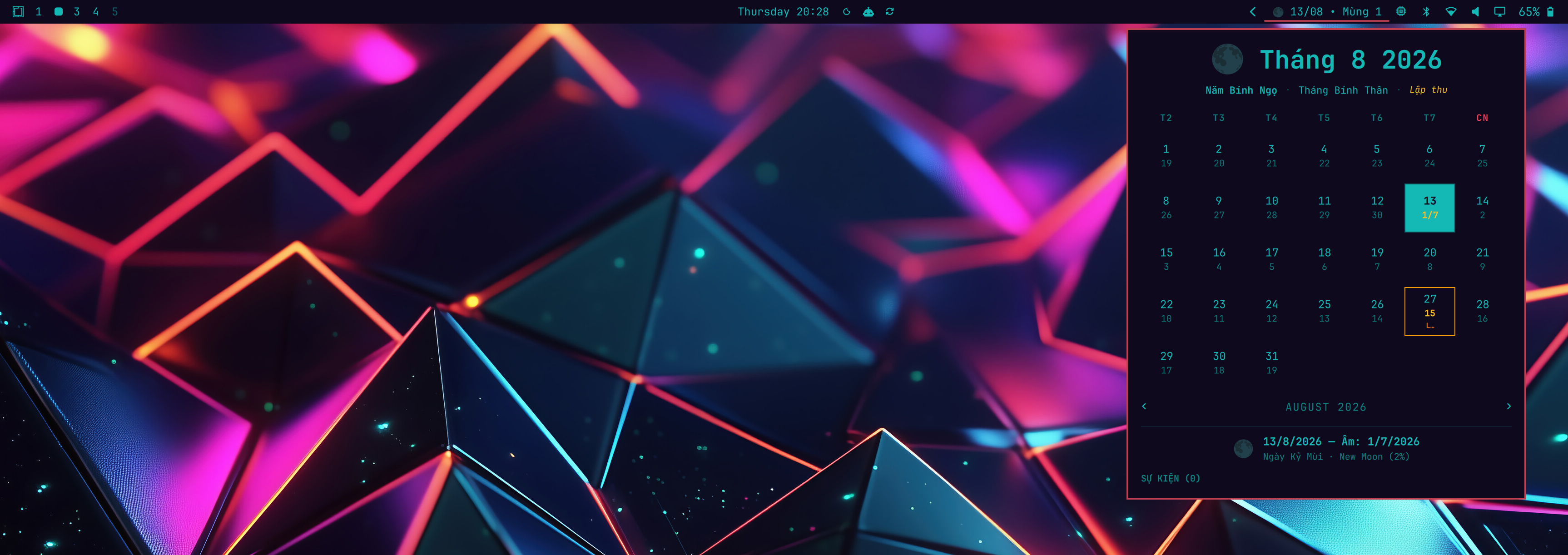
Inspired by archlatam/omarchy-calendar-activity, this plugin brings East Asian Lunar Calendar (Lịch Âm / 农历), Moon Phase indicators, Can Chi (Stem-Branch) cycles, 24 Solar Terms (Tiết khí), and Activity/Event tracking straight to your Omarchy desktop bar.
Features
- Bar Widget: Displays Gregorian date, Lunar date (e.g.
13/08 • Mùng 1or15/07 Rằm), and current Moon Phase icon (🌑🌒🌓🌔🌕🌖🌗🌘) in your top bar. - Interactive Calendar Panel: Pop-up calendar grid showing dual Gregorian + Lunar dates.
- High-Precision Astronomical Converter:
- Converts Solar dates to Lunar dates (Vietnam UTC+7, China UTC+8, or custom timezone).
- Highlights Mùng 1 (New Moon) and Rằm (Full Moon).
- Displays Can Chi Year, Month, Day (e.g. Bính Ngọ, Bính Thân, Kỷ Mùi).
- Displays 24 Solar Terms (Lập xuân, Hạ chí, Thu phân, Đông chí, etc.).
- Calculates exact Moon illumination percentage and age.
- Activity & Event Manager:
- Add activities tied to Gregorian dates or recurring Lunar dates (e.g. Tết, Rằm Tháng Tám, Vu Lan).
- Highlighting for upcoming traditional holidays and user events.
- Omarchy Theme Integration: Respects system fonts and color scheme.
Installation & Removal
Install the plugin with the Omarchy plugin manager:
omarchy plugin add https://github.com/tuthan/omarchy-lunar-calendar.git --enable
omarchy restart shell
The --enable flow places the widget automatically using the plugin's default
bar section. If the bar does not refresh immediately, restart the shell once.
Remove it with:
omarchy plugin remove io.github.tuthan.omarchy-lunar-calendar
Updating
Update this plugin to the latest version from GitHub with:
omarchy plugin update io.github.tuthan.omarchy-lunar-calendar --yes
omarchy restart shell
To update every Git-managed Omarchy plugin instead:
omarchy plugin update --yes
omarchy restart shell
Shortcuts & Controls
- Left / Right Arrows (
◄►): Navigate months. T: Reset view to Today.- Click Day Cell: View detailed Lunar date, Can Chi info, Moon Phase, and Activities for that day.
- Esc: Close panel.
Architecture & Files
manifest.json: Plugin descriptor file for Omarchy Quattro.BarWidget.qml: Status bar widget component.Panel.qml: Interactive popup calendar and activity panel.scripts/lunar_converter.js: Pure JavaScript astronomical solar-to-lunar conversion & moon phase library.scripts/event_store.js: Event persistence and holiday manager.
Reviewer Notes
- No additional packages, services, or elevated privileges are required.
- The plugin uses only Omarchy/Quickshell QML APIs and bundled JavaScript under
scripts/. - There is no installer script or remote build path.
- Event data is handled locally by the plugin logic; the repository does not depend on external network calls at runtime.
License
MIT License