
Steam — Omarchy bar widget
A shortlist of the games you actually play, one click from the bar.
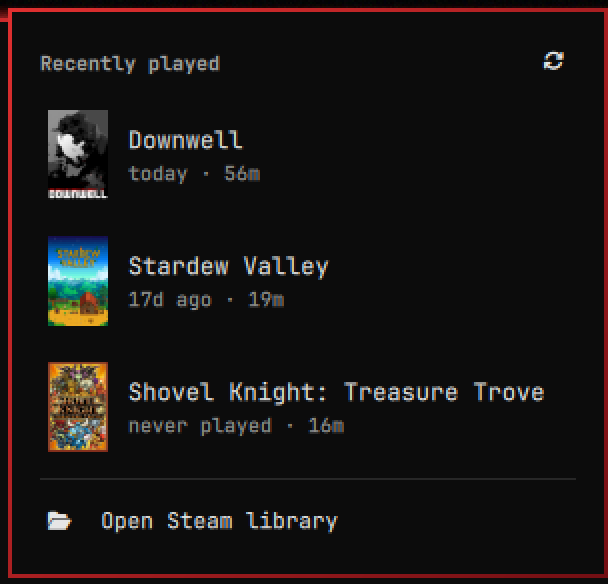
This is not a library browser. Clicking the Steam mark drops the few games you played most recently — cover art, when you last played, how long you have played — and clicking one launches it. There is no search box and no grid, because at five rows there is nothing to search: the game you want is almost always the one you played last.
Everything is read from files Steam already keeps on disk, so the panel opens instantly whether or not Steam is running. No API key, no network call, no account login, and nothing leaves your machine.
Scope, and when to use something else
The whole design is one decision — show a handful of rows and get out of the way. That makes it fast and predictable, and it makes it the wrong tool for some jobs. The Omarchy marketplace has plugins that cover those better:
| If you want | Use |
|---|---|
| Type-to-search over the whole library, and non-Steam games | thedarkcr0w/omarchy-games |
| One list spanning Steam, Lutris, Heroic, Bottles, and Flatpak | sir-francisdrake/game-launcher |
| Steam friends presence rather than launching | daventhedude/omarchy-steam-friends |
This one stays deliberately small: Steam only, installed games only, capped at twelve rows, no search, no aggregation. Staying small buys two things — a panel where the game you want is already on screen, with nothing to type and nothing to scroll, and a provider written in bash and awk, so the plugin adds no language runtime to the long-lived shell process it lives inside.
Install
omarchy plugin add https://github.com/Unr3leas3d/omarchy-steam-recent --enable right
Or clone it yourself and rescan:
git clone https://github.com/Unr3leas3d/omarchy-steam-recent \
  ~/.config/omarchy/plugins/io.github.unr3leas3d.steam-recent
omarchy-shell shell rescanPlugins
omarchy plugin enable io.github.unr3leas3d.steam-recent right
Drag the icon along the bar to move it; the bar writes the new position back
to shell.json itself.
Using it
| Interaction | What it does |
|---|---|
| Left click | Open the panel |
| Click a game | Launch it and close the panel |
| ↑ / ↓ then Enter | Pick and launch from the keyboard |
| Esc | Close |
| Right click (bar mark) | Skip the list, open the Steam library |
| Refresh (↻, top right) | Rescan the library now |
Settings
Set these on the widget's entry in ~/.config/omarchy/shell.json. It
hot-reloads on save.
{ "id": "io.github.unr3leas3d.steam-recent", "count": 8, "covers": true }
| Key | Default | Meaning |
|---|---|---|
count |
5 |
How many games to list (1–12) |
covers |
true |
Show cover art; false gives a tighter text-only list |
How it finds your games
| What | Where it comes from |
|---|---|
| Installed games | appmanifest_*.acf in every library in libraryfolders.vdf |
| Last played | LastPlayed in each manifest |
| Playtime | Playtime in each account's userdata/*/config/localconfig.vdf |
| Cover art | appcache/librarycache/<appid>/library_600x900.jpg |
scripts/steam-recent does the reading and prints one tab-separated row per
game. You can run it directly to see exactly what the panel sees:
~/.config/omarchy/plugins/io.github.unr3leas3d.steam-recent/scripts/steam-recent 5
Only installed games are listed. Proton, the Steam Linux Runtimes, and the
redistributables live in steamapps alongside real games and are filtered out
by name, because the manifests carry no field that distinguishes them.
Security
Every field the panel shows comes from a file that any local process can
rewrite — steamapps/*.acf is not privileged — and the appid ends up
concatenated into a shell command when a row is launched. So it is validated
as a short run of digits three times over: in the provider, again when the
panel parses the provider's output, and once more at the concatenation
itself. Anything that is not digits is dropped, never escaped.
Work and memory are bounded at every stage, so neither scales with what is
sitting in the Steam tree. Nothing there is privileged, so all of it is
treated as attacker-controlled: 8 accounts, 2000 manifests, 20000 playtime
records, 25000 rows into aggregation or sort, 1 MiB per manifest, 32 MiB per
localconfig.vdf, 4096 bytes per line, 200 characters per game name, and
64 KiB of total output. Overflow past any ceiling is rejected rather than
queued. Names are stripped of tabs and control characters before they share
a tab-delimited line with an appid.
A tree built to be hostile — 400 accounts holding 800,000 playtime records — runs in 0.5s and 14 MB, against 20.3s and 440 MB before these ceilings.
Requirements
Bash, awk (gawk, the Arch default — the parser uses match() with a
capture array), and Steam. No language runtime, no extra packages.
Steam flushes playtime when it exits, so a session's minutes may not appear until you close Steam. Last-played updates as soon as a game exits.
Removing it
omarchy plugin remove io.github.unr3leas3d.steam-recent
License
MIT — see LICENSE.
Not affiliated with Valve or Steam.