
Crypto Watch
A bar widget for Omarchy that keeps crypto prices one click away.
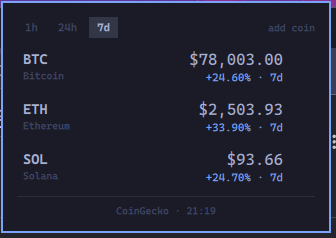
Click the ₿ pill and a panel shows each coin's price and its change over 1h, 24h,
or 7d — with the window labelled on every row, so the percentage is never ambiguous.
Coins are added and removed from inside the panel.
Features
- Price and percentage change for any coin on CoinGecko
- Switchable change window:
1h,24h,7d— switching re-reads the response already in memory, so it costs no extra API call - Add coins by searching name or symbol; remove them with
✕or thexkey - Ships with BTC, ETH and SOL; your list is stored in
shell.json - Last known prices stay on screen when the network or the API is unavailable, marked with the reason and the time they were fetched
- Sub-dollar coins keep their significant digits (
$0.000008234, not$0.00)
Requirements
- Omarchy with the Quickshell-based shell (
omarchy-shell) curl(present on a standard Omarchy install)- Outbound HTTPS to
api.coingecko.com
No API key, no account, and no elevated privileges. The plugin runs entirely as your own user: it asks for no privilege escalation of any kind, and modifies no system state.
Install
omarchy plugin add https://github.com/victorrangel10/omarchy-crypto-watch.git
omarchy plugin enable io.github.victorrangel10.crypto-watch
omarchy plugin add clones the repo into ~/.config/omarchy/plugins/io.github.victorrangel10.crypto-watch/
(the folder is named from the manifest id) and leaves it disabled, so you can read the
code before it runs. enable puts the widget in the bar section named by the manifest
(right); pass a placement to override it, or move it later:
omarchy plugin enable io.github.victorrangel10.crypto-watch --section center
omarchy bar move io.github.victorrangel10.crypto-watch --section right
For scripts and agents, do both steps at once, without prompts:
omarchy plugin add https://github.com/victorrangel10/omarchy-crypto-watch.git --enable --yes
Updating
omarchy plugin update io.github.victorrangel10.crypto-watch        # shows a diff, fast-forwards
omarchy plugin update io.github.victorrangel10.crypto-watch --yes  # no prompts
Since the install is a plain git checkout, pinning a tag or switching branches is ordinary git inside the plugin folder.
Manual install (without git)
dest=~/.config/omarchy/plugins/io.github.victorrangel10.crypto-watch
mkdir -p "$dest"
cp manifest.json BarWidget.qml Panel.qml Model.js "$dest"/
omarchy-shell shell rescanPlugins
omarchy plugin enable io.github.victorrangel10.crypto-watch
Copy the files — do not symlink them. Omarchy rejects symlinks inside plugin folders.
Only those four files are needed at runtime; tests/, preview.png and this README are
never loaded by the shell.
What the install touches
| Path | Change |
|---|---|
~/.config/omarchy/plugins/io.github.victorrangel10.crypto-watch/ |
the plugin files |
~/.config/omarchy/shell.json |
one entry under bar.layout.<section>, holding your coins and window |
Nothing else: no privilege escalation, no service units, no administrator rights, no
PATH changes, and no files outside ~/.config/omarchy. The only network access is
outbound HTTPS to api.coingecko.com.
Responses are treated as untrusted: coin ids are whitelisted, names and symbols are length-capped, and every string the API controls renders as plain text.
Every request is issued by curl with --proto "=https", a 10-second whole-request
deadline, and a 2 MiB response ceiling. The ceiling is enforced by curl itself, so an
oversized or endless body is cut off before it reaches the shell process rather than
after — including bodies that declare no length. A cut-off response reports
Response too large and leaves the last good prices on screen.
Uninstall
omarchy plugin remove io.github.victorrangel10.crypto-watch         # asks to confirm
omarchy plugin remove io.github.victorrangel10.crypto-watch --yes   # no prompts
That disables the plugin first — which removes its entry from bar.layout in
shell.json — and then deletes the folder, because a git-installed plugin can be cloned
again from upstream. A folder installed by hand (no .git) is not deleted; it is moved
to ~/.config/omarchy/plugins/.io.github.victorrangel10.crypto-watch.bak.<UTC timestamp>.
Your coin list lives in the shell.json entry, so removing the plugin discards it.
Save it first if you want it back later:
jq '[.bar.layout[][] | select(.id == "io.github.victorrangel10.crypto-watch")][0]' \
  ~/.config/omarchy/shell.json > crypto-watch-entry.json
To take it off the bar but keep the files and your list:
omarchy plugin disable io.github.victorrangel10.crypto-watch
omarchy plugin enable io.github.victorrangel10.crypto-watch
Verify a clean removal:
omarchy plugin list | grep crypto-watch                                   # no output
jq '[.bar.layout[][] | select(.id | test("crypto-watch"))] | length' \
  ~/.config/omarchy/shell.json                                            # 0
ls -d ~/.config/omarchy/plugins/io.github.victorrangel10.crypto-watch     # no such file
Usage
Mouse
| Action | Result |
|---|---|
Click the ₿ pill |
Open / close the panel |
| Middle-click the pill | Refresh now |
Click 1h / 24h / 7d |
Switch the change window |
Click add coin |
Open the search field |
Hover a row, click ✕ |
Remove that coin |
Keyboard (while the panel is open)
| Key | Result |
|---|---|
← / → |
Switch the change window |
↑ / ↓ (or k / j) |
Move the row cursor |
x |
Remove the coin under the cursor |
Return |
Open the search field |
Return (in search) |
Add the top match |
r |
Refresh now |
Esc |
Leave search, or close the panel |
Tab |
Move to the next bar panel |
Configuration
Settings live inline on the widget's entry in ~/.config/omarchy/shell.json and are
written by the panel itself — editing by hand is optional.
{
  "id": "io.github.victorrangel10.crypto-watch",
  "window": "24h",
  "coins": [
    { "id": "bitcoin",  "symbol": "BTC", "name": "Bitcoin" },
    { "id": "ethereum", "symbol": "ETH", "name": "Ethereum" },
    { "id": "solana",   "symbol": "SOL", "name": "Solana" }
  ]
}
window—1h,24hor7d. Anything else falls back to24h.coins— ordered list;idmust be a CoinGecko coin id. A bare string works too ("dogecoin"), andsymbol/nameare corrected from the API response on the next fetch. Omit the key for the defaults; an empty list shows an empty state.- An
idmust match[a-z0-9._-]{1,128}; entries that do not are dropped rather than sent, so neither a hand-edited config nor a search result can bend the request URL. Names are kept to 128 characters and symbols to 48. Across CoinGecko's full list of 18,664 coins the longest real id, name and symbol are 86, 88 and 38, so no real coin is rejected or truncated — the caps exist to stop an oversized string from stalling the shell in text layout.
API usage and rate limits
CoinGecko's keyless API allows only single-digit calls per minute per IP before it
answers 429. Crypto Watch is built around that:
- One request covers every coin and all three windows
- Requests are throttled to at most one per 30 seconds, no matter how often the panel is opened or refreshed by the host
- The URL carries no cache-busting parameter, so repeat requests are served from CoinGecko's edge cache
- A
429or a network failure leaves the last good prices on screen instead of blanking
Searching for a coin costs one additional request, debounced while you type.
Both requests are built by Model.fetchCommand, so the transport limits above apply to
every call the plugin makes.
Development
Model.js holds the plugin's logic — URL building, response parsing, formatting, list
management — as pure functions with no QML dependency, so it runs under node:
node tests/model-test.js
node tests/panel-test.js
tests/panel-test.js guards the sinks that render CoinGecko-controlled strings: a Text
bound to modelData.name or modelData.symbol must declare textFormat: Text.PlainText,
so a markup-shaped coin name cannot reach Qt's rich-text path and pull remote resources
into the shell process. It also guards the transport: Panel.qml may not assemble a
curl argv inline, and both Process.command assignments must come from
Model.fetchCommand.
Fixtures in tests/fixtures/ are captured from live CoinGecko responses. The QML side
is checked with the tools Omarchy's plugin docs require:
omarchy plugin validate .
qmllint -I <shell-root-parent> BarWidget.qml Panel.qml
Note for contributors: QML passes JSON arrays into JavaScript as a V4Sequence, not a
real Array — Array.isArray is false for the coins setting. Model.js treats
array-likes accordingly, and tests/model-test.js covers that case.
Data
Prices from the CoinGecko API. Crypto Watch is not affiliated with CoinGecko. Prices are informational and may be delayed or wrong — don't trade on them.
License
MIT — see LICENSE.