
Omahub
← All plugins
G

Agent Usage Plus

by Gabriele Vigano

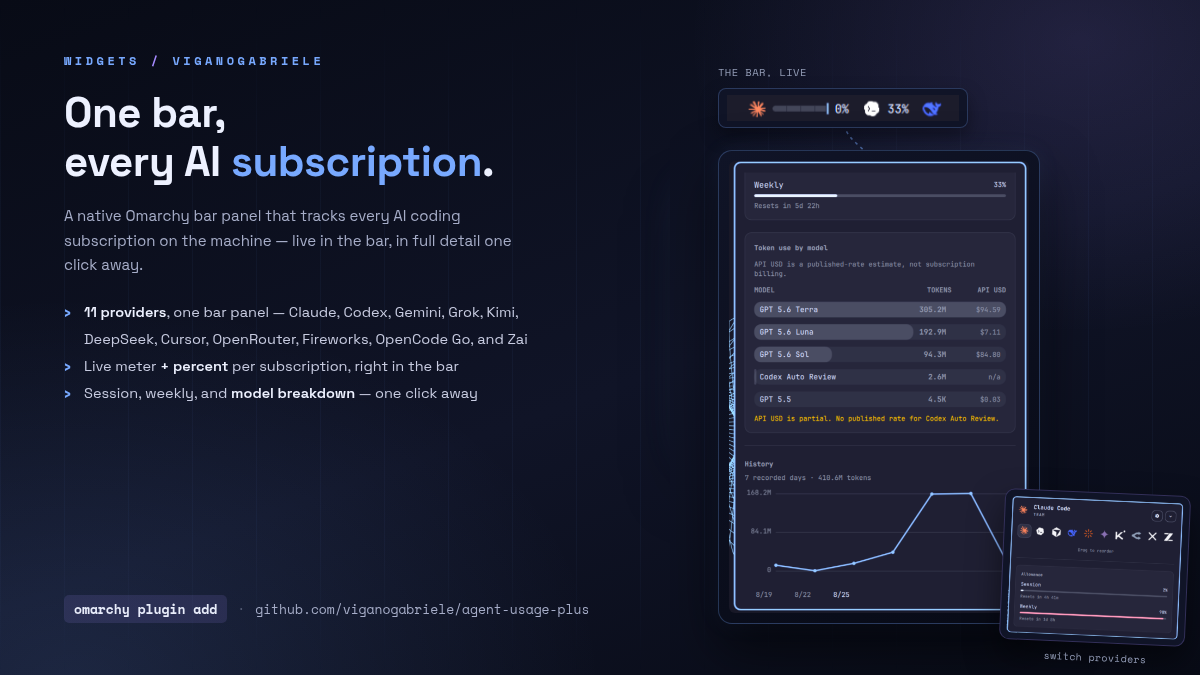
Live AI coding-subscription usage, limits, API-rate estimates, and token history in a native Omarchy bar panel.

Security review

Potentially dangerous behavior detected · 16 findings

Deterministic scan — not a security guarantee

High
Risk level
High
Analyzed commit
0e31cac
Scanned
5 days ago

Automated analysis only — not a security guarantee.

AI advisory review

No obvious issues detected

Language-model assessment · ~deepseek/deepseek-v4-flash-latest — advisory only

Low
AI risk level
Low
Recommendation
install
Model
~deepseek/deepseek-v4-flash-latest
Analyzed commit
0e31cac
Reviewed
5 days ago

The plugin is a legitimate usage-monitoring bar widget. Its collectors read local credentials and make HTTPS calls only to the corresponding provider endpoints, with careful input sanitization and bounded reads. The only persistence is an optional user-level systemd timer created by install.sh, which is opt-in and does not require elevated privileges.

  • The optional install.sh can create a user systemd timer (--enable-timer) that runs every 10 minutes; this is user-level and opt-in, but it is a form of persistence that users should be aware of.
  • Collectors read API keys from environment variables or a mode-600 config file; they are never transmitted outside the provider's own endpoint, but users must ensure the config file permissions are correct.
  • The deterministic scan flagged obfuscation in test files, but these are test fixtures with escape sequences, not executable code, and pose no real risk.
How this check works

This review combines the deterministic scan (the rule-based results above) with an independent look at the plugin's code by a language model. The model reads a trimmed sample of the repository's files, the manifest, and the README, then gives a plain-language risk level and a recommendation: install (no notable danger), review (look closer first), or avoid (clearly dangerous).

It runs on the same analyzed commit as the deterministic scan and is strictly advisory — it is not a security guarantee and never blocks a plugin by itself. A human moderator still reviews plugins before they are listed.

AI advisory only — automated analysis, not a security guarantee.

Install
$ omarchy plugin add https://github.com/viganogabriele/agent-usage-plus --enable
Developer Tools #bar #ai

Agent Usage Plus

Agent Usage Plus

<p align="center"> <img src="preview-full.png" alt="Usage panel with session, weekly, model and history breakdowns" width="49%"> <img src="preview-providers.png" alt="Provider configuration and bar preview" width="49%"> </p>

Native Omarchy bar widget for AI coding usage, limits, balances, pace, costs and history. It reads Omarchy and local collector records, so it works with subscriptions and API accounts without storing credentials.

Forked from the MIT-licensed omarchy.agents widget bundled with Omarchy and expanded into a standalone plugin.

Install

omarchy plugin add https://github.com/viganogabriele/agent-usage-plus.git --enable

Update

omarchy plugin update io.github.viganogabriele.agent-usage-plus

Remove

omarchy plugin remove io.github.viganogabriele.agent-usage-plus

Providers

Claude Code, Codex, Fireworks, OpenRouter, DeepSeek, Gemini, Cursor, Kimi, OpenCode Go, Devin, Google Antigravity, xAI/Grok and Z.AI/GLM.

Claude Code and Codex use Omarchy's built-in records. Other providers use the optional collectors:

./collectors/install.sh
~/.local/share/agent-usage-plus-collectors/bin/agent-usage-plus-collectors update

Requires Omarchy with Quickshell plugin support. The plugin has no other runtime dependency; optional collector setup is documented in collectors/README.md.

The widget follows Omarchy's live theme. An optional traffic-light palette uses green, amber, and red for Healthy, Warn, and Critical meters. Notifications are off by default; when enabled, each provider alerts once at Warn and once at Critical. The widget can optionally express quota as available instead of used; percentages, meters, warning controls, and alerts switch together while keeping the same underlying trigger points.
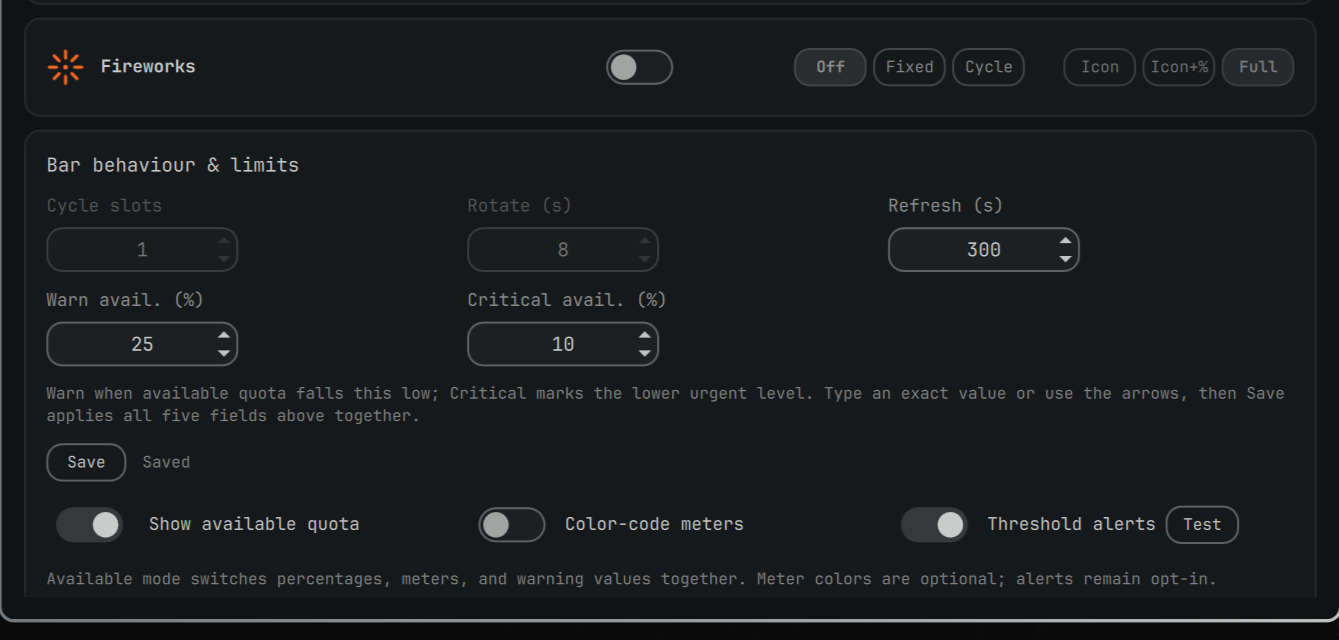
Available quota mode in Settings

Multi-device sync

Local providers (Claude Code, Codex) only see the transcripts on the machine they run on, so a fresh machine reads as all-zero for today and history until it has done some work of its own. To combine usage across every machine you use, turn on Multi-device sync in the panel's Settings and point it at a folder — each machine then writes its own small JSON snapshot into that folder and reads every other machine's snapshot from it, summing today's tokens and merging the daily history.

The panel never syncs the folder itself — it only reads and writes inside one that's already kept identical across your machines by some other tool. Syncthing is a common, free, no-cloud-required choice; a synced Nextcloud/Dropbox folder or a network mount (NFS/SMB/sshfs) works just as well. Point every machine's sync folder setting at the same path once that folder itself is syncing, and each machine picks up the others' numbers on its next refresh.

Details: collector setup, record contract, manual QA, troubleshooting, contributing.

MIT licensed; see LICENSE.