
Panel Resources
Live CPU, memory, disk, AMD, and NVIDIA telemetry for the Omarchy bar — compact, configurable, and private.
Omarchy Marketplace · English · Русский
Version: Omarchy plugin 0.5.0
English
Highlights
- Select only the metrics you want on the bar.
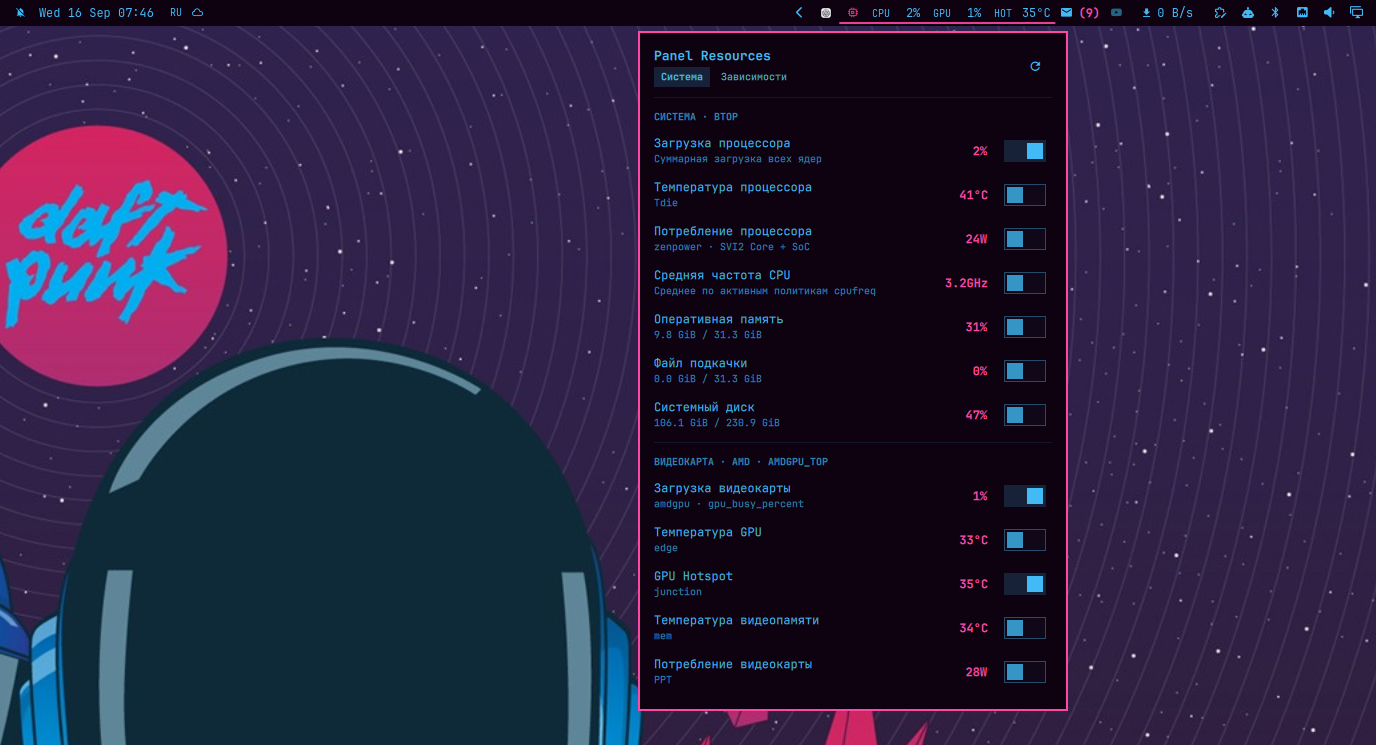
- Monitor CPU load, temperature, power, and frequency; RAM, swap, and root disk usage.
- Read AMD and NVIDIA load, temperatures, VRAM, power, fan, and clock data when supported by the hardware.
- Open
btop,amdgpu_top, ornvtopby clicking a metric. - One persistent collector serves every monitor without network access or elevated privileges.
Install
omarchy plugin add https://github.com/VillainRU/omarchy-panel-resources.git --enable
If the widget is not placed automatically, add it to the right section:
omarchy plugin enable io.github.villainru.panel-resources right
Use and configure
Click the chip icon to open the panel; right-click it to rescan hardware. The System tab controls visible metrics, while Dependencies reports available drivers and optional monitors. The refresh interval is configurable from 1 to 30 seconds and defaults to 2 seconds. The active underline spans the full widget width.
Only sensors exposed by the current machine are shown. The interface uses Russian for ru_* locales and English otherwise.
Opening the panel refreshes all available metrics; closing it resumes selected-only polling. Disk usage updates every 30 seconds. Settings take effect without restarting the collector, and unavailable readings display —.
Update and diagnose
omarchy plugin update io.github.villainru.panel-resources --yes
If a sensor is missing, check the Dependencies tab and right-click the widget to refresh detection. Detailed views require btop for system metrics, amdgpu_top for AMD, or nvtop for NVIDIA.
Remove
omarchy plugin remove io.github.villainru.panel-resources
Русский
Показывает телеметрию процессора, памяти, диска и видеокарты прямо в панели Omarchy — компактно, настраиваемо и без отправки данных в сеть.
Возможности
- Выбор только нужных показателей для панели.
- Загрузка, температура, мощность и частота процессора; использование RAM, swap и корневого диска.
- Загрузка, температуры, VRAM, мощность, вентилятор и частота AMD и NVIDIA, если оборудование предоставляет эти данные.
- Запуск
btop,amdgpu_topилиnvtopнажатием на показатель. - Один постоянный сборщик для всех мониторов без root-прав и сетевых запросов.
Установка
omarchy plugin add https://github.com/VillainRU/omarchy-panel-resources.git --enable
Если виджет не появился автоматически, добавьте его в правую секцию:
omarchy plugin enable io.github.villainru.panel-resources right
Использование и настройка
Нажмите на значок микросхемы, чтобы открыть панель; правая кнопка запускает повторное обнаружение оборудования. На вкладке Система выбираются показатели, а вкладка Зависимости показывает доступные драйверы и дополнительные мониторы. Интервал обновления настраивается от 1 до 30 секунд, значение по умолчанию — 2 секунды. Активное подчёркивание занимает всю ширину виджета.
Отображаются только датчики, доступные на текущем компьютере. Для локали ru_* используется русский интерфейс, для остальных — английский.
При открытой панели обновляются все доступные показатели, при закрытой — только выбранные. Заполнение диска обновляется раз в 30 секунд. Настройки применяются без перезапуска сборщика; недоступные значения обозначаются —.
Обновление и диагностика
omarchy plugin update io.github.villainru.panel-resources --yes
Если датчик не появился, проверьте вкладку Зависимости и обновите обнаружение правой кнопкой мыши. Для подробного просмотра нужны btop для системных показателей, amdgpu_top для AMD или nvtop для NVIDIA.
Удаление
omarchy plugin remove io.github.villainru.panel-resources
Architecture and privacy / Архитектура и приватность
One shared QML service supervises a persistent collector. Hardware is detected at startup and rescanned after read failures, a manual refresh, or ten minutes. Later samples read only enabled metrics. Telemetry stays local; network access is used only to install or update the plugin and to open fixed dependency links.
Один общий QML-сервис управляет постоянным сборщиком. Оборудование определяется при запуске и повторно проверяется после ошибок чтения, ручного обновления или через десять минут. Затем опрашиваются только включённые показатели. Телеметрия остаётся локальной; сеть нужна только для установки, обновления и открытия фиксированных ссылок на зависимости.
The popup loads on first use. Shared models update rows in place; automatic rescans are limited to once per 30 seconds, and failed collectors retry after 1, 2, 5, then 15 seconds.
Окно загружается при первом открытии. Общие модели обновляют строки на месте; автоматическое обнаружение ограничено одним разом в 30 секунд, повторные запуски после сбоя происходят через 1, 2, 5 и затем 15 секунд.
Development / Разработка
make check # JSON, Bash, model, security, locale, QML, and Omarchy validation
See AGENTS.md for contributor guidelines.
Release notes: CHANGELOG.md.