
Accord
Omarchy themes your terminal, your editor, and its own shell beautifully. Accord does the rest: GTK4, GTK3, and Qt apps follow your theme — light and dark, live.
Open Nautilus on a stock Omarchy box and it renders in generic Adwaita, ignoring your theme's colors entirely. Omarchy flips those apps between light and dark mode when you switch themes — but that is all they ever get: the same default grey in every theme, never your background, your text color, your accent. Your desktop wears Ristretto; your apps wear beige.
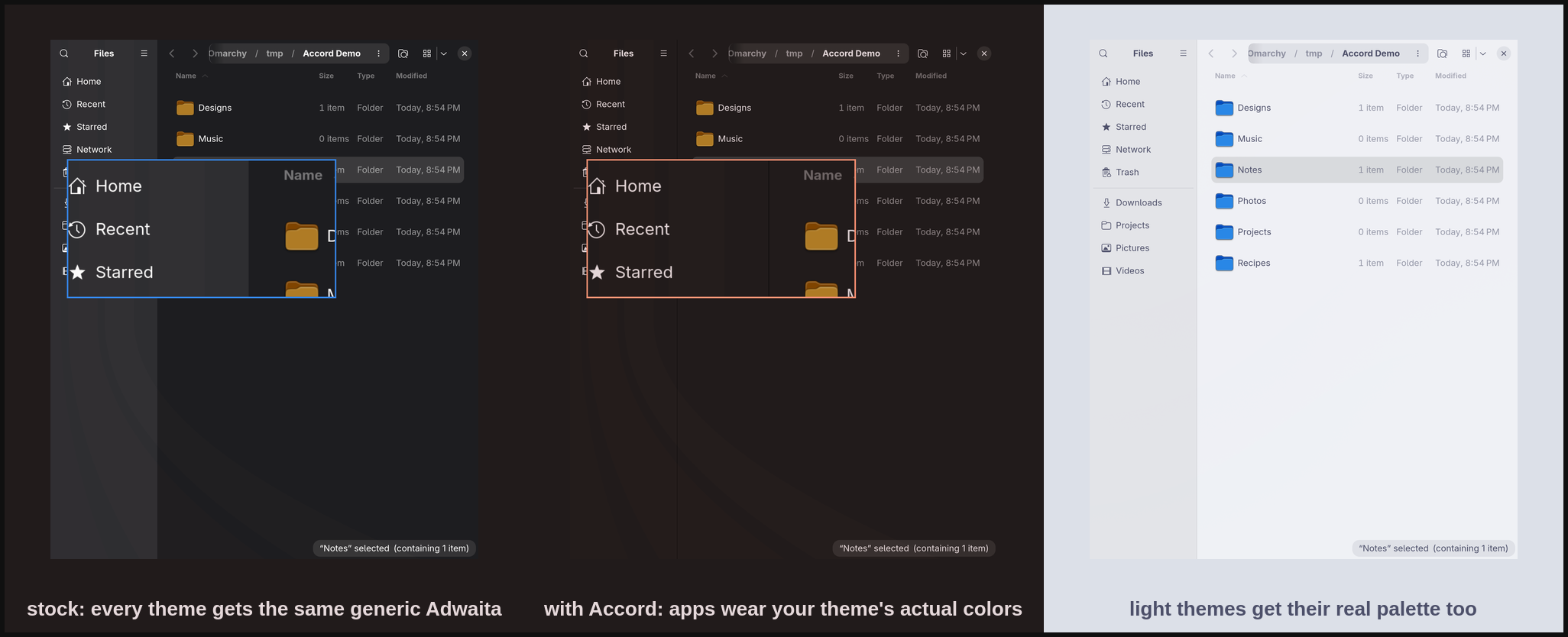
Accord closes that gap. Enable it once and every theme switch carries your whole desktop with it:
- GTK4 / libadwaita apps (Nautilus, Calendar, Text Editor, Loupe, …) —
themed through
~/.config/gtk-4.0/gtk.css, the only user-level lever libadwaita honors. - GTK3 apps — themed through the classic named-color set in
~/.config/gtk-3.0/gtk.css. - Qt 5 / Qt 6 apps — Omarchy ships
QT_QPA_PLATFORMTHEME=gtk3, so Qt derives its default palette from the GTK3 theme Accord just wrote. No qt5ct, no Kvantum, no extra machinery. - Light and dark stay correct too. Accord sets
color-schemeandgtk-themefrom the theme's declared mode — same values Omarchy's ownomarchy-theme-set-gnomepicks, kept correct even on setups where they drifted, and restored properly on revert.
What you get
- A service that notices theme switches (including the symlink swap
omarchy-theme-setperforms, which file watchers miss) and re-applies within a few seconds. - A bar widget: a dot wearing your current accent — read back from what was actually written, so the dot itself is proof the bridge ran. Click for the panel, right-click to re-apply.
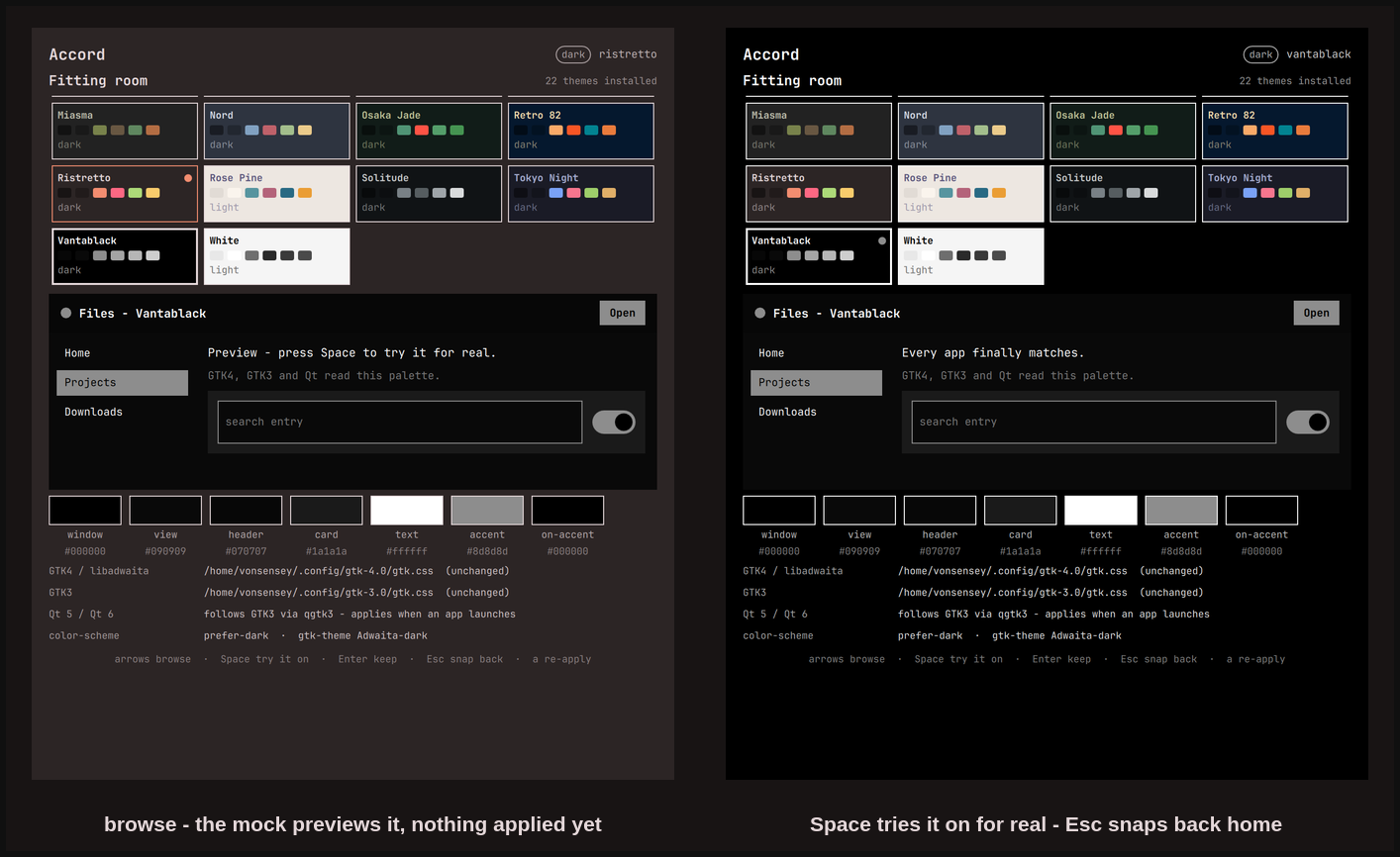
- A panel with a fitting room: every installed theme as a card painted from its real palette, a mock app window that previews the selected theme before anything touches the system, and below it the exact palette on disk plus every file and setting Accord touched.
The craft bits
- On-accent text is chosen by luma distance — whichever of the theme's background/foreground sits farther from the accent in perceived brightness. A naive "is the accent dark?" test fails on light themes. The test suite sweeps all 22 stock themes and asserts a minimum separation of 60/255; the worst case is miasma at 87.
- Your gtk.css survives. Accord manages a clearly marked block, backs up
any pre-existing file once (
gtk.css.accord-backup), puts its block first so your rules win conflicts, and--revertrestores your original bytes exactly. - App restarts are surgical. GTK4 apps read the user stylesheet only at process startup, so windowless daemons (Nautilus's background service and friends) keep painting stale colors until restarted. Accord SIGTERMs only a short allowlist of D-Bus-activatable apps, and never one that owns a visible window — those repaint on their next launch and the panel says so.
- Idempotent and quiet. Re-applying an unchanged theme writes nothing — byte-compared before write, so file watchers see zero churn.
Measured on Omarchy 4.0.0 (2026-08): one apply is a single short-lived
process — ~40 ms wall, ~19 MB peak RSS — writing 2.2 KB + 1.1 KB of CSS.
The resident service is a QML timer polling one readlink every 3 s.
Install
omarchy plugin add https://github.com/vonsensey/accord --enable
Then add the Accord widget to your bar (Omarchy settings → Bar) if you want the accent dot; the service themes your apps either way. Settings: auto-apply on theme switch (On/Off) and restart of background GTK apps (On/Off).
The fitting room
Click the dot (or bind omarchy-shell shell toggle io.github.vonsensey.accord)
and the panel opens on a browsable rail of every theme you have installed —
stock and user themes alike, each card painted from its own palette, light
themes visibly light. Arrow keys move; the mock window previews what your
apps will look like in the selected theme without touching anything.
- Space tries it on for real: the full Omarchy theme switch plus the app bridge, so your whole desktop — shell, terminal, and every GTK/Qt app — wears the theme while the panel stays open.
- Enter keeps what you're wearing and closes.
- Esc snaps everything back to the theme you opened with and closes. Browse five themes, hate them all, press Esc — you're home.
The built-in switcher commits immediately; the fitting room lets you change your mind. That is the same promise as the rest of Accord: nothing it does is ever more than one keypress from undone.
Remove
~/.config/omarchy/plugins/io.github.vonsensey.accord/bin/accord-apply --revert \
  && omarchy plugin disable io.github.vonsensey.accord \
  && rm -rf ~/.config/omarchy/plugins/io.github.vonsensey.accord \
            ~/.local/state/omarchy/accord
--revert restores your original gtk.css files (byte-identical, from the
one-time backups), removes what Accord created, and restores the
color-scheme/gtk-theme values it found on first run. If you edited a
file after Accord merged into it, revert keeps your newer content (minus
Accord's block) and leaves the backup in place for reference. Symlinked
gtk.css files (dotfiles setups) keep their symlink through both apply
and revert.
What it writes, and what it does not
- Writes exactly:
~/.config/gtk-4.0/gtk.cssand~/.config/gtk-3.0/gtk.css— a marked, replaceable block; pre-existing content is backed up once and preserved.- Two GNOME settings:
org.gnome.desktop.interface color-schemeandgtk-theme— originals saved to state for revert. ~/.local/state/omarchy/accord/state.json(honoringXDG_STATE_HOME) — what was applied, for the widget and panel.
- Reads: the active theme's
colors.toml; the two managedgtk.cssfiles (to preserve your rules); its own state; the current values of the two gsettings keys (saved for revert); and the Hyprland window list + process names that the never-kill-a-window guard needs. - No network. Ever. No elevation, no daemons, no writes anywhere else.
- The restart allowlist is exactly: nautilus, geary, gnome-calendar, gnome-text-editor, loupe, evince, snapshot — SIGTERM, windowless only.
Limits, honestly
- Qt apps pick the palette up at launch, not live — qgtk3 reads the GTK theme when the app starts. Launch after a theme switch and it matches.
- Qt apps that manage their own colors keep them. OBS ships its own Yami theme; KDE apps can force a color scheme. The qgtk3 palette is the default, not an override.
- GTK3 recoloring covers apps that use the standard named colors (anything Adwaita-based — the default on Omarchy). A GTK3 app shipping its own hand-rolled theme may only partially follow.
- Flatpak apps need the usual hole punched to see host GTK config:
flatpak override --user --filesystem=xdg-config/gtk-4.0:ro <app>. - Accord recolors stock Adwaita rather than swapping widget themes — that is what keeps it a 3 KB CSS bridge instead of a theme engine.
Test
bash test/check.sh
82 plain-bash assertions: palette mapping for dark and light fixtures, on-accent contrast across every stock theme, marker-block preservation of pre-existing user css, byte-identical revert (including symlinked and non-UTF-8 files, and edits made after the merge), idempotent reruns, self-healing of a truncated managed block, hermetic gsettings and app-restart coverage via PATH shims, and graceful behavior on missing or malformed theme input (exit 3, with the reason recorded in state.json), and the fitting room's theme catalog (all 22 stock themes with full card palettes, user-theme merging, broken themes skipped).
The generator is fully driveable without the shell for testing:
ACCORD_THEME_DIR, ACCORD_GTK4_CSS, ACCORD_GTK3_CSS,
ACCORD_STATE_DIR, and ACCORD_NO_GSETTINGS=1 override every path it
touches, exactly as test/check.sh uses them.