
Omarewind — a config time machine for Omarchy
An undo button for the malleable OS. Omarchy Quattro's upgrade is one-way, a
bad update or an over-eager plugin can clobber your config, and the usual
defense is remembering to git init ~/.config by hand. Omarewind does the
remembering for you: it snapshots your Omarchy configuration automatically
before and after the risky moments (updates, theme changes) plus on a timer,
shows the history as a visual timeline with human-readable diffs, and restores
any snapshot with one confirmed click — safely, because every restore first
saves the current state as an automatic pre-restore snapshot. The restore is
itself undoable.
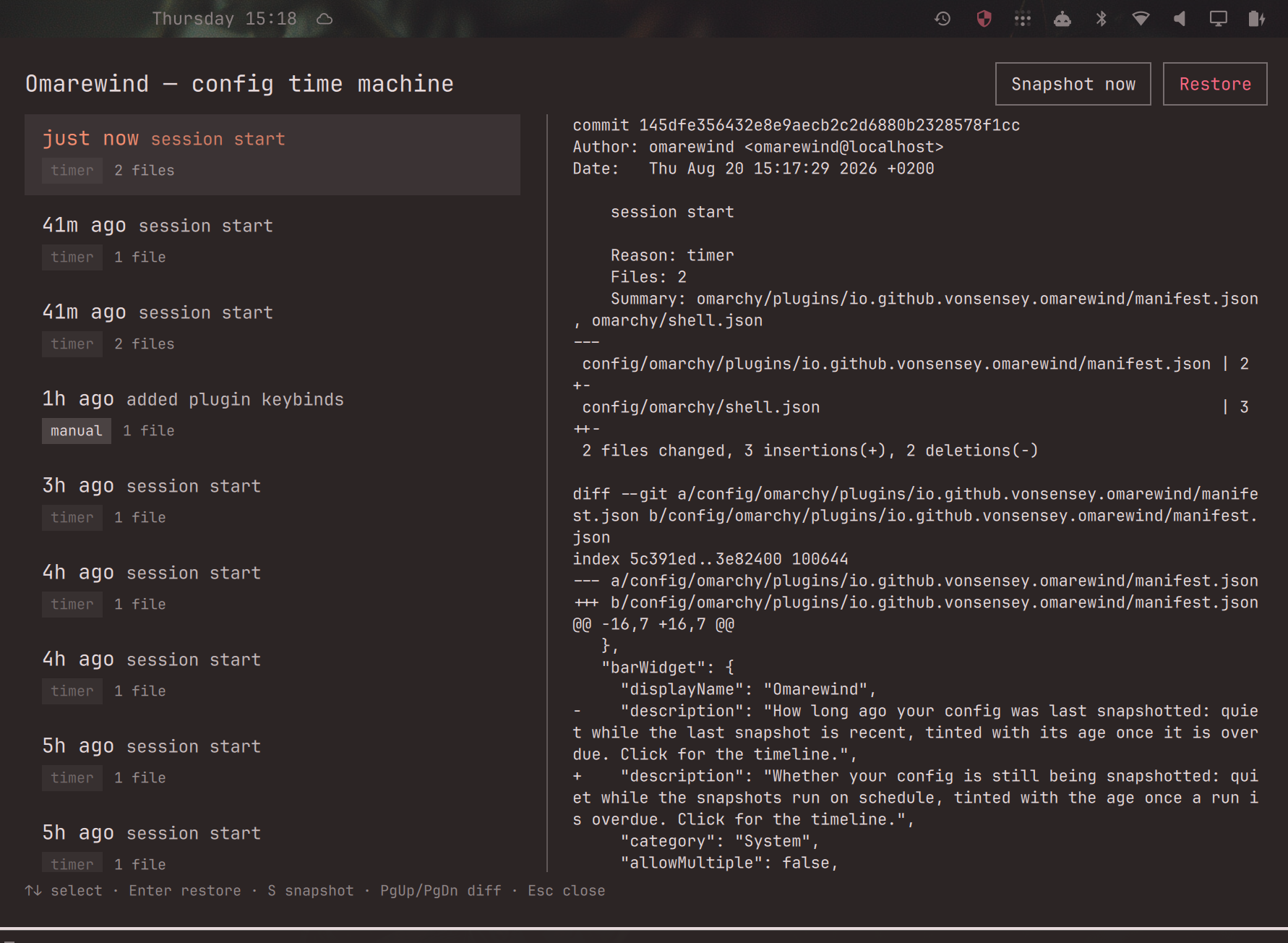
Everything in the shot is real: a live timeline and the diff of the plugin's own installation, captured from the running shell.
- Service: takes a snapshot at shell startup and every N hours (default 6), then trims history to the keep count (default 100).
- Bar widget: answers "am I covered?" at a glance. Just a history glyph
while the snapshots are running on schedule; once no run has happened in
more than twice the snapshot interval it also shows the age (
14h,3d) in the theme's accent, or urgent when nothing has ever been snapshotted. It keys on the last run, not the last change: a run that finds nothing changed makes no commit on purpose, so a stable config — the healthy case — must never read as neglect. The tooltip carries both facts ("Checked 4m ago · last change 3h ago · 11 kept"); clicking opens the timeline. - Panel: a timeline of snapshots (relative time, label, reason chip, file-change count), a scrollable diff pane, "Snapshot now", and a confirm-gated Restore. Fully keyboard-driven.
- Engine: a plain bash CLI (
bin/omarewind) over a dedicated git repo, so everything works from a terminal too — and survives the shell not running.
How this differs from the other backup-flavored plugins
| Scope | Granularity | Restore | |
|---|---|---|---|
| omarchy-snapshots (Snapper) | whole filesystem (needs Btrfs) | block-level snapshots | boot-level rollback |
| omarchy-resurrect / ress | machine loadout | one-shot export for reinstalls | rebuild a new machine |
| Omarewind | Omarchy config only | per-file, human-readable diffs | one click in-shell, itself undoable |
Omarewind is the only one that snapshots automatically around the risky moments (updates, theme changes), shows you exactly what changed per file, and restores reversibly without leaving the shell.
What it tracks
Relative to ~/.config:
| Path | Scope |
|---|---|
omarchy/shell.json |
the whole file |
omarchy/plugins/*/manifest.json |
manifests only — not third-party plugin source (keeps snapshots small; restoring plugin code is out of scope) |
hypr/** |
*.conf and *.lua files only |
omarchy/extensions/** |
all files |
| current theme | the theme name from ~/.local/state/omarchy/current/, recorded as metadata |
Missing paths are skipped gracefully. Filenames with spaces are handled.
Symlinked configs (GNU stow, chezmoi) are snapshotted by content: your
hypr/ and extensions/ files are captured through the link, so a
symlink-mode dotfiles setup is fully protected. Snapshots store content, not
link topology — restoring over a changed symlink replaces it with a regular
file rather than writing through it. Plugin manifests that are symlinks are
never followed (a legitimate manifest is never one), and manifests over
256 KB are skipped.
Install
omarchy plugin add https://github.com/vonsensey/omarewind --enable --yes
The stock installer validates the manifest before installing and places the
plugin at ~/.config/omarchy/plugins/io.github.vonsensey.omarewind, which is
the path the hook snippets below refer to. Later updates: omarchy plugin update io.github.vonsensey.omarewind.
Enabling places the bar widget in the bar's right section — click it to open the timeline. That bar entry is also what keeps the plugin enabled, which is worth two minutes of your attention: see The bar entry is also the plugin's enable switch. Upgrading from a version before the widget existed? The shell only picks a bar slot when a plugin is first enabled, so re-enable once to move the entry into your bar:
omarchy plugin disable io.github.vonsensey.omarewind
omarchy plugin enable io.github.vonsensey.omarewind
From a terminal:
omarchy-shell shell toggle io.github.vonsensey.omarewind
Suggested keybind — add to ~/.config/hypr/bindings.lua:
o.bind("SUPER + CTRL + U", "Omarewind", "omarchy-shell shell toggle io.github.vonsensey.omarewind")
(U as in undo — free in the stock bindings; SUPER+CTRL+R is already
taken by "Set reminder".)
Hooks (recommended): snapshot at the risky moments
Omarchy runs lifecycle hooks from ~/.config/omarchy/hooks/<name>.d/ via
omarchy-hook. Verified call sites on Omarchy 4.0: omarchy-refresh-pacman
runs the pre-refresh-pacman hook before touching pacman, omarchy-update
runs post-update, and omarchy-theme-set runs theme-set <theme-name>.
Install Omarewind's snippets with the stock installer:
P=~/.config/omarchy/plugins/io.github.vonsensey.omarewind
omarchy hook install pre-refresh-pacman "$P/hooks/omarewind-pre-refresh-pacman"
omarchy hook install post-update        "$P/hooks/omarewind-post-update"
omarchy hook install theme-set          "$P/hooks/omarewind-theme-set"
Each command copies the snippet into ~/.config/omarchy/hooks/<type>.d/
(that is all omarchy hook install does — verified against
omarchy-hook-install). Without hooks the plugin still works: the service
snapshots at shell startup and on its timer; hooks just add the
"immediately before an update / on theme change" moments.
Removal
omarchy plugin disable io.github.vonsensey.omarewind
rm -rf ~/.config/omarchy/plugins/io.github.vonsensey.omarewind
rm -f ~/.config/omarchy/hooks/pre-refresh-pacman.d/omarewind-pre-refresh-pacman \
      ~/.config/omarchy/hooks/post-update.d/omarewind-post-update \
      ~/.config/omarchy/hooks/theme-set.d/omarewind-theme-set
rm -rf ~/.local/state/omarchy/omarewind        # snapshot history (optional)
What it writes, and what it does not
- Writes only under
~/.local/state/omarchy/omarewind/: the snapshots go intorepo/, a dedicated git repository with pinned--git-dir/--work-tree, isolated from your global/system git config (no gpg signing, no hooks, no aliases) and from any git repo you own. Beside it sitslast-run, a one-line epoch stamp (replaced atomically) recording when the snapshot mechanism last executed — that is what lets the bar widget tell "checked, nothing to save" from "nothing has checked in days". - On explicit restore only, it overwrites the tracked config paths listed
above with the snapshot's content. It never deletes a file it did not
snapshot, and it never touches anything outside the tracked set. Restored
files get the permissions git recorded (
755for executables,644otherwise); each write is atomic (staged next to the target, then renamed). - Restore never writes through a symlink: a tracked path that is
currently a symlink is replaced by a regular file with the snapshot's
content, and any path whose real parent directory resolves outside
~/.configis refused outright. - Before every restore it takes an automatic pre-restore snapshot, so a restore is always reversible from the same panel.
- One deliberate consequence: restoring a snapshot taken before Omarewind
was enabled also restores that older
shell.json, which has no omarewind entry — the shell disables the plugin and the panel closes. That is the restore working, not a crash: re-enable withomarchy plugin enable, or undo from a terminal withbin/omarewind restore <pre-restore-id>. - The theme is recorded as a name only; restore never writes theme state —
it prints the exact
omarchy theme set <name>command to switch back. --dry-runrestores nothing and snapshots nothing; it only prints what would change.- No network access. Zero dependencies beyond what Omarchy ships (bash, git, jq, coreutils, util-linux).
CLI
omarewind snapshot [--label "text"] [--reason update|plugin|theme|manual|timer|pre-restore]
omarewind list                # JSON, newest first
omarewind diff <id>           # stat + diff vs previous snapshot (bounded)
omarewind restore <id> [--dry-run]
omarewind gc [--keep N]       # keep newest N (default 100); note: kept ids change
Settings
The two knobs are bar-widget settings, so the shell's widget settings UI edits them — or, from a terminal:
omarchy bar set io.github.vonsensey.omarewind snapshotIntervalHours 12
omarchy bar set io.github.vonsensey.omarewind keepCount 200
They persist in ~/.config/omarchy/shell.json (so a plugin update never
overwrites them) and take effect immediately. The service clamps them to
1–168 hours and 10–1000 snapshots. Until the widget has pushed any settings at
all — the first moments after a fresh install — the service runs on the
manifest defaults, 6 hours and 100 snapshots. Settings live on the bar entry,
so omarchy bar set answers could not find widget until the widget is
placed (see the re-enable note under Install).
The bar entry is also the plugin's enable switch
The reassuring half first: the hooks do not care. hooks/omarewind-* call
bin/omarewind directly from the install path, so snapshots around updates,
theme changes and pacman refreshes keep happening whatever the shell thinks —
and the CLI keeps working from a terminal. Your history is never hostage to a
bar layout.
Now the part worth knowing. For a third-party plugin that declares a
bar-widget, omarchy plugin enable writes the plugin's entry into
config.bar.layout and never into config.plugins (this is
PluginRegistry.setEnabled; the __isFirstParty escape hatch that protects
Omarchy's own widgets does not apply to third-party plugins). That layout
entry is then the only record that the plugin is enabled — so anything that
rewrites your bar layout, including omarchy bar defaults or simply taking
the widget out of the bar, disables Omarewind: the service, its snapshot timer
and the panel all stop with it. There is no state in which the widget is off
the bar and the service keeps snapshotting on manifest defaults.
Put it back with:
omarchy plugin enable io.github.vonsensey.omarewind
Tests
bash test/check.sh
Hermetic: the whole suite runs inside a temp $HOME via the OMAREWIND_HOME
override and never touches your real config. The restore path — the one that
writes to your files — is the most heavily tested. The shell side's pure logic
is checked on both sides of every boundary by an offscreen qml6 probe
(test/qml-probe.qml): Age.js for the age and staleness arithmetic the bar
widget and the panel timeline share, History.js for the parsing of list
output and the run stamp. Without qml6 the engine half still runs and still
passes — but the run says so in block capitals and the summary line names
exactly what went untested, so a green tick never hides a probe that never
ran.
Memory
Measured on Omarchy 4.0.0. The always-resident part is a headless QML service
inside the shared omarchy-shell process — one snapshot timer and one file
watch on the single-line last-run stamp, a few hundred KB, no observable
steady-state RSS change when enabled. Snapshots run
in bin/omarewind, a git + jq process that commits and exits: peak ≈ 15
MB; measured against a realistic ~16-file tracked set, list/diff ≈
20 ms and a full snapshot ≈ 150 ms (the full re-copy + git re-hash
dominates) — imperceptible for a background job. No daemon, no network — an
isolated git repo under ~/.local/state/omarchy/omarewind/.
License
MIT © 2026 vonsensey