
OmaRGB
Every RGB device, wearing your theme.
Omarchy themes your terminal, your editor, your shell — and with Accord, your apps. OmaRGB does the last mile: the hardware on your desk. Keyboards, mice, coolers, RAM, motherboards and cases follow your theme's palette live, react to your desktop, and when Arch RGB is being Arch RGB, a built-in Doctor tells you exactly what to fix.
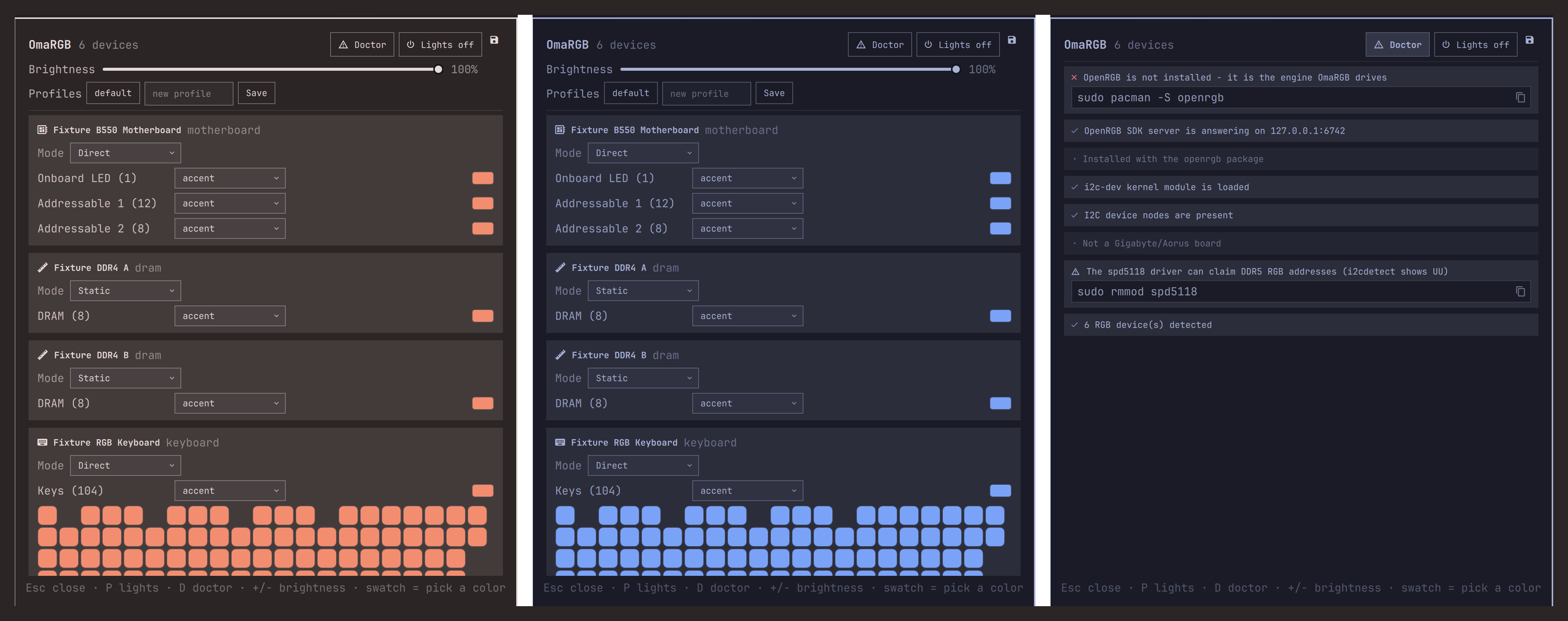
One rig, two themes, zero clicks in between — and the Doctor for when nothing lights up.
What it does
- Follows your theme, fully. The moment you
omarchy-theme-set, every managed device repaints from the resolved theme palette — not just one accent color. Each device and each zone can wear a semantic role:accent,foreground,background,muted,urgent, or any named theme color (red…magenta). Light themes just work; nothing is hardcoded. - A real control room. Device cards with zones, hardware modes, a full saturation/value color picker (pastels and white included), software brightness that works on brightness-less controllers, OpenRGB profiles, and a live keyboard matrix rendered from the device's actual layout.
- Reacts to your desktop. Lock your session and the lights dim or go dark — they restore to exactly what they showed, on unlock. A window demands attention? The rig flashes your theme's urgent color. Both are settings on the bar widget (Dim / Lights off / Nothing, flash on or off) — and lights-off-when-away means your rig stops lighting the room at night.
- The Doctor. Linux RGB has famous failure modes: missing udev rules,
i2c-devnot loaded, Gigabyte's ACPI/SMBus conflict, the DDR5spd5118driver squatting on RGB addresses. The Doctor checks all of it and hands you copyable fixes. If OpenRGB isn't installed at all, OmaRGB says so instead of looking broken. - One engine, every vendor. OpenRGB supports hundreds of devices across ASUS, Corsair, Razer, Logitech, G.Skill, NZXT, MSI and more. OmaRGB speaks its SDK protocol directly — one plugin instead of one widget per brand.
- Scriptable, all of it. Everything the panel does is one shell command away — for keybinds, cron jobs, and agents (see Automation below).
Install
omarchy plugin add https://github.com/vonsensey/omargb --enable
Then install the engine, if you haven't already:
sudo pacman -S openrgb
That's the whole setup. No pip packages, no venv, no daemons to configure —
OmaRGB starts OpenRGB's SDK server itself when none is running. (To have the
server persist across reboots without OmaRGB: openrgb --autostart-enable "--startminimized --server".)
A keybinding, if you want one, in ~/.config/hypr/bindings.conf:
bindd = SUPER SHIFT, R, RGB control, exec, omarchy-shell shell toggle io.github.vonsensey.omargb
Remove
omarchy plugin remove io.github.vonsensey.omargb
rm -rf ~/.local/state/omargb        # its state file, if you want it gone too
Your devices keep whatever colors they last showed (or whatever their firmware boots with). Note: removing just the bar widget from the bar disables the whole plugin — that is how Omarchy anchors bar-widget plugins.
What the roles mean
A role is a name from your theme's palette, not an absolute color — the point is that everything re-resolves when the theme changes:
| Role | What it resolves to |
|---|---|
accent |
The theme's main color — what selections and highlights wear. The default for every zone. |
foreground |
The theme's text color (near-white on dark themes). A gentle "white-ish" glow. |
background |
The theme's background (near-black on dark themes). Very dim, almost off. |
muted |
The theme's dimmed-text color. Quiet. |
urgent |
The attention color the shell uses for urgent windows. |
red … magenta |
The theme's named colors — the ones your terminal shows as red, green, etc. |
off |
Black. This device dark while the rest of the rig wears the theme. |
The catch worth knowing: themes lie about color names on purpose. A jade
theme like osaka-jade defines its yellow as a green (#459451) and its
blue as jade too; ristretto's blue is salmon. Picking role yellow gives
you your theme's idea of yellow — that is the feature. When you want an
exact color regardless of theme, click the zone's swatch and pick it; that
override sticks across theme changes until you clear it.
How the theme mapping works
Every zone resolves its color by precedence:
- Manual override — a color you picked in the panel (per zone)
- Zone role — e.g. this keyboard's
Keyszone wearsurgent - Device role — e.g. the whole cooler wears
accent(the default)
Roles resolve against omarchy-theme-color --all, the same resolver Omarchy
uses for its own templates, so missing keys are synthesized exactly the way
the rest of your system sees them. Omarchy already ships a one-color
theme-to-keyboard bridge for ASUS ROG and Framework 16 (keyboard.rgb);
OmaRGB is the whole-rig, whole-palette version of the same idea. If you have
one of those devices, both will write to it on theme change — last writer
wins, and OmaRGB runs later, so its zone roles win.
Automation
Every control in the panel is reachable headlessly through the shell IPC —
command takes the same JSON the internals speak, status returns the full
picture (devices, zones, doctor report, profiles):
# lights out at bedtime (cron it, bind it, let your agent call it)
omarchy-shell shell call io.github.vonsensey.omargb command '{"cmd":"power","on":false}'

# the whole rig state as JSON
omarchy-shell shell call io.github.vonsensey.omargb status ''

# paint one zone, set a role, load a profile...
omarchy-shell shell call io.github.vonsensey.omargb command '{"cmd":"set-zone-color","device":"KB77","zone":0,"color":"#a55555"}'
omarchy-shell shell call io.github.vonsensey.omargb command '{"cmd":"set-role","device":"CL9","role":"urgent"}'
omarchy-shell shell call io.github.vonsensey.omargb command '{"cmd":"profile-load","name":"gaming"}'
The Doctor also runs standalone, no shell needed:
~/.config/omarchy/plugins/io.github.vonsensey.omargb/bin/omargb-bridge doctor
One semantic worth knowing: a device you move to a hardware effect (Breathing, Rainbow, a loaded profile) is parked — theme applies, lock dimming, and brightness leave it alone until you change its color or role, or switch themes (an explicit theme change restyles the whole rig).
And a promise: your colors stay put. Wireless keyboards love to wake from power-save playing their onboard rainbow. A drift watchdog re-reads every managed device's colors (every 20s) and repaints anything that stopped showing what you chose. Parked devices are exempt — their own show runs freely.
On real hardware
<img src="docs/img/omen-real-hardware.png" width="420" align="right" alt="OmaRGB on an HP Omen 30L: seven case zones themed, a G915 TKL rendered as its real per-key matrix wearing the off role">This is OmaRGB on an HP Omen 30L: all seven case zones (logo, light bar,
four fans, CPU cooler) wearing the theme's accent, a Logitech G915 TKL
rendered as its real 7x20 per-key matrix — dark, because its role is off —
and a G502 below. omarchy-theme-set tokyo-night turns the physical case
blue in about a second; switching back returns it to peach. The off role
is the night setup: case themed, peripherals dark, and with "When the
session locks: Lights off", locking the machine darkens everything and
unlock restores it exactly.
No RGB hardware handy?
The repo ships the test rig as a runnable fake:
python3 test/mock_server.py # a six-device OpenRGB server on 127.0.0.1:6742
Six plausible devices — motherboard, two DIMMs, a 104-key keyboard with a real matrix map, mouse, AIO cooler — that the plugin drives exactly like real hardware. It is how most of this plugin was built and tested.
What it writes, and what it does not
Writes:
~/.local/state/omargb/state.json— roles, overrides, power, brightness, and the last applied palette (so state survives restarts)
Does not:
- No files outside
~/.local/state/omargb/ - No pip installs, no venvs, no systemd units, no udev edits (the Doctor suggests commands; it never runs them — you do, with sudo, if you agree)
- No network beyond one TCP connection to 127.0.0.1:6742, the local
OpenRGB SDK server. Nothing leaves your machine, ever. The only process
it starts is
openrgb --startminimized --server --server-host 127.0.0.1(loopback-only), and only when no server is answering. (OpenRGB itself keeps its own configuration under~/.config/OpenRGB, as it does however you start it.)
The bridge is a single pure-python3-stdlib file (bin/omargb-bridge) that
implements the OpenRGB SDK wire protocol (versions 0–5) itself. You can read
every byte it can ever send.
Footprint
The bridge idles at ~20 MB RSS. No polling loops: theme changes arrive as shell signals, device changes as SDK push events, and lock/urgent reactions as in-process bindings.
Tested how
- 64 Python tests: the wire protocol (byte-exact golden vectors, protocol 0/3/5 servers), palette mapping precedence, overlay restore semantics, the Doctor against fabricated machines, and a hostile-server gauntlet (truncated replies, forged LED counts, oversized packets, mid-setup disconnects, bad command values, full disks) — all against a mock SDK server whose serializer is written independently of the bridge's parser.
- QML logic probed headlessly; UI exercised live on Omarchy 4.0 against the mock rig (screenshots above are real captures).
- The wire protocol is implemented from OpenRGB 1.0rc3's own headers and SDK
documentation (protocol 5 — what Arch ships today), with graceful
negotiation down to protocol 0 for old servers — and validated against a
real OpenRGB 1.0rc3 server driving real hardware: an HP Omen 30L (7 zones),
a Logitech G915 TKL (95-key matrix), and a G502 mouse, including live theme
morphs, per-device roles, and the shell-IPC automation surface. If a device
of yours misbehaves, open an issue with
openrgb --loglevel 6output — the device layer is OpenRGB's own, so quirks usually reproduce in its GUI too.
License
MIT