
Monitor Studio
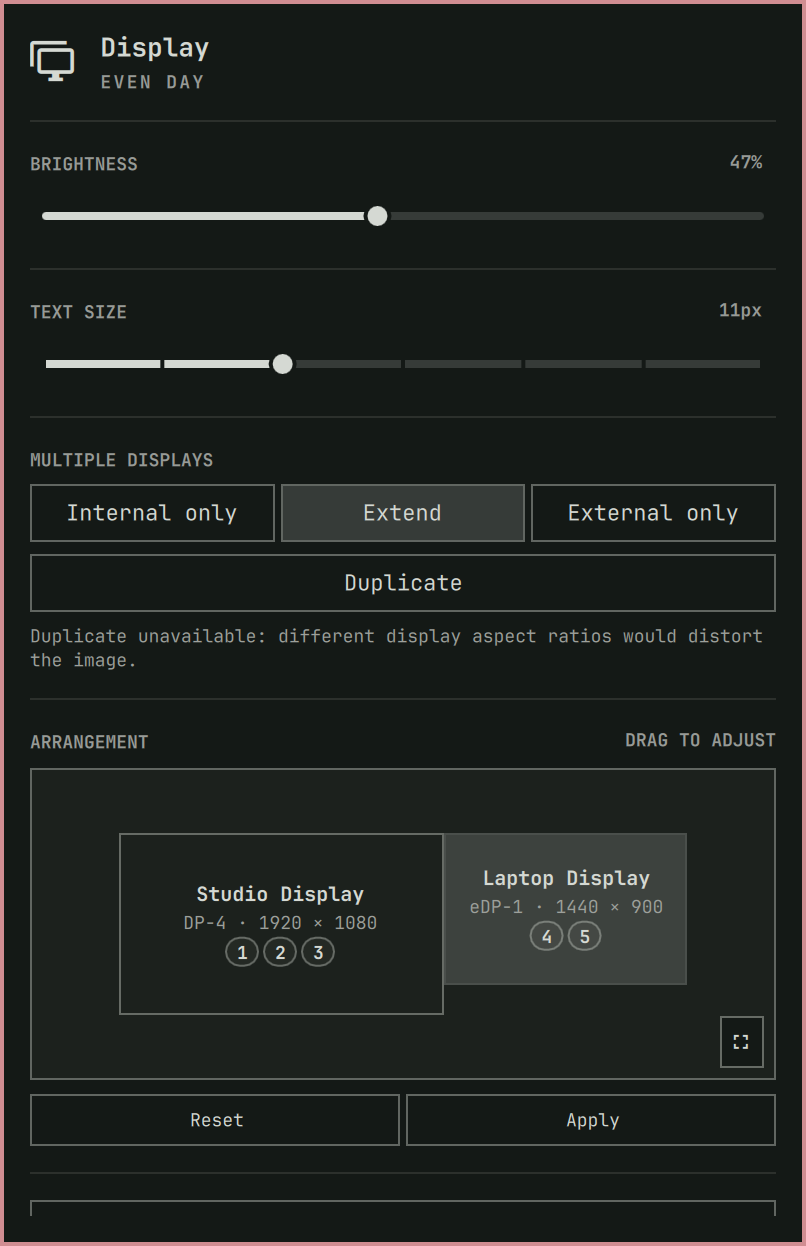
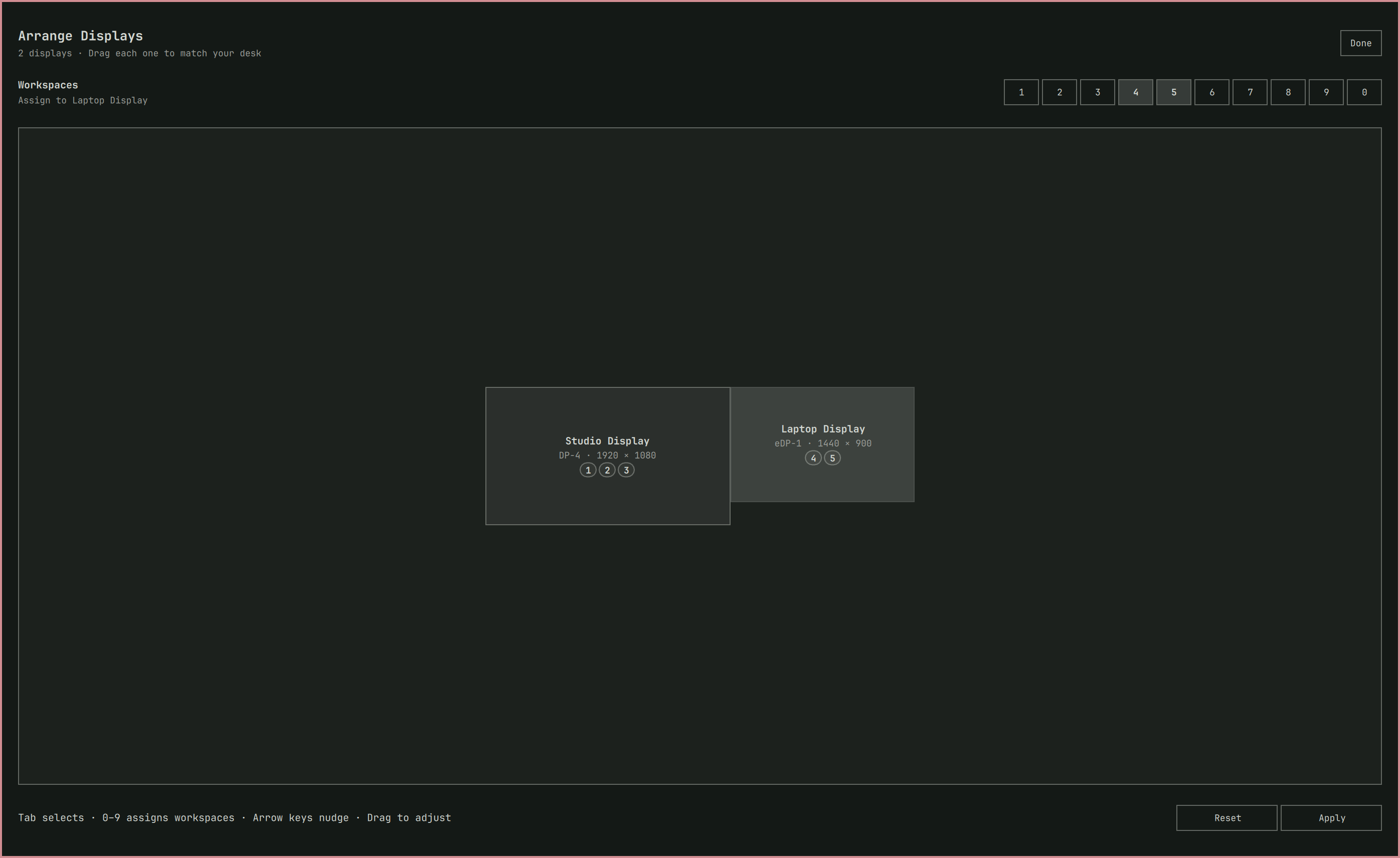
Monitor Studio is an Omarchy Quattro bar plugin for arranging displays without editing monitor coordinates by hand. Select a display in the visual layout to change its resolution, refresh rate, rotation, or scale, drag displays to match the physical desk, and assign numbered workspaces to a monitor.
The plugin is derived from Omarchy's built-in omarchy.monitor panel and keeps
its brightness, text-size, mirroring, and display-toggle controls.
Preview
Bar panel
| Overview and arrangement | Profiles |
|---|---|
 |
 |
| Workspace assignment | Display settings |
 |
 |
| Connected displays | |
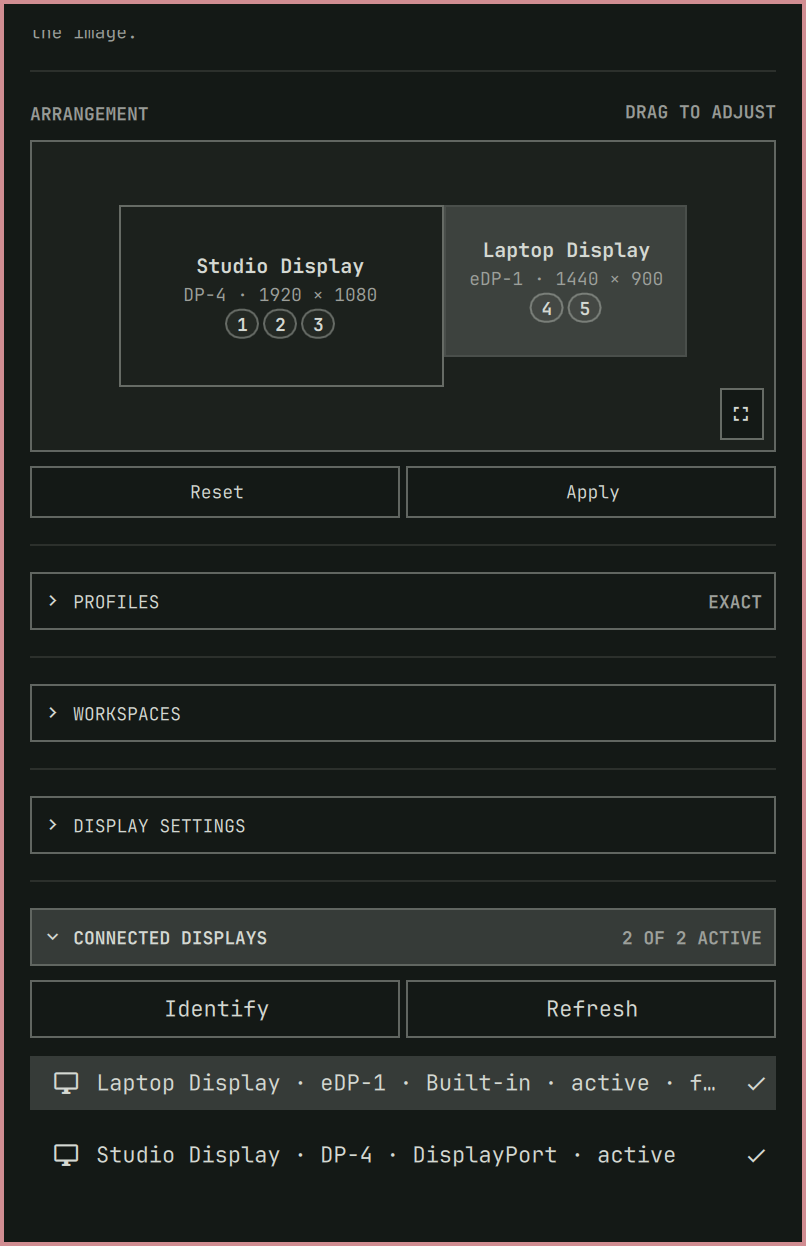 |
Full-screen arrangement
Features
- Responsive drag-and-drop arrangement for one, two, three, or many displays
- Full-screen arrangement editor for large and mixed-DPI layouts
- Friendly display names from monitor make/model information
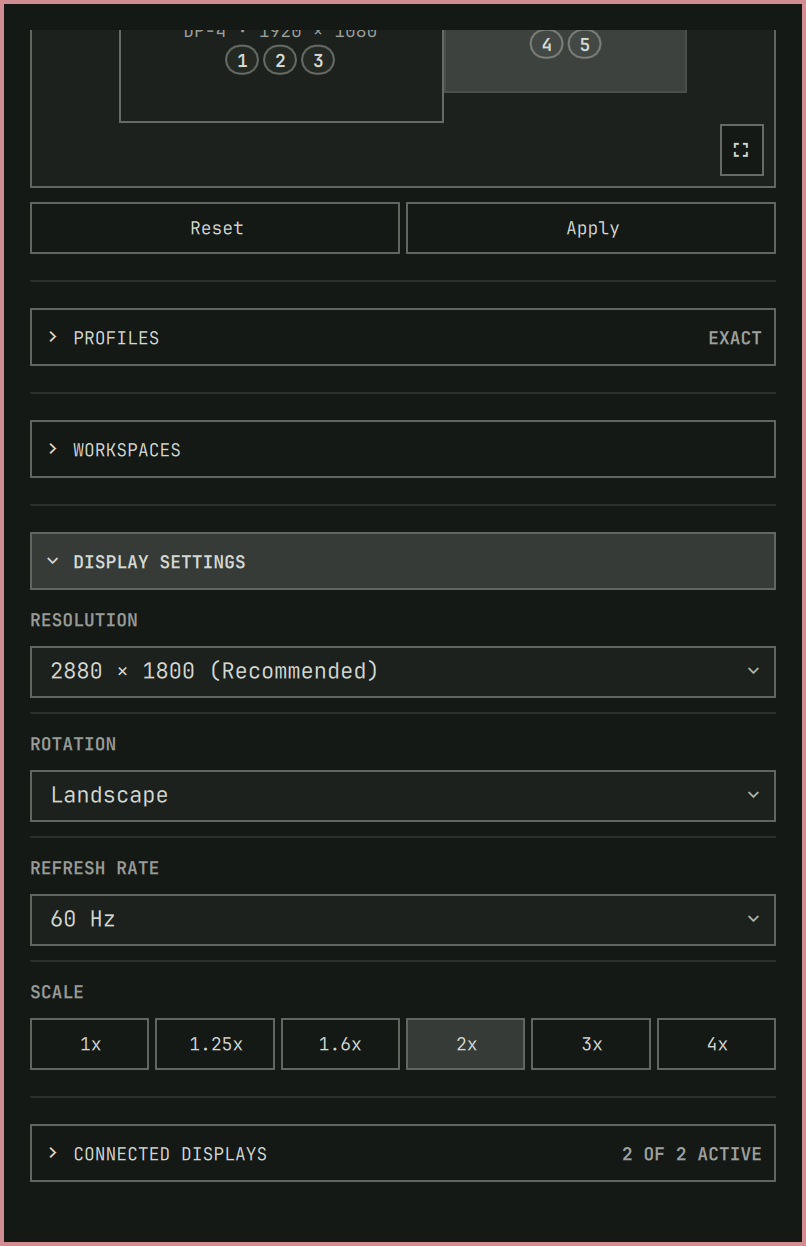
- Per-display resolution, refresh-rate, rotation, and scale controls with EDID-based recommendations and refresh rates filtered for the selected resolution
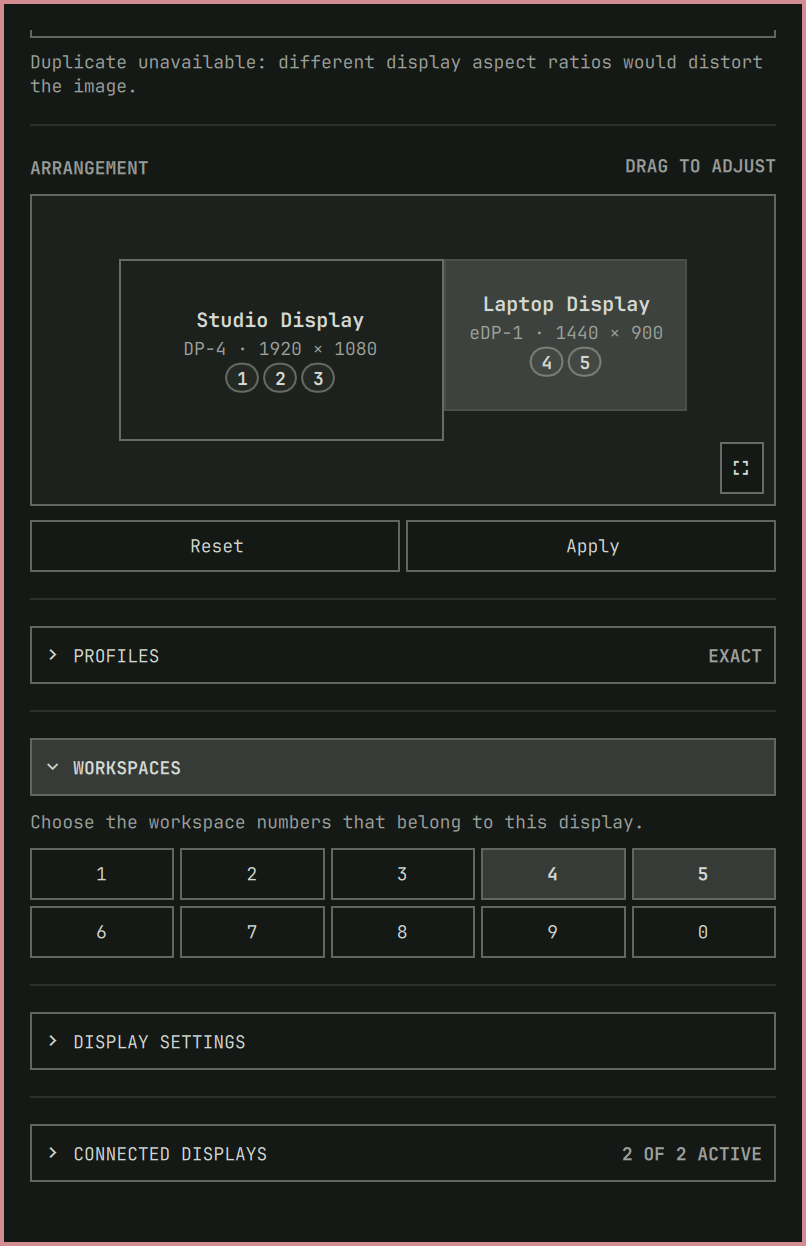
- Workspace 1–10 assignment, with workspace 10 displayed as
0 - A 15-second Apply/Keep/Revert preview before display changes are saved
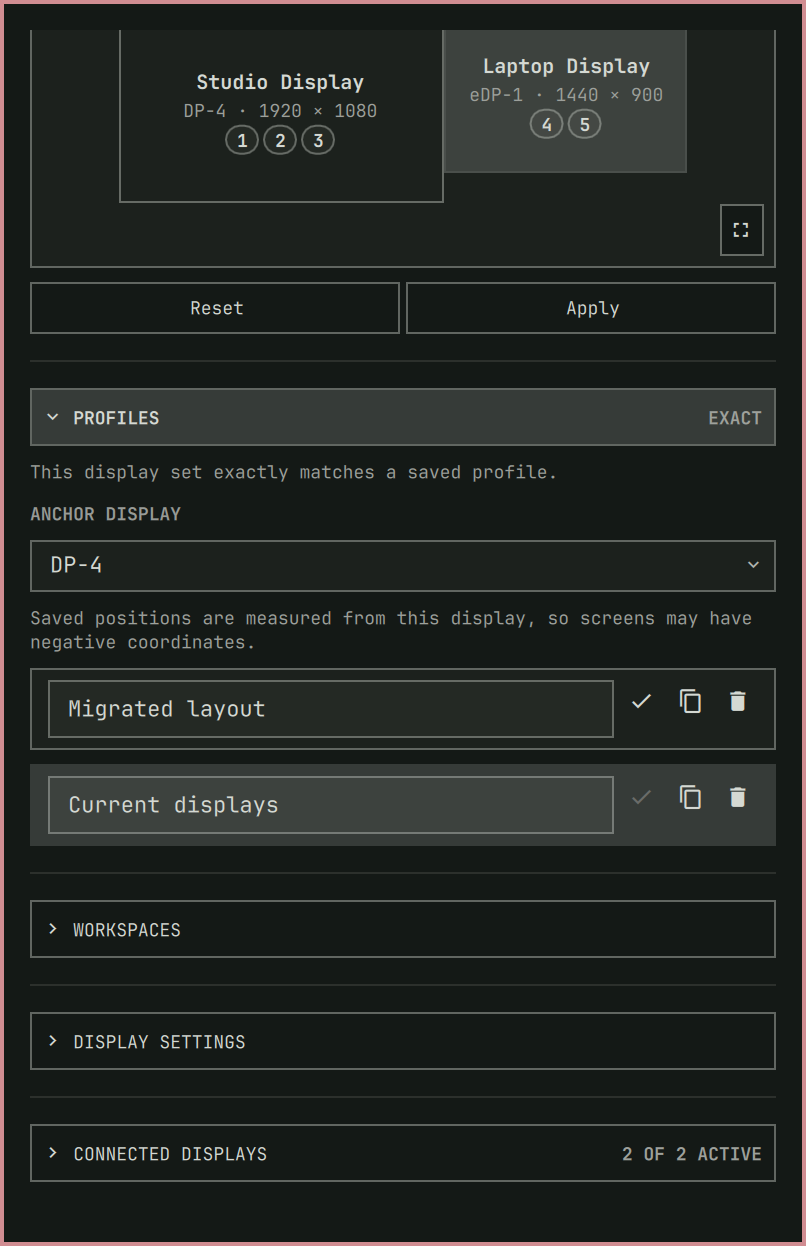
- Identity-aware connected-set profiles with explicit match confidence
- Persistent anchor displays and signed coordinates
- Identify overlays, read-only Refresh, and transitional/disabled status
- Internal only, External only, Extend, and compatibility-checked Duplicate presets with remembered variants
- Settled-hotplug and startup restore previews only for exact, strongly identified connected sets
- Actionable restore notifications: Undo this preview or Open Monitor Studio
- Read-only Display Health diagnostics, sanitized report copy, and guarded repair previews
- New-set recommendations: Extend, Mirror, or Arrange manually
Next-release assistance and safety
Automatic restore waits for a quiet connection window and rechecks the connected-set generation in the backend. The single IPC-owning panel also polls every five seconds while closed to discover events not represented by the Quickshell screen list (including disabled outputs). Only exact matches with strong identity evidence qualify; moved, weak, ambiguous, connector-only legacy and unknown sets never auto-apply. An already matching topology is a no-op.
Restoration uses the existing 15-second preview and watchdog, not an implicit Keep. An attempted or skipped generation is fenced in private runtime state, so Undo, timeout and widget recreation do not cause restore loops. A genuinely observed different set re-arms restoration. Editing, dragging, pending or busy transactions, Display Health, and explicit read-only refresh suppress that observation rather than retrying after the user finishes editing. Edit guards are shared between per-screen instances in the shell engine.
The installed Omarchy notification API (omarchy notification send --exec)
supports one click action per notification, not two labeled action buttons.
Monitor Studio therefore sends two short-lived entries: Undo (bound to the
specific preview ID) and Open (opens the panel). Opening, dismissing, missing
or silencing either entry never confirms the preview. A stale Undo in notification
history cannot revert a later transaction. The overlay/watchdog remain the safety
path if notifications are unavailable.
Display Health is a read-only snapshot check for unsupported/missing advertised
modes, scale geometry, overlaps, disabled displays, broken mirror sources, profile
identity uncertainty and unavailable workspace targets. Disabled displays can be
intentional; these are review findings, not proof of broken hardware. Copy
sanitized report uses wl-copy and a numeric allowlist: it excludes display
names, serial/EDID identity, profile IDs/names, filesystem paths and raw errors.
Review even sanitized reports before sharing. It does not probe link bandwidth,
read kernel logs, benchmark the GPU or guarantee that a cable is healthy.
Preview safe repair explicitly enables all connected displays side by side, clears mirroring, uses advertised modes and remaps unavailable workspace targets to the anchor. It never rewrites user configuration, identifies ambiguous hardware, or silently saves changes. The normal backend validation and Keep/Revert transaction can reject a repair; missing mode data disables it.
For a new connected set, choose Recommended Extend, Mirror, or Arrange manually. Extend chooses the first advertised resolution with the offered refresh nearest 60 Hz, retains valid scale/rotation and enables all outputs. Mirror requires a mode advertised by every output, uses scale 1 and landscape, and can stretch unlike aspect ratios. No PPI, projector, cable or device-class heuristics are used. These recommendations do not replace saved profile variants and apply only after an explicit click and Keep. Arrange manually dismisses the suggestion for this panel instance/set and opens the existing editor (or connected-display controls when fewer than two outputs are enabled).
Limits: physical docking, mixed-GPU and notification interaction still require
hardware acceptance testing; a disconnect/reconnect entirely between observations
cannot re-arm the generation fence. Legacy restore remains a compatibility CLI
for older callers; the panel now exclusively uses guarded auto-restore.
Install
The public repository must exist before this command will work:
omarchy plugin add https://github.com/vuhungthang/omarchy-monitor-studio.git --enable
Omarchy installs third-party plugins disabled unless --enable is provided.
Review the repository before enabling it: shell plugins run unsandboxed with
your user permissions.
Because this plugin declares omarchy.clonedFrom: "omarchy.monitor", enabling
it replaces the built-in monitor widget. Removing it restores the built-in
source and bar placement.
Use
- Open the display icon in the Omarchy bar.
- Use Identify when connector labels are unclear, and Refresh after a dock, KVM, wireless, or virtual display changes.
- Select a display, then arrange it, configure its mode, or assign workspaces; alternatively choose a topology preset.
- Review the compatibility summary before duplicating unlike panels.
- Select Apply to preview staged changes. Presets preview immediately.
- Select Keep within 15 seconds. Select Revert or wait for the timer to restore the previous live layout. Closing the compact panel does not confirm or cancel the transaction; its overlay and watchdog remain active.
If a preview makes the panel unreachable, invoke the independent shell IPC from a terminal or launcher:
omarchy shell omarchy.monitor revert
For a keyboard escape hatch, add this binding yourself to your Hyprland user configuration (Monitor Studio does not install or edit key bindings):
bindd = SUPER SHIFT, BackSpace, Emergency display revert, exec, omarchy shell omarchy.monitor revert
Workspace-only changes are saved immediately when their section's Apply action is selected. Arrangement, mode, rotation, scale, anchor, enable/disable, and topology-preset changes use the confirmation timer.
Profiles and matching
The schema-v2 store keeps a separate topology for each connected display set, including identity evidence, modes, arrangement, workspaces, anchor, and confirmed preset variants. Exact matches may restore automatically. A known monitor that moved connectors must be explicitly updated or saved as a new profile. Weak or ambiguous matches never overwrite a profile; use Identify and verify connector assignments first.
Naming, selecting, and duplicating profiles do not apply a topology. Deleting a profile requires confirmation and does not alter the live desktop.
Persistence and recovery
Kept monitor and workspace settings are stored as validated JSON at:
~/.local/state/omarchy/monitor-studio/profiles.json
The plugin reapplies the active profile when its widget loads only after an
exact connected-set match. It does not edit ~/.config/hypr/monitors.lua or
replace unrelated monitor rules. During Keep, the confirmed state is
re-enumerated and repaired through the runtime monitor transaction without a
full Hyprland reload. Workspace-only saves may reload Hyprland to clear
superseded runtime workspace rules; no permanent loader is added to the
Hyprland configuration.
Older schema-v1 state at
~/.local/state/omarchy/monitor-studio/layout.json is retained as a backup and
imported only when its connector set exactly matches. Migration is atomic and
idempotent; the legacy backup is removed only after the first successful
schema-v2 Keep.
If a saved layout causes trouble, reload Hyprland before reopening the plugin:
hyprctl reload
To discard only Monitor Studio's saved profiles, remove profiles.json, then
run hyprctl reload. Your own monitors.lua remains the fallback. Before the
first confirmed migration, preserve layout.json as the recovery copy.
Troubleshooting
- A display is missing: select Refresh after the connection settles.
Check the cable, dock/KVM, and
hyprctl monitors all -jif it remains absent. - A profile is moved, weak, or ambiguous: use Identify. Update or fork a moved profile deliberately; uncertain profiles cannot be kept automatically.
- A mode or Duplicate is unavailable: choose a mode advertised by the affected display. Lower resolution or refresh rate may avoid link/GPU limits. Duplicate uses a shared advertised mode for matching panels. For mixed-aspect panels it preserves each display's current advertised mode and warns that Hyprland may stretch or crop the mirrored image.
- The compositor adjusted a result: Monitor Studio saves the re-enumerated result and explains which mode, position, scale, or mirror grouping changed.
- The panel became unreachable: use emergency IPC or wait for the detached
watchdog.
hyprctl reloadremains the final fallback.
Remove
omarchy plugin remove io.github.vuhungthang.monitor-studio
hyprctl reload
Removal does not delete saved profiles. Delete
~/.local/state/omarchy/monitor-studio/profiles.json if you do not want to keep
them for a future installation; a pre-confirmation layout.json may also exist
as the schema-v1 recovery backup.
Migrating from the development clone
Early development builds wrote
~/.config/hypr/monitor-layout.generated.lua and required a loader block in
~/.config/hypr/monitors.lua. The public plugin does not use either one.
After confirming the public plugin restores its own saved state, remove that
old generated file and its clearly labelled loader block manually. Preserve
all other content in monitors.lua.
Dependencies
Required dependencies are provided by a normal Omarchy Quattro installation:
- Bash,
jq, GNU coreutils, and util-linux (setsid) - Hyprland's
hyprctl - Omarchy display helpers for brightness, scaling, and text size
- Quickshell and the Omarchy shell QML modules
edid-decode is optional. When available, it provides the monitor's native
resolution recommendation; otherwise the highest advertised mode is used.
Verify a checkout
./scripts/verify-release
The command validates the manifest, shell scripts, QML, package structure, layout transaction behavior, EDID cache behavior, and layout model logic. The 14-scenario evidence map and manual-hardware boundary are recorded in docs/acceptance-matrix.md.
Security
Monitor Studio launches local system commands and changes the live Hyprland
display configuration. It performs no network downloads and does not use
sudo or pkexec. Monitor names and JSON payloads are validated before they
are translated into Hyprland Lua statements. EDID make, model, description,
serial, and connector text is treated as untrusted and rendered as plain text;
profile state stays in the local user state directory. See SECURITY.md and
docs/security-and-operations.md for the
complete boundary and recovery model.
License and attribution
Monitor Studio is available under the MIT License. It is derived from the Omarchy monitor plugin; the upstream copyright notice is retained in LICENSE, with derivative details in THIRD_PARTY_NOTICES.md.