
Clipboard Manager for Omarchy
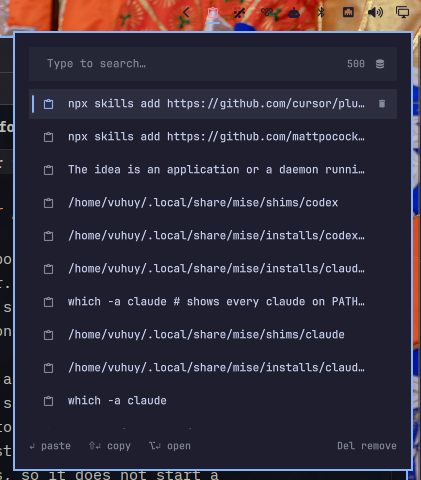
A theme-aware clipboard history panel for the Omarchy Quattro bar. The widget lives in the right section by default and opens an anchored panel on left click.
It is deliberately a UI companion to Omarchy's built-in clipboard service. It
reads the same history file and uses Omarchy's own helpers for pasting, copying,
and opening entries, so it does not start a second wl-paste watcher.
Features
- Search clipboard history by typing while the panel is open
- Open at the mouse cursor with Super + . and paste into the original textbox
- Preview text, copied files, and captured images
- Left click or press Enter to paste an entry
- Right click or press Shift+Enter to copy without pasting
- Press Alt+Enter to open an entry with Omarchy's clipboard opener
- Remove individual entries or clear the complete history
- Keyboard navigation with arrows, Page Up/Down, Home, End, and Escape
- Native Omarchy colors, spacing, bar orientation, and popout coordination
Requirements
- Omarchy Quattro
- The built-in
omarchy.clipboardservice enabled (the Omarchy default) - Omarchy's standard clipboard helper commands
hyprctl, Python 3, Bash, andjq(included with Omarchy)
The panel consumes
~/.local/state/omarchy/clipboard-history.json. Clipboard monitoring and
sensitive-clipboard filtering remain owned by the built-in service.
Keyboard shortcut
After enabling the plugin, add this to ~/.config/hypr/bindings.lua:
o.bind("SUPER + PERIOD", "Clipboard history at cursor", "omarchy-shell shell toggle io.github.vuhuy.clipboard-manager")
If you already use Super + . for something else, add
hl.unbind("SUPER + PERIOD") before the binding. Run hyprctl reload and
check hyprctl configerrors after editing.
Focus a textbox, press Super + ., then type to search. Click an entry or press Enter to paste into the original window. Shift+Enter copies without pasting. Escape clears the search, then closes the panel; pressing the shortcut again also closes it. The popup stays within the cursor's monitor, including scaled and rotated displays. Clicking the bar icon still opens the panel beside the bar.
Local development
Validate the plugin, link this checkout, and enable it in the right bar section:
./scripts/check
./scripts/link-local
omarchy plugin enable io.github.vuhuy.clipboard-manager --section right
Saving files below the linked checkout should trigger a hot reload. To force a complete reload:
./scripts/link-local --reload
Remove the development link safely with:
omarchy plugin remove io.github.vuhuy.clipboard-manager
Install from GitHub
Once published, install and enable it with:
omarchy plugin add https://github.com/vuhuy/omarchy-plugins.git
omarchy plugin enable io.github.vuhuy.clipboard-manager --section right
Acknowledgements
A lot of integration i borrow from the official Omarchy clipboard plugin. The panel itself is designed for this bar-widget plugin.