
Fretwise
A chromatic guitar tuner that lives in the Omarchy bar.
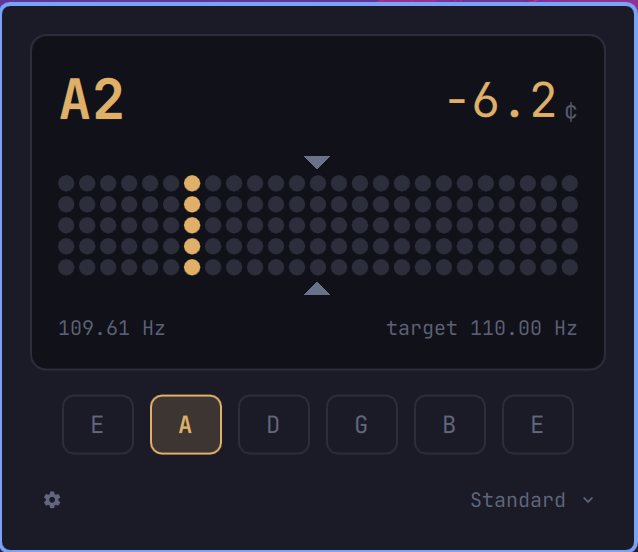
Click the pick in your bar, play a string, and watch it settle. Fretwise shows the target note, how far off it is in cents, and which string you're on — on a dot-matrix display whose lit column walks towards a pair of ticks and turns your theme's green when it lands between them. The scale is finest right around the ticks, where the last few cents are the ones you're still deciding about.
Why it's a little different
- Nothing to install. No
pip, no compiler, nonumpy. Pitch detection is pure-Python standard library, soomarchy plugin addis the whole setup. - It only listens while you're looking. The capture process starts when you open the panel and stops when you close it. A tuner has no business holding a microphone open in the background.
- It follows your theme. In-tune, nearly, and off are drawn from the colours your active theme already defines — including a live theme switch. Nothing is hardcoded.
- It shows you what it can listen to. The panel lists the capture sources
PipeWire actually has, under the names your other audio settings use, so
pointing the tuner at an interface with a guitar plugged into it is a choice
from a list rather than a
pw-dumpand a carefully typed setting. - Chromatic, so alternate tunings just work. Fretwise matches against all twelve semitones, not just the open strings, so every note is recognised whatever you're in. Pick a tuning to make the string indicators agree: drop D, half step down, DADGAD, open G, four-string bass, ukulele — or chromatic, which hides them and just names the note.
Install
omarchy plugin add https://github.com/WayneKruger/omarchy-fretwise.git
omarchy plugin enable io.github.waynekruger.fretwise right
Plugins land disabled so you can read the code before running it, which is why
the second command is separate. Drop right to be asked where to put it, or
move it later:
omarchy bar move io.github.waynekruger.fretwise --section center
Remove
omarchy plugin disable io.github.waynekruger.fretwise
omarchy plugin remove io.github.waynekruger.fretwise
disable takes it off the bar and leaves the files in place. remove deletes
~/.config/omarchy/plugins/io.github.waynekruger.fretwise/ as well. Neither
leaves anything behind elsewhere: Fretwise writes no config of its own — its
settings live inline on its entry in ~/.config/omarchy/shell.json, which
disable cleans up.
Requirements
All of these ship with Omarchy, so on a stock system there is nothing to do:
| Needs | For | Ships with Omarchy |
|---|---|---|
python3 |
pitch detection (standard library only) | yes |
pw-record (PipeWire) |
audio capture | yes |
pw-dump (PipeWire) |
listing capture sources, and looking yours up by name | yes |
No third-party Python packages. No build step. No sudo.
Settings
Open the panel and click the gear at the foot of it. The drawer that opens holds what you set once and then leave alone; the tuning stays out on the face, because that is the one you change when you pick up a different instrument.
| Setting | Default | What it does |
|---|---|---|
referencePitch |
440 |
The frequency of A4, from which every target is derived. 415–466, so 432 and 442 are both reachable. |
tuning |
standard |
Which open strings the indicators show. One of standard, drop-d, half-step-down, dadgad, open-g, bass, ukulele, chromatic. |
captureSource |
(blank) | PipeWire source to listen to. Blank uses the system default. |
inTuneCents |
3 |
How close counts as in tune, either side of the target. 1–10 cents. |
smoothing |
balanced |
How steady the readout is. One of snappy, balanced, calm. |
Everything takes effect on the click — there is nothing to restart and no file
to find. The values are remembered on the widget's entry in
~/.config/omarchy/shell.json, which is also where you can set them by hand if
you would rather; a value out of range there is pulled back into range rather
than breaking the tuner.
The drawer opens downwards, leaving the tuner on screen above it, which is deliberate. The in-tune band and the smoothing are settings you can only really judge by watching the readout while a string rings — widen the band and see the column stop being called sharp, go calmer and see the twitching stop — so covering the readout to change them would be asking you to guess and then go and look.
Keyboard: Tab walks the controls and Shift-Tab walks back, ↑ ↓ (or
k j) do the same, ← → (or h l) move whatever the cursor is holding,
Enter opens a list, and Escape closes the drawer before it closes the
panel.
Tuning. Detection is chromatic whichever you pick: every note is still
recognised, so the tuning only decides which strings are drawn and which one a
note matches. chromatic hides the indicators altogether, for an instrument
none of the others describe.
Capture source. The picker lists what PipeWire actually has, by the same name your other audio settings show it under, and re-reads that list each time you open it — so an interface plugged in while the panel is sitting there appears when you go looking for it. System default is the top row and the default, which is right for a laptop microphone; pick your interface if you play through one. A sink's monitor is listed too, as Monitor of …, for tuning against something already playing.
Setting captureSource by hand takes a source name — pactl list short sources shows them in the second column. Not the number in the first column:
that index is not what PipeWire targets, and Fretwise will tell you it can't
find it. A saved source that is no longer there stays in the picker marked
unavailable, the panel says so in red rather than quietly recording your
default microphone instead, and the gear turns red and brings the drawer out so
the picker is in front of you.
Reference pitch. Move A4 with the − and +, or by scrolling over the row.
The note you are holding stays on the display while you do — only the target
moves, so you can watch the deviation slide as you go rather than having the
reading blink out on every step.
In-tune band. Three cents is the default: below what most ears can pick out, and inside what the detector can hold steady, so a string that reads in tune is one. Ask for one cent and you are demanding more of the string than of yourself — a fresh string drifting as it settles will refuse to sit still. Five is generous, and right for a noisy room or a stage.
Smoothing. A reading can only be made steady by waiting, so this is a
latency setting whatever it is called. calm averages over more frames and
holds a dying string longer: steadier to look at, slower to answer, and the one
to pick if the display twitches while you turn a peg. snappy answers sooner
and wanders more, which suits a quiet room and a string that is already close.
balanced is what Fretwise has always done.
When it can't listen
A tuner that shows nothing looks the same whether the room is quiet or the audio stack is broken. Fretwise tells you which:
| On the panel | Means |
|---|---|
listening… |
Capture is live. Nothing is playing, or nothing it can read a pitch from. |
starting capture… |
Capture is coming up. Not an error — it clears on its own. |
pw-record is missing — Fretwise needs PipeWire to listen |
PipeWire's tools aren't installed. |
pw-record could not start — … |
The tools are there, the daemon isn't reachable. The rest of the line is pw-record's own diagnostic. |
No capture source called “…” |
The saved captureSource isn't there any more. The gear turns red and the drawer opens itself, so the picker is in front of you. |
The default capture source is unavailable |
The same thing, with no source saved: PipeWire has no default input to give. |
No audio from capture source “…” |
The source exists but delivered nothing yet — suspended, muted at the driver, or unplugged. Fretwise keeps listening, so if it's only slow to wake, the message clears on its own. |
No audio from the default capture source |
The same, on whatever PipeWire calls default. |
Capture stopped unexpectedly |
The helper exited on its own. Close and reopen the panel to start it again. |
The pitch detector is not responding |
The helper is running but has gone quiet — it started and then stopped sending readings. |
Capture failed: … |
Anything else the helper reported, passed through as it came. |
It shows a note when I'm not playing anything
Almost always a low E or thereabouts, sitting there in a quiet room. That's real sound: laptop microphones run at high gain and pick up fan and desk rumble, and a fan at 2,500 rpm hums within a cent or two of a bass E. Fretwise listens down to 34 Hz so it can tune a bass, which is low enough to hear that too, and no amount of filtering separates a 41 Hz fan from a 41 Hz string.
Playing anything drowns it out, so it's cosmetic rather than wrong. If it
bothers you, point captureSource at an audio interface — a plugged-in
instrument has no such noise floor.
How it reads the string
Detecting pitch accurately enough to tune against, in pure Python, without blocking the desktop shell, takes a little care. Fretwise does it in three stages:
- Coarse. YIN on audio decimated to 8 kHz — cheap, and it fixes the octave.
- Refine. The difference function again at the full 48 kHz, over a narrow window around that period.
- Sharpen. Correlate across as many periods as the sample budget allows. Lag error in cents falls roughly as 1/k for k periods, which is what gets you from "roughly right" to tuner-grade without a native FFT.
Measured against synthetic tones on all six open strings, in tune and detuned: ~0.3 cents typical, 3.3 cents worst, at about 44 ms per frame — a 23 fps ceiling against the ~10 fps a tuner needs. The range runs from 34 Hz to 1400 Hz, which covers a four-string bass tuned down to drop D at the bottom and the top frets of a guitar at the other end. A five-string bass's low B is below it.
What you see is smoothed on top of that: readings below 85% confidence are discarded, the pitch is median-filtered to reject single-frame outliers, and the deviation is eased so the display holds still while you turn a peg. The last reading is held briefly so the readout doesn't blink empty between plucks.
In tune means within ±3 cents by default — comfortably below the ~5 cents most people can hear, and inside what the detector can actually hold. It is a setting, from 1 to 10 cents.
How to read the display
The dot matrix is a scale, and its columns are not evenly spaced. Counting out from the ticks that mark the centre, the steps are worth a cent each for six columns, then two, then six — so the display reaches ±30 cents while every single cent still moves the lit column near zero, which is where you are deciding whether to stop turning. The outermost column is also the peg: anything past ±30 cents stays there rather than disappearing, so a badly off string still points you the right way.
Bring the lit column in towards the ticks. Inside the in-tune band — at its default of ±3 cents, the middle three columns either side — the note and the reading turn your theme's green, which is the tuner saying you can stop.
Architecture
| File | Does |
|---|---|
tuner.py |
Captures audio and detects pitch. Streams one JSON object per line. |
Model.js |
Notes, cents, string identity, smoothing, and capture state. Plain JS, no QML imports. |
Panel.qml |
The tuner display, and the capture process lifecycle. Renders; decides nothing. |
Picker.qml |
The panel's pickers. A line of caption text that opens a list. |
Drawer.qml |
The settings that open below the tuner, and the controls they are made of. |
BarWidget.qml |
The bar icon. |
tuner.py runs standalone, which is the fastest way to see what it's hearing:
python3 tuner.py                 # spawns pw-record on the default source
python3 tuner.py --source NAME   # a specific PipeWire source
Model.js is deliberately free of QML imports so the musical logic can be
tested under node:
./plugin-test.sh
Licence
MIT. See LICENSE.