
FPL Gaffer
The ultimate dashboard for Premier League fans — FPL mode for players and Fan mode for everyone else.
A Premier League and Fantasy Premier League dashboard for the Omarchy shell. Live scores, the real league table, a fixture difficulty grid, player stats and a podium board — and, if you play the game, your squad scored live with provisional bonus, projected auto-subs and your mini-leagues. All of it wearing your current Omarchy theme.
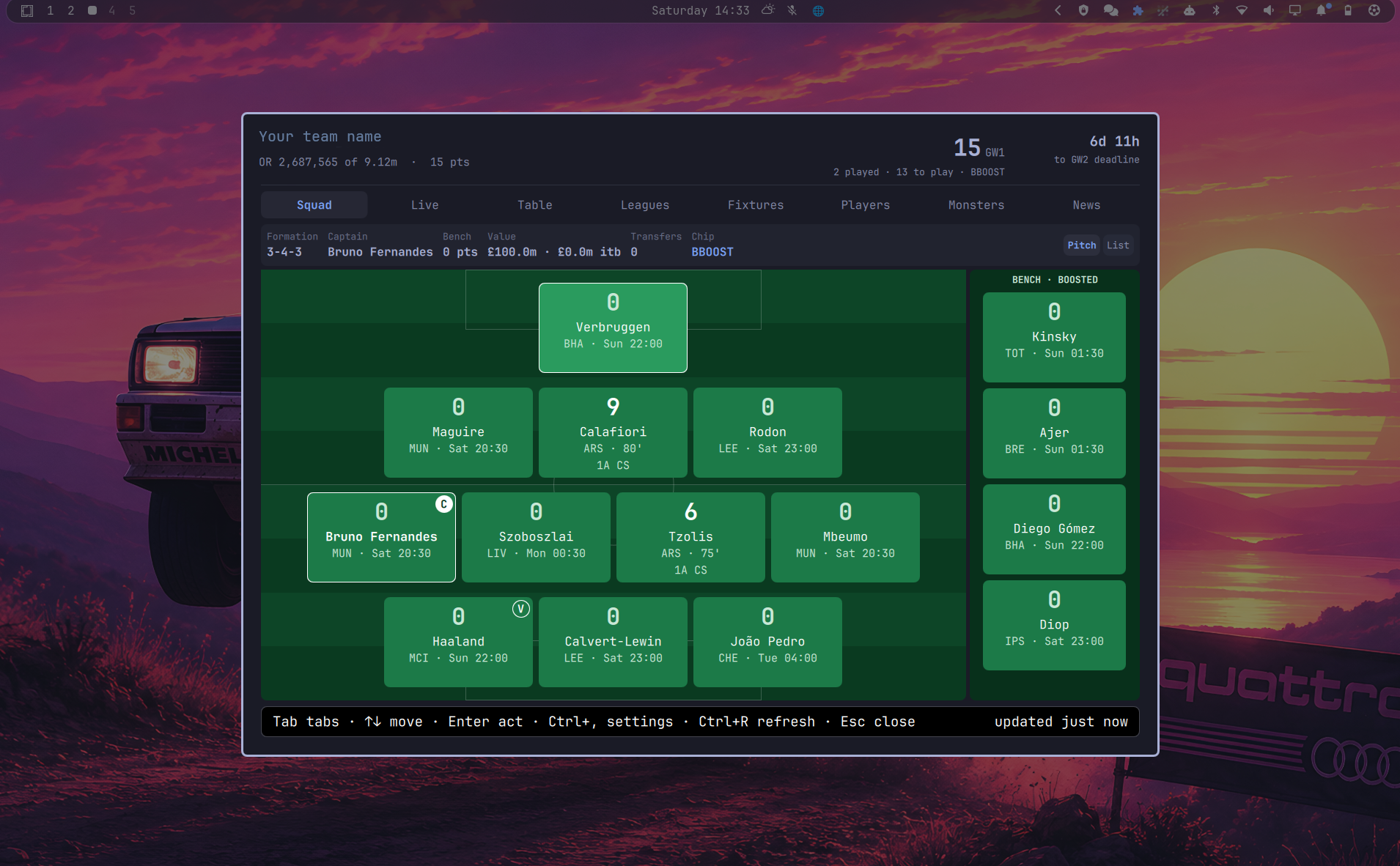
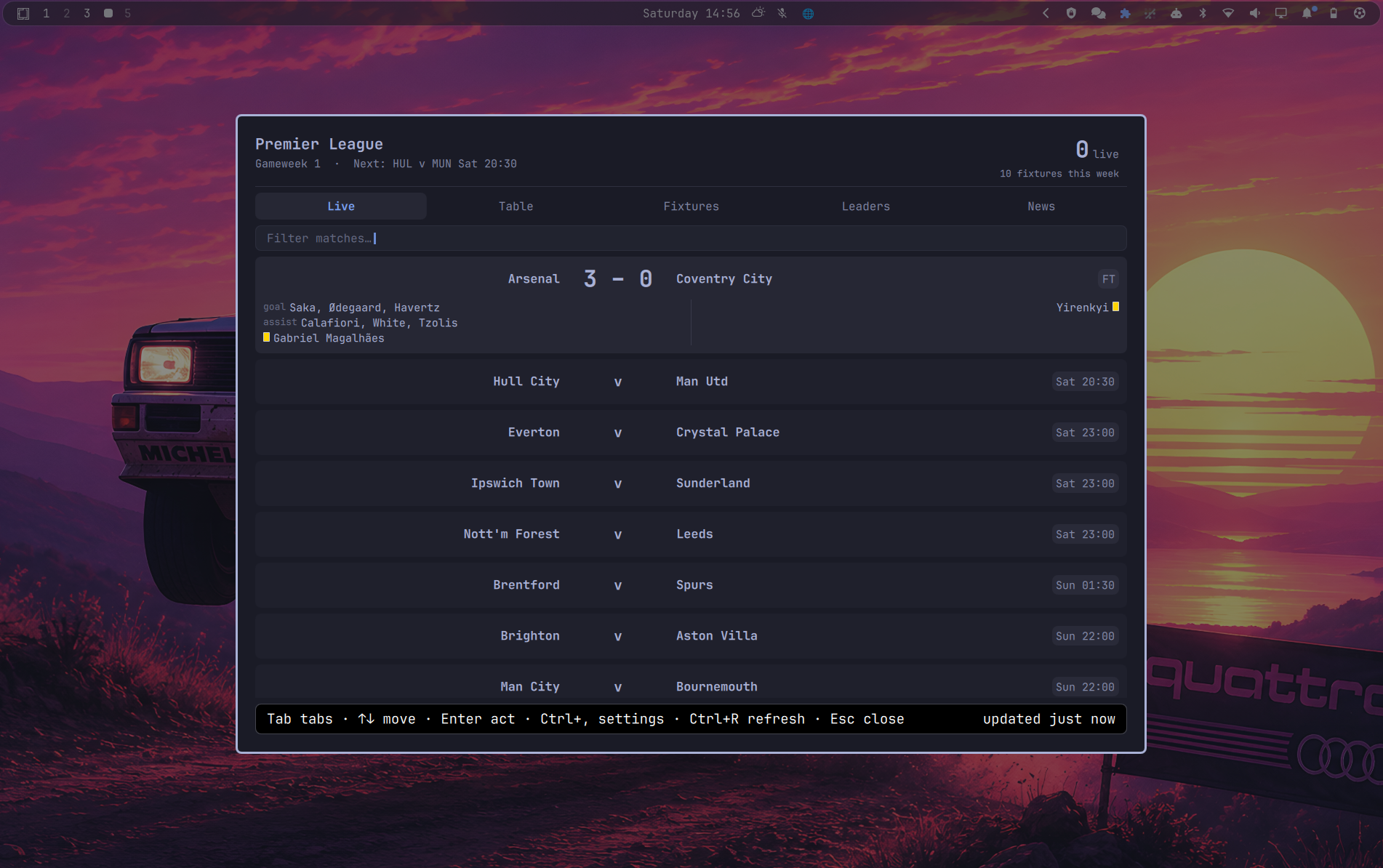
Two ways to use it, chosen on first run and changeable in settings:
- FPL Gaffer mode — you play the game. Eight tabs: your squad as a pitch or a list scored live, the match ticker, the league table, your mini-leagues re-scored live, a fixture difficulty grid, every player in the game, the Monsters board, and news with price and injury watch.
- Premier League Fan mode — you just follow the football. Five tabs: Live, Table, Fixtures, Leaders and News. No fantasy team needed, and nothing that only means something inside the game.
The Live tab is headed with the gameweek it is showing and what that week is doing — nothing kicked off yet, matches in play, or all of it finished. The fantasy clock holds a gameweek as current until the next deadline, so when it does turn over, the week just watched folds away into a results drawer at the foot of the tab rather than disappearing.
Every match card opens. Underneath the scoreline, Enter or a click on the
strip at its foot unfolds the team sheets drawn as a pitch — the shape the
league itself published, home attacking left to right and away right to left,
with shirt numbers, the captain's armband and both benches — and the match's
own numbers under that: possession, shots, shots on target, corners, fouls,
offsides, saves and pass accuracy, each as a bar split between the two sides.
The sides appear about an hour before kick-off, when the league names them.
Club crests appear beside the scoreline and down the league table. They are downloaded once each and kept on your own disk; the screens never fetch an image while you are looking at them.
| FPL Gaffer | Premier League Fan | |
|---|---|---|
| Squad, Leagues, Players | ✓ | — |
| Live, Table, Fixtures, News | ✓ | ✓ |
| Line-ups, match statistics, crests | ✓ | ✓ |
| Podium board | Monsters — goals, defcon, value, cards, referees | Leaders — goals, tackles, blocks, recoveries, cards, referees |
| API calls per refresh | 22, or 24 when last week's results refresh | 4 |
| …plus, in both modes | one more per match in play, for its statistics; the team sheets and the finished matches' numbers are held for a day, and the twenty crests are fetched once ever |
Install
omarchy plugin add https://github.com/weedwhitesandwine/FPL-Gaffer.git --enable
Then restart the shell and open it once to meet the greeter, which asks which of the two modes you want and, in FPL Gaffer mode, for your team ID.
omarchy restart shell
To update or remove it later:
omarchy plugin update io.github.weedwhitesandwine.gaffer
omarchy plugin remove io.github.weedwhitesandwine.gaffer
Removing the plugin leaves your settings and cache in ~/.local/state/gaffer,
so reinstalling picks up where you left off. Delete that directory yourself if
you want a clean slate.
What it writes, and when
Everything this plugin runs and touches, in full — because a plugin shares the shell's process and runs with the same permissions your session already has, and you should not have to read the source to find that out.
Processes it runs
| Command | When |
|---|---|
setpriv --pdeathsig TERM python3 gafferd.py daemon |
started by the shell when the plugin loads; the pdeathsig means it cannot outlive the shell |
python3 gafferd.py once |
one refresh, when you open the overlay or press Ctrl+R |
notify-send |
only to raise a notification you have switched on |
wl-paste --no-newline |
only when you press paste in the team-ID field during setup; it reads the clipboard once and keeps the value only if it is a plain number |
bash gaffer-ctl.sh bar … |
only when you change the bar setting in settings |
bash gaffer-ctl.sh bind/unbind |
only when you change the hotkey in settings |
hyprctl reload |
only from those two, after editing the hotkey block |
kill <recorded pid> |
only from gaffer-ctl.sh stop, which you run — it kills the pid in its own lock file after checking that pid really is the engine, never a name pattern |
bash -c writing one file |
when you change a setting or resize the window — it writes settings.json or the size file inside ~/.local/state/gaffer, staged under an exclusively-created temporary name (mktemp) and renamed into place. Values are passed as positional arguments (--, then "$1"/"$2"), never interpolated into the shell string |
That table is the complete list. Every one of those commands runs as your own user, takes the values it needs as positional arguments rather than as text spliced into a shell string, and exits as soon as it has done its job — the engine on the first row is the only long-lived one.
What it needs installed
Everything in that table comes from packages an Omarchy desktop already has:
python3, setpriv (util-linux), bash, hyprctl (Hyprland),
notify-send (libnotify) and wl-paste (wl-clipboard). The first three are
what the plugin needs to work at all — the engine is Python, and the shell
starts it under setpriv. The rest are each tied to one feature: notify-send
to the notifications you switch on, wl-paste to the paste button in the
team-ID box, hyprctl to reloading Hyprland after a hotkey change. If one of
those three is missing, that one feature is what stops working.
Files it writes
| Path | When |
|---|---|
| its own plugin folder | never, after omarchy plugin add clones it |
~/.local/state/gaffer/ — settings, state, cache, crests, log |
continuously, while running |
~/.config/hypr/bindings.lua |
only if you set a hotkey, and only inside its own marked block, leaving every other line untouched |
~/.config/omarchy/shell.json |
only if you turn the bar readout on or off. It adds, moves or removes its own entry and leaves every other setting as it found it, though the file is rewritten as standard JSON with two-space indentation. Where a dotfiles manager has symlinked this path into its own repository, the link is resolved and the real file written, so the link survives |
Those last two are the only files outside its own directory it will ever touch, and neither is written unless you change that specific setting — finishing the first-run greeter does not rewrite either of them.
Everything it deletes is something it wrote itself, inside its own directory.
Its cached API responses, in ~/.local/state/gaffer/cache/: on each cycle the
engine drops anything older than three days, and then the oldest first while
that folder is over 64 MB, so a cache cannot grow without limit on a machine
left running for months. gaffer-ctl.sh clear-cache empties the same folder in
one go. And in ~/.local/state/gaffer/badges/, two small cases: a file at a
crest's name that turns out not to be a PNG is removed and fetched again, and
the empty marker recording that a crest could not be fetched is removed once it
can. Nothing outside that directory is ever removed.
Privileges. Every process in the table runs as your own user, with the
permissions your session already has. setpriv is in that list for one
reason — --pdeathsig TERM, which ties the engine's life to the shell's. It
changes no user, grants no capability and drops none. The overlay and the bar
readout both draw inside the shell's own Quickshell process.
Network: yes, and this is the point of it. Three hosts, plain HTTPS GET, unauthenticated and read-only:
fantasy.premierleague.com— the game's own public API, for everything the fantasy game owns: points, bonus, prices, ownership, your team, your mini-leagues, injuries and team news, and fixture difficulty.footballapi.pulselive.com— the Premier League's own feed, for the football itself: the match clock, live scores, goals, bookings and the referee. The fantasy API runs two to four minutes behind the match on all of these and publishes bookings late or not at all, so where the league reports something directly, its version is used. Only matches actually in play are looked up for the clock and the score. The same feed carries the team sheets and the match statistics, which are asked for from about an hour before kick-off and held for a day once the match is over.resources.premierleague.com— club crests, and nothing else. One PNG per club, twenty in total, fetched once and then read from your own disk forever. The address is built from the club's own number, which arrives as a number in the fantasy feed and is used as one, so no value from any reply can steer where this fetches from. A crest is refused above 256 KB — compressed or unpacked, so a small reply cannot inflate past it — and discarded unless the bytes that arrive actually start like a PNG. One that cannot be fetched is not asked for again for six hours, so a host that is unreachable costs one round of timeouts rather than one every cycle.
Every request is a GET, and the only value of yours that ever appears in one is your team number, which forms the URL of your own public team page. The three hosts above are the only ones contacted, and the replies are read, cached on your disk and drawn.
No feed is trusted to behave, and "only these three hosts" is enforced rather than intended. Both hosts are checked before the request and again on any redirect, so a reply that tries to send Gaffer somewhere else — off HTTPS, onto a third host, or at a service on your own machine — is refused instead of followed; a name that answers with a loopback, private or otherwise non-public address is refused for the same reason. A reply is refused above 8 MB on the wire and above 32 MB once unpacked, so neither an oversized response nor a small heavily compressed one can exhaust the memory of a process that runs all day, and a whole body has 30 seconds to arrive, so a feed that dribbles bytes to hold the connection open is dropped rather than waited on. Every one of these refusals is treated exactly like a failed request, falling back to the last good copy on disk. Every piece of text the overlay draws is pinned to plain text, so a name or a news line arriving from either API is displayed as the characters it contains and never interpreted as markup.
The same suspicion applies to the disk. Every file the engine replaces —
state, cache, the bar readout, the seen-notifications list — is staged under
an unpredictable name created exclusively (mkstemp, which never follows a
symlink) in a directory first verified to be owned by the user and writable by
nobody else, then renamed over the destination in one atomic step. Reads
refuse symlinks and non-regular files, so a link or FIFO left at one of these
names by a restored backup cannot redirect a write onto another file or park a
read forever. The lock and log files are opened with the same no-follow
guarantee before anything truncates them, and then checked to be ordinary
files: refusing a symlink says nothing about a pipe, and writing to a pipe
nobody is reading would hang the daemon at startup.
Stopping the engine signals only the engine. The recorded process number is
not taken on trust — a lock file outlives a crash and the number in it is
handed to something unrelated soon enough — so stop requires both that the
process is running the engine and that it still holds the lock file open,
which only the live daemon does and a recycled number cannot fake.
Timer: yes. The engine polls on an interval, because live scores are the purpose. It adapts: roughly once a minute while matches are actually being played, every few minutes in the hours before a deadline, and every fifteen minutes otherwise. Responses are cached on disk and a stale copy is used if the API is unreachable, so it is not hammering anything.
How it works
gafferd.py does all the thinking — it talks to the Fantasy Premier League
API, works out live points, provisional bonus, auto-subs, league tables and
fixture difficulty, and writes the result to a small state file. The overlay
watches that file, so opening it is instant and nothing ever blocks on the
network. The daemon also raises desktop notifications while the overlay is
closed.
It polls about once a minute while matches are actually being played, every couple of minutes in the hour before a deadline, and every fifteen minutes otherwise. Everything is cached on disk, and a stale copy is used if the API is unreachable.
Standard library Python only — no virtualenv, no build step.
Keys
| Key | Does |
|---|---|
Tab / ← → |
move between tabs |
↑ ↓ / PgUp PgDn |
move the selection |
| type | filter the current tab |
Enter |
act on the selection (stars a player on the watchlist; on the Live tab, unfolds a match's line-ups and statistics) |
| middle-click the bar icon | refresh now, without opening anything |
| double-click a player | show him on the Players tab, selected and scrolled to |
| click a column heading | rank by it; click again to reverse |
Ctrl+, |
settings |
Ctrl+R |
refresh now |
Esc |
clear the filter, then close |
Your team ID
Your FPL team ID is the number in your own team's web address. This works right now, before the season starts, with no leagues and no history:
- Sign in at fantasy.premierleague.com in a browser.
- Open Pick Team from the menu.
- In the "Points & Rankings" box, click Gameweek History.
- Look at the address bar. It reads
fantasy.premierleague.com/en/entry/1234567/history— the number in the middle is your team ID.
The same number appears if you open Transfers and click Transfer History.
To check you have the right one, open fantasy.premierleague.com/api/entry/YOUR-ID/
in a browser. It should show your team name and your own name. If it shows
somebody else, you have copied the wrong number.
Where things live
| Path | What |
|---|---|
~/.local/state/gaffer/state.json |
everything the overlay draws |
~/.local/state/gaffer/bar.json |
the small slice the bar icon reads |
~/.local/state/gaffer/settings.json |
your choices |
~/.local/state/gaffer/cache/ |
raw API responses |
~/.local/state/gaffer/badges/ |
the twenty club crests, as PNGs, plus an empty marker for any that could not be fetched |
~/.local/state/gaffer/gafferd.log |
engine log |
gaffer-ctl.sh stop stops the background engine, and
gaffer-ctl.sh clear-cache forgets every cached response. The engine also
prunes that cache folder as it runs — entries older than three days, and the
oldest first while it is over 64 MB — which is the only deleting the plugin
does. The crests sit outside that folder on purpose: they are about 150 KB in
total for the whole league and a club badge does not go stale, so sweeping
them by age would mean fetching the same twenty files again every three days.
The bar icon
Just the ball. Your points, rank, captain, what is still to play and the time to the next deadline are all in the tooltip, so a glance at the clock is not also a score you did not ask for.
It flashes in the theme's accent colour for a couple of seconds whenever Gaffer has just told you something about the football — a goal, a red card, a kick-off, full time. It follows your notification settings: the icon flashes for the things you have asked to be told about and stays still for the rest, so turning a notification off turns its flash off too. The flash itself can be switched off in the bar's own settings for this widget, alongside where the icon sits.
Middle-clicking the icon refreshes without opening anything.
The Monsters board
A podium of three for each of ten ways to be remarkable. Most are self explanatory; three are worth a note:
- Dirty Dogs counts bookings, not fouls. Fouls committed are not in the public API — they live in a per-match feed the game does not publish.
- See You Next Tuesday ranks referees by cards shown. The official comes from the Premier League's own feed, the cards from the fantasy feed; a finished match is looked up once and remembered.
- There is no set-piece category, because the API records that a player takes penalties but never which goals came from them.
Data
Everything comes from the Fantasy Premier League's own public API at
fantasy.premierleague.com/api. It needs no key and no login. The match-day detail the fantasy API does not
publish — the referee, the attendance, the match clock, the team sheets and
the match statistics — comes from the
Premier League's own feed at footballapi.pulselive.com;
if that feed is unavailable the referee category goes quiet, the line-ups and
statistics stay folded away, and nothing else notices. The club crests come
from resources.premierleague.com, once each; without them the screens show
the club names alone, which is what they showed before.
Price-change predictions are not calculated here. The game publishes its own projection per player, new for 2026/27, and the plugin reads it. It is shown as two lists: your own fifteen always, whatever their progress, and the rest of the market once a player passes 20%, sorted by how close the move is and marked with a 🔍 where you have added them to your watchlist. The 95% notification is raised for exactly two groups: the players in your own team, and the ones carrying a magnifying glass. It is not a documented or supported product, so it is treated gently: responses are cached, polling backs off when nothing is happening, and the plugin never hammers it.
Credits
Built with Claude Code.
Licence
MIT.