
Omazone
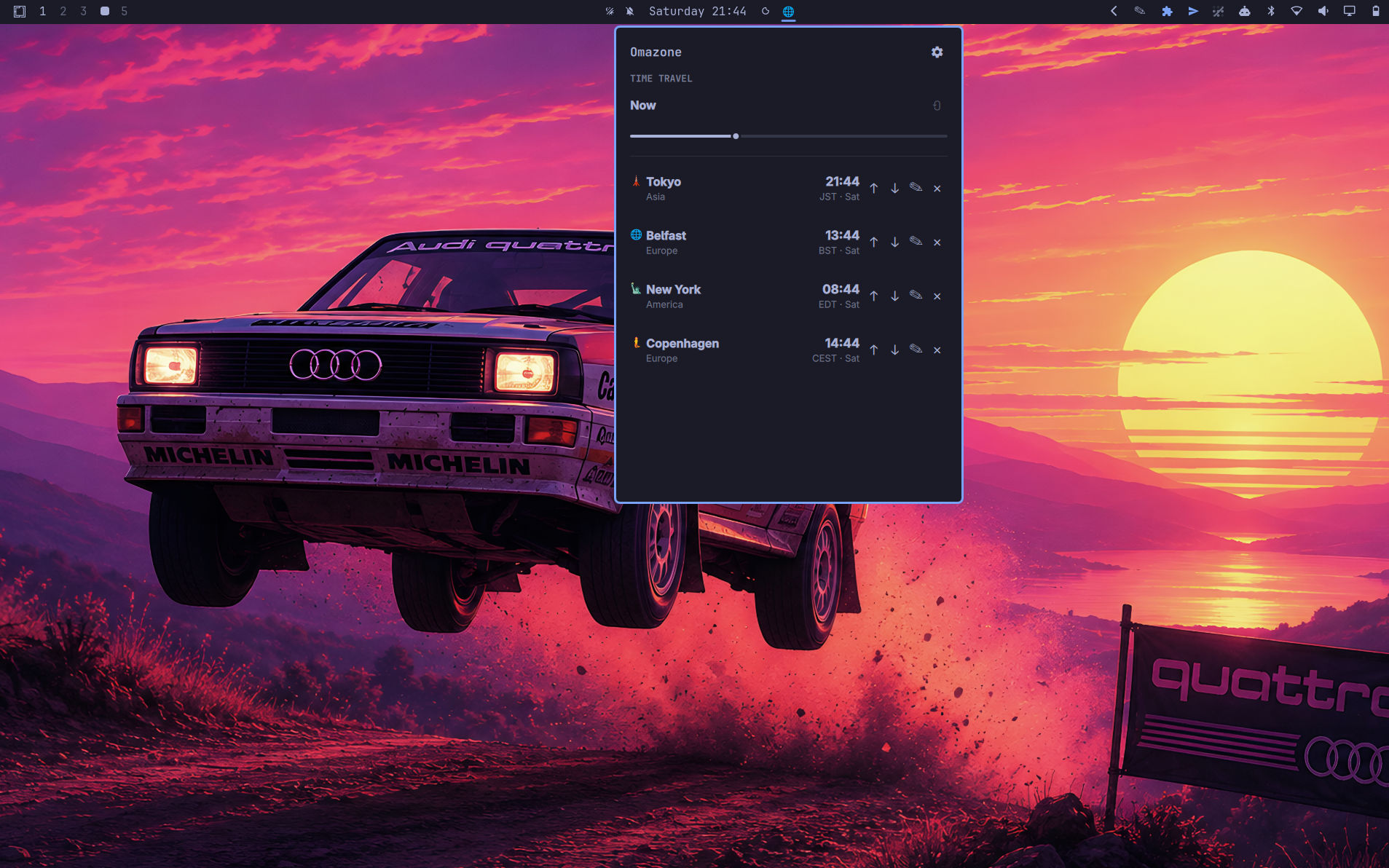
A multi-timezone clock for Omarchy that drops down from a bar icon. Track any number of cities, each with its own icon and label, and drag the Time Travel slider to see what time it'll be everywhere at once.
Features
- Track any number of IANA timezones, picked by searching real city/region names — the list always matches your system's own timezone database.
- Each city gets a fun emoji icon by default (landmarks and local flavor where one fits, a globe otherwise), and both the icon and the label are editable per city.
- Time Travel slider — drag it and every tracked city's clock updates together, so you can preview a meeting time or a future moment across all of them at once. Shows a +1/−1 badge when a city has rolled into a different calendar day than your local time.
- 12-hour or 24-hour display, your choice.
- Reorder cities, or remove ones you no longer need.
- Optional status-bar icon that drops the panel down right under it.
Install
omarchy plugin add https://github.com/weedwhitesandwine/omazone.git --enable
Run in a real terminal, this asks which bar section to place the icon in (left/center/right, right pre-selected) before enabling it — the same prompt any other bar-widget plugin gives you. Change your mind later from the panel's Settings → BAR section (Left / Center / Right), or from a terminal:
omarchy bar move io.github.weedwhitesandwine.omazone --section left
The Settings buttons run exactly that omarchy bar move command, so the shell
makes the change to its own layout. None of the three starts selected: the
panel cannot see where the bar actually put the icon, so it claims nothing
until you press one.
Add a keybind, e.g. in ~/.config/hypr/bindings.lua:
o.bind("SUPER + I", "Toggle Omazone", "omarchy-shell shell toggle io.github.weedwhitesandwine.omazone")
Change it whenever you like — it is an ordinary line in your own config, and Omazone never touches it.
Remove
omarchy plugin remove io.github.weedwhitesandwine.omazone
This deletes the plugin and cleans up its bar icon automatically. Your
tracked cities and settings stay on disk at
~/.local/state/omarchy/omazone/ unless you remove that directory too.
Usage
- Open/close: the bar icon, the shortcut you added at install, or
omarchy-shell shell toggle io.github.weedwhitesandwine.omazone. - Click the gear icon (top-right of the panel) to open settings:
- Cities — search and check off any number of timezones to track.
- Format — 12-hour or 24-hour time.
- Hover a city row and its controls fade in to the left of the time:
↑/↓reorder it, the pencil edits its icon and label,✕removes it. They are always laid out, so nothing shifts as they appear. - The Time Travel slider ranges from 24 hours in the past to 48 hours ahead. The reset icon next to it jumps back to now.
External dependencies and system-level modifications
This plugin runs bash, date, timedatectl, jq, python3 and omarchy
via Quickshell's Process — all standard on any Omarchy install, no
extra packages required. python3 is what reads the settings file back: it
opens it refusing symlinks and anything that is not a plain file, refuses to
wait on a pipe, and reports a file it would not read rather than returning it
empty. Times are computed with the system's own date/tzdata,
not looked up over the network — Omazone works fully offline.
Omazone does not edit your Hyprland configuration. The shortcut is yours
to add and to change, in ~/.config/hypr/bindings.lua, using the line in
Install above. Nothing in this plugin reads or writes that file.
Outside its own state directory, the only file Omazone writes is
~/.config/omarchy/shell.json, and only its own {"id": …} entry, when you
show or hide the bar icon from the settings view.
State files
~/.local/state/omarchy/omazone/settings.json— tracked cities, their custom icons/labels and the 12/24-hour preference. Created on first change; starts empty until you add cities from Settings.
Credits
The panel's Omarchy look — the hero header, the hover row controls, the content-sized card and the theme-following glyphs — was contributed by @CtByte.
Built with Claude Code.
License
MIT — see LICENSE.