
Tides for Omarchy
A tide widget for the Omarchy shell bar, designed to sit next to the built-in weather widget and follow its look and feel.
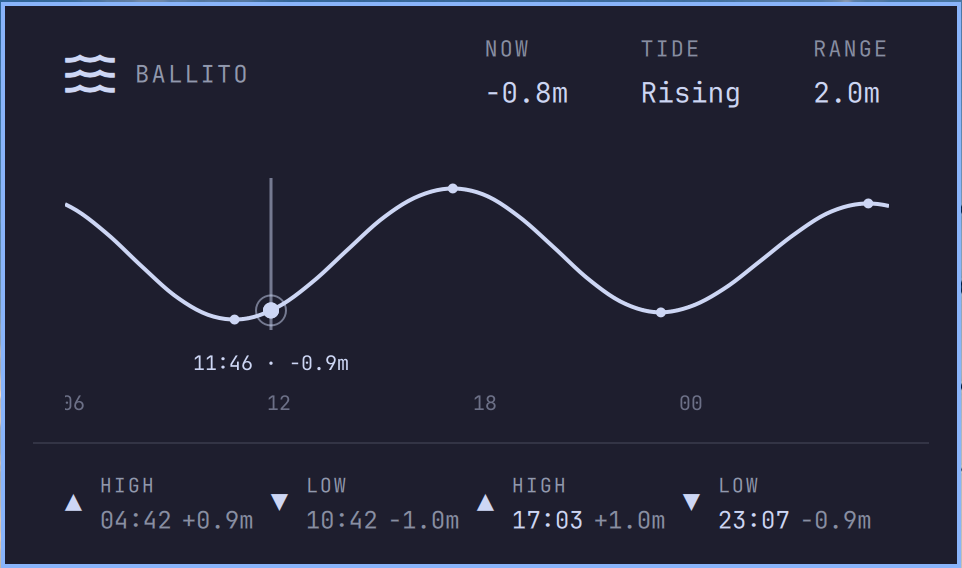
A wave icon lives in the bar. Click it for a panel showing:
- Now / Tide / Range – current sea level, whether the tide is rising or falling, and today's tidal range.
- A 24-hour tide curve – six hours back, eighteen ahead, with the current time marked. Hover or drag along the curve to read the time and height at any point; the cursor snaps gently onto highs, lows and "now".
- Today's tides – every high and low for the day, in order, with times and heights. Past tides are dimmed; after the day's last tide the row rolls forward to tomorrow.
Everything is drawn with the shell's own theme colours and fonts, so it follows your Omarchy theme.
Install
omarchy plugin add https://github.com/Woogy7/omarchy-tides.git --enable
The widget appears in the centre section of the bar. Move it wherever you like:
omarchy bar move io.github.woogy7.tides --section right
Location
By default the panel follows the location set in the Omarchy weather widget, so out of the box the two agree.
To give the tides their own spot – a beach that isn't the town you check the
weather for – click the location name in the panel and search for a place.
Your choice is stored in ~/.local/state/omarchy/settings/tides.json. Click
the ✕ next to the search field (or commit an empty search) to go back to
following the weather location.
Remove
omarchy plugin remove io.github.woogy7.tides
To also forget a saved tides location:
rm -f ~/.local/state/omarchy/settings/tides.json
Data and dependencies
Tide predictions come from the free
Open-Meteo Marine API
(sea_level_height_msl), and place search uses the
Open-Meteo Geocoding API. No
API key or account is needed. Data is fetched with curl, which Omarchy
already ships; there are no other dependencies.
Open-Meteo's tide model is a global prediction, good for planning a beach walk or a surf, but it is not an official tide table – don't use it for navigation.
Interactions
| Where | Action |
|---|---|
| Bar icon, left | Open / close the panel |
| Bar icon, middle | Refresh tide data |
| Location name | Click to change location |
| Tide curve | Hover / drag to scrub |
| Esc | Close the panel |
Privacy
The only network requests are to Open-Meteo: the configured coordinates for tide data, and what you type in the location search for geocoding. Nothing else leaves your machine.
Licence
MIT – see LICENSE.