
Omarchy Tutor
A hands-on guided introduction to Omarchy, for the person you are handing the laptop to.
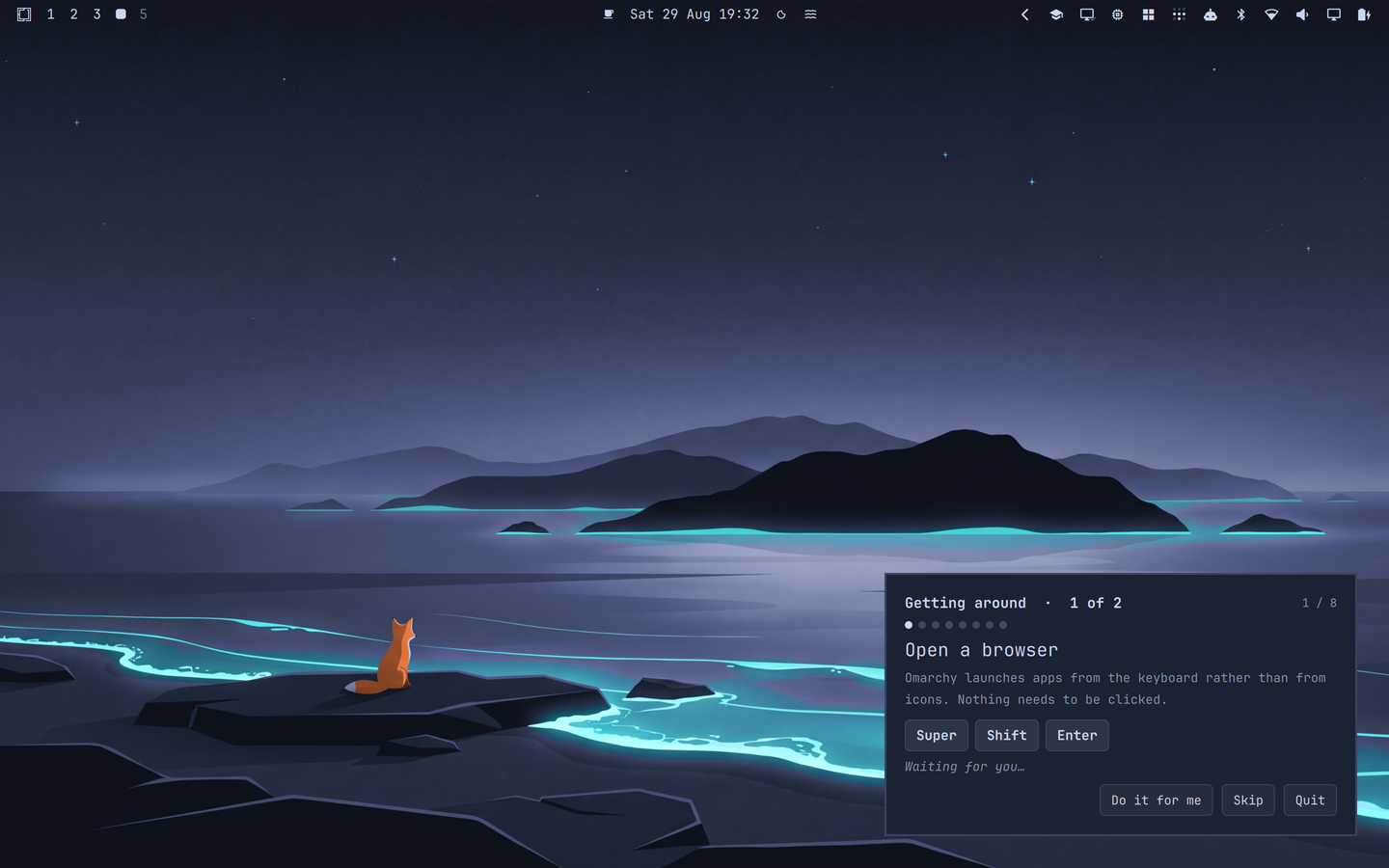
A coach card sits in the corner and walks a newcomer through windows, workspaces and tiling. Every step completes only when they really do the thing: the tutor watches Hyprland's own event stream, so there is no "click next to continue" and no way to finish without having actually done it.
Design rules
The overlay never takes the keyboard. WlrKeyboardFocus.None, and only the
coach card is in the input mask, so every keystroke and every click outside the
card goes to the real desktop. This is not a detail. If the overlay grabbed
input, the learner's Super + Enter would land on the tutor instead of Hyprland
and no step could ever be completed.
Keys come from this machine, not from a lesson file. A lesson names a
binding the way Omarchy names it ("bind": "Close window"), and the tutor
resolves it against live hyprctl -j binds output. If the installer has
rebound half their keyboard, the tutor teaches their keyboard.
Nothing is changed and nothing is destructive. The tutor reads the host's configuration and never writes it. No lesson removes packages, deletes files, or edits config. It is safe to hand to a stranger.
Nobody gets stuck. Every step has Skip, Back, and Do it for me. The last performs the step for them, because the person who installed this is usually not in the room.
The tutor never advances on its own. When a step completes, the card explains what just happened and then waits for Next. The explanation is the step's whole payoff, so it is not put on a timer that beats the learner's reading speed.
Install
git clone https://github.com/Woogy7/omarchy-tutor \
  ~/.config/omarchy/plugins/io.github.woogy7.tutor
Then enable it by adding the id to plugins[] in ~/.config/omarchy/shell.json:
{ "plugins": [ { "id": "io.github.woogy7.tutor" } ] }
and restart the shell: omarchy restart shell.
Requirements
Omarchy with the Quickshell-based shell (omarchy-shell), and Hyprland. The
tutor reads hyprctl for bindings and window geometry and listens to Hyprland's
event stream. No other dependencies, nothing to build, no runtime beyond what
Omarchy already ships. Chapter two shells out to Omarchy's own commands
(omarchy-menu, omarchy-theme-current, omarchy-theme-bg-current) to check
whether a step was completed.
Removing it
omarchy restart shell
after doing both of these:
- Delete the plugin's entry from
plugins[]in~/.config/omarchy/shell.json, and frombar.layoutif you added the bar chip. rm -rf ~/.config/omarchy/plugins/io.github.woogy7.tutor
The tutor writes nothing outside its own directory, so that is a complete removal. It never edits your Hyprland config, your theme, or anything else on the host.
Running it
- Click the graduation-cap chip in the bar (the discoverable route, a newcomer left alone will not type a command).
- Or:
omarchy-shell shell toggle io.github.woogy7.tutor
Settings
Set inline on the plugin's entry in ~/.config/omarchy/shell.json:
| Key | Default | Meaning |
|---|---|---|
corner |
bottom-right |
Which corner the coach card sits in |
dim |
0.35 |
How strongly the screen dims around a spotlit window (0 disables) |
stepTimeoutSeconds |
25 |
How long before a step offers a bigger hint |
Writing lessons
Lessons are plain JSON in lessons/, watched for changes, edit one and the
running tutor picks it up without a restart. No QML required.
lessons/index.json lists the chapters, in order:
["01-getting-around.json", "02-making-it-yours.json"]
The tutor runs them as one linear course, offering Next chapter between them.
{
  "text": "Send this window to workspace 2",
  "detail": "Add Shift to the workspace key and the focused window travels with you.",
  "bind": "Move window to workspace 2",
  "hint": "Super + Shift + 2",
  "spotlight": "activeWindow",
  "await": { "type": "movedToWorkspace" },
  "assist": {
    "lua": "hl.dsp.window.move({ workspace = \"2\" })",
    "classic": "movetoworkspace 2"
  },
  "done": "Gone to workspace 2, and the rest retiled to fill the gap."
}
await.type is one of:
| Type | Completes when |
|---|---|
event |
A named Hyprland event fires (openwindow, closewindow, …). Optional classRegex filters by window class. |
windowCount |
The active workspace holds at least min windows |
focusChanged |
Focus moves to a different window |
workspaceChanged |
The active workspace changes |
movedToWorkspace |
A window is moved to another workspace |
moved |
The focused window's position changes (polled, see below) |
layerOpened |
A layer surface opens, matched by namespace or namespaceRegex. Menus, pickers and the emoji panel are layer surfaces, not windows, so they never produce openwindow |
layerClosed |
The same surface closes, which is how Escape gets taught |
commandOutputChanged |
A command produces different stdout than it did when the step started, polled every intervalMs (default 800). This covers outcomes that are system state rather than compositor events: the theme changed, the wallpaper changed, a screenshot landed on disk |
assist is either {"exec": ["some-command"]} or a dispatcher in both
spellings. Both are required: on a Lua config (Omarchy quattro and later)
hyprctl dispatch workspace 2 fails, because Hyprland wraps the argument as
hl.dispatch(workspace 2) and the Lua parser rejects it. The tutor picks the
spelling by checking what the compositor is running.
A note on trust
assist.exec and commandOutputChanged.command both run commands from the
lesson file. Lessons ship with the plugin and are installed the same way its
QML is, so this is no wider than the trust you already give the plugin, but it
does mean a lesson file pasted in from elsewhere deserves a read first.
Known limits
- Workspace keys cannot be resolved on a Lua config. Omarchy binds
workspaces through
code:10..code:19, and Hyprland reports those back with an emptykeyand a zerokeycode, so the real chord is unrecoverable. Those steps fall back to the lesson'shint(Omarchy's default), which is right on a stock install and possibly wrong on a customised one. movedpolls. Swapping two tiled windows emits no Hyprland event that identifies the swap, so that one step compares window geometry on a 260 ms timer while it is the active step. Every other step is event-driven.layerOpenedcannot tell menus apart. Every Omarchy menu variant (root, apps, capture, theme) is the sameomarchy-menulayer surface, so a step can verify that a menu opened but not which one. Steps that need a specific outcome should assert on the outcome (commandOutputChanged) instead.- Single monitor at a time. The overlay maps one layer surface on the focused monitor; spotlight geometry is computed against that monitor only.