
omarchy-window-switcher
A searchable window switcher for Omarchy/Hyprland — an Alt-Tab alternative that lets you type to filter open windows by title or app, instead of cycling through them one at a time.
It reuses Omarchy's own menu UI (the same overlay used for the system menu, theme picker, etc.) via its dmenu-style IPC, so it looks and feels native — no extra launcher (rofi/wofi/fuzzel/walker) required — and shows a Nerd Font glyph per row for common terminals, browsers, editors, and a handful of other apps.
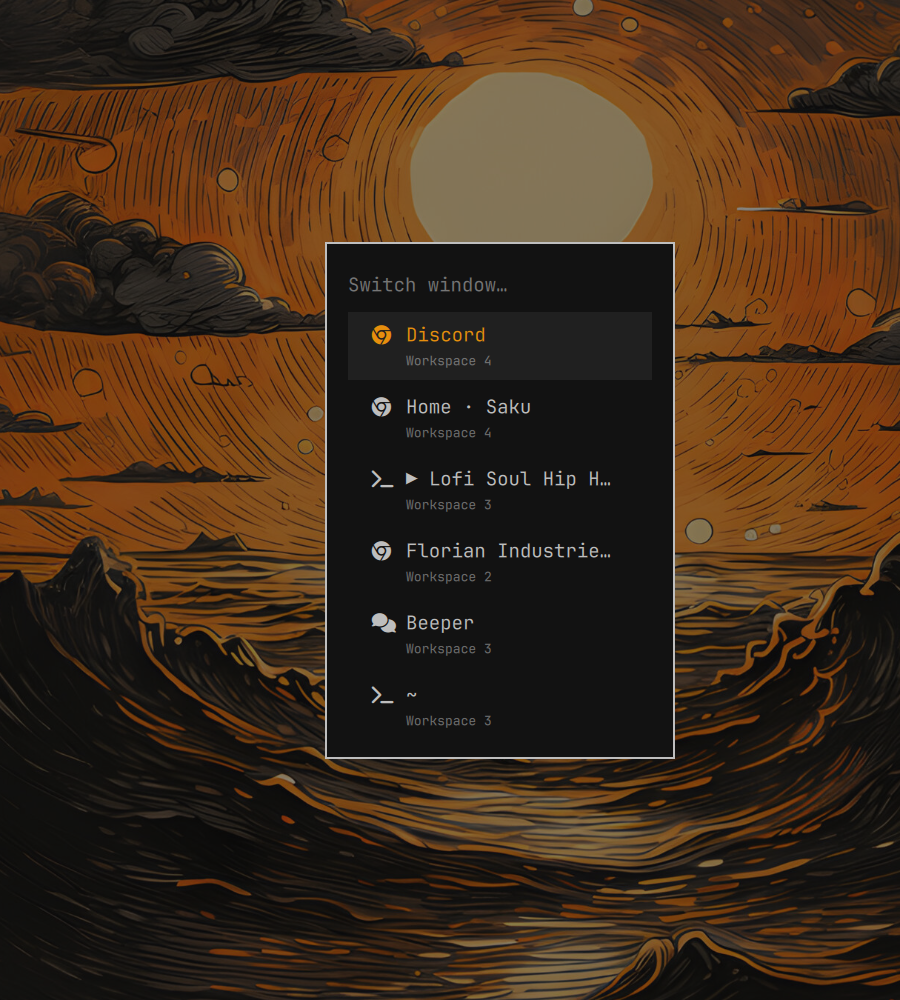
Why
Hyprland/Omarchy already bind ALT + TAB to "focus next window", which
cycles one window at a time — fine with two or three windows open, tedious
with a dozen. This gives you a SUPER + GRAVE (backtick) binding that opens
a filterable list instead: type a few letters of the title or app name,
press Enter, done.
Requirements
- Omarchy (tested on the Quickshell-based
omarchy-shellrelease, Hyprland 0.56.2) jq
Install
This is an Omarchy shell plugin, so the standard plugin flow installs and wires it up in one step:
omarchy plugin add https://github.com/xadacka/omarchy-window-switcher.git --enable
(While this repo is private, git clone needs your credentials to reach it —
either an authenticated gh/git credential helper, or use the git@github.com:...
SSH form instead of the https:// one above.)
What --enable actually does here: this plugin's only job is a service
that runs once inside the Omarchy shell and idempotently appends one line to
~/.config/hypr/bindings.lua:
o.bind("SUPER + GRAVE", "Window switcher", "<path-to-this-plugin>/bin/omarchy-window-switcher")
then reloads Hyprland so it takes effect immediately. It checks for its own
marker before writing, so re-enabling, updating, or restarting the shell
never duplicates the line. (Shell plugins run inside the Quickshell process
and have no direct way to register a Hyprland keybind, so this bootstrap step
is what makes omarchy plugin add alone sufficient — no separate manual
binding step needed.)
Without --enable:
omarchy plugin add https://github.com/xadacka/omarchy-window-switcher.git
omarchy plugin enable io.github.xadacka.window-switcher
Manual install (no plugin system)
If you'd rather not use the plugin manager at all:
git clone https://github.com/xadacka/omarchy-window-switcher.git
cd omarchy-window-switcher
./install.sh
This copies bin/omarchy-window-switcher to ~/.local/bin/ and appends the
same keybinding to bindings.lua directly (skipped if the key's already
bound to something else, or the binding's already there). Override the key
with OMARCHY_WINDOW_SWITCHER_KEY="SUPER + SHIFT + TAB" ./install.sh.
Usage
Press the bound key, start typing to filter, use ↑/↓ to move, Enter to focus the selected window, Esc to cancel.
How it works
hyprctl clients -j lists open windows (address, title, class, workspace,
recency). The script builds that into Omarchy's generic dmenu payload,
picking a Nerd Font glyph per row from the window's class, and opens it with:
omarchy-shell shell summon omarchy.menu '{"mode":"select", ...}'
then blocks on the selection/done temp files the menu writes back to, the same round-trip Omarchy's own image picker uses. Once a window is picked, it's focused with:
hyprctl dispatch 'hl.dsp.focus({ window = "address:0x..." })'
(Hyprland 0.56's Lua dispatch API — the classic hyprctl dispatch focuswindow address:0x... string syntax no longer works on this version.)
The currently-focused window is left out of the list, since switching to it would be a no-op.
Why glyphs, not real app icons
Omarchy's own app launcher/menu shows real app icons (actual images, resolved
from each app's .desktop entry). This plugin can't reuse that: the generic
omarchy.menu "select" mode it's built on renders every row as plain text —
its row delegate only draws an Image for the launcher's own kind: "app"
rows, never for "dmenu" rows (see menu/Menu.qml in the Omarchy shell
source). So a real icon image is architecturally not an option through this
overlay; a same-line Nerd Font glyph is the closest available substitute,
matched off the window's class in bin/omarchy-window-switcher. Showing
real icons would mean this plugin shipping its own custom overlay (a menu
or overlay kind, rendering its own window list) instead of reusing
Omarchy's built-in one — a much bigger undertaking than reusing the existing
menu, and not something this plugin currently does.
Caveats
- Requires the Quickshell-based Omarchy shell (the
omarchy.menuIPC target) — not compatible with older wofi/walker-based Omarchy releases. - Two windows with an identical title, app, and workspace are indistinguishable in the list; picking either one focuses whichever of them was enumerated first.
- Removing the plugin (
omarchy plugin remove io.github.xadacka.window-switcher) does not remove the line it added tobindings.lua— that file is outside the plugin's own directory, so nothing auto-cleans it. Delete the-- Added by the xadacka.window-switcher plugin.block by hand if you uninstall.