
Blip
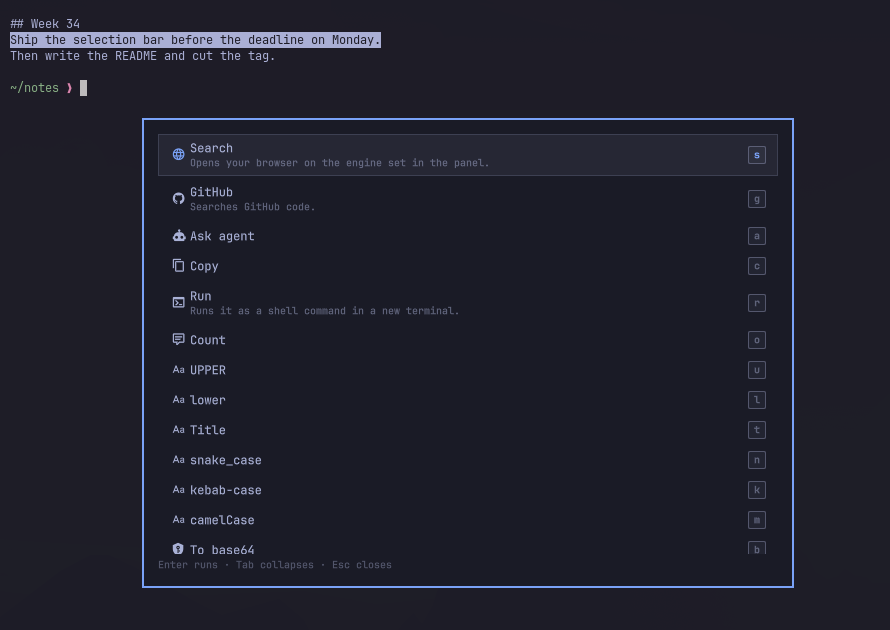
Select text anywhere in Omarchy and a small themed bar appears over it with the actions that fit what you selected. It works in a terminal, a browser, an editor, a chat window.

Basic Usage
https://github.com/user-attachments/assets/501127b1-cdcd-454e-abed-d953d2d8a6c7
A URL gets Open and QR. A JWT gets Decode with the expiry flagged. Minified JSON gets Format. A file path gets Open, Edit, Reveal, Terminal here. Anything at all gets Search, GitHub and Ask agent, with Copy behind them.
Some selections are answered on the bar itself, before you press anything. A
Unix timestamp shows its local time, 23*4+18 shows = 110, #1e88e5 shows
rgb(30, 136, 229) next to a live swatch, 100 mi shows → 160.93 km. Click
the answer, or press =, to copy it.
The transforms write back. Select helloWorld in your editor, pick
snake_case, press Enter, and the buffer now reads hello_world: the result
pastes over the selection in the app it came from. Formatted JSON lands back in
the file it was minified in, decoded base64 lands where the blob was. c
copies instead, Esc walks away, and the result is on the clipboard either
way, so a window that cannot take the paste costs you nothing.
Blip is not just an extension for Omarchy. It is an ecosystem of its own. Every action on the bar is a small file, the ones that ship are written exactly the way yours would be, and anyone can build their own and share them.
Install
omarchy plugin add https://github.com/yogeshojha/blip.git --enable --yes
sudo pacman -S --needed wl-clipboard wtype qrencode jq inotify-tools
A keybind, in ~/.config/hypr/bindings.lua:
o.bind("SUPER + ALT + B", "Blip", "omarchy-shell blip trigger")
One key does three things: shows the bar for the current selection, hands it the keyboard if it is already up, closes it if it already has the keyboard.
Use
Select something. The bar fades in just above the pointer, flips below it when there is no room, and never takes focus. Move the pointer well away and it closes; leave it alone and it fades after a few seconds. Click elsewhere and it closes. Right-click and it is gone before the app's own menu is up — the click passes straight through to the app.
| Key | |
|---|---|
| a letter on a chip | run that action |
← → |
move |
↑ ↓ |
dismiss — in the overflow, move |
Enter |
run the highlighted action |
= |
copy the instant answer, when there is one |
Tab |
show everything, including the overflow |
Esc |
back out one level, then close |
Only the letters printed on the chips are taken — and Enter, once ← →
have highlighted something. Every other key dismisses the bar and lands in the
window you selected in, so ↑ still reaches your shell history, Enter still
sends your message, and typing carries on where it was going.
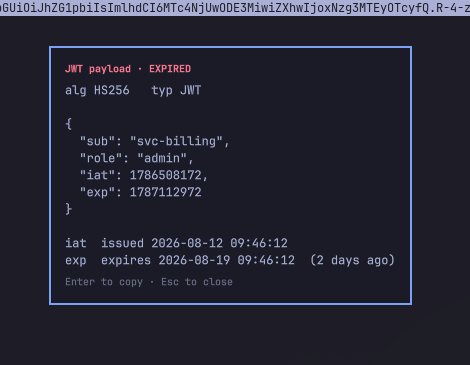
In a result (a decoded token, a formatted document, a QR code), Enter copies
and Esc closes. When the result rewrites the selection — a case change,
formatted JSON, a decode — the card shows the result with Replace and
Copy: Enter pastes it back over the text you selected, c copies it
instead. A stray Space only ever copies; nothing rewrites your text but a
deliberate Enter or a click on Replace.
What ships
| Selection | Actions |
|---|---|
| anything | Search · GitHub · Ask agent · Copy · Run |
| url | Open · QR |
| Mail · QR | |
| ip | Whois |
| jwt | Decode, expiry flagged |
| json | Format · Minify |
| base64 / hex / percent-encoded | Decode |
| epoch | Local time |
| path | Open · Edit · Reveal · Terminal here |
| text | Count · UPPER · lower · Title · snake_case · kebab-case · camelCase · To base64 · Percent-encode |
Run asks before it runs anything. Whois stays hidden until you allow
network actions.
Detection validates rather than guesses: Decode appears only on a JWT whose
header and payload really parse, and/or and 24/7 are not paths, a clock is
not an IPv6 address, prose that mentions an error is not an error, and a
lowercase word that happens to decode is not base64.
Add your own
Blip's own actions get no special treatment. They are JSONC files in the same format, read from the same kind of folder, and anything you write beats them. Reuse an id to replace one, or switch it off entirely.
Drop a .jsonc in ~/.config/omarchy/blip/actions/. No code, no restart.
{
"id": "acme.jira",
"label": "Ticket",
"icon": "",
"when": { "matches": "^[A-Z]{2,10}-[0-9]+$" },
"run": { "exec": ["xdg-open", "https://jira.acme.com/browse/${text}"] }
}
An action can open a url, run a script over the selection, or call another plugin over IPC and show whatever comes back.
What ships covers what everyone needs. What makes Blip yours is the file only you would write.
Say you look up domains all day. Blip's Whois fires on an IP only — a bare
hostname is plain text to it. So write your own:
{
  "id": "me.whois",
  "label": "Whois",
  "network": true,
  "host": "the domain's registry",
  "when": {
    "notTypes": ["ip", "url", "email"],
    "matches": "^[a-zA-Z0-9-]+(\\.[a-zA-Z0-9-]+)+$",
    "notMatches": "\\.(rs|js|ts|py|go|sh|md|json|toml|lock|css|html?)$"
  },
  "run": { "script": "whois-domain.sh" },
  "output": "show"
}
#!/bin/bash
domain=$(head -c 253 | tr -d '[:space:]')
whois "$domain" | head -40
That notMatches earns its place: main.rs and package.json look exactly
like domains until you say they are not.
The rest is the same shape with a different day job. A pod name goes to
kubectl describe, a git SHA opens the commit on your host, a customer id
opens the account in your admin panel. Select it, press one letter, read the
answer without leaving the window.
Bundle a few into a folder and you have a pack, publishable anywhere. You clone
it into packs/ yourself, and it loads the moment it lands.
git clone https://github.com/…/blip-pack-… ~/.config/omarchy/blip/packs/devtools
A pack's scripts run as you, so read them first.
A pack can teach Blip to spot things it has never heard of. A regex is enough to turn a bare hostname, a ticket id or an order number into something the bar answers.
ACTIONS.md is the full reference.
Search
Search opens DuckDuckGo by default. The control panel offers Google, Brave
and Kagi, or takes a url of your own with %s where the selection goes:
https://lobste.rs/search?q=%s
Blip's own ${enc} works there in place of %s, as do ${text} and ${type},
so a custom search can key off what was detected. A url with no placeholder is
refused; Search falls back to DuckDuckGo.
GitHub sits beside it on g and goes straight to GitHub code search, which
wants you signed in.
Control panel
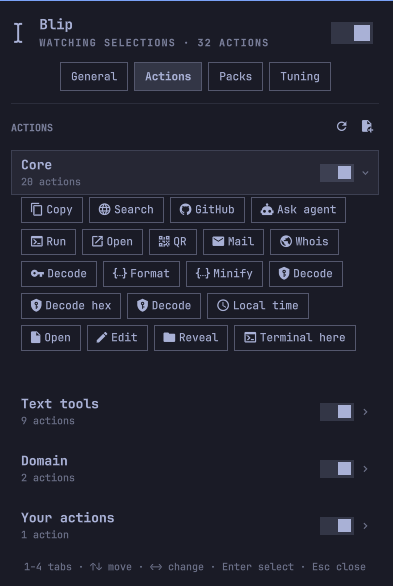
Click the bar icon and the whole panel fits in one view: the armed switch, the
behaviour toggles, the search engine, and a row per module. A module opens into
a grid of chips — the same chips the bar shows — and clicking one turns that
action off or on, so you can drop the text tools, or just Run, without
touching a file; the module's switch, or Space, flips them all at once. Packs
list in their own fold, Enter opens a pack's folder and x removes it after
asking — see
ACTIONS.md — and the sliders sit folded under
Fine-tuning, values readable on the closed row. ↑↓ move, ←→ fold and
unfold, Enter selects. Right-click the icon to arm and disarm without opening
it; middle-click shows the bar for the current selection. A keybind opens it
too: omarchy-shell blip-panel toggle.
Setup > Plugins > Blip holds the same settings. Hide the icon with the Show
the bar icon setting rather than by removing the widget from the bar: the
entry in shell.json is what keeps the plugin enabled.
Remove
omarchy plugin remove io.github.yogeshojha.blip
That takes the plugin and its bar entry. Your actions, your packs and what you
allowed live in ~/.config/omarchy/blip/; delete that too if you want nothing
left behind.
Privacy
- Selections are never written to disk and never logged. They go from
wl-pasteinto the shell's memory and no further. - Nothing is sent anywhere by default. An action that transmits the selection
must declare
network: true. Those stay hidden until you allow network actions, and Blip asks before the first send, naming the action and the host.omarchy-shell blip forgetclears what you allowed. Handing the selection to an app you can see, such as your browser or your agent, is not gated. - Packs are folders you put under
~/.config/omarchy/blip/packs/yourself. Blip reads what is there and never downloads or updates one. - Scripts and the clipboard get the selection on stdin.
execactions expand it into their argv, where it is visible in the process table while the command runs. - Password managers are skipped by window class and title, and so is any selection a client marks sensitive.
- Screen sharing disarms Blip. No bar appears over a recording or a call.
- Blip binds keys in Hyprland while the bar is up, so an unfocused surface can still hear them, and right-click for as long as it is armed. Every bind passes the press through to the window underneath, and all of them go when you disarm, disable, or remove Blip.
Development
git clone https://github.com/yogeshojha/blip.git && cd blip
node test/run.js
omarchy plugin validate .
Detect.js, Actions.js, and Transforms.js are pure, with no QML and no IO.
Service.qml watches and orchestrates, Popup.qml is the layer-shell surface,
Runner.qml executes, BarWidget.qml is the indicator and the control panel.
To run a working copy:
rsync -a --delete --exclude .git --exclude test . ~/.config/omarchy/plugins/io.github.yogeshojha.blip/
omarchy-restart-shell
QML changes need that restart. Action files under ~/.config/omarchy/blip/ do
not; they reload as you save. Logs are journalctl -t omarchy-shell -f.
Licence
MIT.