
MX Control
Logitech device settings for the Omarchy bar — plus a full settings window.
A Quattro plugin for Logitech MX mice and keyboards using Solaar’s HID++ support. Available controls depend on the model, firmware, and connection; receiver support does not guarantee support for every attached peripheral.
Inspired by Logi Options+, with partial hardware-settings coverage. Supported HID++ controls now have plugin-owned shortcuts, exact app-specific overrides, directional gestures, and short shortcut sequences on Omarchy’s Lua-based Hyprland. Flow, cloud backup, firmware management, and the full Smart Actions workflow are not implemented. Real-device validation of the new action runtime is still required. See the feature parity review and roadmap.
It lives inside the long-running omarchy-shell process. It never starts a second Quickshell instance.
Install
Review the code first. Plugins run unsandboxed as your user.
omarchy plugin add https://github.com/zachwilke/omarchy-mxcontrol.git
That clones the repo into ~/.config/omarchy/plugins/io.github.zachwilke.mx/ and leaves it disabled. Read the files, then:
omarchy plugin enable io.github.zachwilke.mx
omarchy pkg add solaar
Or do both in one step after you have reviewed the source:
omarchy plugin add https://github.com/zachwilke/omarchy-mxcontrol.git --enable
omarchy pkg add solaar
Solaar is optional until you want to change settings. Without it the bar still lists connected MX devices. After installing Solaar, reconnect the device (or toggle its Bluetooth channel / unplug and replug the receiver) so the hidraw udev rules apply.
Move the widget if you want it somewhere else:
omarchy bar move io.github.zachwilke.mx --section right
omarchy plugin add only clones files and toggles enabled state. It does not run install hooks, does not use sudo, and does not overwrite your Hyprland or Solaar config.
Remove
omarchy plugin disable io.github.zachwilke.mx
omarchy plugin remove io.github.zachwilke.mx
Removal deletes the plugin checkout and takes the widget out of the bar. On unload the helper stops and removes its command files and lock from the private runtime directory ($XDG_RUNTIME_DIR/omarchy-mx/ or /run/user/$UID/omarchy-mx/). A status.json snapshot may remain as a warm-start cache; it lives on tmpfs and vanishes on reboot, and the UI treats it as stale until a live helper heartbeats it again.
Left in place on purpose:
| Path | Why it stays |
|---|---|
solaar package |
Shared system package; other tools may use it |
~/.config/solaar/ |
Your saved device profiles |
| Device onboard settings | DPI, SmartShift, remaps live on the hardware |
~/.config/omarchy-mx/ |
Local profiles, software action assignments, and pointer acceleration choices |
Nothing in ~/.config/hypr/ or the rest of ~/.config/omarchy/ is rewritten except the bar layout entry that omarchy plugin remove already owns.
Usage
| Input | Action |
|---|---|
| Left click | Open or close the bar popover |
| Right click | Re-read everything live from the device (bypasses the settings cache) |
| Hover i | Explain that setting |
| Escape | Close the popover or settings window |
j / k |
Move the popover cursor |
| Enter | Activate the focused control |
r in the popover / Ctrl+R in settings |
Refresh |
| All settings | Open the full settings window |
omarchy-shell shell summon io.github.zachwilke.mx '{}'
omarchy-shell shell hide io.github.zachwilke.mx
summon opens the settings window (remaps, divert/gestures, keyboard extras, profiles). The bar icon still opens the lean popover.
Bar popover
- Battery and connection (Bluetooth, USB, Bolt, Unifying, Lightspeed)
- Sensitivity in 50 DPI steps, including 8K (8000 DPI)
- SmartShift, invert scroll, high-resolution scroll
- Thumb-wheel invert
- Easy Switch hosts
Settings window
A sidebar on wide windows and wrapping tabs on smaller windows separate device controls, button/key actions, Easy Switch, local profiles, and Advanced settings. The window follows the active Omarchy theme and lists only controls reported by the device.
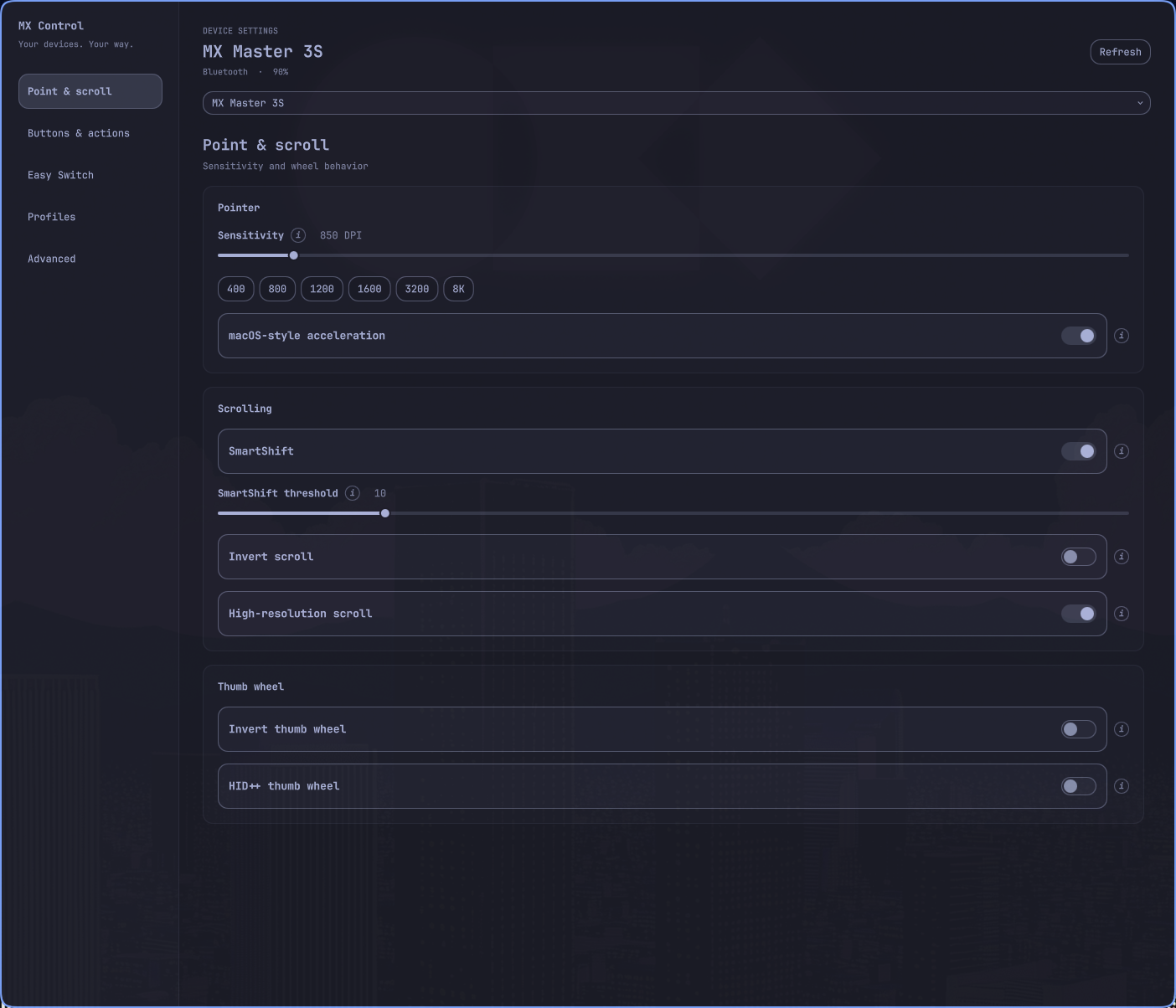
- Hardware button/key remaps, shown as labeled controls
- Shortcuts and sequences of up to eight shortcuts, with a recorder and common presets
- App-specific overrides: select an open app or enter its exact Hyprland class
- Click plus up/down/left/right gestures on controls that expose raw XY reporting
- Optional external Solaar rule handling remains under Hardware remaps & Solaar rules
- Advanced scalar and keyed settings, including pointer speed and report rate when supported
- Rename Easy Switch channels (names are stored on the device and show on every computer)
- Keyboard Fn swap, backlight, platform, disable Caps/Win/Insert
- Local profiles on this computer (
~/.config/omarchy-mx/profiles.json) — not Logi cloud, Easy Switch channel is not stored - macOS-style acceleration per mouse, saved with each profile (see below)
Pointer acceleration
Coming from a Mac, Linux's default pointer feel can seem flat. Point & scroll (and the bar popover) has a macOS-style acceleration toggle for each mouse. On, the pointer speeds up as you move faster and stays precise on slow moves; DPI remains the base tracking speed. Off restores whatever your Hyprland input.accel_profile says.
The toggle is stored per device in ~/.config/omarchy-mx/pointer.json and captured by Save on the Profiles page, so a "Work" profile can be accelerated while "Games" stays flat. Applying a profile restores its acceleration choice along with the hardware settings.
Under the hood the helper builds a libinput custom acceleration curve scaled to the mouse's current DPI and hands it to Hyprland at runtime through hl.device({ name = ..., accel_profile = "custom …" }) over the compositor socket. It only ever names the Hyprland device that belongs to that mouse's evdev node, never edits ~/.config/hypr/, re-applies after a Hyprland config reload, and reverts to the global profile when the toggle is turned off or the helper exits normally. If Hyprland has input.force_no_accel on, acceleration cannot apply and the page says so.
Software actions
Open Buttons & actions (or Keys & actions), choose a control, leave Application at All apps, and record a shortcut or select a preset. Save it to activate the action. You can then save overrides for individual apps. An All apps action is required so the control remains useful outside those apps; removing it also removes that control’s app overrides.
The recorder handles letters, numbers, F1–F12, and common navigation keys. Other key names, such as XF86AudioPlay, can be entered manually.
For sequences, enter one shortcut per line (up to eight), for example CTRL+c followed by CTRL+Tab. Steps are separated by 60 ms. They target the same window, and execution stops if focus changes. These are application shortcuts, not arbitrary shell commands or compositor bindings.
For gestures, select Directional gestures on a supported control. Configure its click action and any of the four directions. An empty direction does nothing. Actions fire on release; a short movement is treated as a click. Motion is captured while a gesture-enabled button is held, including when an app override uses a simple shortcut. Complex multi-segment gestures, configurable delays, and app-launch steps are not implemented.
Assignments live in ~/.config/omarchy-mx/actions.json, separately from hardware profiles. The helper automatically resumes saved assignments (and saved pointer acceleration) when the plugin loads. It uses Solaar's library and its own notification read handles; the Solaar GUI does not need to run. Controls already diverted to Solaar are rejected: set their rule handling to Regular first, and do not run a separate Solaar rule for the same control.
The action runtime uses temporary diversion, verifies the device’s reported flags, and restores regular input when an assignment is removed or the helper exits normally. If the helper is forcibly killed or a device cannot acknowledge restoration, reconnect that device. After a device wakes or reconnects, a heartbeat checks/rearms its controls (up to 60 seconds). The UI reports listener/dispatch failures. Hardware testing across actual device models and transports remains necessary.
Configure
Settings live on the bar layout entry in ~/.config/omarchy/shell.json. The plugin does not keep a separate config file.
| Key | Default | Meaning |
|---|---|---|
refreshIntervalSec |
15 |
How often to rescan hidraw when the helper is idle. Cheap sysfs only — it does not open HID++. |
selectedDevice |
"" |
Preferred device id; empty prefers the mouse |
External dependencies
Nothing is installed automatically. omarchy plugin add only clones this repo.
Required (already on Omarchy)
| Dependency | Package | Used for |
|---|---|---|
| Omarchy 4 / Quattro | omarchy |
Hosts the plugin inside omarchy-shell (Quickshell). No second Quickshell process. |
| Python 3 | python |
Runs mxctl.py. Only the stdlib is imported unless Solaar is present. |
| bash | bash |
Optional Reload udev command line only. |
Optional
| Dependency | Package | License | Used for |
|---|---|---|---|
| Solaar | solaar (Arch extra) |
GPL-2.0-or-later | HID++ read/write through logitech_receiver and solaar.configuration. Also ships the udev rules that make /dev/hidraw* user-accessible. |
| BlueZ | bluez |
GPL-2.0-or-later | Battery overlay via Quickshell.Bluetooth when the HID++ helper is not open. |
| udev | systemd |
LGPL-2.1-or-later | Only if you click Reload udev. |
Install Solaar yourself:
omarchy pkg add solaar
The panel’s Install Solaar button runs that same command in a terminal (omarchy-launch-tui). It does not install packages silently.
Commands this plugin may start
| Command | When | Privilege |
|---|---|---|
python3 mxctl.py discover |
Periodic hidraw scan | User |
python3 mxctl.py serve |
After you open the panel (keeps hidraw open) | User |
python3 mxctl.py write-cmd |
Panel setting changes (writes one cmd-*.json per change) |
User |
python3 mxctl.py runtime-dir |
Creates the private runtime directory | User |
python3 mxctl.py cleanup |
Plugin unload / remove | User |
hyprctl -j clients |
Populate the application picker when settings opens | User |
Hyprland command socket: j/activewindow |
Resolve and verify an action’s target window | User |
Hyprland command socket: /dispatch hl.dsp.send_shortcut(...) |
Run a user-configured shortcut | User |
omarchy-launch-tui omarchy pkg add solaar |
Install Solaar button | User; you confirm the package install |
omarchy-launch-tui sudo bash -lc 'udevadm control --reload-rules && udevadm trigger' |
Reload udev button | You type your password in a terminal. Never run automatically. |
No pip packages, no AUR-only packages, no remote downloads, no install hooks.
Runtime files
$XDG_RUNTIME_DIR/omarchy-mx/ when that variable is set, otherwise /run/user/$UID/omarchy-mx/ (status.json, a cmd-*.json command spool, mxctl.lock). Each command is its own spool file so quick bursts of changes are never lost. Created mode 0700 as your user. Never /tmp. Command files and the lock are deleted by mxctl.py cleanup when the plugin unloads; leftover commands from a dead session are purged at the next start so they can never replay.
Privileges
The helper talks to /dev/hidraw* as your user. Solaar’s udev rules grant that access after you install Solaar and reconnect the device. The plugin never writes /etc, never edits ~/.config/hypr/, and never starts a second Quickshell process. Pointer acceleration is set at runtime over Hyprland's own socket and is not persisted into any Hyprland config file.
~/.config/solaar/ is Solaar’s own store. This plugin may update it when you change a setting (through Solaar’s library). Removal does not delete that directory.
Develop
Action tests use synthetic HID++ packets, mocked control flags, and mocked Hyprland calls. They never send keys to real applications or change connected hardware.
omarchy plugin validate .
python3 mxctl.py discover
python3 mxctl.py cleanup
python3 -m unittest discover -s test -v
node test/plain_hid_text.js
node test/settings_model.js
python3 test/service_recovery.py # isolated integration test; requires Quickshell
Battery: readings come from the kernel's hidpp_battery_* power-supply nodes first — the kernel keeps them current from device battery events, so they are fresh at zero HID++ radio cost and work for every connection type, even before the helper ever runs. While the helper is serving it re-checks them on every wake (≤30 s) and publishes on change; the HID++ radio read remains only as a slow fallback for devices the kernel does not cover. Bluetooth devices additionally get the BlueZ battery overlay as a last resort.
Idle cost: the bar path only scans sysfs (no Solaar import, no hidraw open). The manifest declares a service entry point, so the shell instantiates one shared Service for the whole plugin — every monitor's bar widget and the settings window drive the same helper, device selection, and snapshot. On shells without plugin services, each widget falls back to a local instance (passive except for one active owner). After you open the panel the helper blocks on inotify for spooled cmd-*.json files and hidraw plug events; a 60-second heartbeat re-reads only the battery and stamps the snapshot fresh. Initial reads stream: the helper publishes after every HID++ setting read, so the first controls paint while the rest of the burst is still running.
While macOS-style acceleration is on for any mouse, the helper also keeps one connection to Hyprland's event socket so it can re-send the device curve after configreloaded; with every mouse on the system default that socket stays closed. When software actions are configured, independent read handles block on HID++ button/motion notifications; their workers also block when idle. Shortcuts use direct Hyprland socket requests with a 350 ms deadline and bounded replies, without spawning processes. The 60 ms sequence spacing applies only between steps. Ordinary setting changes keep action listeners running; profile operations pause only the target device. Listener failures wake the helper to restore input on its main thread, and retries back off up to 60 seconds. Assigned controls are checked on the existing heartbeat so they can recover after sleep. With no assignments, these listeners are not started.
The settings service backs off after helper crashes and bounds its initial snapshot polling to 60 seconds; file watching continues afterward. See the performance and stability review for measurements, regression coverage, and remaining hardware checks.
Saved files under ~/.config/omarchy/plugins/io.github.zachwilke.mx/ reload automatically. If a change looks stale:
omarchy-shell shell rescanPlugins
omarchy restart shell
License
GPL-2.0-or-later. Copyright © 2026 Zach Wilke.
The Python helper imports Solaar’s logitech_receiver library, which is also GPL. See Solaar.