
YouTube Clipper
Cut a section out of a YouTube video without downloading the whole thing.
The video is previewed through YouTube's own embedded player, so scrubbing and
choosing the range costs nothing. Nothing is fetched until you press Clip &
save, and then yt-dlp downloads only the span you picked — a thirty second
clip out of a three hour stream downloads thirty seconds.
The panel and the web UI both follow the accent of your current Omarchy theme.
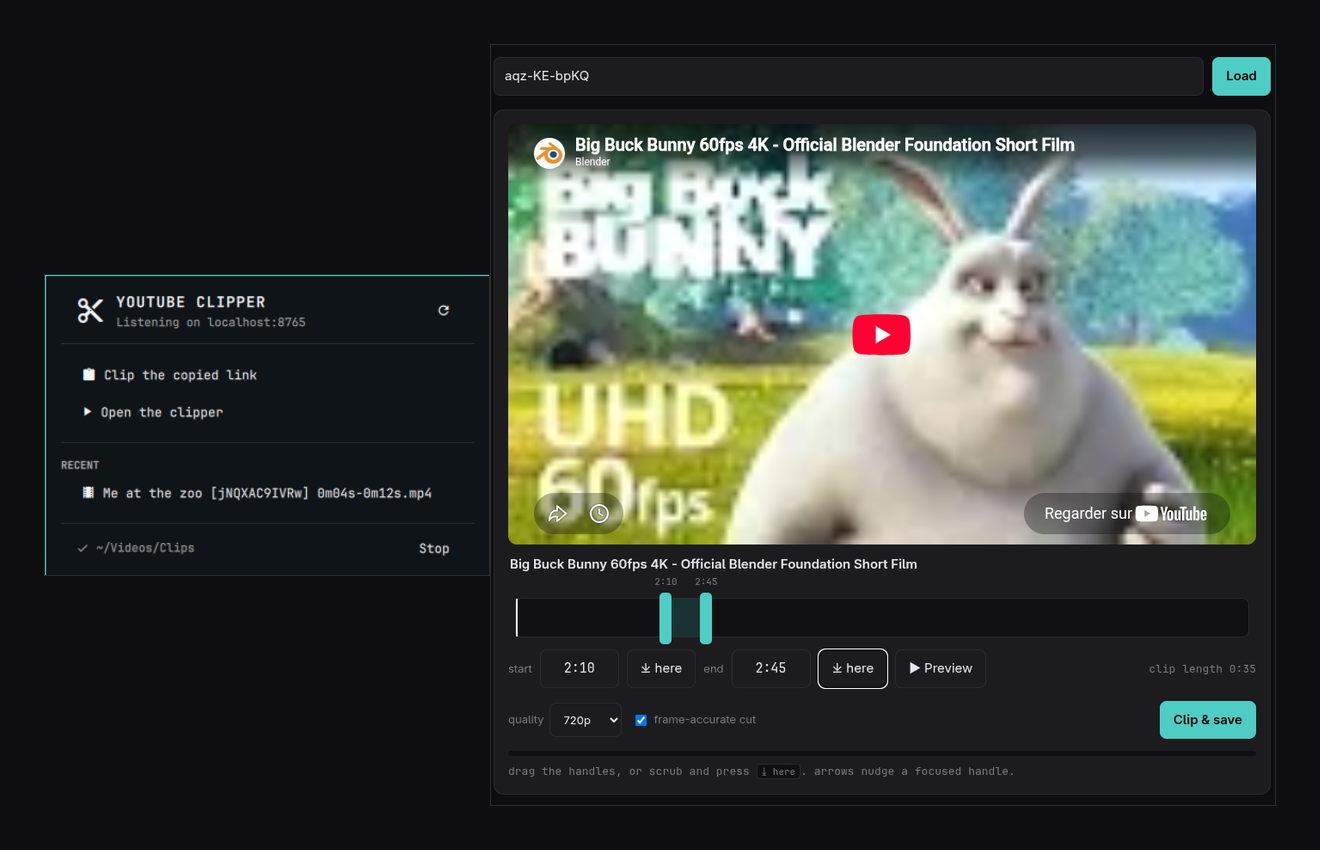
Left: the bar panel — clip the copied link, open the clipper, recent clips. Right: the clipper, previewing a video through YouTube's player with a 35 second range picked out of it.
Requirements
Install these first — the clipper cannot work without them:
sudo pacman -S yt-dlp ffmpeg
yt-dlp must be 2022.04.08 or newer; --download-sections, which is what
makes this a clipper rather than a downloader, does not exist before that.
ffmpeg is not optional — yt-dlp uses it to cut the section.
Install
Installing is two commands. The first adds the bar widget; on its own the clipper does not run, because Omarchy has no way to run a plugin's installer for it.
omarchy plugin add https://github.com/Zedster07/omarchy-ytclip --enable
The second sets up the local service and the launcher entry. Without it there is no service, and the widget has nothing to talk to:
~/.config/omarchy/plugins/io.github.zedster07.ytclip/bin/ytclip-install
It prints service: active on port 8765 -> ~/Videos/Clips when it worked. If
the service did not start it says so, shows the log, and exits non-zero — it
will not report success over a service that died.
Options: --port 8765, --out ~/Videos/Clips, --force. Re-run it after
changing the port or folder, and with --force after switching themes if you
want the launcher icon restyled.
Re-running is safe: if you have edited the service unit or the launcher entry,
the installer keeps your copy, prints the difference, and stops. It replaces
them only when you pass --force.
Usage
- Click the bar widget for the panel.
- Middle-click it to clip whatever YouTube link is on the clipboard — straight to the trimmer, no panel.
- In the panel: Clip the copied link, Open the clipper, your recent clips (click one to play it), and a start/stop for the service.
- In the clipper: paste a link, drag the two handles,
⤓ heresnaps an edge to the playhead, arrow keys nudge a focused handle by 0.1s (shift for 1s), Preview plays just the selection. Clip & save writes the file.
Clips are named <title> [<id>] <start>-<end>.mp4.
Frame-accurate cut re-encodes around the boundaries so the clip starts and ends on the frame you picked rather than the nearest keyframe. Turn it off for a faster, keyframe-aligned cut.
A hotkey can drive it directly:
qs -p /usr/share/omarchy/shell ipc call io.github.zedster07.ytclip clip
Configuration
Set in Omarchy menu → Plugins → YouTube Clipper:
| Setting | Default | Notes |
|---|---|---|
| Server port | 8765 |
Must match the installed service. Re-run the installer with --port to change both. |
| Where clips are saved | ~/Videos/Clips |
The panel lists this folder. |
| Recent clips to list | 6 |
0 hides the section. |
Updating
omarchy plugin update io.github.zedster07.ytclip
~/.config/omarchy/plugins/io.github.zedster07.ytclip/bin/ytclip-install
Both, in that order. The first pulls the new code, but Omarchy has no way to run a plugin's installer, so it leaves the service unit as it was and leaves the old server process running — the update is on disk without being in use. The second rewrites the unit and restarts the service onto the new code.
Re-running the installer is safe. It knows the units it has written itself, so
one left by an earlier version is upgraded in place; only a unit you actually
edited is refused, and --force still overrides that.
To check what is really running:
curl -s -H "X-Ytclip-Token: $(curl -s localhost:8765/ | grep -oE '"[A-Za-z0-9_-]{40,}"' | head -1 | tr -d '"')" \
  localhost:8765/api/health
The version it reports is the one the live service loaded. If it trails the
version in manifest.json, the service has not been restarted onto the
update yet.
If something goes wrong
Open the clipper: a missing or too-old tool is reported at the top of the page as soon as it loads, rather than when you first press Clip & save.
"yt-dlp is not on the service's PATH" — but my terminal finds it. Both can
be true. The service is a systemd user unit and does not inherit your shell's
PATH, so a yt-dlp installed by pipx or pip install --user into
~/.local/bin is invisible to it. Re-run bin/ytclip-install: it resolves
yt-dlp where you see it and writes that directory into the unit's PATH.
The clip comes out lower quality than I picked. Update yt-dlp. Which formats YouTube offers changes, and older builds may only be able to reach a single low-resolution muxed format.
The service will not start. Check it directly:
systemctl --user status ytclip.service
journalctl --user -u ytclip.service -n 30
A port clash is the usual cause; bin/ytclip-install --port 8766 moves it.
Change the same port in Omarchy menu → Plugins → YouTube Clipper so the
widget follows.
Removal
~/.config/omarchy/plugins/io.github.zedster07.ytclip/bin/ytclip-uninstall
omarchy plugin remove io.github.zedster07.ytclip
The uninstaller stops and deletes the service and the launcher entry. Clips already saved are left alone.
What this plugin does to your system
Omarchy plugins run unsandboxed with your user's permissions. Everything this one touches is listed here.
External commands
| Command | From | Used for |
|---|---|---|
yt-dlp |
yt-dlp |
Downloading the chosen section. Required, 2022.04.08+. |
ffmpeg |
ffmpeg |
yt-dlp merges and cuts with it. Required. |
python3 |
python |
Runs the local server. Required. |
wl-paste |
wl-clipboard |
Reading a link off the clipboard. |
systemctl --user |
systemd | Service status and start/stop. |
xdg-open |
xdg-utils |
Opening a saved clip. |
omarchy-launch-webapp |
omarchy | Opening the web UI. |
rsvg-convert or magick |
librsvg / imagemagick |
Rendering the launcher icon, at install time only. |
A local service. bin/ytclip-install writes
~/.config/systemd/user/ytclip.service and enables it, so a small Python HTTP
server starts at login (about 9 MB resident). It binds to 127.0.0.1 only
and is never reachable from the network.
Loopback alone is not enough, because a web page you open can still send
requests to it. Every /api/ call therefore carries a random token minted at
start-up and served only inside the page. A site you visit cannot read that
page, so it cannot learn the token, and it cannot attach the header carrying it
without a preflight this server never answers. Calls are also refused unless
Host names this machine — which is what stops DNS rebinding — and unless any
Origin present is our own. POST bodies must be application/json, are
capped at 64 KB, and only the heights the interface offers are accepted. At
most two clips run at once.
Nothing is overwritten without consent. The installer refuses to replace a
service unit or launcher entry you have edited, showing the diff and stopping;
--force is the explicit opt-in. The plugin never touches Hyprland, Omarchy, or
any other application's configuration.
Files written. Clips go to the configured folder (~/Videos/Clips by
default). The installer also writes the unit above, a .desktop entry at
~/.local/share/applications/YouTube Clipper.desktop, and a PNG under
~/.local/share/icons/hicolor/256x256/apps/. The uninstaller removes all of
them.
The clipboard is read only when you ask for it — the middle-click action or the panel button — never on a timer.
Network. yt-dlp talks to YouTube when you clip. The web UI loads
YouTube's IFrame player API from https://www.youtube.com/iframe_api and embeds
the player, so opening the clipper contacts YouTube and YouTube can see that
embed like any other. Nothing is sent anywhere else, and the plugin has no
telemetry.
Theme reading. The server reads
~/.local/state/omarchy/current/theme/colors.toml to pick up your accent.
Requirements
yt-dlp,ffmpeg,pythonwl-clipboardfor the clipboard actionslibrsvgorimagemagick, only to render the launcher icon at install time
Scope
YouTube only. The preview relies on YouTube's IFrame player API, which is what makes choosing a range possible before downloading anything; other sites have no equivalent that works without an API key. To trim a local file, or a video from anywhere else, use omacut.
License
MIT. See LICENSE.