
Deco Mesh — Omarchy Plugin
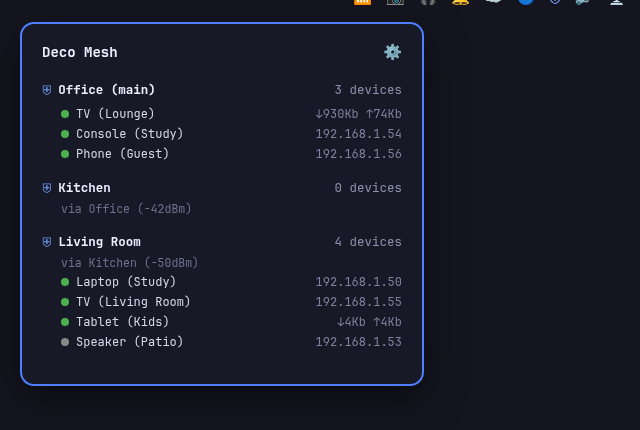
(mock data shown above — not a real network)
An Omarchy plugin that adds a bar icon for your TP-Link Deco mesh network. Click the icon to see every connected device grouped by which Deco node it's on, with live up/down speed, offline/online desktop notifications, and — for a node hopping its backhaul wirelessly through another one instead of straight to the main unit — the signal strength of that hop.
This is a bar-widget plugin: a single QML entry point (Panel.qml) that
renders both the bar icon and its floating popup, with two views — the
device tree, and a settings screen (the cog icon) for entering your Deco's
IP/username/password, with a live connection test before it saves.
Requirements
- Omarchy with plugin support (
omarchy plugincommands) - Python 3 (already present on Omarchy) — the panel offers an "Install
dependencies" button on first use, which builds a local virtualenv and
installs
requestsandpycryptodomefrom pinned, hash-verified versions (a few seconds, once). Nothing is installed automatically or without that click - A TP-Link Deco mesh with local network access to it (tested on the X50; other Deco models use the same local API family and should work, but field names can vary by firmware — open an issue if something's off)
Install
git clone https://github.com/ZestyBytes/omarchy-plugin-deco.git ~/.config/omarchy/plugins/io.github.zestybytes.deco-mesh
omarchy plugin enable io.github.zestybytes.deco-mesh
omarchy bar put io.github.zestybytes.deco-mesh
Click the new bar icon, open settings (the cog), and enter your Deco's
local IP (usually 192.168.68.1 or 192.168.0.1 — check your router or
the Deco app), the admin username (admin), and your Deco admin password.
Save runs a live test before confirming.
Remove
omarchy plugin disable io.github.zestybytes.deco-mesh
rm -rf ~/.config/omarchy/plugins/io.github.zestybytes.deco-mesh
rm -rf ~/.local/state/omarchy/deco-mesh
How it works
deco_status.py is a small headless Python helper that logs into the
Deco's local /cgi-bin/luci/;stok=... HTTPS API — a self-signed cert, and
a request/response format encrypted with RSA (for login) and AES (for
everything after) — reverse-engineered from prior community work on this
API family, notably amosyuen/ha-tplink-deco.
Panel.qml runs it every 60 seconds via a background Process and renders
whatever JSON comes back; it never talks to the Deco directly.
Your Deco's host/username/password are saved as plain JSON at
~/.local/state/omarchy/deco-mesh/config.json (0600 permissions) — outside
the plugin's own directory, so editing it doesn't retrigger Omarchy's
plugin hot-reload.
Limitations
- Read-only: this shows your network, it doesn't change anything on your Deco (no reboot, no guest-wifi toggle). That's deliberate for now, not a missing feature — see the repo's issues if you'd like one added.
- The per-node client breakdown, backhaul routing, and signal strength come from endpoints not officially documented by TP-Link; they've worked reliably in testing but could shift with a firmware update.