
Veilleuse
Veilleuse is a native Omarchy Quattro shell plugin for display brightness, night light temperature, gamma, and day/night schedules. Its bar widget opens a panel with Home, Automation, and Settings views.

Installation · Configuration · Usage · Troubleshooting · Documentation
Features
- Brightness from 1–100% for the focused or a selected enabled display, through
omarchy-brightness-display. - Global night light temperature from 2500–6500 K and gamma from 0–100%, through
hyprsunset. - Day/night schedules with optional brightness and gamma for each period, plus timed night light snooze.
- Keyboard navigation, pointer hover focus, and English/Spanish interface text.
- Optional, conflict-checked Hyprland shortcut with a backup of the original bindings file.
- Python standard library only, private atomic state storage, and no additional persistent daemon.
Screenshots
| Home | Automation | Settings |
|---|---|---|
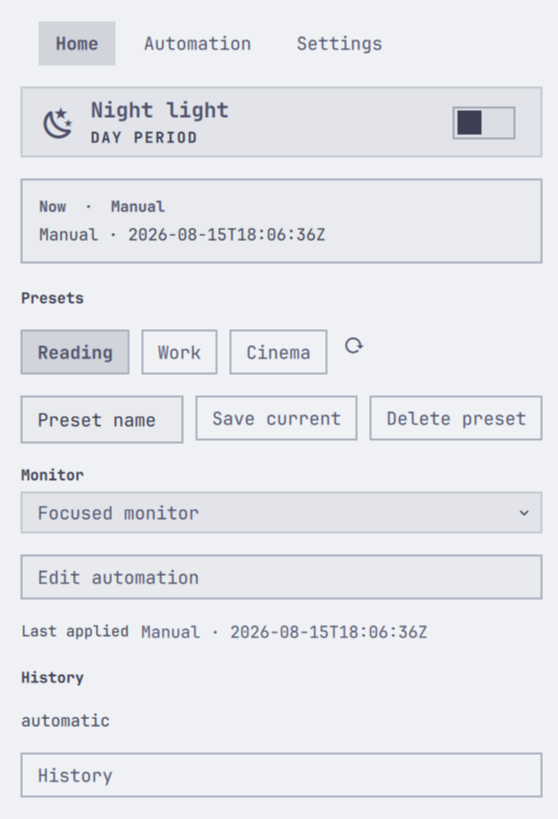 |
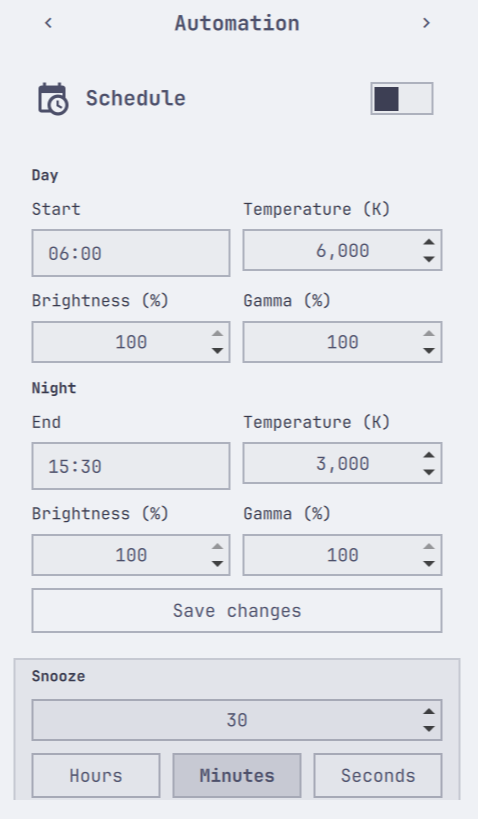 |
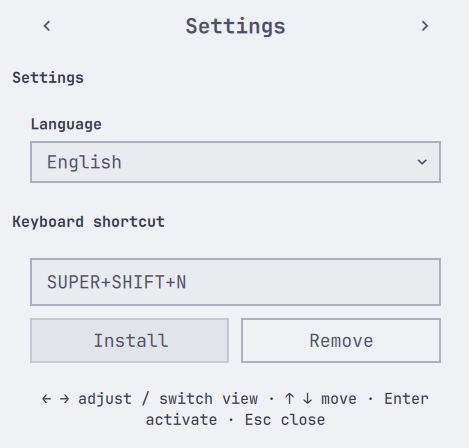 |
Requirements
Use an Omarchy Quattro environment with its native shell/plugin tooling and QML components (qs.Commons, qs.Ui), Hyprland, and a running hyprsunset backend. The helper requires Python 3.12+ and the Omarchy commands omarchy-monitor-state and omarchy-brightness-display on PATH.
There are no Python packages to install. Node.js is needed for development tests only. This is an Omarchy shell plugin, so the QML files are not a standalone application.
Installation
Run in your Omarchy desktop session:
omarchy plugin add https://github.com/ZnOw01/Veilleuse.git --enable --yes
Click the Veilleuse bar widget to open the panel. You can also toggle it through shell IPC:
omarchy shell io.github.znow01.veilleuse toggle
To update and reload the UI:
omarchy plugin update io.github.znow01.veilleuse --yes
omarchy restart shell
Before uninstalling, remove any shortcut installed through Settings or shortcut remove; removing the plugin does not clean up that binding. Then run:
omarchy plugin remove io.github.znow01.veilleuse --yes
Plugin removal leaves Veilleuse state, hyprsunset.conf, and user configuration backups in place. If you disabled a schedule and want it restored, enable it before removing the plugin.
Configuration
Use Home to select a monitor, Automation to edit the schedule, and Settings to choose English or Spanish and install/remove a shortcut. No API keys or credentials are required.
The panel persists preferences through Omarchy's inline bar-entry settings:
| Setting | Default | Purpose |
|---|---|---|
locale |
en |
Interface language (en or es) |
monitor |
focused |
Brightness target: focused display or an enabled monitor name |
shortcutKeys |
SUPER+SHIFT+N |
Shortcut editor value; does not install a binding by itself |
helperPath |
Bundled scripts/veilleuse-control |
Optional helper executable override, typically for development |
These settings are separate from ~/.config/veilleuse/config.json, which currently stores only the backend schema. Do not add language or monitor fields to that file.
| Environment variable | Required? | Purpose |
|---|---|---|
XDG_CONFIG_HOME |
No | Absolute configuration base; defaults to ~/.config |
XDG_STATE_HOME |
No | Absolute private-state base; defaults to ~/.local/state |
HOME |
Normal user environment | Home directory used for fallback paths |
PATH |
Normal Omarchy environment | Resolves Python and native backend commands |
PYTHON |
No; checks only | Interpreter for the check scripts; defaults to python3 |
Relative XDG bases fall back to the home-directory defaults. Omarchy's shell IPC also relies on its session environment; run IPC commands from that session.
Usage
Home controls night light, brightness, temperature, and gamma. Monitor selection changes the brightness target; color temperature and gamma are global hyprsunset controls.
Automation edits day/night times in 24-hour HH:MM format. Day temperature accepts 5900–6500 K; values at or above 6000 K are saved as natural color. Night temperature accepts 2500–5000 K. Optional brightness (1–100%) and gamma (0–100%) fields can be left blank to omit that period's scheduled display value. Snooze temporarily applies natural color for the selected duration.
Veilleuse reconciles schedule and snooze state every 30 seconds while the panel component is loaded, including when the panel is closed. Pending requests defer reconciliation. If the shell/plugin is stopped, Veilleuse does not apply scheduled brightness/gamma or process snooze expiration until reconciliation resumes. Native hyprsunset scheduling is separate.
Settings selects the interface language and manages an optional global shortcut. Veilleuse does not install a shortcut automatically. Installation checks for conflicts in bindings.lua.
| Input | Action |
|---|---|
↑ / ↓ |
Move the cursor between rows |
← / → on a slider |
Adjust brightness/gamma by 1 percentage point or temperature by 50 K |
← / → on other rows |
Navigate views or grouped actions, depending on the row |
Enter / Space |
Activate the focused control or open its editor/dropdown |
Esc |
Leave an editor, close a dropdown, or dismiss the panel |
| Pointer hover | Focus the hovered row for keyboard adjustment |
Text editors and dropdowns handle their own keys while focused. See CLI.md for diagnostics, display commands, schedule examples, shortcut management, and shell IPC.
Global shortcut
Run these commands from the repository root or installed plugin directory:
./scripts/veilleuse-control shortcut status
./scripts/veilleuse-control shortcut install --keys "SUPER, V"
./scripts/veilleuse-control shortcut remove
Installation manages only this block in ~/.config/hypr/bindings.lua:
-- >>> Veilleuse shortcut >>>
o.bind("SUPER + V", "Veilleuse", "omarchy-shell -q io.github.znow01.veilleuse toggleNightlight")
-- <<< Veilleuse shortcut <<<
Before the first installation/update, the helper creates a bindings.lua.bak backup. Removal deletes only the managed block and preserves other user edits. Check the returned reload result: the file can be saved successfully even if hyprctl reload fails.
Troubleshooting
| Symptom | Check or action |
|---|---|
A slider shows — or a backend is unavailable |
Run status and preflight from the plugin directory; inspect JSON availability/error fields. Check the running hyprsunset backend and detected monitor names. Independent controls can still work. |
| Arrow keys change views instead of a slider | Hover the slider row or select it with ↑ / ↓. |
| Updated UI is not visible | Run omarchy restart shell to reload QML components. |
| Shortcut does not trigger | Run shortcut status, check for collisions and reload errors, and confirm that the plugin is loaded. |
| Schedule or snooze does not resume | Confirm the shell/plugin is loaded; run reconcile to apply the current state. |
| A schedule transaction reports a conflict | Review hyprsunset.conf and its backup before retrying. Keep the pending recovery record; do not overwrite it to bypass the conflict. |
Diagnostic commands, run from the repository root or installed plugin directory:
./scripts/veilleuse-control status
./scripts/veilleuse-control preflight
./scripts/veilleuse-control shortcut status
status and preflight can exit zero with failed checks in their JSON payload. See the CLI reference for response handling.
Development
From a checkout, run both quality gates:
./scripts/check.sh
./scripts/check_hygiene.sh
CI uses Python 3.12 and Node.js 24. Tests cover backend behavior, JavaScript models, and QML source contracts; they do not launch a real GUI. The gate runs qmllint and omarchy-plugin-validate when available and prints SKIP otherwise. See CONTRIBUTING.md for setup and review expectations and TEST_INFRA.md for test commands and limits.
Documentation
| Document | Purpose |
|---|---|
| CLI.md | Commands, parameters, response handling, and shell IPC |
| PROJECT.md | Component map, request flow, persistence, and safety contracts |
| CONTRIBUTING.md | Development environment, verification, and contribution conventions |
| TEST_INFRA.md | Automated coverage and manual verification limits |
| CHANGELOG.md | Release history |
| AUDIT.md | Dated technical audit and its verification evidence |
License
MIT, copyright 2026 ZnOw01.