
Eight Sleep for Omarchy
Your Eight Sleep Pod in the Omarchy bar.
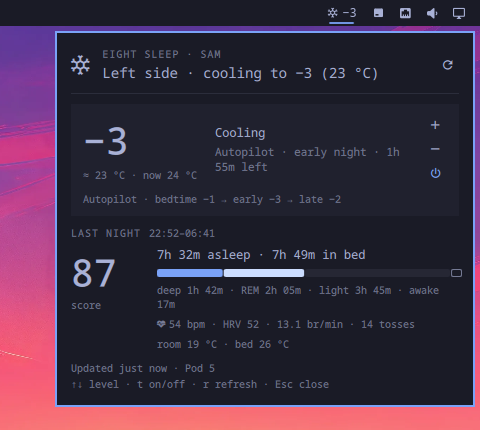
A bar badge shows your side's level (or its temperature, or last night's sleep score) and lights up when the Pod needs attention — offline, out of water, needs priming. Click it for a panel with the bed's state and controls (warmer, cooler, on/off) and last night's sleep: score, time asleep, stage breakdown, heart rate, HRV, breathing rate, room temperature. When a night's score lands you get a desktop notification.
The widget signs in with the same account as the Eight Sleep app and talks to the same private API the app does — there is no public one. That API is documented by the pyEight / Home Assistant community and has been stable for years, but Eight Sleep could change it at any time.
Requires Omarchy Quattro (
omarchy-shell) and an Eight Sleep account with a Pod. External dependencies are all part of a stock Omarchy install:curl,jq,secret-tool(libsecret),wl-copy(wl-clipboard) andflock(util-linux). No sudo, no packages to install, no changes to your configuration beyond the plugin's own entry inshell.jsonthatomarchy plugin enablewrites.
Install
omarchy plugin add https://github.com/zuccs/omarchy-eightsleep.git --enable
The widget lands in the right section of the bar. Move it with omarchy bar move.
Setup
-
Store your Eight Sleep email and password in your login keyring.
secret-toolprompts for each value so it never touches your shell history:secret-tool store --label='Eight Sleep email' service omarchy-eightsleep key email secret-tool store --label='Eight Sleep password' service omarchy-eightsleep key password -
Press
rin the panel (or middle-click the badge). Until both are stored the panel shows these same commands with copy buttons.
Verify from a terminal any time:
~/.config/omarchy/plugins/io.github.zuccs.eightsleep/bin/eightsleep-api status
~/.config/omarchy/plugins/io.github.zuccs.eightsleep/bin/eightsleep-api state | jq
Using it
| Where | Action |
|---|---|
| Badge — left click | Open / close the panel |
| Badge — middle click | Refresh now |
| Badge — right click | Turn your side on / off |
Panel — ↑ ↓ / + - / k j |
Warmer / cooler by one step (−10..+10, like the app) |
Panel — t / Enter |
Turn your side on / off |
Panel — r |
Refresh now |
Panel — Tab / Shift+Tab |
Switch to the neighbouring bar panel |
Panel — Esc |
Close |
Level changes apply about a second after the last keypress, so a run of ↑↑↑
is one request. Setting a level on a side that is off turns it on first, as the
app does. Turning a side on starts Autopilot from its bedtime phase at the
schedule's bedtime level — the same thing the app's power button does — so
off → on lands on that level, not the one you had before; adjust from there.
Bind keys in ~/.config/hypr/bindings.lua:
o.bind("SUPER + CTRL + SHIFT + E", "Eight Sleep", "omarchy-shell shell toggle io.github.zuccs.eightsleep")
The panel also answers omarchy-shell io.github.zuccs.eightsleep toggleSide,
warmer and cooler, for bindings that skip the panel.
Uninstall
omarchy plugin remove io.github.zuccs.eightsleep
That removes the plugin directory and its shell.json entry. Two things are
yours and are left alone; clear them if you want a clean slate:
secret-tool clear service omarchy-eightsleep key email       # your login in the keyring
secret-tool clear service omarchy-eightsleep key password
rm -rf ~/.local/state/omarchy/eightsleep                      # cached token and bed state
If you added a keybind in ~/.config/hypr/bindings.lua, delete that line too.
Settings
Settings live inline on the widget's entry in ~/.config/omarchy/shell.json,
like every Omarchy bar widget. The defaults:
{ "id": "io.github.zuccs.eightsleep", "refreshIntervalSec": 300, "units": "C", "badgeShows": "level", "notifications": "On" }
| Key | Values | Meaning |
|---|---|---|
refreshIntervalSec |
60–3600 |
How often to poll. The official app polls about every 5 minutes; 60 s is the floor. |
units |
C / F |
Eight Sleep works in levels (−10..+10); the approximate surface temperature shown next to them uses this. |
badgeShows |
level / temp / score |
What number sits next to the badge glyph: your side's target level, its current surface temperature, or last night's sleep score. |
notifications |
On / Off |
Desktop notification when a night's sleep score arrives, or when the Pod goes offline, runs out of water or needs priming. |
How it behaves
- Two people, one Pod. The widget shows and controls your side — the one the account you signed in with is assigned to. Your partner's side is theirs. A solo bed shows as "Bed".
- Polite polling. The bearer token is cached, so your password is only sent
when there is no usable token (roughly once a year, or after a
eightsleep-api logout). The last good state is cached in~/.local/state/omarchy/eightsleep/(mode0600). Opening the panel or restarting the shell reads the cache; only the timer, explicit refreshes and your own control changes hit the API. If the API is down or rate-limiting, the cached state stays on screen with an "Offline — showing data from …" note. - Several monitors, one request. Each monitor's bar hosts its own copy of
the widget; the bridge serialises them with
flock, so they share one fetch and one set of notifications. - Notifications compare consecutive fetches: a new night's score, or a night finishing processing, is reported once; a Pod alert is reported when it first appears. A session still in progress is shown as "In progress" with the current stage and never notifies.
- Sleep data lags. Eight Sleep finishes scoring a night some time after you get up; until then the panel shows the session as in progress or processing.
- Theme-native. Colours, fonts, spacing and corner radius come from the shell's theme tokens, so it matches whatever Omarchy theme you switch to.
Privacy & security
- The only network endpoints are
auth-api.8slp.net(login),client-api.8slp.net(profile, Pod state, sleep trends) andapp-api.8slp.net(your side's temperature — read and write). Nothing else is contacted. The only files written are the token and state caches above. - Your email and password live in the login keyring (libsecret). They are never
written to
shell.json, the QML never reads them, andbin/eightsleep-apihands them — and the bearer token — tocurlas a config on stdin (-K -) rather than as arguments, so they don't show up in the process list either. - The bearer token is cached at
~/.local/state/omarchy/eightsleep/token.json(mode0600). It grants the same access as the app;eightsleep-api logoutdeletes it. - The OAuth
client_id/client_secretbaked into the bridge are the mobile app's public ones, as published by pyEight and the Home Assistant integration; they identify the app, not you. Should Eight Sleep rotate them, store new values under keysclient-id/client-secretin the same keyring service. - Everything the API returns is treated as untrusted. Response bodies are
capped at 4 MiB before anything parses them, the device record is reduced to
scalar fields and the trends to a handful of nights with one sample per
series, and every remote string is flattened to one bounded line of plain
text. Every
Textin the panel is pinned toText.PlainText, so no field can turn into rich text and pull in a remote image. - The state directory sits at a predictable path, so the bridge treats it as
hostile: it refuses to use it if
omarchy/oreightsleep/is a symlink, takes its cross-monitor lock on the directory itself (there is no lock file to plant), writes caches only viarename(2), and reads them with a size cap and a timeout so a swapped-in FIFO or oversized file can't wedge the shell. bin/eightsleep-apiis ~600 lines of bash. Read it before you enable the plugin, as with any Omarchy plugin.
Development
# Install the normal way — the result is a plain git checkout you can edit in place.
omarchy plugin add https://github.com/zuccs/omarchy-eightsleep.git --enable
cd ~/.config/omarchy/plugins/io.github.zuccs.eightsleep

omarchy plugin validate .
qmllint -I "$OMARCHY_PATH/shell" *.qml   # note: qmllint 1.0 rejects `function x(): void`, as it does on first-party Weather
node --test test/*.test.js               # Model.js is plain JS and unit-tested
EIGHTSLEEP_EMAIL=… EIGHTSLEEP_PASSWORD=… bin/eightsleep-api state --max-age 0 | jq   # bridge without a keyring
Saving files under ~/.config/omarchy/plugins/ hot-reloads most plugin kinds,
but bar-widget QML is currently cached until the shell restarts
(basecamp/omarchy#8555) —
run omarchy-restart-shell after editing BarWidget.qml or Panel.qml.
Layout:
manifest.json     plugin identity, settings schema and defaults
BarWidget.qml     bar entry point: badge + Loader for the panel
Panel.qml         popup: fetch lifecycle, controls, notifications, bed + night cards
Model.js          pure functions (parsing, level↔temperature, durations, diffs)
bin/eightsleep-api  the only code that touches the network or your credentials
test/             node:test suite for Model.js
Roadmap
- Alarm: show the next alarm and let you snooze/dismiss it.
- Partner's side (read-only) when both accounts share a Pod.
- Autopilot schedule levels editable from the panel.
License
MIT — see LICENSE. Not affiliated with Eight Sleep or Omarchy.