
Network Shares
An Omarchy shell plugin that lets you mount, browse, and manage SMB/CIFS network shares directly from the bar.

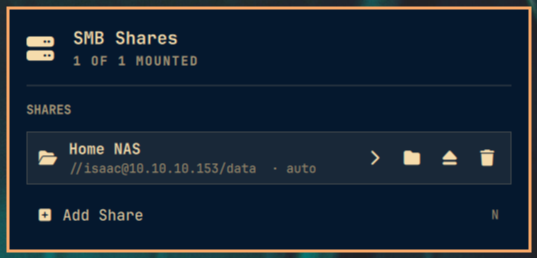
Features
- Bar widget showing the number of currently-mounted shares.
- Click to open a panel listing all saved shares and their mount state.
- Add / edit / remove share definitions (label, server, share, domain, user).
- One-click mount / unmount via
gio mount(gvfs). - Browse a mounted share's directory listing in-panel, and open it in your file manager.
- Optional auto-mount on shell start, with a configurable retry interval.
- Passwords are stored in the session keyring
(
org.gnome.keyring.NetworkPassword) and never placed on the command line or in the share URI.
Installation
omarchy plugin add https://github.com/isaact135/omarchy-network-shares.git --enable
Or install by hand: clone this repo into
~/.config/omarchy/plugins/isaact135.network-shares/, run
omarchy-shell shell rescanPlugins, then omarchy plugin enable isaact135.network-shares.
Requirements
All dependencies (gvfs-smb, libsecret, nautilus) ship with Omarchy by
default — no extra packages to install.
Configuration
The widget exposes two settings (Setup → Widgets, or
omarchy bar set isaact135.network-shares <key> <value>):
| Key | Default | Description |
|---|---|---|
refreshIntervalSec |
5 | Mount-state poll while the panel is open (s) |
autoRetrySec |
60 | Auto-mount retry interval (s) |
Share definitions are stored per-user in
~/.config/omarchy/smb/shares.json; credentials live in the session keyring,
not in that file.
IPC
The plugin registers the isaact135.network-shares shell IPC target:
omarchy-shell isaact135.network-shares toggle          # open/close the panel
omarchy-shell isaact135.network-shares list            # JSON array of shares + mount state
omarchy-shell isaact135.network-shares mount <id>      # mount a share
omarchy-shell isaact135.network-shares unmount <id>    # unmount a share
omarchy-shell isaact135.network-shares refresh         # re-poll mount state