
Omarchy Phone


The first application built with Omarchy UI. It provides Android discovery, wireless pairing, scrcpy control, iPhone discovery, and AirPlay mirroring from an Omarchy bar widget and panel.
Android sessions support mouse and keyboard control through scrcpy. iPhone sessions mirror video and audio through AirPlay; Apple does not permit remote touch or keyboard input through AirPlay.
Built entirely in Ruby
All application behavior, system integration, and UI declarations are authored in
Ruby. There is no handwritten QML source. Omarchy UI compiles the Ruby-declared UI
into OmarchyUI/Bundles/ and emits the tiny root QML loader shims required by the
plugin manifest; those shims are generated packaging output.
Features
- Discover Android and iPhone devices automatically.
- Pair Android 11+ devices using Wireless debugging.
- Mirror and control Android through scrcpy, with audio, resolution, FPS, bitrate, fullscreen, and physical-screen options.
- Mirror iPhone video and audio through AirPlay with an on-screen PIN.
- Show connection status and device-specific actions in the Omarchy bar and panel.
- Run without Ruby, mruby, or the
omarchy-uigem installed on the destination computer.
Install
Omarchy Phone is submitted for inclusion in the Omarchy Plugin Marketplace. Until the listing is approved, install directly from its public repository:
omarchy plugin add https://github.com/AdamMusa/omarchy-phone.git --enable
Review third-party plugin code before enabling it. Omarchy plugins run with your user account.
The repository is self-contained: it includes its QML bridge and prebuilt x86-64 mruby runtime. The current release supports x86-64 Linux systems running Omarchy with the Quickshell plugin host.
Capabilities and system tools
The plugin itself does not install system packages. Install only the tools needed for the features you plan to use:
| Capability | Command used | Required tool |
|---|---|---|
| Android discovery, pairing, and Wi-Fi connection | adb |
Android platform tools |
| Android mirroring and mouse/keyboard control | scrcpy |
scrcpy |
| Trusted USB iPhone discovery and pairing | idevice_id, ideviceinfo, idevicepair |
libimobiledevice |
| iPhone screen and audio mirroring | uxplay |
UxPlay |
| Wireless Android service discovery | avahi-browse |
Avahi tools |
Android supports remote control through scrcpy. AirPlay mirrors an iPhone but cannot send touch or keyboard input back to iOS.
Android quick start
Android 11 or newer and the Omarchy computer must be on the same Wi-Fi network.
- On Android, enable Settings → System → Developer options → Wireless debugging.
- Tap Pair device with pairing code. Keep this popup open.
- In Omarchy Phone under Connect Android, enter the popup's complete temporary pairing address
(
IP:port) and its six-digit code, then click Pair before the code expires. - The phone remains listed as Paired even while Android rotates its connection port.
- Click Connect on the paired phone; Omarchy Phone resolves the current wireless service.
- When it becomes connected, click Open Phone to start scrcpy and control it.
If the screen mirrors but you cannot control it
Some vendor Android builds refuse the INJECT_EVENTS permission that scrcpy's default sdk
input mode relies on, and report this in the scrcpy log:
[server] ERROR: Injecting input events requires the caller ... to have the INJECT_EVENTS permission.
[server] ERROR: Make sure you have enabled "USB debugging (Security Settings)" and then rebooted your device.
The screen mirrors correctly but clicks and keystrokes are ignored. This has been reported on
Xiaomi and POCO (HyperOS and MIUI), Oppo, and some Samsung devices. The suggested
USB debugging (Security settings) toggle needs a vendor account and a SIM, and on some ROMs it
is not present at all.
Omarchy Phone therefore starts scrcpy with --mouse=uhid alongside --keyboard=uhid, which
simulates a physical HID device instead of asking Android to inject events, so control works
without that permission. One side effect worth knowing: in uhid mode scrcpy captures the
pointer, so press LAlt or LSuper to give the mouse back to the computer.
On a device that blocks injection you may still see one INJECT_EVENTS line at startup, from
scrcpy's attempt to wake the screen. It is harmless and the session works normally.
Generate a new pairing popup if pairing reports that the code expired. Pairing establishes trust once. If Android changes its wireless connection port, pair again so the current service can be discovered and remembered.
iPhone quick start
For AirPlay mirroring, connect the iPhone and Omarchy computer to the same trusted network:
- Click Start AirPlay in Omarchy Phone.
- Note the four-digit PIN displayed in the panel and desktop notification.
- On iPhone, open Control Center, tap Screen Mirroring, and select Omarchy.
- Enter the PIN on the iPhone when prompted.
- Click Stop AirPlay when finished.
For USB discovery, connect and unlock the iPhone, accept Trust This Computer, and use the Trust action in Omarchy Phone if it appears. iOS permits mirroring but not remote touch or keyboard control.
AirPlay and firewall
UxPlay uses TCP and UDP ports 7100-7102; mDNS discovery uses UDP 5353. If UFW is enabled,
allow those ports from the local network. Starting AirPlay displays a four-digit PIN in the
panel and desktop notification. Active AirPlay sessions appear automatically in the device list.
Update or remove
omarchy plugin update izeesoft.omarchy-phone
omarchy plugin remove izeesoft.omarchy-phone
The plugin stores connection metadata and process logs in
~/.local/state/omarchy-phone-ruby. Removing the plugin leaves this local state in place so a
future installation can remember paired Android devices. Delete that directory manually if you
also want to forget the saved state.
Privacy and permissions
Omarchy Phone runs as the current user and starts only the local tools listed above. It communicates
with phones through USB or the local network, does not provide telemetry, and does not send device
information to an external service. Android pairing addresses and runtime logs remain in the local
state directory. The bundled omarchy-ui-runtime is the x86-64
runtime-v0.1.4 release artifact.
Command output is limited before it reaches application state, discovery results have item and string ceilings, and runtime protocol messages are size-bounded before QML buffering. External device text is rendered as plain text. AirPlay shutdown verifies the saved PID, process start time, process group, and executable identity immediately before signaling; stale, replaced, symlinked, or non-regular state records are cleared without signaling a process.
Marketplace submission
- Plugin ID:
izeesoft.omarchy-phone - Category: Hardware
- Kinds: service, bar widget, and panel
- License: MIT
- Submission: HANCORE-linux/omarchy-plugin-marketplace#1616
- Root preview:
preview.png
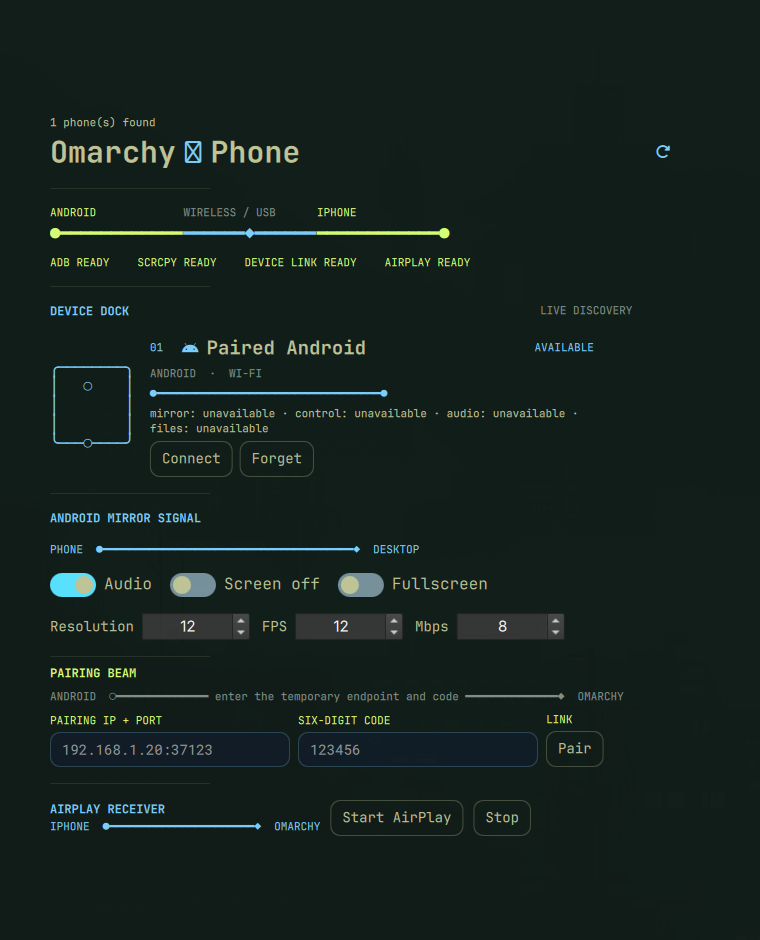
The automated repository, manifest, README, license, and Quattro compatibility checks passed. The bundled runtime is disclosed for the marketplace's required manual executable review.
License
MIT.