
Workspace Lens
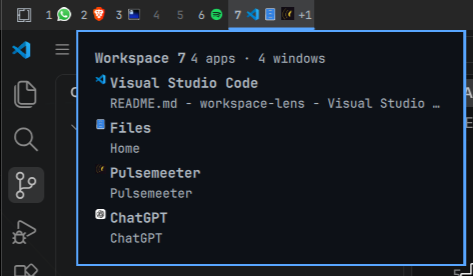
Workspace Lens is an Omarchy Shell widget that makes applications in each Hyprland workspace visible directly from the bar.
Requirements
- Omarchy 4
- Quickshell 0.3
- Hyprland
Installation
Install and enable the public plugin with:
omarchy plugin add https://github.com/JacobsenNando/workspace-lens.git --enable
For local iteration, scripts/install.sh copies the runtime files from the
working tree into ~/.config/omarchy/plugins/jacobsennando.workspace-lens
(or the isolated WORKSPACE_LENS_INSTALL_ROOT used by tests). It validates
the staged plugin, replaces a previous copy it made, and refuses to overwrite
an unknown plugin or a checkout managed by omarchy plugin add. Uninstall
that copy with omarchy plugin remove before switching to the git install.
Activation rescans Omarchy Shell plugins and enables Workspace Lens. Its
manifest metadata declares that it replaces omarchy.workspaces, so Omarchy
uses Workspace Lens in place of the built-in workspace widget.
Experience
- Each workspace shows up to three grouped application icons and a
+Noverflow indicator. - Group badges show the number of windows for an application.
- Hovering for 180 ms opens a contextual panel; it closes after 220 ms.
- The panel is informational and lists the applications and windows without changing native workspace switching.
Development
Run the automated checks with:
node --test tests/*.test.mjs && bash tests/install.test.sh
To remove the plugin (Omarchy disables it and removes its directory, keeping a backup when it was not a git checkout):
omarchy plugin remove jacobsennando.workspace-lens
Web apps show their own icon when a desktop entry launches the site, by URL
or through an omarchy-webapp-handler-* script: the window class names the
site, and the entry supplies the name and icon. Sites opened without a desktop
entry keep the generic icon.
The approved direction is in the design specification; changes are tracked in CHANGELOG.md.