
Proton VPN widget for Omarchy
A native Omarchy bar widget for Proton VPN, built on the same bones as the first-party Network and Tailscale panels.
The idea
Most VPN indicators answer one question: is an interface up? That is not the same question as "am I protected". A tunnel can be up while the default route still goes out of your Wi-Fi, or while DNS resolves against your ISP. Both look identical to an on/off dot, and both are worse than no tunnel at all, because you believe something untrue about your own machine.
So this widget checks three things, not one:
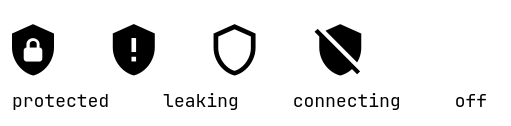
| State | Icon | Meaning |
|---|---|---|
| Protected | filled shield with a lock | Tunnel up, default route through it, DNS answered by it |
| Not protected | filled shield with !, in the urgent colour |
Tunnel up, but traffic or DNS is bypassing it |
| Connecting | hollow shield | Interface exists, not activated yet |
| Network blocked | padlock, in the urgent colour | Kill switch up with no tunnel behind it |
| Disconnected | shield struck through | No tunnel |
The "not protected" state also raises a banner in the panel naming which of the two checks failed.
"Network blocked" is deliberately not a shield: nothing is being shielded, the door is just bolted. It is also deliberately not folded into "Disconnected", even though both mean "no tunnel", because only one of them means the machine has no network and cannot get one back on its own. See below.
The kill switch can lock you out of fixing it
A permanent kill switch is a NetworkManager dummy connection — pvpn-killswitch-perm,
route metric 98, DNS 0.0.0.0 at dns-priority −1400 — saved as a system
connection, so it autoconnects at boot before any user session exists. Proton's
only exception to it is a host route to one specific VPN server, added once a
server is known, which requires a session.
Reboot without a readable session and those two facts collide: the app has to
reach Proton's API to authenticate, and the kill switch it installed blocks
exactly that. The CLI cannot dig you out either — protonvpn config set refuses
to change any setting while signed out, and it has no "permanent" value to set
in the first place, only off and standard. Hand-editing
~/.config/Proton/VPN/settings.json is the only move left, and it leaves the
machine unprotected until someone remembers to undo it.
The widget cannot fix that on its own, but it can refuse to be vague about it. The fast tier reads whether the blocking connection is up — which matters precisely because in this state the slow tier can reach nothing at all — names the state, and offers the one button that works.
That button prefers protonvpn-bootstrap if it is on PATH: a host script that
lifts the kill switch, signs in, reconnects, re-arms, and re-arms fail-closed on
every abort path. It is not part of this plugin. It touches NetworkManager
and your account, which is not something a bar widget should install on other
people's machines. Without it the button falls back to a plain protonvpn signin, which is the right thing when no kill switch is holding the door shut.
The Proton VPN desktop app takes the CLI hostage
The protonvpn CLI refuses to run at all while the GTK desktop app is open:
Error: Proton VPN desktop app is currently running
The CLI and GUI cannot run simultaneously.
That takes out server load, settings, the country list and every action at once. The widget detects it and says so, hides the controls that cannot work, and keeps the live status, because the fast tier never touches the CLI:
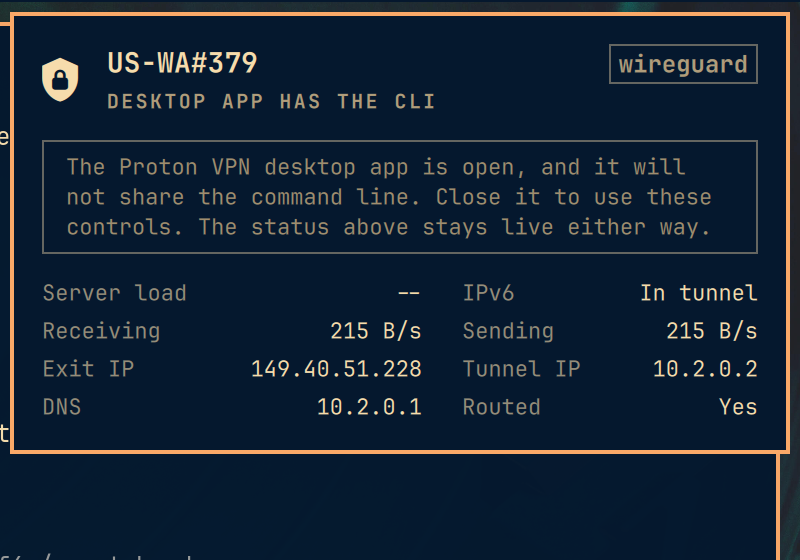
It recovers by itself once the app is closed.
Interaction
Bar icon: left click opens the panel, right click connects or disconnects, middle click refreshes.
In the panel: j/k or arrows move the cursor, h/l move across the
quick-connect pills, enter/space activates, / focuses the country filter,
t toggles the connection, d disconnects, r refreshes, esc closes.
Mouse and keyboard share a single cursor, so exactly one thing is ever highlighted. Hovering moves the cursor rather than painting a second highlight.
What the panel shows
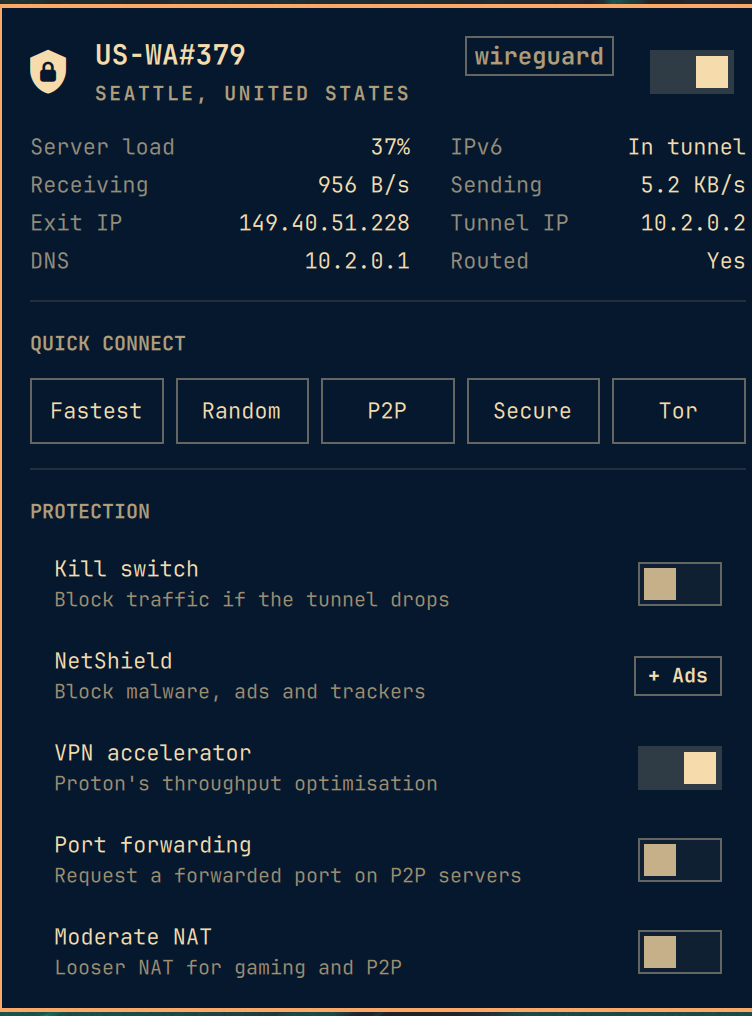
- Hero. Server name, city and country, protocol pill, and an on/off switch that throws optimistically so it answers the click immediately.
- Details. Server load (coloured past 75% and 90%), whether IPv6 is carried inside the tunnel, live throughput, exit IP, tunnel IP, DNS, and whether the default route actually goes through the tunnel. IPs are click-to-copy.
- Quick connect. Fastest, random, P2P, Secure Core, Tor.
- Protection. Kill switch, NetShield, VPN accelerator, port forwarding, moderate NAT, IPv6. Booleans get a switch; NetShield gets a value pill because it has three states and a switch would have to lie about one of them. The whole row is the click target either way, so one Enter cycles it. Kill switch is the exception: the Proton CLI refuses to change it while a tunnel is up, so that row goes read-only and says "Disconnect to change this" instead of offering a click that can only fail. Every other setting applies while connected.
- Countries. Filterable, with the country you are in pinned to the top. Clicking one connects to the fastest server there.
Deliberately not surfaced: custom-dns (needs addresses typed in, belongs in the
CLI) and anonymous-crash-reports (not a networking control). A panel that
mirrors every flag a CLI has is a worse panel than one that picks.
How it stays fast
Two tiers, because the two sources of truth cost about 18x different amounts.
Fast: bin/protonvpn-probe, ~85ms. NetworkManager, /sys, and Proton's
own session cache. Tunnel state, server name, addressing, DNS, routing, byte
counters, and whether the kill switch connection is currently up. This runs on a
timer whether or not the panel is open, which is what keeps the bar icon honest.
It never shells out to protonvpn.
Kill-switch state is read here rather than in the slow tier even though it is nominally a client setting, because the moment it matters most — armed at boot with nothing behind it — is the exact moment the CLI is unreachable. A fact that is only available when nothing is wrong is not worth reading.
Slow: the protonvpn CLI, ~1.5s and occasionally far worse when it decides
to refresh its 24MB server list. Server load, city, settings, country list.
Only runs while the panel is open, or right after an action. The bar icon never
waits on it.
Proton's session file is only trusted when its connection_id matches the
connection NetworkManager currently has up. The file survives a disconnect and
would otherwise describe a session that ended hours ago.
Every poll has a watchdog. A poll is skipped while its own process is still running, so one that never exits would otherwise stop the panel refreshing at all, permanently.
Nothing unbounded reaches the shell
Quickshell's StdioCollector has no size limit: it collects a process's output
to completion and hands QML the whole thing. The bar's shell process is
long-lived and owns every widget in the bar, so a response that never stopped
arriving would be a denial of service and not just a big string. Some of that
output is built from data Proton serves over the network, which puts a remote
party on the far end of it.
So every process this widget starts, the probe included, runs through
bin/protonvpn-run, which caps stdout and stderr at 64 KiB each and drops the
excess in a separate process, before any of it is collected in QML. 64 KiB is
about 12x the largest real response (countries list, ~5.5 KiB). An over-limit
call comes back non-zero, so the reader discards it instead of parsing half a
record, and the panel keeps the last good value.
Requirements
proton-vpn-clionPATH, signed in. The panel offers an install button when the CLI is missing and a sign-in button when it is not signed in, each opening a real terminal, because credential prompts do not belong behind a bar popup.wl-copyfor the click-to-copy values.nmcli(NetworkManager),ip(iproute2) andpython3for the fast state probe inbin/protonvpn-probe. All three are part of a base Omarchy install; they are listed here because the probe will not run without them.
No root and no polkit rule: protonvpn connect and disconnect run as your own
user against the Proton daemon, which owns the privileged part itself.
Install
git clone https://github.com/jampick/omarchy-protonvpn \
  ~/.config/omarchy/plugins/jampick.protonvpn

omarchy-shell shell rescanPlugins
omarchy plugin enable jampick.protonvpn
omarchy bar move jampick.protonvpn --before omarchy.network
The directory name must match the id in manifest.json.
If the widget does not appear after a hot reload, restart the shell with
omarchy restart shell. The plugin hot-reload path can wedge after repeated
edits, leaving a stale instance answering IPC while the bar slot renders nothing.
Uninstall
omarchy plugin disable jampick.protonvpn
rm -rf ~/.config/omarchy/plugins/jampick.protonvpn
Disabling removes it from the bar layout in ~/.config/omarchy/shell.json. The
widget owns no other state: it writes nothing outside its own directory, adds no
systemd units, no polkit rules and no sudoers entries, and it never edits your
Proton VPN configuration except through protonvpn config set when you click a
toggle. Nothing to clean up beyond those two lines.
Settings
Both are exposed through the widget's manifest schema:
| Key | Default | What it does |
|---|---|---|
refreshIntervalSec |
5 | How often the bar icon re-checks the tunnel |
detailIntervalSec |
60 | How often an open panel re-reads load and settings from the CLI |
Tests
Model.js is pure, side-effect-free JavaScript with a module.exports guard, so
all the parsing and formatting runs under Node without a compositor:
cd test && node model.test.js
The output cap has its own tests, which need only bash and coreutils:
bash test/run.test.sh
The fixtures in test/fixtures/ are real captured output from protonvpn status, config list, countries list, cities list US, and the probe, with the
local NetworkManager connection uuid zeroed.
Layout
manifest.json           plugin + bar-widget declaration and settings schema
Panel.qml               bar button, panel UI, cursor model, row components
Service.qml             process orchestration, two-tier polling, watchdogs
Model.js                pure parsing/formatting (Node-testable)
bin/protonvpn-probe     the fast state probe
bin/protonvpn-run       output cap between the CLI and the shell
LICENSE                 MIT, matching Omarchy
test/                   Node tests and real CLI fixtures
Notes for anyone adapting this
- The root item must forward
implicitWidth/implicitHeightfrom the bar button. The bar sizes each slot from its widget's implicit size, and the basePanelis a bareItemwith no size of its own, so without this the slot collapses to zero width and the widget silently never appears, with no error, no warning, and nothing in the log. - Do not name a property
state.QQuickItemalready has one. - The plugin id is
jampick.protonvpnbecauseomarchy.*is the first-party namespace. Renaming it for upstream is a one-line change inmanifest.jsonplus the twomoduleName/ipcTargetlines.
IPC
omarchy-shell jampick.protonvpn status      # "Protected US-WA#379"
omarchy-shell jampick.protonvpn toggle      # open/close the panel
omarchy-shell jampick.protonvpn connect     # fastest server
omarchy-shell jampick.protonvpn disconnect
omarchy-shell jampick.protonvpn toggleVpn   # connect or disconnect
omarchy-shell jampick.protonvpn refresh
Status
Working and in daily use on Omarchy 4.0.0-1. Not submitted upstream: Omarchy supports third-party plugins as drop-ins, so this does not need to enter the Omarchy tree to be installable, and upstream appetite for more VPN integrations is unproven (see basecamp/omarchy#4997 and #7417, both unpicked-up at both small and large size).