
Gmail Inbox
An Omarchy bar widget for your Gmail inbox: the unread count sits in the bar, and the panel lists what is waiting - subject, sender, the first line of the body, and how long it has been there.
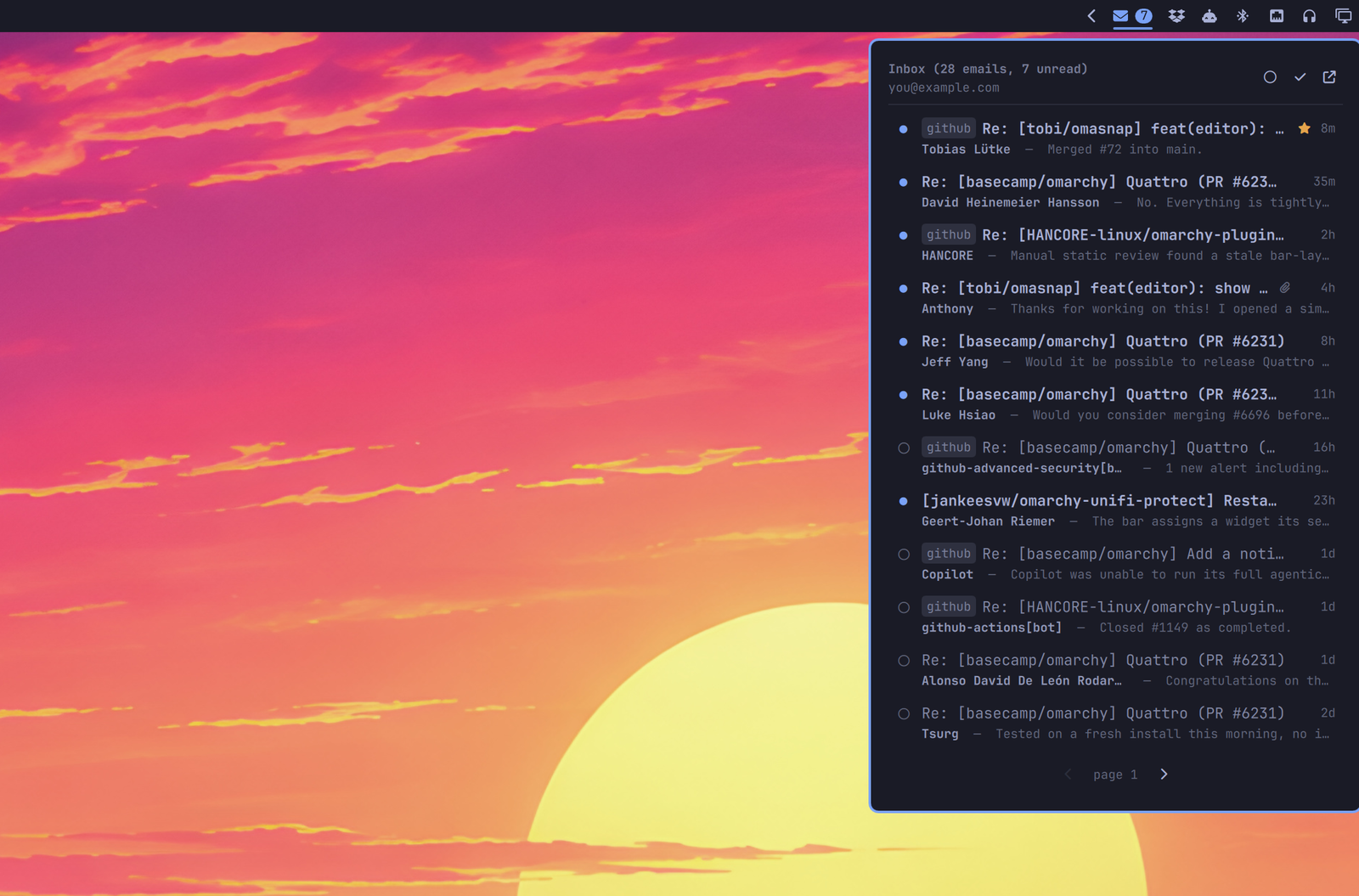
- Unread count in the bar. The exact total for the whole label, not just what fits on a page.
- A dot per message, filled while unread and an outline once it has been read. Clicking it works both ways, so a mail can be put back to unread.
- Stars, shown where you set them and settable from the panel. The slot stays empty rather than absent, so the ages line up down one column.
- A paperclip on anything carrying an attachment.
- Your own labels as chips in front of the subject, resolved from label id
to the name you gave it. Gmail's own bookkeeping -
INBOX, the category tabs,IMPORTANT- is left out; it says nothing you did not know. - Paging through everything the query matches, 25 at a time.
- Unread only, one button, for when the read ones are in the way.
- Mark all as read, covering every unread message in the label rather than only the page on screen.
- Archive or move to Trash from the keyboard, with Gmail's own
eand#shortcuts. Trash is recoverable; this does not permanently delete mail. - Click a message to open it in your browser, signed in to the right account. It is marked read at the same time.
Requirements
This widget assumes you already have the Google Workspace CLI installed
and authenticated. It owns the OAuth token, and no credential ever passes
through this plugin. jq is used for the JSON handling.
If you do not have it yet, its own README has the current instructions. The short version is a pre-built binary from the releases page, or:
npm install -g @googleworkspace/cli # needs Node 18 or newer
Then, once:
gws auth setup              # sets up the Google Cloud project it needs
gws auth login -s gmail     # opens a browser; needs an interactive terminal
That first step is not optional: gws authenticates against a Cloud project of
your own rather than a shared client, and auth setup is what creates it. It
drives gcloud to do so, and the CLI's README covers setting the project up by
hand in the Cloud Console if you would rather not install that. The
login needs the gmail.modify scope, which the gmail service covers. Reading
the inbox is not enough on its own, because marking a message as read is a
write.
Check it with gws auth status, where "token_valid": true means you are set.
Install
omarchy plugin add https://github.com/jankeesvw/omarchy-gmail-inbox
omarchy plugin enable jankeesvw.gmail-inbox
omarchy bar move jankeesvw.gmail-inbox --section right
Optionally bind the panel to a key, in ~/.config/omarchy/hypr/bindings.lua:
o.bind("SUPER + M", "Gmail", "omarchy-shell shell toggle jankeesvw.gmail-inbox")
Removing it
omarchy plugin remove jankeesvw.gmail-inbox
That leaves two things on disk on purpose, so removing the plugin by accident costs you nothing:
~/.config/omarchy-gmail-inbox/config, if you made one.~/.cache/omarchy-gmail-inbox/, which holds the subject, sender, first line and label ids of every message the panel has listed, plus the address of the account. That is mailbox content, so delete it if the machine is changing hands:
rm -rf ~/.cache/omarchy-gmail-inbox ~/.config/omarchy-gmail-inbox
Signing gws out is separate, and worth doing on a machine you are handing
over: gws auth logout.
Using it
| Click the bar icon | open the panel |
| Right-click the bar icon | open Gmail in the browser |
| Middle-click the bar icon | refresh now |
| Click a message | open it in the browser and mark it read |
| Click its dot | mark it read, or put it back to unread |
| Click its star | star or unstar it, panel stays open |
↑ ↓ or j k |
move through the list |
Enter, Space or o |
open the message under the cursor |
s |
star or unstar it |
e |
archive it |
# |
move it to Trash |
Shift+I |
mark it read |
Shift+U |
mark it unread |
r |
toggle read either way |
a |
mark everything read |
f |
show only unread, or everything again |
n / p |
next page, previous page |
Esc |
close |
The keys Gmail has are the keys Gmail uses: j/k to move, o to open, s
to star, e to archive, # to move to Trash, and Shift+I and Shift+U
for read and unread. Paging a list and filtering to unread have no Gmail
equivalent, so those took the plain letters.
The panel refreshes every minute, whether it is open or not, and again whenever you open it or change something.
Configuration
Settings live in ~/.config/omarchy-gmail-inbox/config:
# Anything Gmail search understands.
query = in:inbox

# The label whose totals the bar counts. A user label needs its id, which
# `gws gmail users labels list` will tell you.
label = INBOX

# Messages per page, 1 to 50.
max = 25
Every key is optional; the defaults above are what you get without a file. Changes are picked up on the next refresh, so within a minute.
OMARCHY_GMAIL_QUERY, OMARCHY_GMAIL_LABEL and OMARCHY_GMAIL_MAX do the
same job for a one-off run from a terminal, and take precedence over the file.
More than one account
One widget reads one mailbox, so two mailboxes means two widgets. Give each one an account in its bar entry in ~/.config/omarchy/shell.json:
{ "id": "jankeesvw.gmail-inbox", "account": "work" },
{ "id": "jankeesvw.gmail-inbox", "account": "personal" }
The name is yours to pick; it becomes a directory name, so it is letters, digits, dot, dash, underscore and at-sign, and anything else is refused rather than cleaned up.
An account gets its own gws configuration directory at ~/.config/gws/<account>, and that is a complete boundary: gws resolves the client secret, the encrypted credentials, the encryption key and the token cache all through that one path, so signing one account in cannot reach the other's mail. Sign each one in separately:
GOOGLE_WORKSPACE_CLI_CONFIG_DIR=~/.config/gws/work gws auth login -s gmail
Its cache is separate too, at ~/.cache/omarchy-gmail-inbox/<account>. That matters beyond tidiness: the cache holds the address the panel puts in its header, so a shared one would not just mix two lists, it would label one mailbox with the other's name.
Keys in the config file can be scoped to an account, so a shared default and a mailbox that wants something else fit in the same file:
query = in:inbox
work.query = in:inbox -label:newsletters
work.max = 50
Each widget answers to its own IPC name, so a keybinding can open a particular mailbox:
omarchy-shell jankeesvw.gmail-inbox.work open
Without an account everything is where it always was, and the plain jankeesvw.gmail-inbox name still works.
How it works
bin/gmail-inbox is the whole backend; the QML only draws what it hands over.
A page costs four requests: the ids for the page, one search for which of them are unread, one for which are starred, and one label read for the totals. The two searches keep the dots honest without a request per message, so the cost does not grow with the page size.
Everything that never changes about a message - subject, sender, snippet,
timestamp, thread, attachment, your labels - is cached per message id under
$XDG_CACHE_HOME/omarchy-gmail-inbox (mode 700, capped at 1000 entries).
Revisiting a page you have already seen therefore costs nothing extra.
Paging uses Gmail's nextPageToken, which only ever points forward, so going
back means remembering the tokens already used. Mark-all walks those pages
too: one request caps at 500 ids and hands back a token for the rest, and a
single call would silently stop there - on a label with 3383 unread it would
clear 500 and leave 2883 behind with nothing but the badge to hint at it.
Every Text in the QML is Text.PlainText, because subjects and snippets are
written by whoever sent the mail, and Qt's default would happily render an
<img src="http://..."> in a subject as real rich text - an outbound request
from your shell process to a server the sender picked.
Screenshots without your own mail in them
bin/gmail-inbox demo on
bin/gmail-inbox demo off
A fixed demo list with no network behind it, long enough to page through, and every write turns into a no-op while it is on, so a screenshot session can never touch a real mailbox.
License
MIT