
Herdr for Omarchy
A bar widget for herdr: how many herdr servers are running, what is inside each one, and one click to open it.
Herdr runs one server per named session. They are easy to start and they never stop by themselves, because closing a window detaches rather than ends the session. So they pile up unseen. This widget puts the count in the bar and the list one click away.
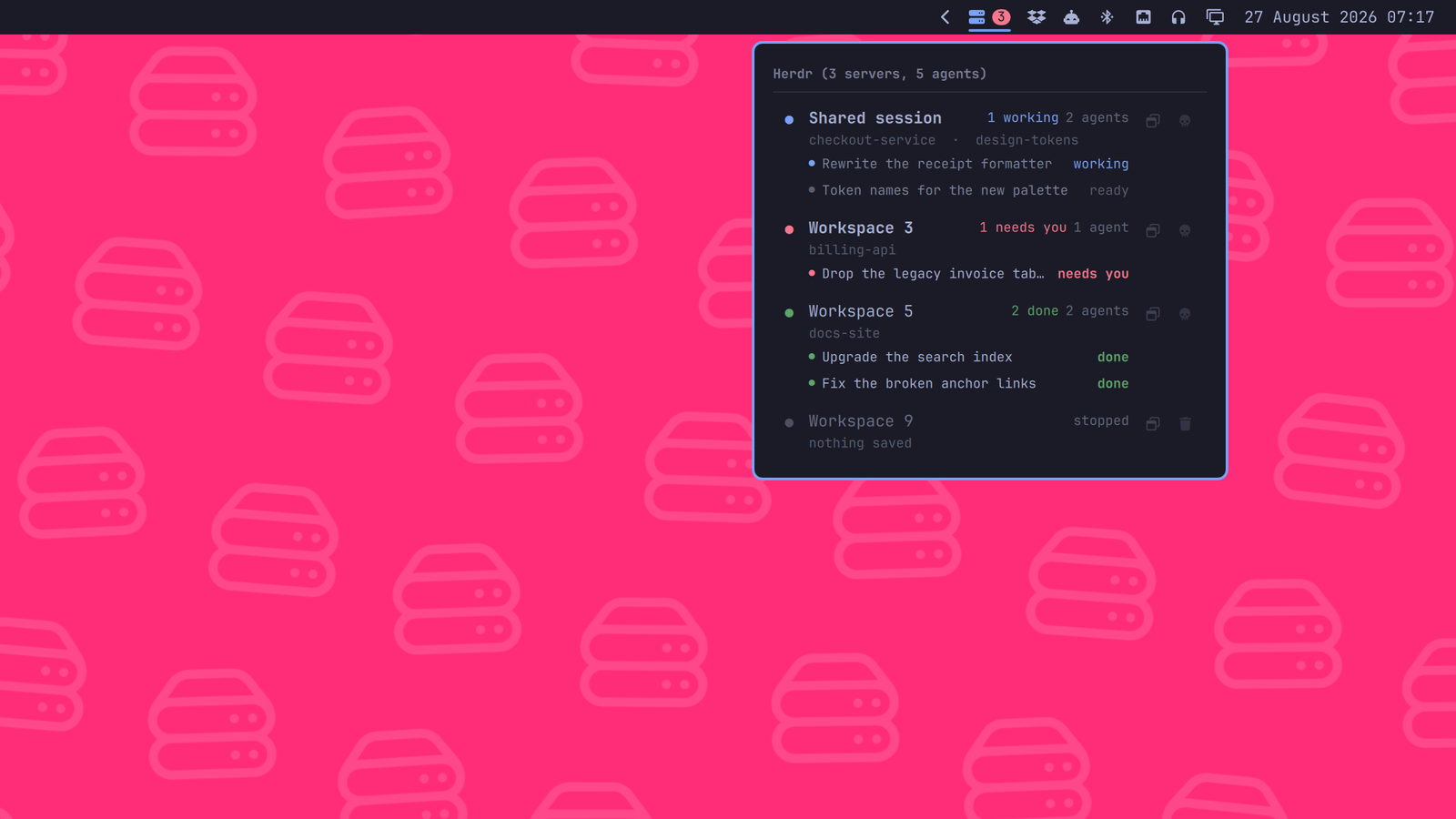
What it shows
The bar carries the number of running servers, on a badge sitting in the top right corner of the icon. It turns red when an agent is blocked and waiting on an answer, green when work finished while you were looking elsewhere, and amber while something is still running. When every agent is idle there is nothing to say, so the badge goes away and the icon stands on its own.
Saved SSH machines are part of the same herd: their sessions and agents are counted and coloured exactly like local ones, marked with the machine's label. See Remote machines.
Each row in the panel is one session:
- its name, in bold when a window is already showing it
- the projects open inside it, taken from the workspace labels
- how many agents it holds, and what the most urgent of them is up to
- what every one of those agents is doing, from its terminal title, with its own status dot beside it. The line above the title names where it sits: its workspace, then its tab if you gave the tab a name. All of them, however many and wherever herdr keeps them: a pane in a second tab counts the same as one sitting in front of you. Each of those lines is its own way in
- a dot in the session's colour, taking the state of its loudest agent
The states
Herdr classifies every agent, and two of those states are the reason to look at all:
| needs you | red | herdr recognised an approval or a question on screen: that agent is waiting on an answer |
| done | green | it finished work you have not seen yet. Focusing the tab turns it back into plain idle |
| working | accent | busy |
| idle | grey | ready for input, and already seen |
Every agent line carries its state as a word, right-aligned in one column down
the edge of the panel, so what the herd is doing is a single glance rather than
a scan. The agents inside a session are ordered by that state rather than by
where they happen to sit - what wants an answer first, then what finished
unseen, then what is busy, then what is only waiting for you to type. That is
herdr's own attention queue, the order its agent panel takes when
agent_panel_sort = "priority". idle is written as ready, because it is the ordinary resting
state and "idle" reads like a fault.
Both needs you and done are written bold and in colour, along with the title beside them, and their whole row is washed in that colour: red for a question, green for work that finished. working and ready stay quiet, because a panel where every line is coloured is a panel where colour means nothing. A dot is something you have to be looking at; a row of colour is something you catch out of the corner of your eye, which is how a pinned panel is read at all. The badge in the bar takes the same colour, so a herd that wants something says so with the panel closed.
Waiting beats finished beats busy, wherever a session has to be summed up in one colour.
What it does
- Click a row (or
Enter, oro) to open that session. A session shows at most one window, because two windows on one session mirror each other, so this focuses the window it already has, wherever it is, and only opens a new one when there is none. Without a window one is started, in foot. - Click one of the agent lines to land on that agent rather than on whatever the session was last showing: its pane is focused inside the server first, then the window comes up. That also marks a finished agent as seen, so clicking the line that says done is what clears it.
- The skull (or
k) ends that server, and is the only way it is ended from here. It asks first, and the dialog opens on Cancel rather than on the confirming side: a dialog that destroys something on a reflexive Enter is worse than no dialog, because it trains the reflex. It is the only action in the panel that stops to ask - opening, focusing and deleting a stopped session are all recoverable or trivial, and this one is not.herdr session stopasks over herdr's own socket, so a server too wedged to read that socket never hears the request and the button looks broken at exactly the moment you needed it. This signals the process instead: TERM first, and KILL a second later if that was not enough. The shared session is killed like any other, because it wedges like any other. - The bin (or
x) throws away a session that is already stopped - the directory and the state herdr kept in it - which is what clears it out of the list for good. It takes the same slot as the skull, because a session is never both running and stopped. The shared session is herdr's own and is never deleted from here. rrefreshes, and so does a middle click on the bar button.- The pin (or
p) takes the panel out of the bar and leaves it on the desktop. See below.
A row marked stopped is a session whose server is not running. The session
itself still exists on disk, under ~/.config/herdr/sessions/<name>/, which is
why it stays in the list: clicking it starts that server back up, and the bin
throws the session away for good. There is nothing to kill there, so the skull
gives way to the bin.
What survives the server is the layout - herdr keeps it in session.json - so
a stopped row still names the workspaces it was holding and the directories
they were opened in, the same names a running session shows. That is the
difference between a session worth starting back up and a name left over from
an afternoon, and it is not something the word "stopped" can tell you. A row
that saved nothing worth naming says nothing saved.
The list refreshes every three seconds while the panel is open and every twenty seconds when it is closed.
Pinning it
A dropdown is something you open to answer a question and close again. A herd you are running is something you glance at all afternoon, and a panel that shuts the moment you touch anything else cannot be glanced at. So the panel can come loose: click the pin in its header, or press p, and the same card carries on as a window of its own, on every workspace, above whatever you are working in, and still one click away from any agent in it.
- Drag it by the six dots in the header. Only that strip moves it. The rest of the card is rows and buttons, and those were click targets before the pin existed.
- Resize it from the corner, bottom right. A height you set is a height the list lives inside from then on, so the panel keeps the shape you gave it and scrolls rather than growing and shrinking every time an agent turns up or finishes.
- It remembers where you put it. Unpinning puts the card back under the bar button; pinning again brings it back to the same place at the same size, because that spot was a decision about your own desktop and re-deciding it on every pin is the panel forgetting something you told it. The first time, with nothing to remember, it opens in the bottom left corner, clear of the bar.
- The bar button still shows and hides it, and
Escapehides it too. Neither of those unpins: only the pin does that. - It wears the accent border only while it has the keyboard, the way every other window on the desktop does. A card that says "focused" all day is saying nothing at all, in the loudest colour the theme has.
- A pin belongs to one screen. Every monitor's bar carries its own copy of this widget, so the pinned card appears on the screen you pinned it from and nowhere else.
Position, size and screen are kept in this widget's own entry in ~/.config/omarchy/shell.json, the same entry the bar's settings screen reads, so there is no config file of its own to keep track of:
{ "id": "jankeesvw.herdr", "pinned": true, "pinScreen": "DP-3", "pinX": 54, "pinY": 1404, "pinW": 420, "pinH": 240 }
Remote machines
Saved SSH machines (herdr machine list) are part of the herd. Every enabled
machine is asked for its session over herdr's own command routing -
herdr --machine <id> api snapshot, which runs the call on the session the
machine's profile points at - and its agents count toward the badge exactly
like local ones: a blocked agent on another host turns the badge red the same
as one in front of you. A remote row carries its machine's label in front of
the session name, dimmed.
- Click opens it the way herdr does: a terminal running
herdr --remote <target> --session <name>. Clicking an agent line focuses its pane on the remote host first, overherdr --machine <id> agent focus, and then brings the window up. - A machine that cannot answer says so, as a line under the header
carrying herdr's own reason, rather than vanishing with all its rows.
Host-key approval, passwords and passphrases are settled interactively
beforehand - running
herdr --remote <target>once in a terminal is enough - the same rule herdr's own background connections follow. - Killing and deleting stay local. Ending something on another machine from a bar widget is a way to lose work you cannot see, so remote rows do not offer the skull or the bin.
Both ends need herdr 0.9.1 or newer: --machine routing is what carries the
call, and anything older simply gets no remote rows. Only machines from
herdr's own catalog are ever asked, and a disabled machine is left alone, the
same as in herdr's UI.
Screenshots
It follows the theme, so it reads the same on a light one:
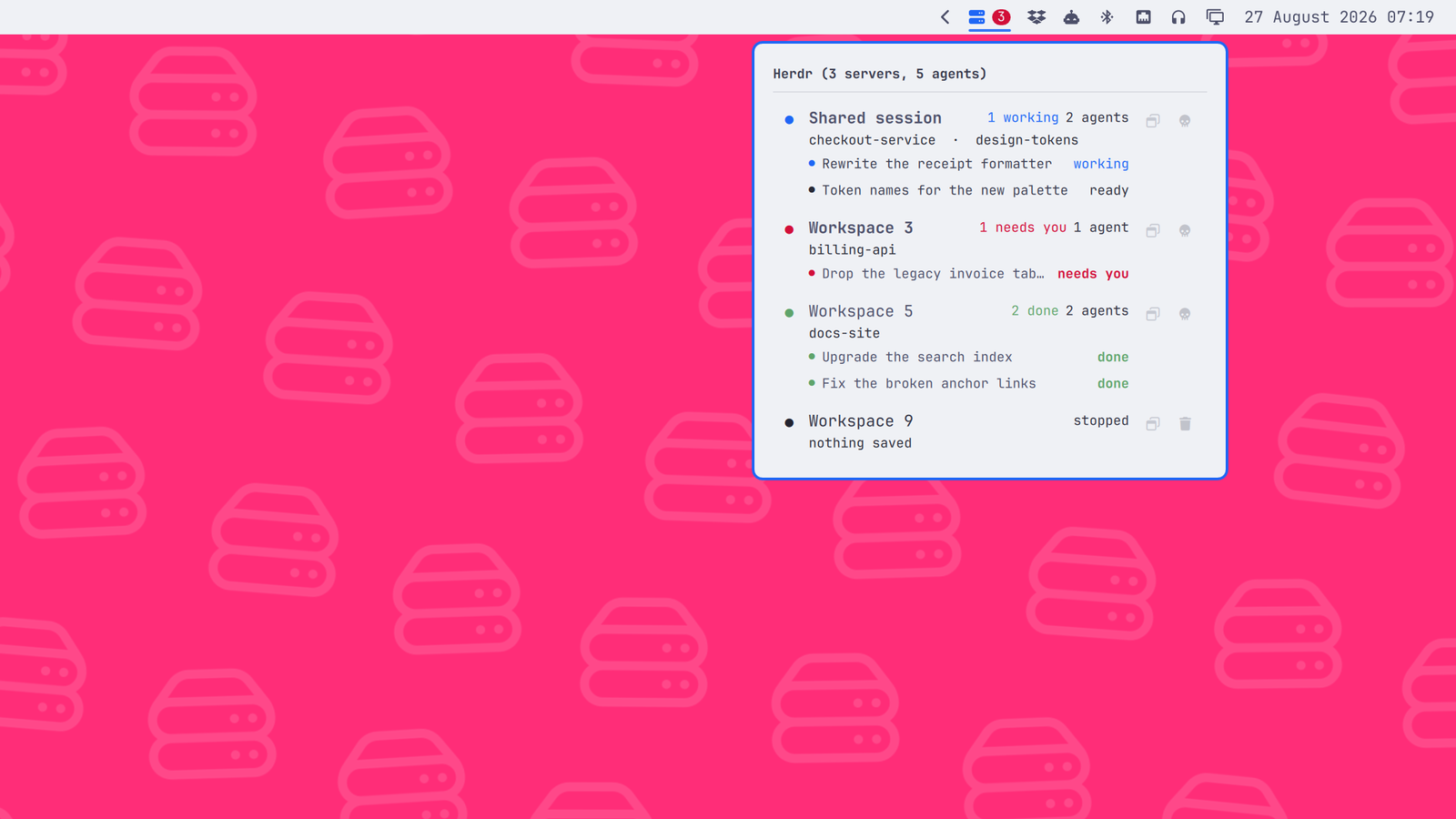
The data script has a demo mode, so a screenshot never carries real project names or agent titles and looks the same in a year:
bin/herdr-sessions demo on
# ... take the screenshot ...
bin/herdr-sessions demo off
Every write is a no-op while it is on, so a click during a shoot cannot kill a real server.
Installing it
omarchy plugin add https://github.com/jankeesvw/omarchy-herdr
omarchy plugin enable jankeesvw.herdr
omarchy bar move jankeesvw.herdr --section right
Needs herdr, jq and hyprctl on $PATH. The last one is what pairs a
session with the window showing it; without Hyprland the list still works, but
every session looks like it has no window and a click opens a new one. ss
(from iproute2) is what the skull button uses to find the process behind a
session's socket, and a window is opened in foot, falling back to
xdg-terminal-exec. Listing saved SSH machines needs herdr 0.9.1 or newer on
both this machine and each of them; an older far end shows up with herdr's
own error as its reason.
Theme colours
Themes can optionally set the done and working colours in their shell.toml:
[herdr]
done = "#006800"
working = "#6f5500"
These example colours are from Modus Operandi. done colours the finished
labels, dots, row highlights and count badge. working colours the working
labels, dots and count badge. Both follow Omarchy theme switches; choose
colours that remain readable on the panel background and behind badge text.
Without these entries, the widget keeps its original colours: green for done,
amber for the working badge and the theme accent for working labels and dots.
The blocked state continues to use the theme's urgent colour. These entries
can also be set in ~/.config/omarchy/shell.toml, where they override the
selected theme.
Removing it
omarchy plugin disable jankeesvw.herdr
omarchy plugin remove jankeesvw.herdr
The widget keeps no cache of your work: every value on screen is read from herdr at the moment it is drawn, and nothing about your projects, agents or titles is ever written to disk.
The one file it can create is the demo flag, and only if you turned demo mode on. It is empty and holds nothing about you, but it outlives the plugin:
rm -rf ~/.cache/omarchy-herdr
Your herdr sessions are untouched by removing the plugin - they live in
~/.config/herdr/ and are herdr's, not this widget's.
License
MIT