
Herald Notification Center for Omarchy
A clean notification center for the Omarchy shell. Click the bell icon to browse recent notifications and active toasts, focus the source app, or dismiss items individually.
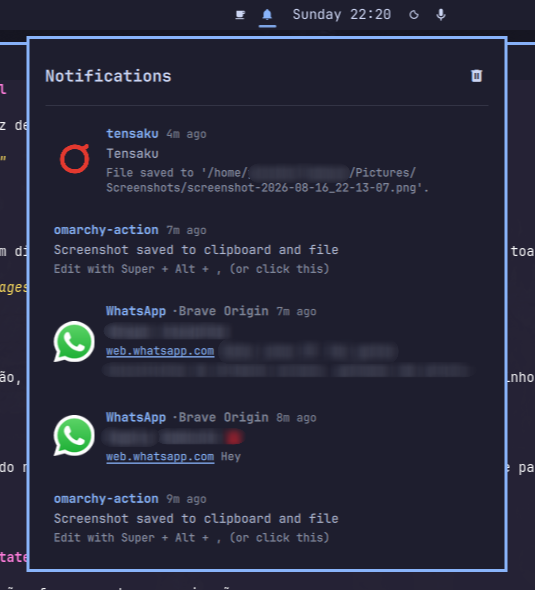
Features
- Unified list of active popups and recent history in one panel
- Themed icons for web notifications (WhatsApp, Telegram, Gmail, and more)
- Source-aware titles like
WhatsApp · Brave Origin - Click to focus the originating window or app
- Right-click to dismiss a single notification
- Clear all with the header button or right-click the bar icon
- Follows the active Omarchy theme colors
Easter Eggs
The Herald has a few surprises hidden up its sleeve:
- Click the panel title: Open the notification panel and repeatedly click the "Notifications" header. The Herald will cycle through alternative titles for the royal dispatch.
- The Threshold Mystery: Let your notifications pile up and watch how the Herald reacts. Some things are best discovered by using it.
Found something else? It might be a feature, or it might be the Herald playing tricks.
This project is a work in progress — I'd be happy to receive suggestions for improvements.
Install
omarchy plugin add https://github.com/jesseburlamaque/herald-notification.git --enable
Then restart the shell:
omarchy restart shell
Usage
- Left-click the bell icon to open the notification center
- Right-click the bell icon to clear all notifications
- Left-click a notification to focus the source app or window
- Right-click a notification to dismiss it
- Use the header button to clear all visible notifications
Keyboard navigation
The panel is fully keyboard-driven, following the standard Omarchy panel keys:
| Key | Action |
|---|---|
j / k or ↑ / ↓ |
Move the cursor (the clear-all button sits above the list) |
Enter or Space |
Activate: focus the source app, or clear all when on the header |
x |
Dismiss the selected notification |
c |
Clear all notifications |
Esc |
Close the panel |
Tab / Shift+Tab |
Switch to the neighboring bar panel |
Mouse hover and the keyboard cursor share a single highlight, so there is always exactly one selected item on screen.
For Update
omarchy plugin update jesseburlamaque.herald-notification --yes
Enable / Disable
You can manage the plugin through the Omarchy menu:
omarchy > menu >  Enable Plugin > Herald Notification
omarchy > menu >  Disable Plugin > Herald Notification
Or use the CLI:
omarchy plugin enable jesseburlamaque.herald-notification
omarchy plugin disable jesseburlamaque.herald-notification
After enabling or disabling, restart the shell:
omarchy restart shell
Remove
omarchy plugin remove jesseburlamaque.herald-notification
Then restart the shell:
omarchy restart shell
License
MIT