
Omahub
← All plugins
J

Windows VM

by jkwuc89

Status, start, and stop for the Docker-based Windows VM

Security review

No obvious issues detected

Deterministic scan — not a security guarantee

None
Risk level
None
Analyzed commit
b1e3327
Scanned
1 month ago

No potentially dangerous behavior detected in the analyzed commit.

Automated analysis only — not a security guarantee.

AI advisory review

No obvious issues detected

Language-model assessment · ~deepseek/deepseek-v4-flash-latest — advisory only

Low
AI risk level
Low
Recommendation
install
Model
~deepseek/deepseek-v4-flash-latest
Analyzed commit
b1e3327
Reviewed
1 month ago

This plugin is a straightforward QML utility for the Omarchy shell that manages a local Windows VM via Docker. It reads a read-only Docker status, invokes a pre-existing trusted command (`omarchy-windows-vm`) for start/stop/launch actions, and reads a compose file for display metadata. No signs of obfuscation, credential theft, network exfiltration, or unauthorized file modification. The deterministic scan found no issues, and manual review agrees.

  • The plugin relies on the external command `omarchy-windows-vm` and reads system files (`/var/lib/omarchy/windows/docker-compose.yml`). This is trusted code from the same package, but a malicious implementation could be abused; no such signs here.
  • It automatically starts the VM when the VM directory is created (`false->true` transition). This is a design choice and not dangerous by itself, but a user might not expect an auto-start.
  • No sandboxing of the plugin itself, but it only runs standard utilities and reads/writes via defined interfaces.
How this check works

This review combines the deterministic scan (the rule-based results above) with an independent look at the plugin's code by a language model. The model reads a trimmed sample of the repository's files, the manifest, and the README, then gives a plain-language risk level and a recommendation: install (no notable danger), review (look closer first), or avoid (clearly dangerous).

It runs on the same analyzed commit as the deterministic scan and is strictly advisory — it is not a security guarantee and never blocks a plugin by itself. A human moderator still reviews plugins before they are listed.

AI advisory only — automated analysis, not a security guarantee.

Install
$ omarchy plugin add https://github.com/jkwuc89/omarchy-windows-vm-plugin --enable
System #system

Windows VM (Omarchy bar widget)

An Omarchy shell plugin that puts the Docker-based Windows VM (managed by the packaged omarchy-windows-vm command) on the bar, matching the look and feel of the built-in Bluetooth/Power/Network widgets: an icon that reflects live status, and a click-to-open panel with a Start/Stop button.

It never touches Docker or the VM's compose file for writes directly — only a read-only docker inspect for status, and the already-hardened, packaged omarchy-windows-vm launch --keep-alive / omarchy-windows-vm stop commands for actions. All privilege handling (sudoless Docker vs. pkexec) stays in that command.

Screenshots

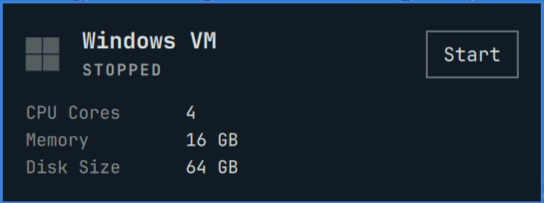
Stopped state — icon dimmed, Start button visible: Screenshot: Windows VM widget in stopped state
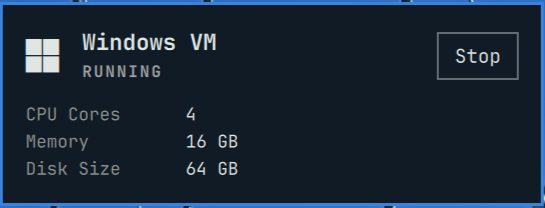
Running state — icon bright, Stop button visible, VM configuration shown: Screenshot: Windows VM widget in running state
Install

omarchy plugin add ~/projects/personal/omarchy-windows-vm-plugin --enable

Update

After pulling or editing this repo's files and committing:

omarchy plugin update jkwuc89.windows-vm

Dependencies

  • Docker — running container daemon
  • omarchy-windows-vm — packaged VM management command
  • Wayland/uwsm — for RDP session context

License

This plugin is licensed under the MIT License. See LICENSE file for details.

Files

  • manifest.json — plugin declaration (id jkwuc89.windows-vm).
  • Service.qml — polling and start/stop process logic.
  • Panel.qml — bar icon + popup panel UI.
  • Model.js — pure state-classification/label helpers.