
💡 Logitech Litra for Omarchy
"Your desk lights, one bar click away."
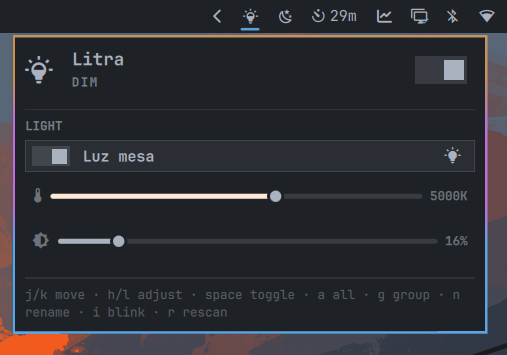
A Logitech Litra control panel for the Omarchy 4 bar — power, brightness, and color temperature
for one light or a whole set, as a group or individually, from a widget that looks and behaves like the first-party ones.
Install
omarchy plugin add https://github.com/jlopezxs/omarchy-logitech-litra --enable
--enable puts it straight into the bar's right section. Without it, add it later via Omarchy menu → Bar → Widgets, or with:
omarchy plugin enable jlopezxs.logitech-litra --section right
No build step and nothing to install as root for the plugin itself. The helper is a single Python 3 standard-library script that talks to the litra CLI.
Uninstall
omarchy plugin remove jlopezxs.logitech-litra
Nothing is left behind: no daemon, no unit file, no state outside the plugin directory, its cache under ~/.cache/omarchy-logitech-litra/, and its entry in ~/.config/omarchy/shell.json.
✨ Features
| Feature | Description | |
|---|---|---|
| ⚡ | Quick on/off | Right-click the bar icon or use the master switch. Scroll on the icon to change brightness without opening the panel. The glyph dims when every light is off. |
| 🎚️ | Group or individual | One pair of sliders for every light at once, or a compact pair per light. Opens in group mode by default; press g to switch during a session. |
| 🌈 | Beam LX back light | On Beam LX fixtures, toggle the rear RGB panel, pick from ten presets, and adjust back brightness per light. |
| 🏷️ | Local names | Rename a light and the name is cached on this machine — the hardware has no display-name field. |
| ✨ | Blink to identify | Flash a light so you can tell which row is which when several fixtures share a desk. |
| ⌨️ | Keyboard driven | The panel is fully navigable without a mouse (j/k, h/l, space, and more). |
| 🎨 | Themed | Colors, font, corner rounding, and border weights come from the active Omarchy theme — omarchy theme set restyles it live. |
| 📦 | Install from the panel | If litra-rs is missing, Install litra-rs launches omarchy-pkg-aur-add litra. |
| 📷 | Webcam autotoggle | Optional litra-autotoggle integration — lights follow the webcam via a user systemd unit. |
| 🔗 | Hyprland IPC | Drive lights from keybindings without opening the panel (lightsToggle, brightness, kelvin, and more). |
Requirements
-
Omarchy 4 (the Quickshell bar)
-
Python 3.9+ (already present on Omarchy)
-
litra-rs (
litraon PATH) — from the panel or manually:omarchy pkg aur add litraAUR: litra
-
Logitech Litra connected via USB (Glow, Beam, or Beam LX)
-
Linux HID permissions —
videogroup + udev rules (see below)
⚙️ Settings
| Key | Default | Description |
|---|---|---|
hosts |
"" |
Comma-separated serial numbers or device paths. Leave empty for every connected Litra. |
refreshIntervalSec |
30 |
How often to re-read state while the panel is open. |
groupMode |
true |
Open the panel in group mode. Press g to switch during a session. |
hideWhenAbsent |
false |
Remove the bar icon when no lights are found. |
{
  "id": "jlopezxs.logitech-litra",
  "hosts": "ABC123, /dev/hidraw3",
  "groupMode": false
}
From the CLI:
omarchy bar set jlopezxs.logitech-litra hosts "ABC123"
omarchy bar set jlopezxs.logitech-litra refreshIntervalSec 60 --json
omarchy bar set jlopezxs.logitech-litra groupMode false --json
Using it
Mouse
| Action | Result |
|---|---|
| Left-click icon | Open the panel |
| Right-click icon | Toggle every light |
| Middle-click icon | Rescan for lights |
| Scroll icon | Group brightness |
| Left-click a row | Toggle that light |
| Right-click a row | Rename it |
| Blink button on a row | Flash that light so you can find it |
Keyboard
| Key | Result |
|---|---|
j / k |
Move the cursor |
h / l |
Adjust the slider under the cursor |
space |
Toggle |
a |
All lights on/off |
g |
Group ⇄ individual |
n |
Rename the light under the cursor |
i |
Blink the light under the cursor |
r |
Rescan |
Esc |
Close |
Hyprland bindings
Add to ~/.config/hypr/bindings.conf:
bind = SUPER SHIFT, L, exec, quickshell -p $OMARCHY_PATH/shell ipc call jlopezxs.logitech-litra lightsToggle
bind = SUPER ALT,   L, exec, quickshell -p $OMARCHY_PATH/shell ipc call jlopezxs.logitech-litra toggle
Available IPC calls: open, close, toggle, lightsOn, lightsOff, lightsToggle, brightness <0-100>, kelvin <2700-6500>, identify <host>, rescan, state. Quickshell requires every argument — pass identify "" to blink the first light.
📷 Webcam autotoggle
Optional litra-autotoggle integration: click the webcam icon () on a light row. If the tool is not installed, an inline install panel opens; after install, the light syncs with your webcam automatically.
When enabled, the plugin writes:
~/.config/litra-autotoggle/config.yml— mirrors yourhostsfilter when a single light is configured~/.config/systemd/user/litra-autotoggle.service— user service runninglitra-autotoggle --config-file …
systemctl --user status litra-autotoggle
journalctl --user -u litra-autotoggle -f
See the litra-autotoggle docs for advanced options (video device, delay, Beam LX back light).
If installation fails with 99-litra.rules exists in filesystem, you already have the udev rules (from litra or a manual copy). Remove the orphan file and retry:
sudo rm /usr/lib/udev/rules.d/99-litra.rules
omarchy pkg aur add litra-autotoggle
Both litra and litra-autotoggle ship the same rules file — only one copy is needed.
🔌 USB permissions
Non-root access requires membership in the video group and udev rules. The AUR litra package usually installs them; if not, use the copy in this repo:
sudo usermod -aG video $USER
sudo cp 99-litra.rules /etc/udev/rules.d/
sudo udevadm control --reload-rules && sudo udevadm trigger
Log out and back in (or reboot) after adding yourself to video.
Screenshots
 |
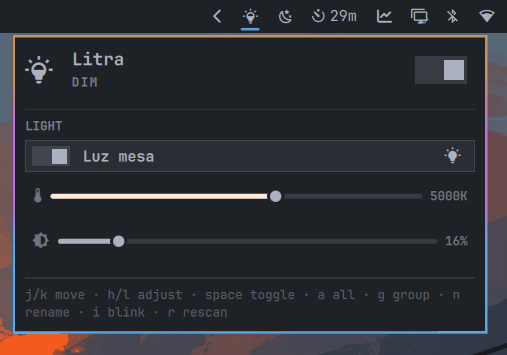 |
| Bar icon | Control panel |
Helper CLI
scripts/litra is usable on its own and prints JSON on stdout for every subcommand:
scripts/litra discover
scripts/litra state
scripts/litra autotoggle-status
scripts/litra autotoggle-enable
scripts/litra autotoggle-disable
scripts/litra set --brightness 60 --kelvin 4500
scripts/litra set --host ABC123 --off
scripts/litra rename --host ABC123 "Desk"
scripts/litra identify --host ABC123
scripts/litra firmware
Every subcommand exits 0 and reports failure as {"ok": false, "error": ...}, including when litra is not installed (litra-missing) or a light is unplugged.
Lights are controlled over USB HID via the litra binary from litra-rs. Brightness is shown as 0–100% (mapped from lumens); temperature is 2700–6500 K in 100 K steps. Values are applied optimistically while you drag and reconciled from the hardware shortly after.
Development
omarchy plugin validate .
python3 -m unittest discover -s tests
Work on the panel without installing it:
quickshell -p tests/harness/shell.qml
omarchy plugin add and plugin validate refuse symlinks inside a plugin folder — copy the working tree into ~/.config/omarchy/plugins/ rather than linking. The harness exists to avoid needing that.
| File | Role |
|---|---|
manifest.json |
Plugin id, bar widget metadata, settings schema |
Panel.qml |
Bar glyph, popout, cursor model, IPC |
Model.js |
Parsing, clamping, labels, argv building |
scripts/litra |
Helper CLI wrapping litra devices --json |
99-litra.rules |
udev rules from litra-rs |
tests/test_litra.py |
Unit tests over the helper |
tests/harness/shell.qml |
Standalone window for developing the panel |
Attribution
- HID protocol and udev rules courtesy of litra-rs by Tim Rogers
- Webcam autotoggle support uses litra-autotoggle
- Panel structure adapted from omarchy-elgato-keylight by nille
- README intro style inspired by omarchy-one-dark-pro-darker-theme
License
MIT. See LICENSE.
Not affiliated with or endorsed by Logitech.