
Textify


Native Omarchy Quickshell bar widget to extract text from any region of your screen and copy it to the clipboard. Select a region (or grab the whole screen), and the text lands on your clipboard instantly — no network, no cloud, fully local.
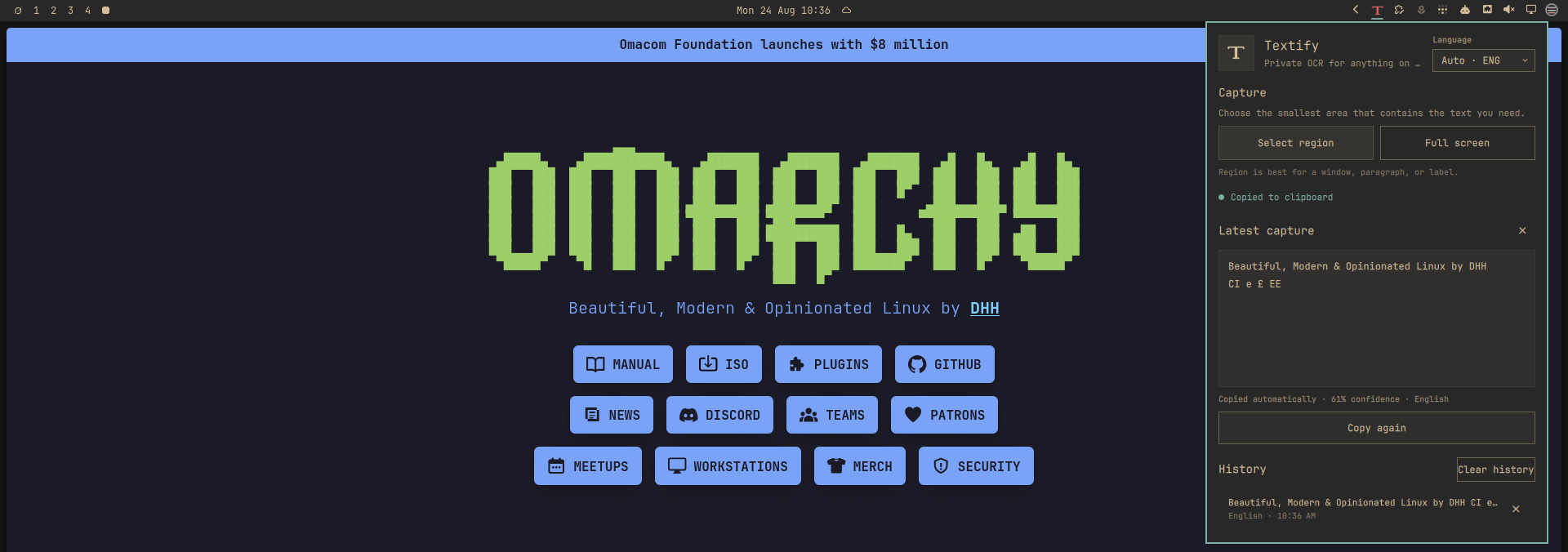
Powered by tesseract with
slurp/grim (Wayland capture) and ImageMagick (pre-processing).
Features
- Select region — click the icon, drag a box over any text, done.
- Full screen — grab everything on screen in one shot.
- Auto-copy — extracted text is copied to the clipboard immediately.
- History — the last 12 extractions are kept in the panel; click one to copy it again.
- Local & private — everything runs on your machine. No API keys, no uploads, no network.
- Rust engine — a small
textifyCLI (serde, zero heavyweight deps) that orchestrates the pipeline with fixed argument lists (no shell), temp files in private directories under$XDG_RUNTIME_DIR, and cleanup on every exit path.
Requirements
- Omarchy 4 with its Quickshell bar
slurp,grim(Wayland screen capture)tesseract(OCR engine) with at least theenglanguage dataidentify(ImageMagick, required to enforce image bounds)magick(ImageMagick, optional pre-processing — falls back to the validated raw image)wl-copy(Wayland clipboard)
All of these are present on a standard Omarchy install. For other languages,
install the matching tesseract data, e.g. tesseract-ocr-por for Portuguese.
Install
omarchy plugin add https://github.com/jltrench/textify.git --enable
cd ~/.config/omarchy/plugins/jltrench.textify && make install
omarchy bar move jltrench.textify --section right
The marketplace install clones the repository; make install builds the Rust
binary into the plugin folder (requires cargo/rustc at build time only).
No elevated privileges are required; everything lives in
~/.config/omarchy/plugins/jltrench.textify/.
From this repository
git clone https://github.com/jltrench/textify.git
cd textify
make install                                  # builds native/ + installs plugin
omarchy plugin enable jltrench.textify right   # adds the widget to the bar
Updating / removing
git pull && make install      # update in place
make remove                   # uninstall
Usage
Click the OCR icon in the bar:
| Control | Action |
|---|---|
| Select region | Drag a box over text to extract it |
| Full screen | Extract text from the whole screen |
| Copy again | Re-copy the last extraction |
| History row | Click to copy that extraction again |
| Esc | Close the panel |
CLI
The same engine is usable standalone:
~/.config/omarchy/plugins/jltrench.textify/bin/textify region --json
~/.config/omarchy/plugins/jltrench.textify/bin/textify full
~/.config/omarchy/plugins/jltrench.textify/bin/textify file ~/Pictures/photo.png
~/.config/omarchy/plugins/jltrench.textify/bin/textify langs
printf '%s' "some text" | ~/.config/omarchy/plugins/jltrench.textify/bin/textify copy
--json prints {"text": "...", "lang": "eng", "copied": true, "source": "screen"}.
Security and privacy
Omarchy plugins run with the current user's permissions. Textify does not
request elevated privileges, open network connections, upload images, or
invoke a shell. It launches only the documented local tools above, plus
hyprctl/fcitx5-remote for best-effort language detection. Screen captures
and intermediate images are kept in private temporary directories and
removed when the OCR process exits. Clipboard text is sent to wl-copy over
stdin, never as a process argument. The engine enforces bounded runtimes and
output, a 32 KiB text/result limit, a 64 MiB image limit, 10,000 px dimensions,
50 megapixels, bounded language/region/path fields, and ImageMagick plus OS
resource limits. The panel also bounds process output and history before QML
retains it. The optional file command reads only the path explicitly
supplied by the user.
Development
make build       # cargo build --release
make test        # cargo unit tests
make lint        # qmllint against the installed shell imports
make validate    # manifest validation via omarchy plugin validate
Layout:
manifest.json     Plugin manifest (marketplace contract)
BarWidget.qml     Bar entry point (SVG icon recolored per theme)
Panel.qml         OCR panel state + processes + history
icon.svg          Bar icon (Phosphor scan icon)
native/src/main.rs   CLI dispatch
native/src/engine.rs  slurp/grim/magick/tesseract/wl-copy pipeline
Saved changes under ~/.config/omarchy/plugins/ hot-reload; force with
omarchy-shell shell rescanPlugins. If a change refuses to apply (stale QML
disk cache), run omarchy restart shell. Inspect runtime errors with
qs log -p "$OMARCHY_PATH/shell" --tail 100.
Acknowledgements
- tesseract for OCR.
- slurp / grim for Wayland capture.
- ImageMagick for image pre-processing.
- The Omarchy shell kit and its built-in plugins, used as reference for the
panel lifecycle (
Panel,KeyboardPanel,WidgetButton). - Icon: Phosphor Icons (MIT).
License
MIT.