
Swiss Weather

MeteoSwiss weather in the Omarchy bar: what the nearest station measured ten minutes ago, the forecast with its uncertainty, and the warnings in force — in English, French or German.
Left alone it is one weather symbol in the bar. Click it and it becomes a full panel.
Highlights
- Measured, not only forecast. Temperature, precipitation, wind and sunshine as an SMN station actually recorded them, stamped with the station and the minute, next to the 10–90 % forecast band for the same hour.
- Warnings in force, in MeteoSwiss's own two categories — Bad weather and Natural hazards — each named with its danger level and published colour, and each category switchable on its own.
- Notifications for new warnings of danger level 3 and above, off until you ask for them.
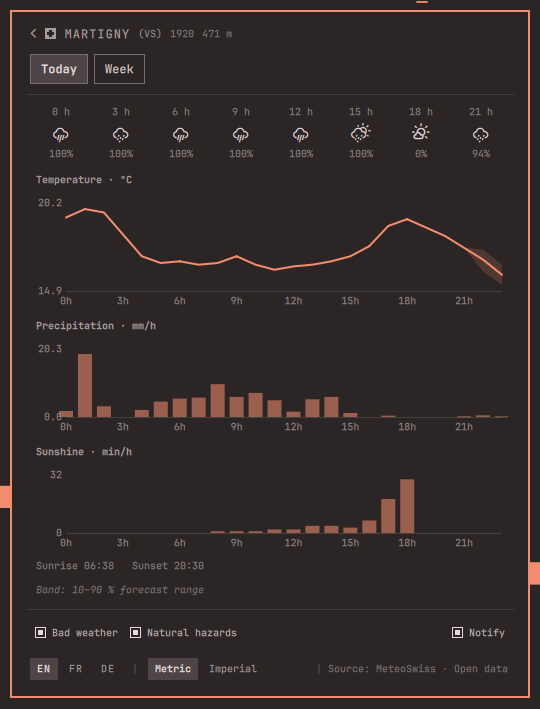
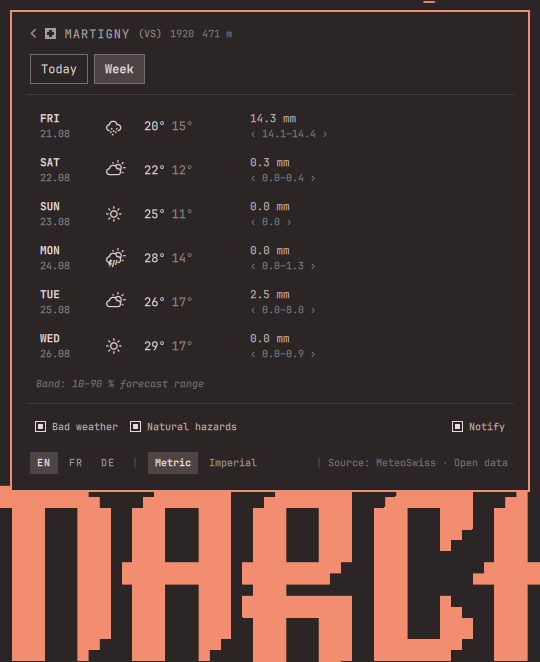
- Three charts: today by the hour, the week ahead, and 48 hours of wind with its gusts, all with their uncertainty bands.
- Every Swiss postal code, 4071 of them, searchable by name or number — offline, because the index ships with the plugin.
- English, French or German, metric or imperial. Unit conversion is arithmetic done on your machine.
- One notification for every favourite — a drop-in replacement for
Omarchy's
SUPER + CTRL + ALT + W.
| Today | The week |
|---|---|
 |
 |
Install
omarchy plugin add https://github.com/jmaeder/omarchy-swissweather.git --enable
--enable asks where to put it in the bar. To place it yourself:
omarchy plugin enable jmaeder.swissweather center --before omarchy.clock
Needs Omarchy 4 (Quattro) with shell plugin support, curl, and a Nerd Font
for the weather symbols — a stock install has all three.
Replacing the built-in weather widget
Omarchy ships its own omarchy.weather. The two run happily side by side —
that is what the small Swiss cross on this one's symbol is for — but one is
usually enough:
omarchy plugin disable omarchy.weather
One key binding goes with it. SUPER + CTRL + ALT + W calls the built-in
widget; point it here instead, in ~/.config/hypr/bindings.lua:
hl.unbind("SUPER + CTRL + ALT + W")
o.bind("SUPER + CTRL + ALT + W", "Weather", "omarchy-shell jmaeder.swissweather summary")
Same key, same habit: one notification with every favourite's current weather.
Swiss Weather · 18:00
Bern (BE)        15.7 °C · 0.0 mm · 4 km/h · 0 min
Davos Dorf (GR)  13.7 °C · 0.0 mm · 5 km/h · 0 min
Engelberg (OW)   19.8 °C · 0.4 mm · 5 km/h · 0 min
Controls
| Action | Result |
|---|---|
| Left click the bar item | Open / close the panel |
| Middle click | Refresh now |
| Right click | Next favourite town |
| Click any value | Open its chart |
Enter |
Town search |
1…9 |
Jump to that favourite — or, in the charts, Today / Week |
Esc |
Back, then close |
h |
The keyboard shortcuts, over the panel |
Settings
In ~/.config/omarchy/shell.json, on the plugin's entry:
| Key | Default | Meaning |
|---|---|---|
showTemperature |
false |
Show the temperature next to the bar symbol |
swissCross |
true |
Badge the bar icon with a small Swiss cross |
refreshMinutes |
15 |
Poll interval, clamped to 5–180 minutes |
language |
(locale) | en, fr or de; the panel's own selector overrides it |
detectLocation |
true |
Detect your region once, on first run |
Data and privacy
Everything on screen is MeteoSwiss data, from data.geo.admin.ch and the
service behind the official MeteoSwiss app. Location detection is one request
to ipapi.co, at most once, and only if you leave detectLocation on. Those
three hosts are the only ones the plugin ever contacts; the list is enforced in
code and redirects are not followed. Town search runs against the bundled
index, so what you type is never part of a request. The plugin writes one file:
its own state under ~/.local/state/omarchy/plugins/jmaeder.swissweather/.
MeteoSwiss Open Data may be used freely provided the source is cited, which the panel does in its footer. The MeteoSwiss weather graphics are proprietary and are not used: the plugin takes the documented symbol numbers and draws its own Nerd Font glyphs.
Documentation
- Manual — the panel in detail, notifications, IPC, where it starts, removing it
- Where the data comes from — every source, and why the maps and weather cams are links
- Privacy and security — what it fetches, launches and writes, and what it refuses
- Development — layout, tests, iterating on a live shell
Licence
MIT — see LICENSE.
Weather data: Source: MeteoSwiss, used under the MeteoSwiss Open Data terms of use. This plugin is not affiliated with or endorsed by MeteoSwiss.