
Omarkey
An Omarchy shell plugin for people who are still
learning their keybindings. When you open an app through the Omarchy menu
(SUPER + SPACE) instead of its dedicated shortcut, it sends you a
desktop notification reminding you what the shortcut is, so next time you
can skip the menu.
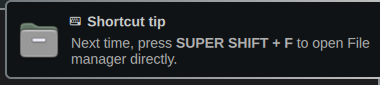
Example: open your browser via the menu, and you'll get a notification like:
⌨ Shortcut tip Next time, press SUPER SHIFT + B to open Browser directly.
with the app's own icon and everything, styled through Omarchy's own notification popup.
Each tip tapers off automatically (3 times by default) once you've presumably learned it, so it doesn't nag forever.
How it works
Omarchy's app menu is a layer-shell surface with namespace omarchy-menu.
This plugin watches raw Hyprland events for that layer opening and
closing. If a new window matching one of its known apps opens within a
few seconds of the menu closing, it looks up the current keybinding for
that app (live, via omarchy menu keybindings --print, so it always
reflects your actual bindings even if you've customized them) and sends a
notification with the key combo bolded and the app's icon attached.
It does not try to guess at in-app shortcuts, only app launches, and only for apps you can already open with a dedicated keybind.
Install
omarchy plugin add https://github.com/0d4vid/omarkey
omarchy plugin enable jnodavid.omarkey
omarchy restart shell
Configuring which apps it covers
Edit config/apps.json in the installed plugin directory
(~/.config/omarchy/plugins/jnodavid.omarkey/config/apps.json). Changes
apply live, no restart needed.
{
  "maxShowsPerApp": 3,
  "notifyGraceMs": 4000,
  "apps": [
    { "classPattern": "obsidian", "description": "Obsidian", "icon": "obsidian" }
  ]
}
classPattern— a regular expression matched (case-insensitively) against the launched window's class.description— must exactly match the description shown byomarchy menu keybindings --printfor that app's binding, since that's how the current key combo is looked up.icon— an icon-theme name (or absolute path) shown in the notification. Optional; if it doesn't resolve on your system, the notification just shows without one.
Only add apps that have exactly one meaningful shortcut. Apps with several overlapping bindings that share the same window class (for example a plain terminal vs. a tmux/herdr variant) aren't included by default, since there's no reliable way to tell which one you meant from the window alone.
IPC
omarchy-shell omarkey status   # current state, dump of shown-counts
omarchy-shell omarkey reset    # clear learned/shown state
omarchy-shell omarkey reload   # reload config/apps.json + keybindings
License
MIT