
Desktop Ambience
A standalone Omarchy Shell plugin for composing animated desktop atmosphere. Twelve ordered renderers share one persistent surface per output, while a separate vignette can sit above or below the stack. The plugin owns its settings, theme adaptation, settings window, and runtime status endpoint.
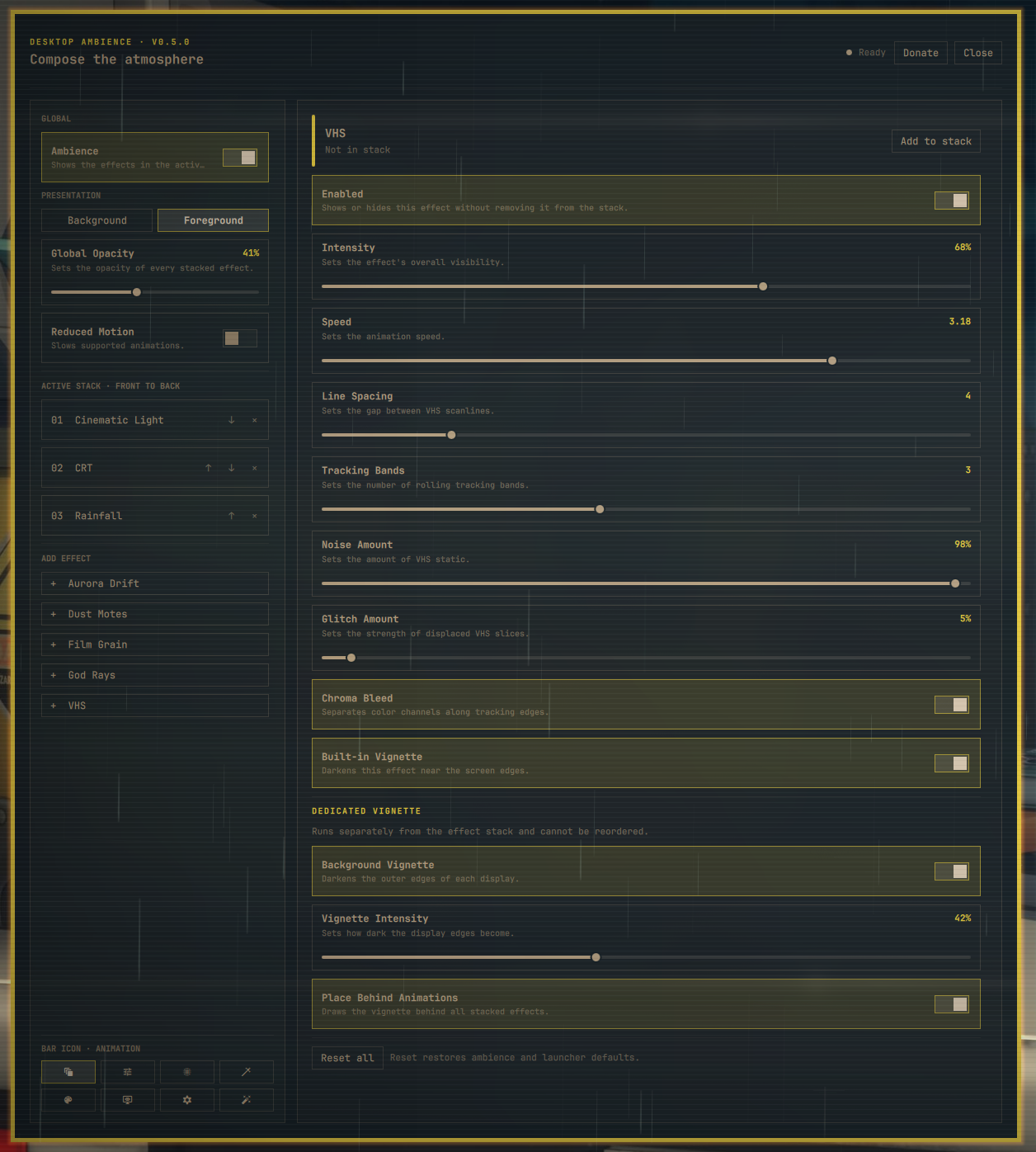
Included effects
- Aurora Drift
- Cinematic Light
- CRT
- Dust Motes
- Drip — including an opt-in cinematic blood mode with randomized cult-style toggle labels
- Film Grain
- God Rays
- Rainfall
- Tactical Grid
- VHS (
trackingLinesin the settings file) - Bokeh (opt-in)
- Node Mesh (opt-in)
- Dedicated background vignette
The ordered list is front-to-back: position 1 is topmost. The dedicated vignette
is intentionally outside that list. Rainfall now selects between the compatible
layered rain renderer and a bounded snow renderer with configurable flake size,
flutter, slant, and soft/crystal detail. This remains one ordered rainfall
effect, so the production renderer count stays at twelve. Node Mesh renders a
bounded deterministic field with nearby connections, selectable theme roles,
reduced-motion static output, and optional pointer attraction or repulsion
through the shared cursor tracker.
Requirements
- A current Omarchy installation with the stock Omarchy Shell running
- Quickshell and Hyprland as supplied by Omarchy
- Git for repository installation and upgrades
Omarchy plugins execute unsandboxed inside the long-running shell process. Review third-party plugin code before enabling it.
Install
Install from the public Git repository and enable it:
omarchy plugin add "https://github.com/OldJobobo/desktop-ambience.git" --enable
For a reviewed local checkout, run this from the repository root. This performs a real Git clone into Omarchy's plugin directory; it does not create a development symlink:
omarchy plugin add "file://$(pwd)" --enable --yes
If the repository was added without --enable, enable it later. New installs
place the single-instance launcher in the right bar section:
omarchy plugin enable jobo.desktop-ambience --section right
Install the optional Omarchy menu row from the cloned plugin. The helper is
idempotent and owns only its marked desktop-ambience entry:
"$HOME/.config/omarchy/plugins/jobo.desktop-ambience/scripts/menu-entry.sh" install
Avoid running multiple full-desktop effect systems at the same time. Their layer surfaces can overlap even when both remain click-through.
Open settings
Click the Desktop Ambience animation icon () in the bar or choose Desktop
Ambience from the optional Omarchy menu row. Both launchers summon the same
persistent settings window and own no renderer or settings state themselves.
The bar icon can be changed from the Bar Icon section in plugin settings.
Choices include Animation, Tune, Blur, Magic staff, Palette, Monitor eye,
Vintage filter, and Auto-fix. Animation is the default. The selected icon is
stored with the widget's existing inline bar settings and updates every bar
surface without restarting the ambience renderer.
The equivalent shell command is:
omarchy-shell shell summon jobo.desktop-ambience '{}'
The window shows the installed plugin version and controls global enable, background/foreground presentation, opacity, reduced motion, stack membership and order, every effect setting, effect-level reset, the dedicated vignette, save retry, and full reset. Pause preview temporarily stops all rendering and cursor sampling while the window is open without changing saved settings. The Donate button opens OldJobobo's Ko-fi.
Inspect runtime state without opening the window:
omarchy-shell jobo-desktop-ambience status | jq
The status includes active order, loaded renderer count, per-output surfaces, fullscreen suppression, settings persistence health, theme-adapter health, shared-cursor requests, and per-output Node Mesh ownership and population metrics.
Presentation behavior
Background mode uses a click-through, non-exclusive Bottom layer and is the default. Foreground mode moves the same persistent surface to Overlay. It may cover the stock bar, menus, and other Overlay UI depending on compositor mapping order. A fullscreen application suppresses foreground paint only on its own output; the surface and renderer tree remain alive.
Settings and state
The only persistent plugin state is:
$XDG_CONFIG_HOME/omarchy/jobo/desktop-ambience/settings.json
When XDG_CONFIG_HOME is unset, the path falls back to
$HOME/.config/omarchy/jobo/desktop-ambience/settings.json.
Writes are normalized, serialized, and atomically replaced. Unknown JSON-safe
fields are retained for forward compatibility. A malformed external edit keeps
the last valid runtime state and surfaces a repairable persistence error.
Rain and snow share the persisted effects.rainfall.dropCount population key
for backward compatibility; the settings window labels it Precipitation Count.
Upgrade
Installed repository copies are Git-managed:
omarchy plugin update jobo.desktop-ambience
Omarchy fetches the configured origin, fast-forwards the checkout, validates the manifest, and rescans plugins. Settings are versioned and normalized on load; upgrades do not read or migrate state from other plugins.
When upgrading from a panel-only version, disable and re-enable once so Omarchy moves the existing plugin entry into the bar layout:
omarchy plugin disable jobo.desktop-ambience
omarchy plugin enable jobo.desktop-ambience --section right
Re-running the menu helper refreshes the marker-owned row without creating a duplicate:
"$HOME/.config/omarchy/plugins/jobo.desktop-ambience/scripts/menu-entry.sh" install
Disable
Disable rendering and unload the plugin while preserving its settings:
omarchy plugin disable jobo.desktop-ambience
Re-enable it with:
omarchy plugin enable jobo.desktop-ambience
Uninstall
Remove the optional menu row while the helper is still available, then remove the installed Git checkout:
"$HOME/.config/omarchy/plugins/jobo.desktop-ambience/scripts/menu-entry.sh" remove
omarchy plugin remove jobo.desktop-ambience
Then remove the plugin-owned settings directory if no state should remain:
rm -rf -- "${XDG_CONFIG_HOME:-$HOME/.config}/omarchy/jobo/desktop-ambience"
No theme, Hyprland, shell.json, or unrelated application settings are owned or
modified by this plugin.
Troubleshooting
The plugin is not listed
Validate the checkout and ask the shell to discover plugins again:
omarchy plugin validate "$HOME/.config/omarchy/plugins/jobo.desktop-ambience"
omarchy-shell shell rescanPlugins
omarchy plugin list
The bar icon or menu row is missing
Reinsert the bar widget and install the optional menu row:
omarchy plugin disable jobo.desktop-ambience
omarchy plugin enable jobo.desktop-ambience --section right
"$HOME/.config/omarchy/plugins/jobo.desktop-ambience/scripts/menu-entry.sh" install
The settings window does not open
Confirm the plugin is enabled, then summon it directly:
omarchy plugin enable jobo.desktop-ambience
omarchy-shell shell summon jobo.desktop-ambience '{}'
Effects are hidden in foreground mode
Check the per-output fullscreen state:
omarchy-shell jobo-desktop-ambience status | jq '.surfaces'
Foreground paint is intentionally suppressed on an output whose active workspace contains a fullscreen application.
A save failed
Use Retry in the settings window. The status endpoint reports the requested and confirmed revisions plus the persistence error:
omarchy-shell jobo-desktop-ambience status | jq '.persistence'
Foreground effects cover shell chrome
This is the documented Overlay policy. Switch Presentation to Background in the settings window for a behind-windows surface.
Development
The repository root is the installable plugin root. Run host-independent checks while developing:
./scripts/check-contracts.sh
Before merging, run the complete suite from an active Omarchy Wayland session:
./scripts/check.sh
The complete suite validates the manifest, lints every QML file, checks shell scripts, rejects forbidden runtime dependencies and extra file owners, runs all behavior tests with zero skips, and checks the Git diff.
Run the reversible monitor lifecycle check when validating Hyprland hotplug:
JOBO_AMBIENCE_LIVE_HOTPLUG=1 python tests/live_phase3_hotplug.py
Run the complete Phase 6 release matrix only from a live Omarchy session. It
uses temporary XDG homes and headless outputs, briefly tests an advertised
alternate refresh rate, restores the original mode, and writes evidence under
docs/release/evidence/<version>/:
JOBO_AMBIENCE_LIVE_PHASE6=1 ./scripts/check-phase6.sh
Profile the Phase 7 per-effect matrix with isolated settings and reversible headless outputs. Its precipitation cases cover rain and snow defaults, maxima, reduced motion, rain mist/splash extremes, style-switch churn, hidden state, and fullscreen suppression on one and three negative-origin outputs:
JOBO_AMBIENCE_LIVE_PHASE7=1 python tests/live_phase7_performance.py
The Phase 6 matrix also captures rain/snow visual variants and a dedicated reversible two-output precipitation probe; neither harness reads or writes live plugin settings.
Use --target-root <worktree> to compare another revision, or combine --cases dustMotes --repetitions 5 for a repeatable focused sample. Run the complete
performance and Phase 6 parity matrix before release:
JOBO_AMBIENCE_LIVE_PHASE7=1 ./scripts/check-phase7.sh
Findings and current machine evidence are documented in
docs/performance/phase7.md.
Desktop Ambience is available under the MIT License.
Versioning, pull-request checks, and the release process are defined in
CONTRIBUTING.md. Release notes are kept in
CHANGELOG.md. Validate a clean release candidate with:
./scripts/release-check.sh
Extraction provenance and milestone gates are documented in PLAN.md
and docs/extraction-baseline.md.