
OmaType
Offline typing practice, built into Omarchy.
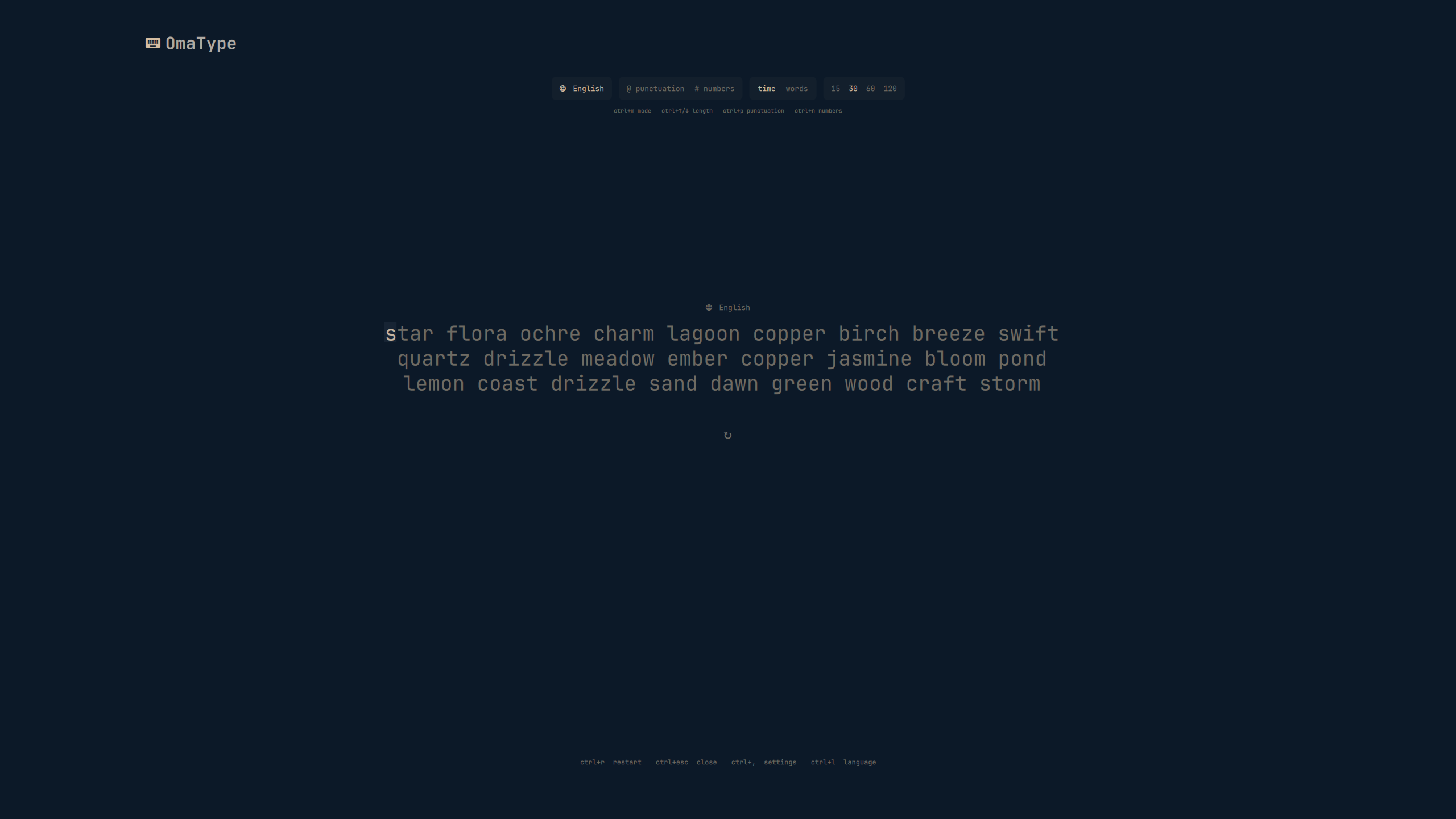
Timed and word tests in a focused interface that follows your active theme—without an account, telemetry, or network access.
Why OmaType
- It feels at home. The full-screen interface uses your active Omarchy colors and typography, while a compact bar widget keeps your latest WPM close by.
- It stays out of the way. Focus mode clears the surrounding interface once you begin. Everything from setup to settings has a keyboard-only path.
- Your data stays yours. Tests, preferences, and history remain on your machine. There is no account, cloud service, or network dependency.
Practice your way
- Run 15, 30, 60, or 120-second tests.
- Choose 10, 25, 50, or 100-word tests.
- Add punctuation and numbers to natural-language prompts.
- Practice English, German, Spanish, French, Italian, Portuguese, or Dutch, or choose one of 36 programming-language vocabularies including Bash, Nix, Python, Rust, JavaScript, TypeScript, C/C++, Go, SQL, Swift, Zig, and more.
- Review WPM, raw WPM, accuracy, consistency, character counts, and a second-by-second speed chart.
- Track comparable pace, personal bests, recent accuracy, streaks, daily activity, goals, and same-setup language progress over time.
- Inspect or delete retained results, clear history with confirmation, and export retained runs to CSV.
- Tune the caret, timer, live metrics, typography, line geometry, focus behavior, motion, contrast, and error indicators.
Each natural language uses a 500-word offline corpus. OmaType preserves its original English vocabulary and expands every pack with reviewed common-word data, native spelling, and diacritics. Programming packs contain original, project-curated keywords, operators, syntax terms, and common API identifiers. Vocabulary attribution is documented in THIRD_PARTY_NOTICES.md.
Install
OmaType requires an Omarchy installation using the Quattro shell and the system Python 3 interpreter at /usr/bin/python3 for secure local persistence. It uses only Python’s standard library; no third-party packages are needed.
omarchy plugin add https://github.com/OldJobobo/omatype.git --enable
[!NOTE] Omarchy’s current add/update commands follow the repository’s mutable branch head; they are not bound to the exact commit checked by the marketplace. Marketplace validation is a limited, commit-specific static check—not a security audit or guarantee.
Once enabled, select OmaType from the bar and begin typing. It opens on that bar’s display; direct launches use the focused Hyprland monitor. You can also open it directly:
omarchy-shell shell toggle jobo.omatype '{}'
For a pointer-free launch, assign that command to an available shortcut through your normal Omarchy/Hyprland keybinding configuration. OmaType intentionally does not claim a global key during installation.
Controls
While typing
| Action | Shortcut |
|---|---|
| Start a test | Type any printable character |
| Repair the previous character | Backspace |
| Start a fresh test | Ctrl+R |
| Switch between time and word modes | Ctrl+M |
| Change the test length | Ctrl+Up / Ctrl+Down |
| Toggle punctuation | Ctrl+P |
| Toggle numbers | Ctrl+N |
| Choose a language | Ctrl+L |
| Open progress | Ctrl+H |
| Open settings | Ctrl+, |
| Close OmaType | Ctrl+Escape |
| Move to the next display | Ctrl+Alt+M |
Enter starts the next test from the results screen and can optionally end an active test early. The quick-restart key can be set to Tab, Escape, Enter, or disabled; Ctrl+R always works.
Panels and settings
- Use
Arrowkeys orTab/Shift+Tabto move through controls. - In the language picker,
Home/Endjumps to either boundary andPage Up/Page Downmoves through the list faster. PressEnterorSpaceto select. - In settings, use
Ctrl+1throughCtrl+5orCtrl+Left/Ctrl+Rightto switch between Test, Behavior, Display, Caret, and Access. - Left/Right changes the focused value,
Enter/Spaceadvances it, andRresets the current section.Home/Endjumps to the first or last settings row;Page Up/Page Downscrolls the drawer. - In progress, use
Tab/Shift+Tabto move between visible regions andLeft/Rightto change filters. In the retained-results region,Up/Down,Home/End, andPage Up/Page Downmove through results; elsewhere those keys scroll the progress page.Crestores the current-setup filter. Deleterequires a second press before removing the selected retained result.Shift+Deleteor the clear-history control requires confirmation before all history is erased.- Plain
Escapecloses an open panel first. Otherwise, it follows your quick-restart preference or closes the overlay.Ctrl+Escapealways closes OmaType.
Progress comparisons default to the current exact mode, amount, language, punctuation, numbers, and metrics version. Mixed activity can be filtered by retained language, Time/Words mode, and amount for volume and streak inspection, but it is never presented as a combined WPM, accuracy, or personal best claim.
Programming vocabularies preserve syntax tokens as written, so punctuation and number transformations are unavailable while a programming language is selected. Natural-language packs support both transformations.
Local by design
OmaType does not use the network, read credentials, request elevated privileges, invoke a package manager, or modify unrelated user configuration.
| Data | Location |
|---|---|
| Preferences and daily goal | ~/.config/omarchy/omatype-settings.json |
| Typing history and compacted long-term statistics | ~/.local/state/omarchy/omatype-history.json |
| Optional retained-result CSV export | ~/.local/state/omarchy/omatype-history.csv |
Preferences and history are versioned and validated before use. A settings file from a newer schema is left untouched: OmaType starts with safe in-memory defaults, cancels queued writes, and refuses to overwrite it. Local reads are bounded and accept only owned regular files reached through owned, non-writable-by-group-or-others directories without following symlinks; FIFOs, sockets, directories, oversized content, invalid UTF-8, and excessive history structures are rejected.
Saves use OmaType’s bundled standard-library Python helper. Revision-checked settings and history writes take an advisory directory lock, verify the exact previously read bytes, create a private 0600 temporary, sync it, recheck destination identity, and atomically publish it. Conflicting history operations are replayed onto the newly loaded document instead of retrying a stale snapshot. CSV export intentionally replaces its own destination without following a symlink and neutralizes spreadsheet-formula prefixes. A non-cooperating process running as the same user can still race after the final identity check; owner-private directories, revision checks, and atomic rename narrow that residual window but cannot provide a kernel-level compare-and-swap.
OmaType retains the newest 2,000 individual runs, then conserves older totals, daily activity, comparable averages, and personal bests in compacted local rollups. A test snapshots its active behavior and setup preferences when it begins, so mid-test changes cannot alter the run already in progress.
[!IMPORTANT] Like all Quattro plugins, OmaType runs unsandboxed inside
omarchy-shellwith your current user permissions. OmaType uses that access only for the local files above and the host-shell command that opens or closes its interface.
Remove
omarchy plugin remove jobo.omatype
Removing the plugin leaves your preferences, history, and any CSV export intact. To erase them as well, delete the local files listed above after uninstalling.
<details> <summary><strong>Local development</strong></summary>Link a checkout
mkdir -p ~/.config/omarchy/plugins
ln -s /absolute/path/to/omatype ~/.config/omarchy/plugins/jobo.omatype
omarchy plugin validate ~/.config/omarchy/plugins/jobo.omatype
omarchy plugin enable jobo.omatype right
omarchy-restart-shell
Validate changes
Node.js 20 or newer is required for the development test suite. There are no npm dependencies.
tests/run
node -e 'for (const f of ["manifest.json", "data/words-en.json"]) JSON.parse(require("node:fs").readFileSync(f))'
git diff --check
QML runtime validation requires Qt 6, Quickshell, and the Quattro plugin host. Contract tests keep deterministic business logic testable without a compositor.
Project structure
| Path | Purpose |
|---|---|
manifest.json |
Quattro schema-v1 plugin manifest |
OmaType.qml |
Full-screen overlay entry point |
BarWidget.qml |
Bar widget entry point |
src/ |
Generator, typing state, metrics, sessions, schema-v2 history, progress aggregation, settings, layout, and language registry |
components/progress/ |
Keyboard-first progress view, pace charts, activity heatmap, and controls |
components/SecureFile.qml and scripts/secure_file.py |
Bounded, no-follow local persistence boundary |
data/words-en.json |
Curated 500-word English corpus |
tests/ |
Dependency-free Node tests and QML contract checks |
The overlay owns a full-screen PanelWindow and exclusive typing focus. Quattro keeps the plugin instance alive and calls open(payloadJson) and close(). The bar widget follows the supported BarIconButton contract and uses bar.run(...) to toggle jobo.omatype through omarchy-shell.
License
OmaType is original, MIT-licensed software. It takes visual cues from the calm, distraction-free category of typing trainers without copying Monkeytype code, word data, or assets. See LICENSE.