
Devices — Omarchy bar plugin
A USB icon () in the Omarchy bar. Click it for a popup of everything connected — USB and Bluetooth — each with an icon that actually matches what it is.
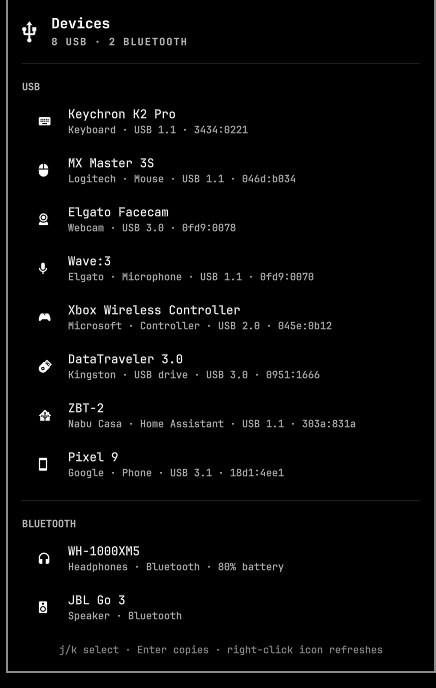
(Preview rendered by the plugin with devices-list --demo sample data.)
Keyboard, mouse, webcam, microphone, speaker / headphones / headset, game controller, storage, USB drive, printer, phone, network adapter, serial device, wireless receiver, Bluetooth adapter, Zigbee coordinator (with a Home Assistant icon for Nabu Casa sticks). Anything unknown shows a generic USB icon.
Install
omarchy plugin add https://github.com/jonasbove/omarchy-devices.git --enable
Or via the marketplace at omarchyplugins.com. Remove with omarchy plugin remove jonasbove.devices.
Use
| Action | Result |
|---|---|
| Left-click icon | Open / close the popup |
| Right-click icon | Refresh the list now |
j / k (or arrows) |
Move between devices |
Enter / click row |
Copy "name — details" to the clipboard (needs wl-copy; silently skipped otherwise) |
Esc |
Close |
Tab / Shift+Tab |
Switch to the neighbouring bar panel |
IPC: omarchy-shell jonasbove.devices open|close|toggle
Settings
Set on the widget entry in ~/.config/omarchy/shell.json:
{ "id": "jonasbove.devices", "refreshIntervalSec": 5, "showBluetooth": true }
refreshIntervalSec— how often the list re-scans while the popup is open (1–60 s). Nothing runs while it's closed.showBluetooth— include connected Bluetooth devices (needsbluetoothctl).
How devices are classified
devices-list reads sysfs only (no lsusb), and decides the type in layers, most reliable first:
- Kernel subsystem bound to the device —
bluetooth,video4linux,sound,net,block,tty. - Product/vendor name hints for things interface classes can't tell apart — microphone vs. speaker (both USB Audio), receivers vs. keyboards (both HID), Zigbee sticks vs. generic serial, controllers.
- USB interface class and HID protocol (keyboard vs. mouse).
Bluetooth devices come from bluetoothctl devices Connected + BlueZ's icon class, with battery level when reported.
Nothing is hard-coded to particular hardware; add a hint to classify() if your device lands on the generic icon.
Requirements
- Omarchy shell (Quattro) —
bar-widgetplugin API python3(always present on Arch)- Optional:
bluetoothctl(Bluetooth section),wl-copy(copy to clipboard)
Development
Symlink the checkout into your plugins directory and enable it:
ln -s "$PWD" ~/.config/omarchy/plugins/jonasbove.devices
omarchy plugin enable jonasbove.devices --section right
Code under ~/.config/omarchy/plugins/ hot-reloads on save. Note that a bar widget whose
root has no implicitWidth/implicitHeight gets a zero-width slot and never appears — and a
hot-reload does not re-mount it once that has happened; omarchy restart shell does.
devices-list --demo prints a sample inventory (used for the preview image); point listProc.command at it to work on the UI without real hardware.
Validate before publishing: omarchy plugin validate .
License
MIT