
Omahub
← All plugins
J

OmaFocus

by Jeroen van Baarsen

A timed, reboot-resistant distraction blocker for Omarchy.

Security review

Potentially dangerous behavior detected · 12 findings

Deterministic scan — not a security guarantee

High
Risk level
High
Analyzed commit
2343040
Scanned
1 month ago
  • Bundles a systemd unit file.

    [Unit]
  • high persistence bin/omafocus-root:62

    Registers scheduled or boot-time system tasks.

    systemctl enable --now omafocus.service
  • high persistence bin/omafocus-root:68

    Registers scheduled or boot-time system tasks.

    systemctl disable omafocus.service || true
  • high persistence bin/omafocus-root:73

    Registers scheduled or boot-time system tasks.

    systemctl disable omafocus.service; exit 0; fi
  • high persistence bin/omafocus-root:80

    Registers scheduled or boot-time system tasks.

    systemctl disable omafocus.service
  • medium sudo uninstall:12

    Command runs with sudo, elevating the process beyond the plugin environment.

    sudo rm -f /usr/local/lib/omafocus/omafocus-root /etc/systemd/system/omafocus.service
  • medium sudo uninstall:13

    Command runs with sudo, elevating the process beyond the plugin environment.

    sudo rmdir /usr/local/lib/omafocus 2>/dev/null || true
  • medium sudo uninstall:14

    Command runs with sudo, elevating the process beyond the plugin environment.

    sudo systemctl daemon-reload
  • Docs sudo install:16

    Command runs with sudo, elevating the process beyond the plugin environment.

    sudo install -d -m 755 /usr/local/lib/omafocus
  • Docs sudo install:17

    Command runs with sudo, elevating the process beyond the plugin environment.

    sudo install -m 755 "$repo_dir/bin/omafocus-root" /usr/local/lib/omafocus/omafocus-root
  • Docs sudo install:18

    Command runs with sudo, elevating the process beyond the plugin environment.

    sudo install -m 644 "$repo_dir/systemd/omafocus.service" /etc/systemd/system/omafocus.service
  • Docs sudo install:19

    Command runs with sudo, elevating the process beyond the plugin environment.

    sudo systemctl daemon-reload

Automated analysis only — not a security guarantee.

AI advisory review

No obvious issues detected

Language-model assessment · ~deepseek/deepseek-v4-flash-latest — advisory only

Low
AI risk level
Low
Recommendation
install
Model
~deepseek/deepseek-v4-flash-latest
Analyzed commit
2343040
Reviewed
1 month ago

OmaFocus is a distraction blocker that requires explicit user consent to install a root-owned systemd service and nftables rules. The code is transparent, well-documented, and performs only the intended domain-blocking functionality with no hidden network activity, credential theft, or destructive behavior. The deterministic scan's high risk flags are expected consequences of the plugin's design (persistence and sudo), not indicators of malice.

  • The plugin installs a root-owned systemd service and modifies nftables, which requires elevated privileges; this is clearly documented and only runs after the user manually executes ./install.
  • The systemd service is enabled only while a focus block is active and disabled when the timer ends, limiting persistent impact.
  • The blocklist is user-controlled and validated; the service only resolves domains and adds nftables rules, with no external communication or data exfiltration.
How this check works

This review combines the deterministic scan (the rule-based results above) with an independent look at the plugin's code by a language model. The model reads a trimmed sample of the repository's files, the manifest, and the README, then gives a plain-language risk level and a recommendation: install (no notable danger), review (look closer first), or avoid (clearly dangerous).

It runs on the same analyzed commit as the deterministic scan and is strictly advisory — it is not a security guarantee and never blocks a plugin by itself. A human moderator still reviews plugins before they are listed.

AI advisory only — automated analysis, not a security guarantee.

Install
$ omarchy plugin add https://github.com/jvanbaarsen/omafocus --enable
Productivity #quickshell

OmaFocus

OmaFocus is a SelfControl-inspired Omarchy Quattro plugin: choose a duration, list distracting domains, and start a focus block from the right side of the Quickshell bar.

Once started, the root-owned omafocus.service keeps the block active until the recorded end time, including after an Omarchy-shell or system restart. It enables itself only for the active block and disables itself again when the timer expires. If you genuinely need an escape hatch, the active panel provides I know I’m weak, but stop, which immediately removes OmaFocus's rules and ends the timer.

Panel
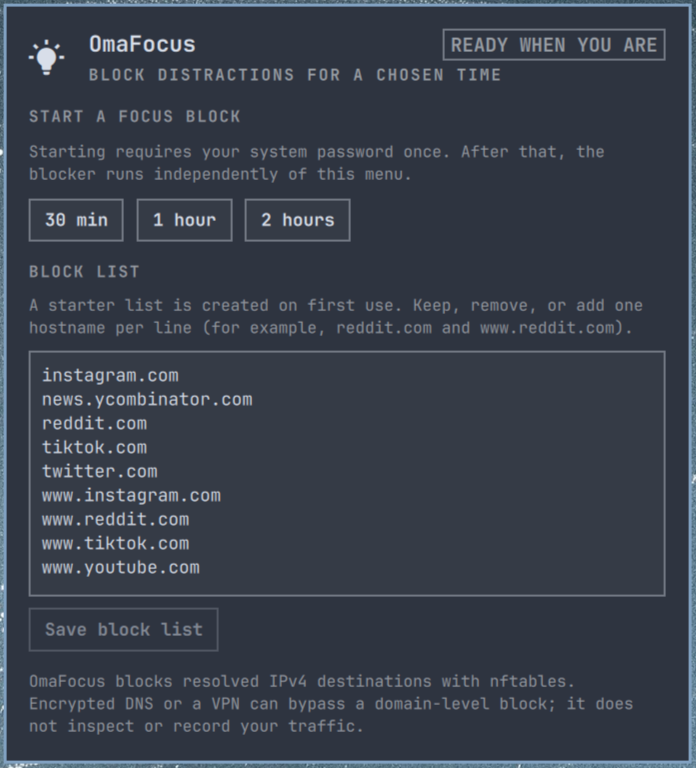
OmaFocus Quickshell panel with focus-duration controls and the editable starter blocklist

Install from Omarchy Plugins

The marketplace installs the Quickshell code but deliberately does not run installers or privileged commands. Review the repository, then run the required local setup in a terminal:

omarchy plugin add https://github.com/jvanbaarsen/omafocus.git --enable
cd ~/.config/omarchy/plugins/jvb.omafocus
./install

./install installs the user command at ~/.local/bin/omafocus and asks for sudo only to install the root-owned systemd enforcement service. It does not download or execute third-party code.

Dependencies and permissions

  • Omarchy Quattro / Quickshell
  • nftables, systemd, pkexec, and getent (present on a standard Omarchy installation)
  • sudo only while installing or removing the root-owned helper

The panel starts and stops a block through pkexec. The privileged helper owns only /var/lib/omafocus, /run/omafocus, its omafocus.service, and its own inet omafocus nftables table. No focus block or firewall change occurs until you explicitly start or stop one.

Remove

Wait for any active focus block to end, then run:

cd ~/.config/omarchy/plugins/jvb.omafocus
./uninstall
omarchy plugin remove jvb.omafocus

The uninstaller refuses to run while a block is active. It removes the helper and service; omarchy plugin remove removes the plugin checkout.

On first opening the menu, OmaFocus creates an editable starter blocklist with Reddit, YouTube, X/Twitter, Instagram, TikTok, and Hacker News hostnames. It never overwrites an existing ~/.config/omafocus/blocklist.txt. Blocklists are limited to 256 hostnames and 16 KiB, so the panel and privileged helper always handle a bounded configuration.

How it blocks

The service resolves the configured domains to IPv4 addresses and applies an nftables output rule, refreshing the addresses every minute. It stores only the active timer and domains; it does not inspect or log web traffic.

This is deliberate friction, not a security boundary against the system owner. A VPN, encrypted DNS, direct IP address, or root access can evade a domain-level block. IPv6 is not included in this first release.

Security and privacy

OmaFocus is an unsandboxed community plugin. Read the source before installing it. It resolves the domains you choose and stores only the active timer plus blocklist in local OmaFocus state; it does not inspect, transmit, or log web traffic.

Development checks

bash -n install uninstall bin/omafocus bin/omafocus-root
qmllint BarWidget.qml FocusPanel.qml FocusService.qml
omarchy plugin validate .