
OmaTunnel
Remote development services that still feel like
localhost.
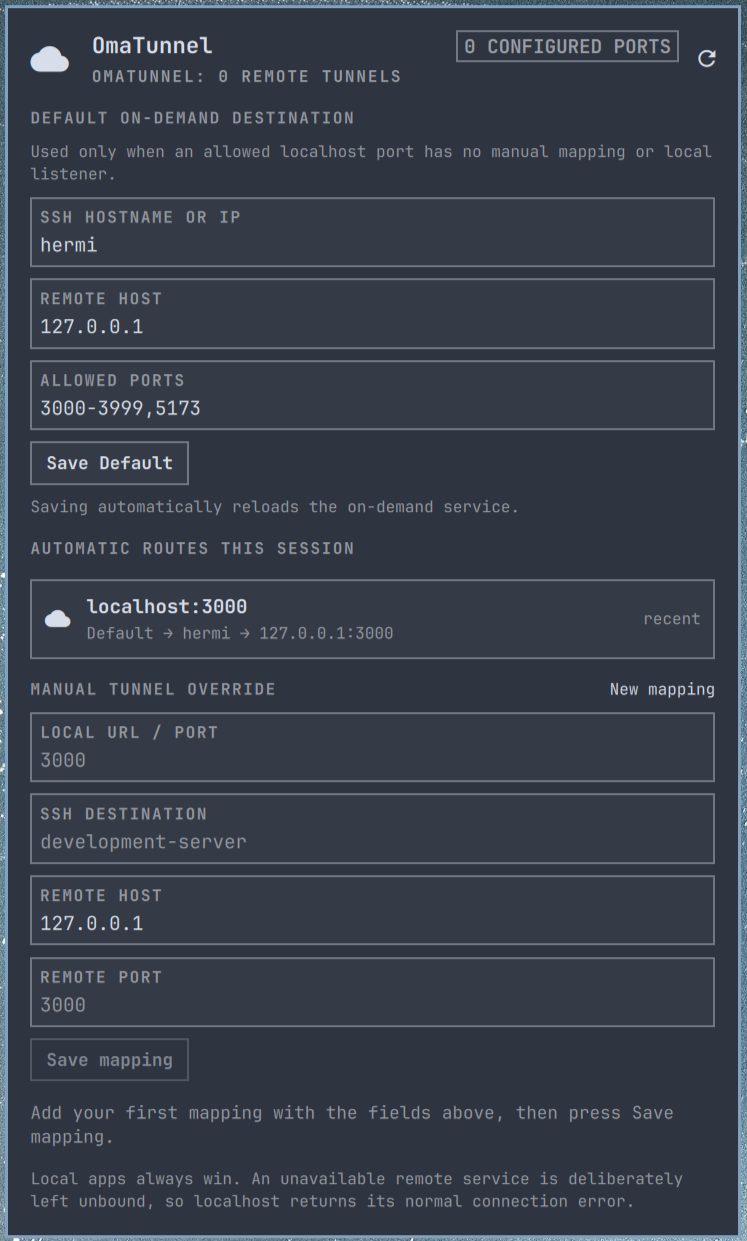
OmaTunnel is an Omarchy Quickshell bar widget and SSH-forward manager. It
makes selected development-server ports available through localhost, without
exposing them beyond 127.0.0.1.
What it gives you
- Local services always win. A genuine listener is never replaced.
- Manual mappings. Explicitly map a local port to an SSH destination and remote host.
- Optional all-localhost mode. Use eBPF to route eligible missing localhost
ports from browsers,
curl, database clients, and development tools. - Visible state. See active manual tunnels and automatic routes opened in the current service session.
Choose a mode
| Mode | Best for | Privileges |
|---|---|---|
| Manual tunnels | A known set of development ports | User-level only |
| On-demand forwarding | Any eligible missing localhost port | Optional sudo setup for eBPF |
How it behaves
For every configured mapping, the service repeatedly checks the local port.
- If another local process listens on it, OmaTunnel does nothing: the local app wins.
- If the port is free and its remote target is reachable over SSH, OmaTunnel starts an SSH forward on
127.0.0.1:<local-port>. - If the remote target is unavailable, OmaTunnel does not open the local port.
localhost:<local-port>therefore gets the ordinary connection-refused error.
This necessarily works for an explicit list of ports. An application cannot
intercept arbitrary localhost:<port> requests after the browser has already
received a network error; configuring mappings lets the service prepare those
ports before you open them.
Each mapping is tab-separated in ~/.config/omatunnel/ports.tsv:
# local_port  ssh_destination  remote_host  remote_port
3000	development-server	127.0.0.1	3000
ssh_destination is deliberately an SSH config host alias (for example
development-server in ~/.ssh/config). This keeps identities, host-key
verification, ProxyJump, and non-standard SSH ports in OpenSSH rather than in
the plugin. OmaTunnel always uses BatchMode=yes; it never opens a password
prompt or disables host-key verification.
Normally you do not need to edit that file: click the OmaTunnel icon in the top-right bar and use the panel's configuration fields to add or edit a mapping. The fields are Local URL / port, SSH destination, Remote host, and Remote port. Selecting an existing mapping loads it into the form; saving applies it immediately, while removing it closes any forward that OmaTunnel owns for that local port.
Install
Install the bar widget from its public repository:
omarchy plugin add https://github.com/jvanbaarsen/omatunnel.git --enable
The widget requires the accompanying helper and user service. Run its installer once from the installed plugin directory:
cd ~/.config/omarchy/plugins/jvb.omatunnel
./install
The installer copies the user helper and systemd unit, creates private configuration files only if they do not already exist, starts the user service, and enables the widget in the top-right of the Omarchy bar. Edit the example mapping before using it:
$EDITOR ~/.config/omatunnel/ports.tsv
omatunnel reconcile
If you ever disable the widget, restore it to the top-right with:
omarchy plugin enable jvb.omatunnel right
OmaTunnel does not start another QuickShell process. Its bar-widget entry point loads the panel in the existing Omarchy shell.
Useful commands
omatunnel status --json
omatunnel reconcile
systemctl --user status omatunnel
journalctl --user -u omatunnel -f
The bar panel shows whether each mapping is currently served by a tunnel,
already occupied by a local process, or unavailable remotely.
System-wide on-demand forwarding
The optional eBPF mode covers every TCP localhost client: browsers, curl,
database clients, and application processes. It is disabled by default.
Configure one Default SSH hostname, IP address, or SSH alias and a deliberately
limited list or range of remote ports in ~/.config/omatunnel/on-demand.conf,
then enable it:
cd ~/.config/omarchy/plugins/jvb.omatunnel
./install --on-demand
Use user@hostname or user@IP when the remote SSH user differs from your
local username. The service uses non-interactive OpenSSH authentication, so the
destination must work with BatchMode=yes (normally an IdentityFile entry in
~/.ssh/config or an available unencrypted default key).
The installer builds the BPF program and uses sudo to enable a system service
with only CAP_BPF, CAP_NET_ADMIN, and CAP_PERFMON. The loader retains
those capabilities only for its BPF work; every ssh child clears them before
reading your SSH configuration (including any ProxyCommand). SSH and the
proxy run as your own user. At each eligible connect(2) call, the BPF program looks up
the requested localhost TCP listener first. It leaves an existing listener
untouched; otherwise it redirects the connection to OmaTunnel's proxy, which
uses ssh -W to reach the same port on the configured remote host.
The proxy recovers the original port from the redirected client's TCP tuple, so its own localhost listener cannot be confused with the requested destination. The port list is also enforced in the BPF program; no other localhost port is redirected.
Saving the Default through the panel automatically reloads the on-demand
service. The installer enables a systemd path watcher for on-demand.conf,
so no password prompt or manual restart is needed after edits.
The panel also shows automatic routes opened during the current service
session, with their active connection count or a recent marker.
Manual mappings remain available in the OmaTunnel panel. They are explicit per-port overrides; the Default is only used for an eligible localhost port without a local listener or a manual mapping.
Inspect its status with:
sudo systemctl status "omatunnel-ebpf@$USER.service"
journalctl -u "omatunnel-ebpf@$USER.service" -f
Remove
From the installed plugin directory, remove the user-level helper and service:
./uninstall
omarchy plugin remove jvb.omatunnel
If you enabled system-wide on-demand forwarding, remove its privileged system service first:
./uninstall --on-demand
omarchy plugin remove jvb.omatunnel
Removal preserves ~/.config/omatunnel/ so manually entered tunnel settings
are not lost. Remove that directory yourself only when you explicitly want to
discard your configuration.
Security and dependencies
The widget runs in Omarchy's existing shell process with your user permissions.
The helper invokes only ssh, ss, systemctl, and standard shell utilities.
The optional on-demand mode additionally requires clang, libbpf, and sudo
because it loads an eBPF program with the limited capabilities documented
above. During privileged installation, source files are supplied on stdin so
sudo never reopens user-writable checkout paths. No credentials, SSH keys,
or remote endpoints are stored in this repository.