
Omascreen
Record your screen and cut it into a finished video — without leaving the shell.
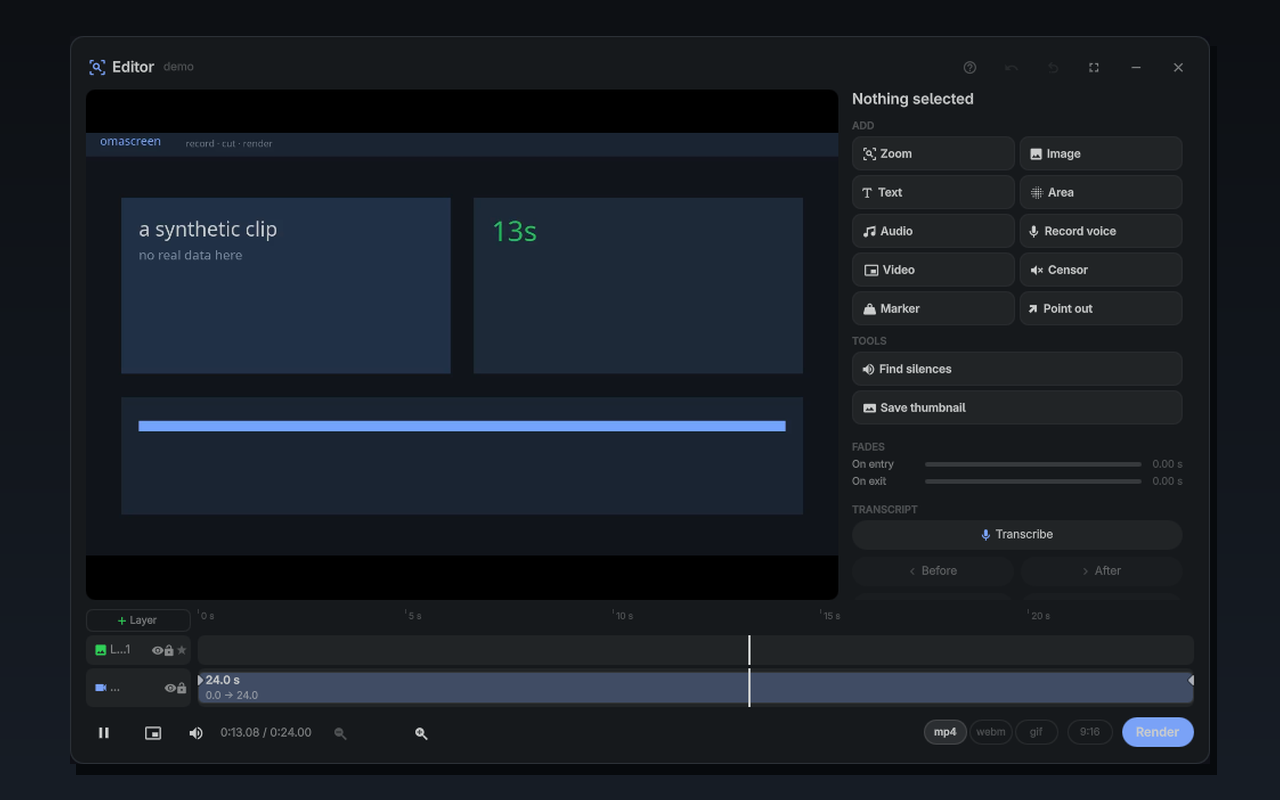
An Omarchy shell plugin: a capture menu and a full video editor, in one overlay. Hit record, stop, and the recording opens in a timeline where you can cut it, zoom into what you were pointing at, add captions, duck the music under your voice, burn subtitles and render an MP4 ready to upload.
What it does
Capture
- Screen, region or a single window
- To a file, to the clipboard, or both
- Records with
gpu-screen-recorderwhen it is there andwf-recorderotherwise - System audio and microphone on separate tracks, so you can balance them afterwards — mixing at record time is irreversible
- Optional webcam to its own file, so it becomes a layer you can move and crop
Edit
- Cut, reorder, trim, speed, colour, freeze frames
- Automatic zoom that follows where your cursor actually was, with the clicks highlighted — the recording keeps a cursor trail for exactly this
- Layers: image, caption, audio, picture-in-picture, blur/pixelate/spotlight areas, censor beeps, arrows and shapes
- Keyframes you can see and drag, easing, Ken Burns, motion traced by clicking the video
- Voice-over: watch the video and talk over it; what you say lands as an audio layer, aligned to what you were looking at
- Ducking: a track drops under another one — the video, your voice-over, any layer you pick
- Background-noise removal you can hear while editing, not only in the render
- Transcription to burnt-in subtitles, chapters from markers, SRT beside the file
- Renders to MP4, WebM, GIF, and 9:16 for shorts, at −14 LUFS if you want what YouTube expects
Install
omarchy plugin add https://github.com/k4ditano/omascreen.git --enable
Then summon it:
omarchy-shell shell summon k4ditano.omascreen '{}'
Bind that to a key and you have a record button. To jump straight into a video:
omarchy-shell shell summon k4ditano.omascreen '{"video":"/path/to/clip.mp4"}'
Remove
omarchy plugin remove k4ditano.omascreen
That takes the plugin away and nothing else. Your files are left alone on purpose: recordings, renders and projects live next to your videos, and a plugin has no business deleting them on its way out.
The only thing it leaves behind is its own settings, thirteen lines you can delete by hand if you want a clean slate:
rm -rf ~/.local/state/omarchy/omascreen
Requirements
Needed:
python3 |
the render engine and the capture helpers |
ffmpeg / ffprobe |
everything that touches pixels or samples |
grim, slurp |
stills and region selection |
wl-clipboard |
copying a capture |
Recommended:
gpu-screen-recorder |
records on the GPU, two audio tracks from one process |
wf-recorder |
the fallback when the above is missing |
zenity |
the file pickers |
imagemagick |
the arrows and shapes |
libnotify |
it tells you when a render finishes |
Optional: whisper-cpp (or whisper-cli) for transcription and subtitles.
How it is put together
manifest.json     what Omarchy reads
Overlay.qml       the seam: Omarchy's open/close on one side, the editor on the other
Estado/           the state — recording, plan, layers, settings. Singletons.
Vistas/           the interface: capture menu, editor, timeline, panels
Ui/               widgets and the theme adapter
K4/               the small QML API the views were written against
tools/            the engine: editar.py builds an ffmpeg graph and runs it
dev/              a harness to run the plugin outside Omarchy
The editor is a port of the one in k4, a
Dynamic Island bar for Hyprland. It keeps working the same way because the port
is an adapter, not a rewrite: Ui/Theme.qml maps Omarchy's Color and
Style onto the names the views expect, so the editor follows your Omarchy
theme without a single view knowing it changed shells.
keepLoaded is not cosmetic: recording runs for minutes with the overlay
hidden. If the state died on close, the recording would die with it.
About the language
The source is written in Spanish, which is the language it was born in. The
interface is translated at runtime — English by default, Russian if your locale
asks for it, Spanish untranslated because that is the source. Adding a
language is one JSON file in Ui/: the key of each string is the Spanish text,
so anything you leave out simply shows up in Spanish instead of breaking.
Running it outside Omarchy
dev/probar.sh                          # the capture menu
OMA_VIDEO=/path/clip.mp4 dev/probar.sh # straight into the editor
dev/qs/Commons is a minimal copy of Omarchy's palette — the same names, the
default theme's values — so import qs.Commons resolves. Inside Omarchy the
real one wins and this is never used.
What it does not do
- It is not sandboxed. Like every Omarchy plugin it runs with your
permissions, and it shells out to ffmpeg, grim and the recorders listed above.
Everything it runs is in
Estado/andtools/, in the open. - It writes only two places: your videos folder, and
~/.local/state/omarchy/omascreenfor settings. - The preview is an imitation, and says so where it matters: ducking and noise removal are reproduced from measured curves, and the render is what decides.
Licence
MIT. See LICENSE.