
This Day in History for Omarchy
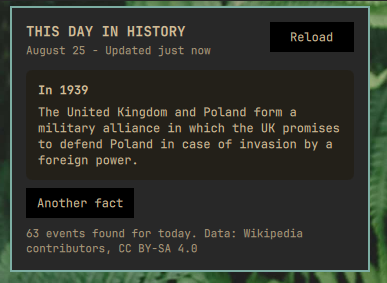
A bar widget: a bookmark icon that, when clicked, opens a panel showing a random historical event that happened on today's calendar date. Facts come from Wikipedia's free, key-free "On This Day" feed.
The icon is the Nerd Font nf-fa-bookmark glyph (U+F02E), not the Unicode
🔖 emoji. A color-emoji font would render that codepoint in fixed colors
regardless of theme, while the Nerd Font glyph is plain outline artwork that
inherits the bar's foreground color like every other icon in it.
Highlights
- One click shows a random event from today's date in history
- "Another fact" picks a different event from the same day, instantly, with no extra network request
- Fetches once per calendar day, plus manual "Reload", so it stays well within any reasonable use of a free public API. Requests are floored at one a minute however they are triggered, and a failed fetch backs off for 30 minutes rather than retrying every 10
- No local state, no cache, no files written anywhere - nothing to clean up
Use
Left-click the bar widget to open the panel.
| Control | Result |
|---|---|
| Reload | Fetch today's events now (at most once a minute; a click inside that window leaves the current fact on screen) |
| Another fact | Show a different event already fetched for today |
| Try Again | Retry after a failed fetch |
Data source
Events come from
https://en.wikipedia.org/api/rest_v1/feed/onthisday/events/{MM}/{DD}, a
free public endpoint from the Wikimedia Foundation that needs no API key or
account. Only the month and day are sent - nothing else about you or your
system.
The request goes to that one hardcoded HTTPS host and nowhere else: redirects are not followed and non-HTTPS schemes are refused, so a reply cannot move the request to another host, to a loopback or private address, or to another scheme. The request carries no authentication and no identifier of any kind - just a User-Agent and today's month and day.
The response is capped at 3 MiB and the parsed event list at 300 items, regardless of what the endpoint returns; both bounds are enforced before the response is held in memory, not after, and a body that hits the ceiling is refused rather than parsed for whatever prefix still happens to be valid. Every event's text is stripped of markup-significant and control characters before it is stored or displayed, and the plugin's own panel renders every string as plain text. A descriptive User-Agent identifying this plugin and linking to its repository is sent with every request, per Wikimedia's API etiquette. Requests are capped to once per calendar day by design; clicking "Reload" fetches on demand but does not change that cadence.
Historical fact text and years shown in the panel are © Wikipedia
contributors, licensed under
CC BY-SA 4.0. This plugin's
own code is MIT-licensed (see LICENSE); the two are independent - the
software is not "made available" under CC BY-SA just because it displays
CC BY-SA content fetched at runtime.
Install
omarchy plugin add https://github.com/kairos-tech-oh/omarchy-this-day-in-history.git --enable
The shell normally picks up the plugin immediately. If the widget doesn't appear, restart it once:
omarchy restart shell
Update
omarchy plugin update kairos.day-in-history --yes
Remove
omarchy plugin remove kairos.day-in-history --yes
Removing the plugin removes its widget and its checkout. This plugin writes
no state files, no cache, and nothing to ~/.config/omarchy/shell.json beyond
the bar-layout entry every widget gets - there is nothing else left behind.
Dependencies
The plugin shells out to curl (present on any standard Omarchy install) to
talk to Wikipedia, and to sh, timeout, and head - coreutils, already on
the system - to put a byte ceiling and a deadline on the response. No other
packages, background services, or daemons are required.
Development
The three files that make up the plugin itself:
| File | Purpose |
|---|---|
manifest.json |
Plugin metadata |
BarWidget.qml |
Thin bar-bound button; forwards bar/settings into the panel |
Panel.qml |
All logic: fetching, parsing, sanitizing, random selection, and the popup UI |
Changes inside an installed plugin directory normally hot-reload. Restart the shell if a QML component remains cached:
omarchy restart shell
License
MIT (c) 2026 Kairos Technologies. Historical fact content displayed by the plugin is separately licensed - see "Data source" above.